Setting up Kanzi Particles
Setting up your Kanzi Studio project
Before you can use Kanzi Particles in your Kanzi application, you must set up your Kanzi Studio project.
To set up your Kanzi Studio project:
In Kanzi Studio, open the project where you want to create particles with Kanzi Particles.
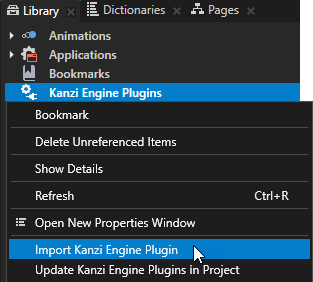
In the Library, right-click Kanzi Engine Plugins and select Import Kanzi Engine Plugin.
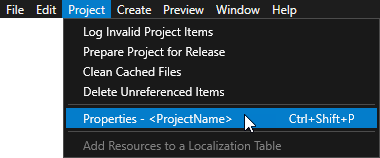
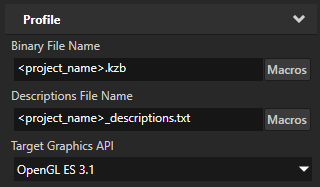
In the Kanzi Studio main menu, select Project > Properties. In the Properties, set the Target Graphics API property to OpenGL ES 3.1.
You must use OpenGL ES 3.1 or higher to enable compute shaders in a Kanzi Studio project.
In the
<KanziWorkspace>/Engine/plugins/plugins-particles-2/libdirectory, open the directory of the configuration that you want to use. Selectkzparticles.dlland click Open.Kanzi Studio imports the Kanzi Particles plugin to your Kanzi Studio project. The plugin contains the elements that you need to create particle systems in your Kanzi application.
In the Assets Packages, press the Add Assets Source button and select the folder
<KanziWorkspace>/Engine/plugins/plugins-particles-2/assets/ParticlesAssetPackageto add the assets source project to your Kanzi Studio project.You should now see ParticlesAssetPackage in the Assets Packages with its assets.
Now that your project is ready, you can start creating particle effects:
You can start creating an effect from scratch. See Getting started with Kanzi Particles.
You can also start creating custom emission and simulation behavior for advanced effects. See Writing custom compute materials.
Building Kanzi Studio application with Kanzi Particles for Android
To run your Kanzi Studio application with Kanzi Particles on a target device, add Kanzi Particles as a dependency to the build.gradle configuration of your application.
Navigate to the directory at
<ProjectName>/Application/configs/platforms/android_gradle/kanzinative.Open the
build.gradlefile in a text editor.Locate the line that defines the argument for using the Particles plugin within the externalNativeBuild section, and set the DKANZI_LINK_KZPARTICLES flag to ON. See the example code below:
// Enable to add Particles plugin to the AAR. It has to be available in Engine/plugins/plugins-particles-2/.
arguments "-DKANZI_LINK_KZPARTICLES=ON"
Save the updated
build.gradlefile and run the build process.