Exporting USD files
You can use Kanzi USD Importer to export the content of Scene nodes in your Kanzi Studio project to a USD (Universal Scene Description) file.
Kanzi USD Importer can export these USD features:
Feature |
Support |
|---|---|
Animation |
Yes |
Material |
Yes |
Skeleton |
Yes |
HDRI |
Yes |
Kanzi USD Importer supports these USD file formats:
usd: Binary format for compact storage
usda: Human-readable ASCII format
usdc: Compressed binary format
usdz: Uncompressed zipped file of textures and USD files
To export all active Scene nodes to a USD file, in the Kanzi Studio main menu, select Kanzi USD Importer > Export USD. Select the name for the USD file and click Save.

Kanzi USD Importer saves the USD file along with the textures used in the Scene nodes. Kanzi USD Importer stores the textures in a directory with the same name as the USD file. If a USD file or textures exist in the set location, Kanzi USD Importer overwrites them.
For example, when you export a Scene like this
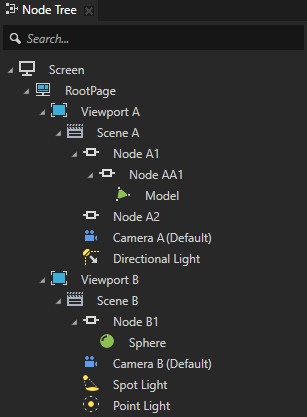
Kanzi USD Importer exports each Scene node to the root (defaultPrim) path. You can find the materials in Materials.
For example, you can see the structure of the exported USD file in USDViewer.
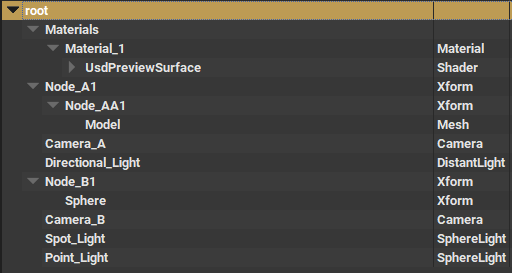
USD prim names can contain only alphanumeric ASCII characters and underscores. Kanzi USD Importer replaces all other characters with an underscore. For example, Kanzi USD Importer exports Scene A as Scene_A.