Developing with the Kanzi Android Service
The Kanzi Android Service enables using the same Kanzi Android framework (droidfw) instance from multiple applications on your device. This is done by hosting Kanzi Android framework (droidfw) in an Android service in one application, and then utilizing it from all the client applications, using Android IPC mechanisms.
This enables the following capabilities:
Shared libraries. Optimizes static memory usage by reusing a single set of Kanzi libraries across the client applications.
Shared runtime and resources. Optimizes runtime memory and GPU usage by sharing the same Kanzi Engine and resources across the client applications.
Improved application startup time. Improves startup time by preloading Kanzi Engine and resources in the background.
Cross-application transition animations. Enables seamless transition animations between different applications using shared Kanzi resources.
For an example on how the Kanzi Android Service can be used, see Android Service example.
Note
Kanzi Android Service is an experimental feature, and your feedback is very important to us. To submit your feedback, use this feedback form.
Breakdown of the architecture
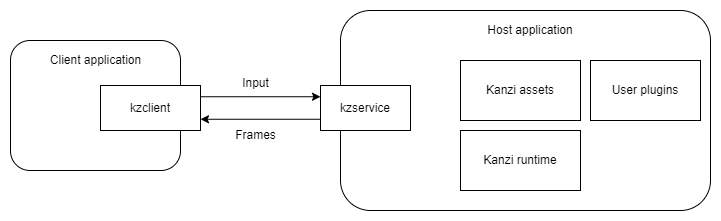
Service host application
This application hosts a Kanzi Android Service through the kzservice library. The service is responsible for initializing the Kanzi Android framework (droidfw), and through it the Kanzi runtime.
The host application is where you bundle all your Kanzi assets, Kanzi native libraries and Kanzi Engine plugins.
Client applications
These are any number of applications on the same system that use the Kanzi functionality from the Service application.
They access Kanzi using the view and composable types from the kzclient library.
Cross-application transition animations
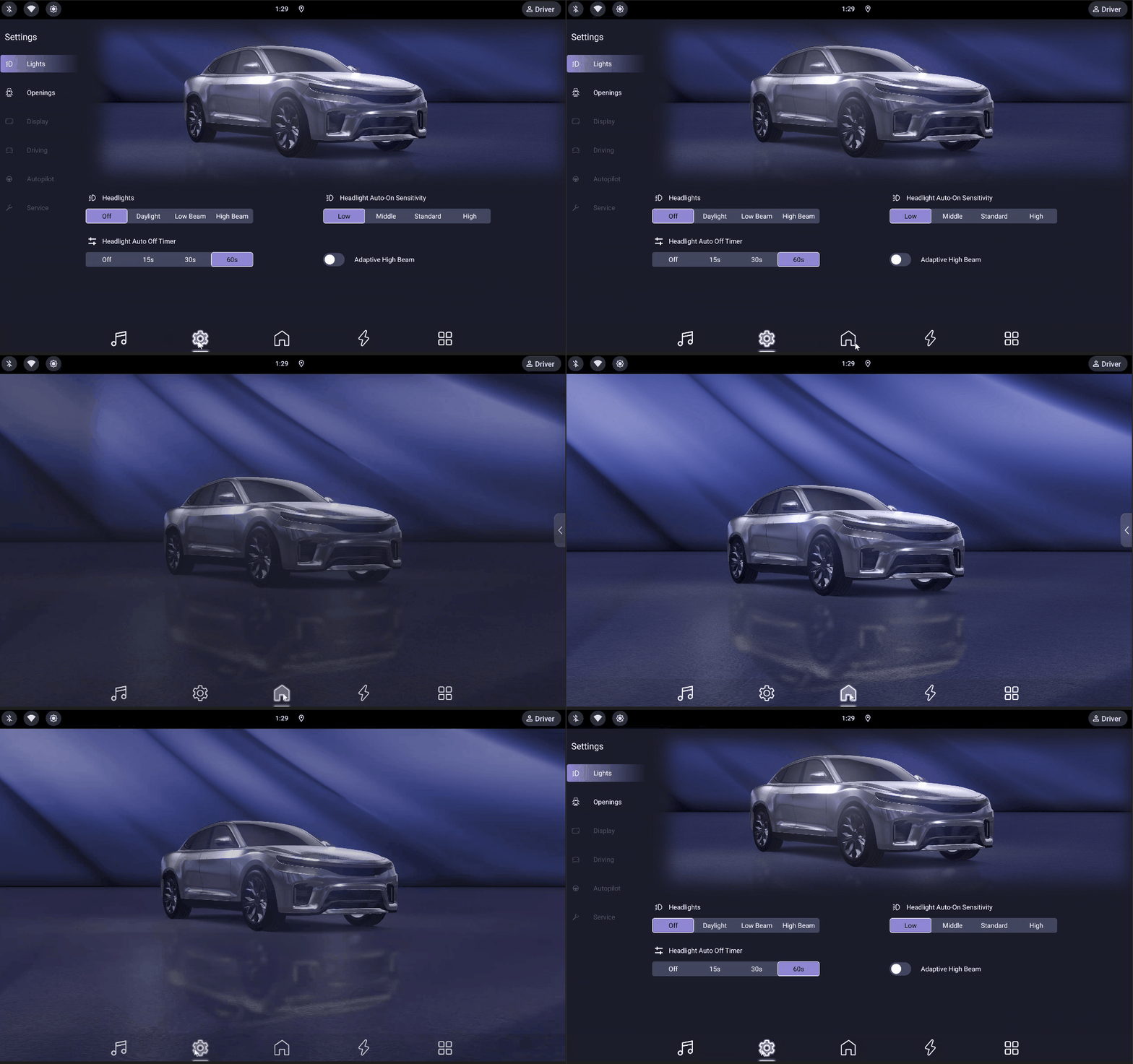
Clients can request the service to perform seamless transition animations between different applications using shared Kanzi resources. This works by the service creating an overlay window that is visible on top of all other applications, and rendering the transition animation there. When the animation is done, the overlay window is hidden.
Getting started
You can create Kanzi Android Service project using the application template provided by Package Manager. See Installing the Package Manager.
Before you start, make sure your environment meets the Kanzi Android Service requirements. See Kanzi Android Service.
To create a Kanzi Android Service project in Kanzi Studio:
In the New Project window, set Template to Kanzi Android Service based Application Template.
Click Create.
Kanzi creates a Kanzi Studio project and two Android Studio application projects:
MyProjectHostservice host application located in the<MyProject>Applicationandroid_servicedirectory.MyProjectClientapplication located in the<MyProject>MyProjectClientdirectory.
Using the Client API
This is the API that you use in your client applications to configure and communicate with the Kanzi Engine instance in the service application.
View and Composable types
You can add Kanzi content to your XML layout or Composables.
In XML layout, for SurfaceView-based rendering, add
<com.rightware.kanzi.service.KanziServiceSurfaceView
    android:id="@+id/clientred"
    app:clientId="clientred"
    app:kzbPathList="clientred.kzb"
    app:startupPrefabUrl="kzb://clientred/StartupPrefab"
    app:serviceHostPackage="com.example.host"
    app:serviceIntentAction="com.example.host.action.LAUNCH_SERVICE"
    />
For TextureView-based rendering, add
<com.rightware.kanzi.service.KanziServiceTextureView
    android:id="@+id/clientred"
    app:clientId="clientred"
    app:kzbPathList="clientred.kzb"
    app:startupPrefabUrl="kzb://clientred/StartupPrefab"
    app:serviceHostPackage="com.example.host"
    app:serviceIntentAction="com.example.host.action.LAUNCH_SERVICE"
    />
To learn about the differences between SurfaceView-based and TextureView-based views, see Adding a Kanzi view.
Or in your composable, add:
KanziServiceComposable(
    modifier = Modifier,
    request = Request(
        clientId = "clientblue",
        kzbPathList = "clientblue.kzb",
        startupPrefabUrl = "kzb://clientblue/StartupPrefab",
    ),
    serviceHostPackage = "com.example.host",
    serviceIntentAction = "com.example.host.action.LAUNCH_SERVICE"
)
KanziServiceComposable is based on KanziServiceSurfaceView and also accepts optional parameters: transparency, focusableInTouchMode, and listener.
The view and composable types accept these XML attributes:
Attribute |
Format |
Description |
|---|---|---|
|
string |
Unique identifier each client must supply. |
|
string |
Comma-separated list of .kzb or .kzb.cfg files to be loaded for this client. |
|
string |
URL of the prefab that is instantiated onto the client’s surface when it loads. |
|
string |
Android package name of the application that hosts Kanzi Android Service. |
|
string |
Intent action that Kanzi Android Service uses to bind the client application with the service. |
|
color |
Color used to clear the surface. Default: |
|
boolean |
Enables clearing the surface. Default: |
|
boolean |
Enables built-in rotary input handling. When set, Kanzi processes rotary input events and translates them to Kanzi key events. Default: |
|
boolean |
Enables transparency support. Default: |
Ensure that serviceHostPackage and serviceIntentAction exactly match applicationId and the Intent action declared in the manifest file of your Service host application.
KanziServiceClientListener
KanziServiceClientListener is an interface for receiving notifications about client lifecycle events. All callbacks have default empty implementations, so you only need to override the ones you are interested in.
Callback |
Description |
|---|---|
|
Called when the Kanzi Android Service is connected and the client is ready to use. |
|
Called when the client view is attached to a window. |
|
Called when the client view is detached from its window. |
|
Called when the rendering surface is created and available. |
|
Called when the rendering surface is about to be destroyed. |
|
Called when the rendering surface size has changed. |
To set a listener on a view:
val kanziView = findViewById<KanziServiceSurfaceView>(R.id.clientred)
kanziView.listener = object : KanziServiceClientListener {
    override fun onServiceConnected(client: KanziServiceClient) {
        // Service is ready, interact with Kanzi
    }
}
Note
The listener must be set before the service connection is established, or before the view is attached to the window. Setting the listener after the service is already connected results in missed callbacks.
Data source setters
You can obtain a KanziServiceClient reference, in view-based application as:
val clientX = findViewById(R.id.clientred) as KanziServiceClient
And in compose-based application as:
var kanziServiceClient: KanziServiceClient? by remember { mutableStateOf(null) }
KanziServiceComposable(
    ...
    listener = object : KanziServiceClientListener {
        override fun onServiceConnected(client: KanziServiceClient) {
            kanziServiceClient = client
        }
    },
)
Through this reference, you get access to setters pushDataInt, pushDataString, pushDataReal, and pushDataBoolean. For example:
kanziServiceClient?.pushDataInt(
    "kzb://launcher/Data Sources/Scene Data source",
    "MainMenuScene",
    MainMenuScenes.HOME.value
)
You need to provide the KZB URL of the data source, the path to the data object, and the value to be pushed.
Manual client detachment
By default, the client application does not explicitly detach from the service when the activity stops. As a result, the service continues running the associated Kanzi Engine instance and keeps the resources allocated for that client.
To explicitly detach, call handleClientAttached and handleClientDetached on the KanziServiceClient instance within the activity’s lifecycle methods.
override fun onStop() {
    super.onStop()
    kanziServiceClient?.handleClientDetached()
}

override fun onStart() {
    super.onStart()
    kanziServiceClient?.handleClientAttached()
}
Note
Manual detach is incompatible with the seamless transition feature. Do not call these methods if you are using cross-application transitions.
Handling orientation changes
When the device orientation changes, notify Kanzi Android Service so that it can update the Kanzi rendering accordingly:
kanziServiceClient?.handleOrientationChange(newOrientation)
Set newOrientation to the new device orientation value from the Android Configuration.
Handling visibility changes
When the visibility of the client view changes, notify Kanzi Android Service so that it can optimize rendering:
kanziServiceClient?.handleVisibilityChange(isVisible)
Set isVisible to true when the view is visible and false if not.
Using the Service API
This is the API that you use in the service host application to initialize and configure Kanzi Android framework (droidfw) through the Kanzi Java API:
KanziServiceRuntime is a reference-counted singleton that you acquire by calling KanziServiceRuntime.acquire(context). Store the returned Reference as a member in your Application subclass to keep the runtime alive before the service has been started. When the last Reference is closed, the runtime shuts down.
To register Kanzi Engine Java plugins, acquire
KanziServiceRuntimeand use itsdomainwith the Kanzi Java API. For example:private lateinit var runtimeRef: KanziServiceRuntime.Reference override fun onCreate() { super.onCreate() runtimeRef = KanziServiceRuntime.acquire(this) val domain = requireNotNull(runtimeRef.get().domain) { "KanziServiceRuntime.domain must not be null after acquire()" } domain.registerPlugin(MyJavaPlugin()) }
You can implement
KanziServiceViewAdapterListenerto listen for state changes in aKanziViewAdapterassociated with a client application in your service host application.For example, use the
KanziServiceViewAdapterListener.onPrefabLoadedcallback to access and modify the node tree instantiated from the startup prefab that you have configured.override fun onCreate() { super.onCreate() KanziServiceRuntime.addViewAdapterListener(clientId, object : KanziServiceViewAdapterListener { override fun onAttachedToWindow( clientId: String, viewAdapter: KanziViewAdapter, domain: Domain ) { // Look up a child node starting from the root. val text = viewAdapter.root.lookupNode<TextBox2D>("#Text") // Set properties on a node. text.setProperty(TextBox2D.TextProperty, "Hello world!") } }) }
Preloading client prefabs
You can preload a client prefab in the service host application so that when the client application starts, the Kanzi content is immediately available without waiting for the prefab to load.
To preload a client prefab, in your Application subclass onCreate method, acquire KanziServiceRuntime, and call preloadClientPrefab:
private lateinit var runtimeRef: KanziServiceRuntime.Reference

override fun onCreate() {
    super.onCreate()
    runtimeRef = KanziServiceRuntime.acquire(this)
    runtimeRef.get().preloadClientPrefab(
        "clientred",
        arrayOf("clientred.kzb"),
        "kzb://clientred/Prefabs/ClientRedPrefab"
    )
}
preloadClientPrefab creates a KanziViewAdapter for the given clientId, loads the KZB files, and instantiates the prefab.
The client application configuration does not differ whether the prefab is preloaded or not. Preloading only affects the client startup time.
Note
Preloaded content stays in memory until a real client connects with the same clientId and takes ownership of it. If no client ever connects with a given clientId, its preloaded resources remain allocated for the lifetime of the service.
Setting up cross-application transition animations
Cross-application transition animations allow you to create seamless visual transitions when moving between different Android applications in your Kanzi project.
To set up a cross-application transition:
Configure the Kanzi service views in the source and target applications to:
Use the same Kanzi Android Service instance and the same
clientId.Use the same type of Kanzi service view (for example,
KanziServiceSurfaceView) in both client applications.Be a fullscreen view in the activity.
Meet the Kanzi Android framework (droidfw) transparency requirements. See Creating a transparent view:
In the Kanzi service view, set:
transparencytotrueclearEnabledtotrueclearColorto@android:color/transparent
Edit the
application.cfgto require a surface with alpha bits. See Color format.SurfaceBitsAlpha = 8
In Kanzi Studio select the node that shows the transparent content and in the Properties set the Background Brush property to < No Brush >.
Call the
startSeamlessTransitionAPI with the following parameters:clientId- The client ID that moves across Android applications.transitionDuration- The duration that the Kanzi content remains in the overlay.kanziTransition- A lambda function that updates the Kanzi state to drive the visual transition.androidTransition- A lambda function that initiates the Android-side application transition.leftMargin- Optional left margin in pixels for positioning the Kanzi content in the overlay. Default:0.topMargin- Optional top margin in pixels for positioning the Kanzi content in the overlay. Default:0.rightMargin- Optional right margin in pixels for positioning the Kanzi content in the overlay. Default:0.bottomMargin- Optional bottom margin in pixels for positioning the Kanzi content in the overlay. Default:0.
// Start a seamless transition between applications.
kanziServiceView?.startSeamlessTransition(
    clientId = "coverflow",
    transitionDuration = 2.seconds,
    kanziTransition = {
        // Update Kanzi state to drive the visual transition.
        kanziServiceView?.pushDataInt(
            "kzb://service/Data Sources/Data source",
            "State",
            1
        )
    },
    androidTransition = {
        // Launch the target application.
        val intent = Intent().apply {
            setClassName(
                "com.example.clientred",
                "com.example.clientred.MainActivity"
            )
            addFlags(Intent.FLAG_ACTIVITY_NEW_TASK)
        }
        startActivity(intent)
    }
)
When you call this API, Kanzi Android Service creates an overlay window that displays the animation during the application transition.
Grant the Display over other applications permission to each application involved in the transition.
To grant this permission:
Install the service host and client applications on your device.
For each application involved in the transition:
Open the device settings.
Navigate to Apps > <ApplicationName> > Permissions.
Enable the Display over other applications permission.
Note
On Android Automotive devices, you cannot grant the Display over other applications permission through the Android UI for newly installed applications.
As an alternative, you can sign the APK with platform keys to automatically grant this permission.
Known issues
The service host application currently requires the Display over other applications permission, even if the animation feature is not used by any client.
See also
Developing Kanzi applications for Android
Developing with the Kanzi Android framework (droidfw)
Developing for Android with the Kanzi application framework (appfw)
Deploying Kanzi applications to Android