Advanced Drive Mode Template
Advanced Drive Mode template is a Kanzi project template that demonstrates automotive 3D visualization with GPU-instanced vegetation, wind simulation, and advanced rendering in a full outdoor car showcase scene.
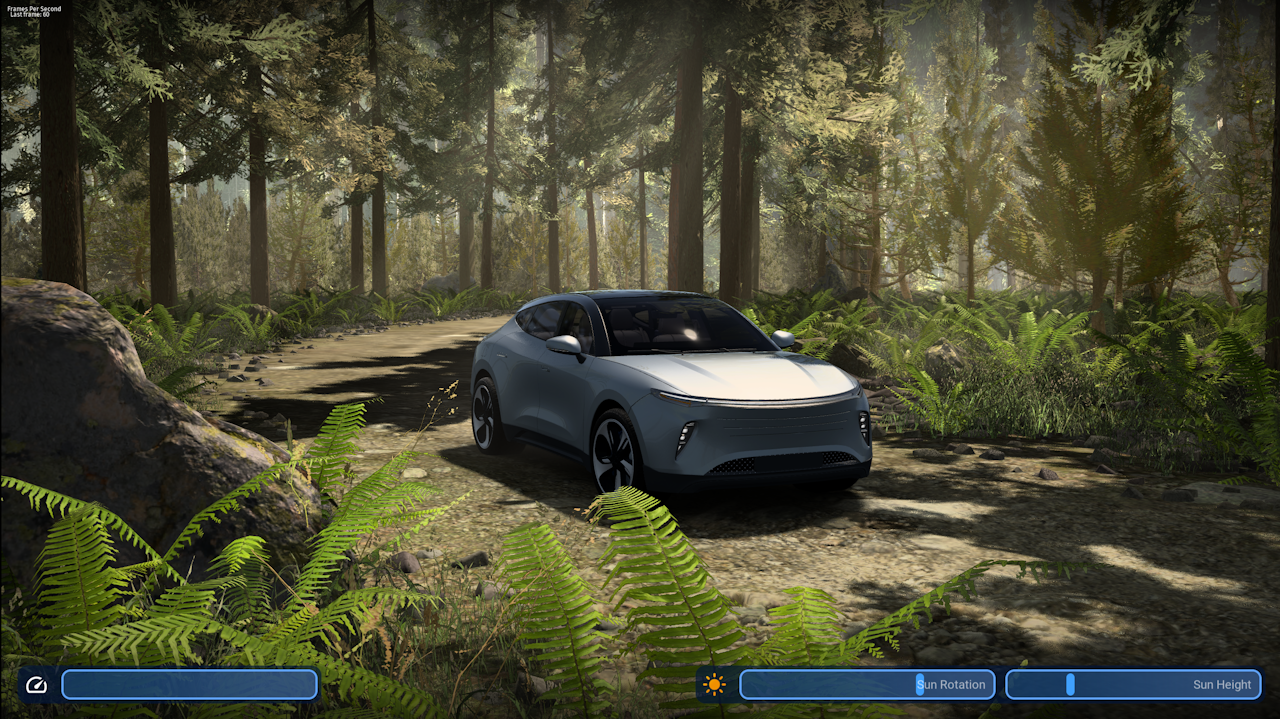
The template ships with an InstancedMesh Kanzi Engine plugin that enables efficient rendering of hundreds of foliage and rock instances. This template is available from Kanzi Studio 4.1.0.
3D vehicle visualization
The template provides a detailed, modular 3D car with independently animatable parts:
Four doors, each with glass, mirror, and interior geometry
Hood and trunk
Four wheels with disc and caliper geometry
Front and rear light groups: headlights, daytime running lights (DRLs), fog lights, turn signals, brake lights, and reverse lights
Charge ports that indicate an electric vehicle
Interior cabin with an instrument cluster display screen
A CubemapCamera inside the CarContainer node captures the environment at runtime and provides the reflection texture used by PBR materials on the car body.
Environmental scene
The 3D world surrounds the car with a full outdoor environment:
A procedural sky dome driven by a shader (ProceduralSky)
A directional sun light with a shadow camera and a spot light
God rays rendered with a mesh and a shader (FlareBlitStreaks)
Distance fog applied with a shader on separate near and far fog meshes (DistanceFog_BG)
A road mesh and a background forest (Ground_Grass, Ground_Road and Forest_BG)
The DATA node manages the animation cycle and sun position. The UI provides multiple sliders controlling its values. The speed slider drives the Animation Speed of the scene and the sun sliders the Sun Rotation and Sun Height.
Vegetation with wind simulation
GPU-instanced foliage uses the InstancedMesh plugin to render pine trees, ferns, grass, and rocks with up to four levels of detail (LODs) per asset. A WindSimulation node drives a WindGustsAnimation that updates certain instances through the Render Pass.
The wind and LOD system keeps frame time low even when hundreds of instances are visible.
Advanced rendering
Two main features of this template are the dynamically generated Cubemap and the dynamic ShadowMap.
The Render Pass (Compose and Blit Pass) generates a cubemap of the environment on runtime and applies it to the car. Another Pass generates a ShadowMap and applies it to the scene.
The template uses physically based rendering (PBR) throughout:
Multiple Physically Based shaders for rendering the car and environment
Multiple Physically Based shaders for rendering instanced meshes (specifically configured to function with the instancing feature)
Post-processing effects include bloom applied with a high-pass blit pass (BloomHighpassBlit shader) and lens flare streaks (FlareBlitStreaks).
Shadow mapping
The directional light (Sun) contains a ShadowCamera child node. Four shadow passes cover instanced opaque geometry, wind-affected instanced geometry, and cutout foliage.
The ShadowPivot node exposes these properties:
Directional Shadow Bias: controls the shadow bias to reduce self-shadowing artifacts
Directional Shadow Softness: controls the softness of shadow edges
The ShadowCamera node exposes these properties:
Z Near and Z Far: define the depth range of the shadow camera frustum
Orthogonal Plane Size: sets the size of the orthographic projection for shadow map generation
Render pipeline
The Compose and Blit Pass render pass prefab drives the pipeline in this order:
WindBuffer: generates the wind texture which can be used to modify wind-affected geometry before scene rendering
DrawShadowmaps: generates the directional shadow map for the scene and instanced vegetation
Cubemap Render Pass: captures the surrounding environment into a runtime cubemap
Image-Based Lighting Filter Pass: pre-filters the cubemap into ambient and specular reflection textures for the PBR materials on the car
MainPass: renders the full scene, drawing sky, opaque geometry, emissive surfaces, instanced vegetation, and transparent surfaces
FakeVolume: renders atmospheric overlay effects such as god rays and lens flare
FinalOutput: composites the scene and overlay passes with a vignette blit to screen
Debug: additional passes for debug purposes are available but deactivated by default
Object source buckets separate geometry by rendering requirements: Car, CubeCapture, Emissive, Grass, Opaque, Opaque_NoSky, Overlay, Rocks, Shadow_Instanced_Opaque, Shadow_Wind_Instanced_Cutout, Shadow_Wind_Instanced_Cutout_Grass, Shadow_Wind_Instanced_Opaque, Sky, SortEmissives, Transparent, Trees, Trees_Cubemap, and Wind.
Interactive UI controls
A 2D HUD overlaid on the 3D viewport provides:
Speed Controls: controls the speed of the animation cycle of the scene (Car Speed)
Sun Controls: controls the sun position through rotation and height
CameraScroll enables orbit camera interaction so users can rotate around the car.
InstancedMesh plugin
The template includes the precompiled InstancedMesh Kanzi Engine plugin (InstancedMesh.dll). The plugin extends Kanzi Engine to render large numbers of identical mesh instances in a single draw call using GPU instancing.
The template package includes the plugin for Windows and Android.