Cluster Template
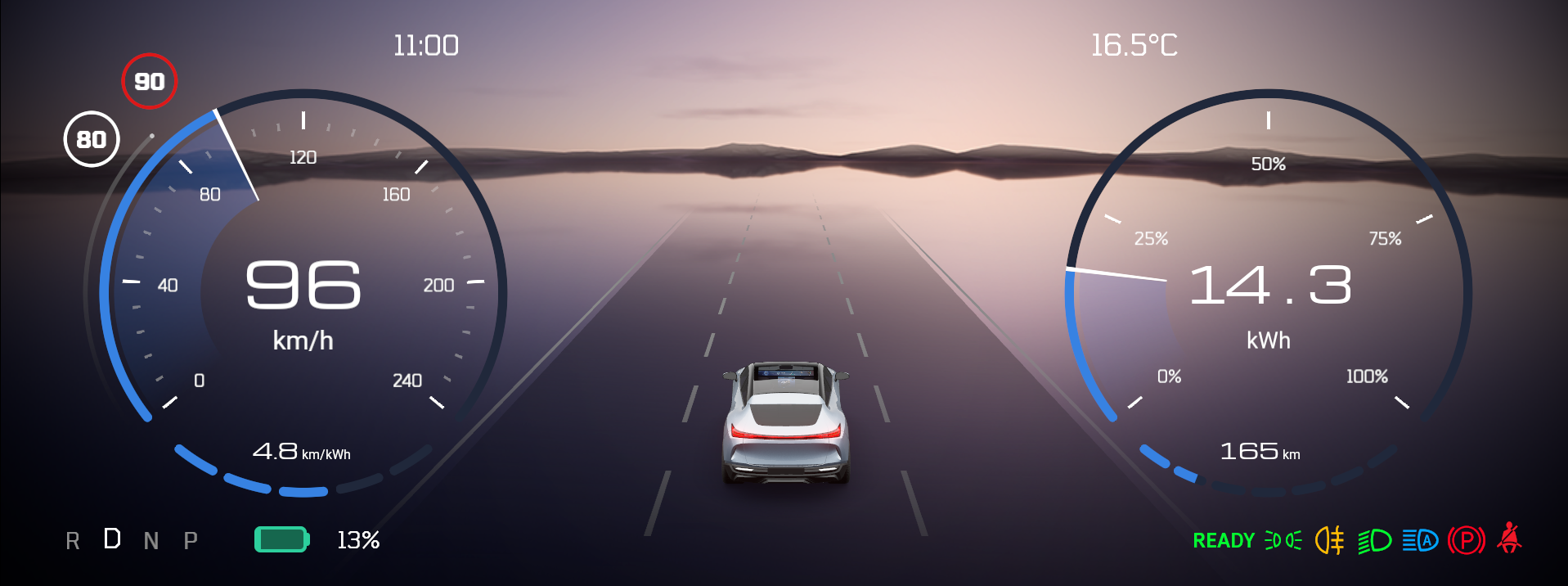
Cluster template is a Kanzi project template that demonstrates a digital automotive instrument cluster with a 3D Advanced Driver Assistance Systems (ADAS) viewport. The template provides a configurable two-gauge layout for speed and power display, telltale warning indicators, and a fully data-driven UI backed by Lua scripting.
This template also demonstrates the customization possibilities you have by using the two used shaderd, FillStrokeRadialBrush and FillStrokeBrush. Nearly all elements are built with these shaders/materials and can be freely ajudsted to ones liking.
This template is available from Kanzi Studio 4.1.0.
Cluster display
The instrument cluster uses a two-gauge layout. Each gauge is available in three visual themes selectable through the Visual Configuration node in Activity Host - Main:
Default: gauge with visually reduced data fields visible
Rich: extended layout with tick labels and additional details
Minimal: compact layout with all core information
Gauge Left shows the speed display: the current speed (in km/h or mph), an outer speed limit indicator (thin line), and an efficiency readout. Gauge Right shows power and range: current power draw and remaining range.
Telltale indicators
A limited selection of telltale warning and status lights are displayed using the Telltale prefab:
Auto high beam, fog lights, low beam lights, parking brake, position lights
Ready indicator, seatbelt reminder, turn left signal, turn right signal, and charge
Each telltale is bound to its own property and channel in the Lua data source.
ADAS 3D viewport
A 3D ADAS (Advanced Driver Assistance Systems) viewport is embedded in the cluster using the ADAS Scene prefab:
A Car sprite rendered on a procedural Road mesh with animated lane separator markings (dashed and solid lines)
A Sky Sphere environment background
Motion Controls for environment movement, and speed adjustment
Road and lane separator materials (PBR Road, Separator, SeparatorDashed) use a physically based shader with animated dashed-line offsets driven by material properties.
Data source
Cluster data is driven by a Lua-scripted data source:
ClusterDataSource_Lua: maps cluster state to UI nodes via Kanzi’s data binding system
ClusterDataSource_Lua_Simulation: supplies simulated data for standalone preview, animating speed, battery level, temperature, and gear
Data channels cover the full cluster domain:
General: gear (automatic), measurement units, ambient temperature, and time
Speed: current speed, speed limit, speed limit sign, efficiency, and maximum speed
Battery: charge percentage, power draw, power maximum, range, and range maximum
Telltales: individual on/off bindings for all availabel warning lights
State managers
Four state managers coordinate the scene:
State manager |
Purpose |
|---|---|
Gear State Manager |
Controls the displayed gear state. |
Info - Top State Manager |
Manages the top info panel state. |
Activity Transition - Fade Left |
Drives left-side panel transition animations. |
Activity Transition - Fade Right |
Drives right-side panel transition animations. |
Prism Graph
The ADAS - Prism Graph defines a render pipeline through a visual node editing tool. It renders the road scene and applies a Vignette effect through a node to the output.