Airflow Template
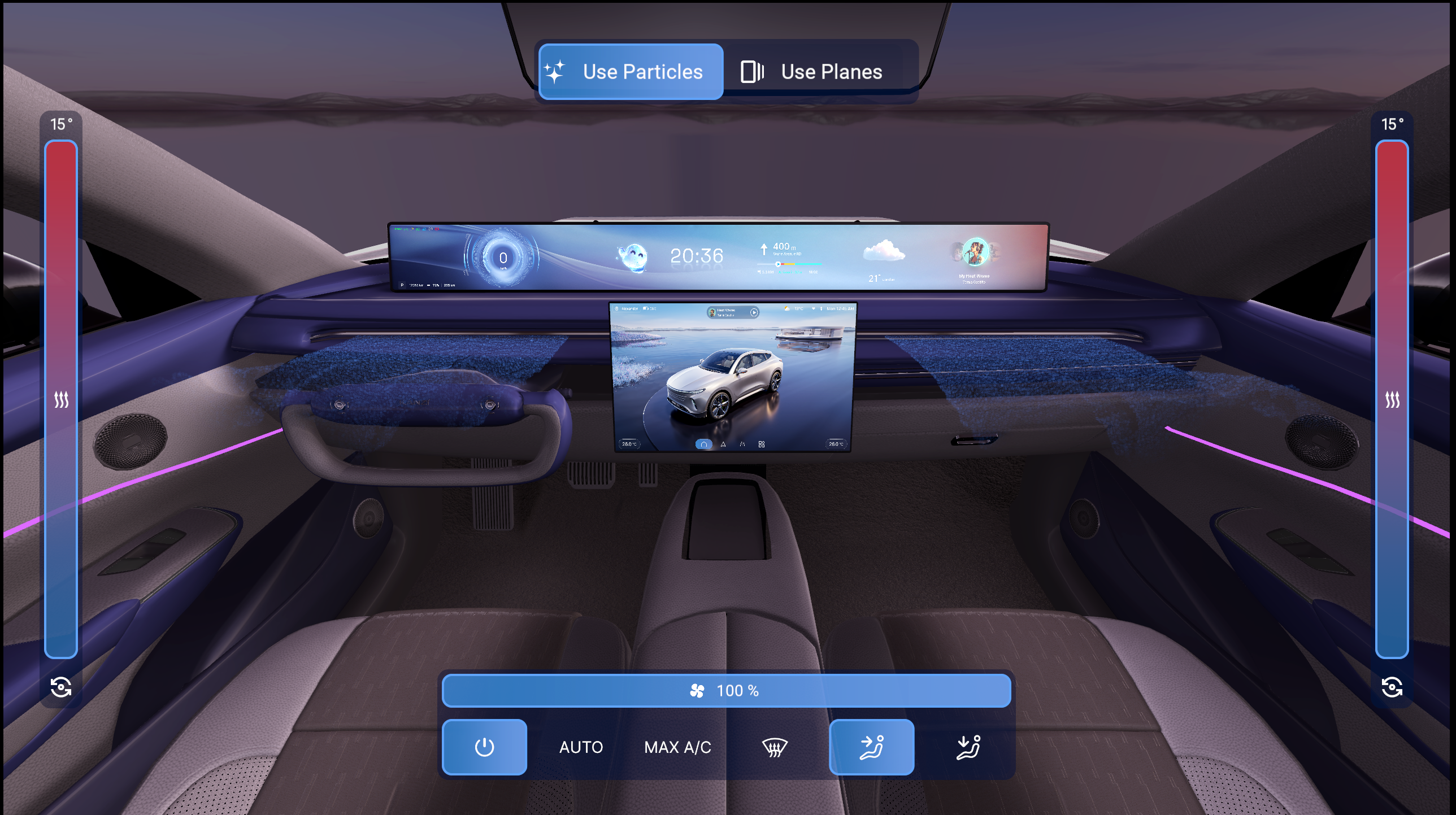
Airflow template is a Kanzi project template that demonstrates car interior 3D visualization with climate control HVAC UI, airflow particle effects, and physically based rendering with lightmapped interior materials. The template shows the inside of a car cabin with dynamic water effects on the windshield and interactive controls for temperature and airflow direction.
This template requires the Kanzi Particles Kanzi Engine plugin (see Requirements) to enable the airflow particle systems.
This template is available from Kanzi Studio 4.1.0.
Car interior visualization
The template provides a detailed car interior with physically based rendering and pre-baked lightmaps:
Two front doors (front-left and front-right), each with carpaint, glass, interior geometry, mirror, and rearview mirror geometry
Hood geometry visible through the windshield
Full interior cabin: dashboard, ceiling details, center console, pedals, seats, and carpeting
Two IVI (in-vehicle infotainment) display screens: IVI Display and Panoramic Display
Lightmapped PBR materials for every interior surface: leather seats (perforated and solid), cloth seats, carpeting, plastic trim (primary, secondary, dark gray), chrome, mirror, and speaker surfaces
Climate control UI
A 2D HUD overlaid on the 3D viewport provides climate control, scene controls and controls for the driver and passenger sides:
Climate Controls: the main panel with controls over the airflow and its strength
Temperature Controls Left and Temperature Controls Right: separate temperature controls for driver and passanger sides
Scene Controls: a toggle group with two options
Toggle Button Particles: toggles the airflow particle visualization on
Toggle Button Planes: toggles the airflow mesh plane visualization on
The driver and passenger sides each have a dedicated Scroll View 2D node (Scroll View 2D Driver and Scroll View 2D Passenger) and a Hit_Area touch region for independent interaction.
Airflow visualization
The template visualizes airflow from three vents: front, lower (footwell), and windshield. Each vent has both a particle system and a mesh-based representation.
Particle systems use the Kanzi Particles plugin with a box-volume emitter, a curl-noise affector, and an emission-count-per-second control driven by compute shaders:
Particle Airflow Front: particles from the front dashboard vents
Particle Airflow Lower: particles from the lower footwell vents
Particle Airflow Windshield: particles from the windshield defroster
Each particle system is controlled by a corresponding prefab (AirflowFront, AirflowLower, AirflowWindshield) that exposes X and Y directional offset properties.
Mesh-based representations provide a complementary visualization using flat geometry:
Airflow Bottom Driver and Airflow Bottom Passenger: lower vent airflow planes
Airflow Front Driver and Airflow Front Passenger: front vent airflow planes
AirflowWindshield: windshield defroster airflow planes
The Airflow Bottom, Airflow Front, and Airflow Windshield prefabs combine both the particle and mesh representations for each vent zone.
Advanced rendering
The template uses physically based rendering (PBR) throughout with pre-baked lightmaps for the car interior.
Lightmapped PBR materials cover every interior surface:
PhysicallyBasedTexturedLightmap_Carpet: carpeting
PhysicallyBasedTexturedLightmap_CeilingCloth: ceiling cloth
PhysicallyBasedTexturedLightmap_Leather_P and PhysicallyBasedTexturedLightmap_Leather_S: perforated and solid leather seat surfaces
PhysicallyBasedTexturedLightmap_SeatCloth_C, PhysicallyBasedTexturedLightmap_SeatLeather_C, and PhysicallyBasedTexturedLightmap_SeatLeather_Perf_C: cloth and leather seat color variants
PhysicallyBasedUVTextured_Lightmap_Speaker: speaker grille
PhysicallyBased_Lightmapped_Chrome_A, PhysicallyBased_Lightmapped_PedalDark, PhysicallyBased_Lightmapped_PedalMain, PhysicallyBased_Lightmapped_PlasticDarkGray_A, PhysicallyBased_Lightmapped_PlasticPrimary_A, and PhysicallyBased_Lightmapped_PlasticSecondary: lightmapped variants for trim, pedals, and plastic surfaces
Non-lightmapped PBR materials cover glass and other surfaces: PhysicallyBasedClearCoatMaterial, PhysicallyBased_Chrome, PhysicallyBased_Mirror, PhysicallyBased_Plastic, and PhysicallyBased_Windows.
IBL (Image-Based Lighting) uses the Environment_Morning cubemap with pre-filtered irradiance (Environment_Morning_irradiance) and specular (Environment_Morning_specular) textures for accurate interior lighting.
State managers
Five state managers coordinate the scene:
State manager |
Purpose |
|---|---|
Hit_Area_Passenger State Manager |
Controls the touch region state for the passenger-side controls. |
UI Button State Manager |
Manages UI button states. |
UI Slider State Manager |
Controls the slider state for temperature controls. |
UI Toggle State Manager |
Manages toggle button visibility for particle and plane visualization modes. |
Prism Graph
The Airflow Prism Graph defines a render pipeline through a visual node editing tool. It creates a proper rendering order for the scene and the airflow visualization.
Kanzi Particles plugin
The template uses the Kanzi Particles Kanzi Engine plugin. The plugin extends Kanzi Engine to simulate and render particle systems (the airflow particle systems in this template) using GPU compute shaders.