Raytracing Template
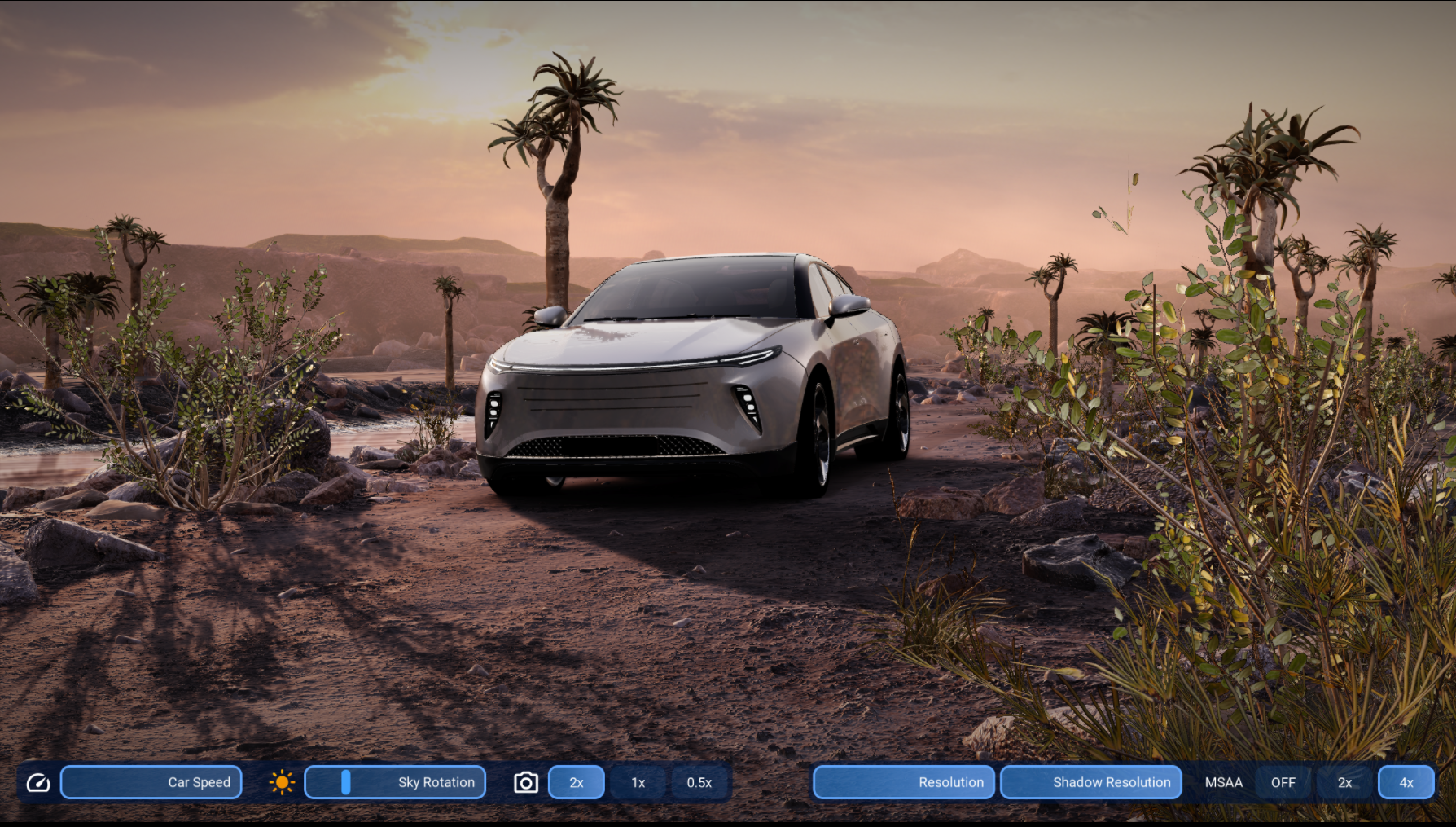
Raytracing template is a Kanzi project template that demonstrates hardware-accelerated ray tracing in a car and canyon terrain scene. The template showcases raytraced directional shadows with soft shadow support, raytraced reflections, temporal denoising, and GPU-instanced vegetation — all running within Kanzi Studio.
This template is available from Kanzi Studio 4.1.0.
3D scene
The scene places a car in a canyon environment with full terrain, water, and vegetation:
A car model (KanziCar) with physically based carpaint, clear coat, interior, and wheel materials
Canyon terrain with road and shoulder surfaces, using parallax-occlusion mapped rock and ground textures
Water surface with a normal-atlas animation, foam masks, and edge blending against terrain geometry
Atmospheric depth fog applied as a cylindrical volume pass
IBL (Image-Based Lighting) driven by an HDR environment map (RT Demo_HDRI_004-8.hdr) with pre-filtered irradiance and specular cubemaps
The scene uses four directional lights for car and environment lighting and an orbit camera control (OrbitControls) for interactive viewport rotation.
Hardware ray tracing
The demo uses Kanzi’s hardware ray tracing API to compute shadows and reflections on the GPU:
Raytraced directional shadows
A compute shader pass (RaytracedShadows.comp.glsl) traces shadow rays from scene geometry toward the directional light. A soft-shadow variant (RaytracedShadows_soft.comp.glsl) produces penumbra softening. The resulting shadow map (RaytracedDirectionalShadowMap) is fed into scene materials as the directional shadow input.
Raytraced reflections
A compute shader pass (RaytracedReflections.comp.glsl) traces reflection rays from the GBuffer surface normals. The reflection result (RaytracedReflection texture) is composited onto reflective surfaces such as the car body and water.
Both passes consume a top-level acceleration structure (TLAS) built from scene geometry.
Denoising
Bilateral blur passes (BilateralBlur and BilateralBlurRGB) denoise the raytraced shadow and reflection outputs before compositing.
GPU-instanced vegetation
Vegetation and rock geometry is rendered using GPU instancing with KZPCD (Kanzi Pre-Compiled Data) instance data:
Large rocks and boulders (Boulder1_Instances, Cliff2_Instances, OuterCliffs variants)
Quiver trees (VeggiesBig_Scatter_quiver_tree) and medium/small vegetation (VeggiesMedium, VeggiesSmall)
Small scattered rocks (RocksSmall_Scatter and RocksBig_Scatter)
Vegetation uses a shared texture atlas (VeggieAtlas_Diffuse, VeggieAtlas_ORM, VeggieAtlas_Normal) and a physically based instanced mesh material type (PhysicallyBased_InstancedMesh).
Post-processing
A CustomBlit_CombinedPostFX pass combines bloom, depth of field, and motion blur into a single compositing step. A GBuffer velocity pass (GBufferVelocity) provides per-pixel motion vectors for motion blur and temporal effects. Instanced geometry uses a dedicated velocity variant (GBufferVelocity_IM).
Scene controls
A toggle button group and scene property controls are overlaid on the viewport:
Speed: scene animation playback speed
Sky Rotation: rotates the HDR environment map around the vertical axis
FOV: camera field of view
Scene Resolution: render resolution multiplier relative to the viewport size
Shadow Resolution: shadow map resolution scale
MSAA: multisample anti-aliasing level selector with three options (Off, 2×, and 4×)
Render pipeline
The render pipeline drives the scene in this order:
GBuffer: renders scene geometry into depth, normal, and velocity buffers used as inputs to the raytracing passes
Raytraced Directional Shadow Map: computes hardware-accelerated directional shadows with bilateral blur denoising
Raytraced Reflections: computes hardware-accelerated reflections with bilateral blur denoising
Scene composite: shades geometry using the raytraced shadow and reflection inputs together with IBL
Combined PostFX: applies bloom, depth of field, and motion blur in a single blit pass