Car Template
Car template is a Kanzi project template that demonstrates automotive 3D visualization with physically based rendering and dynamic weather effects. The template includes a particle-based rain system and an interactive HMI for a car settings application.
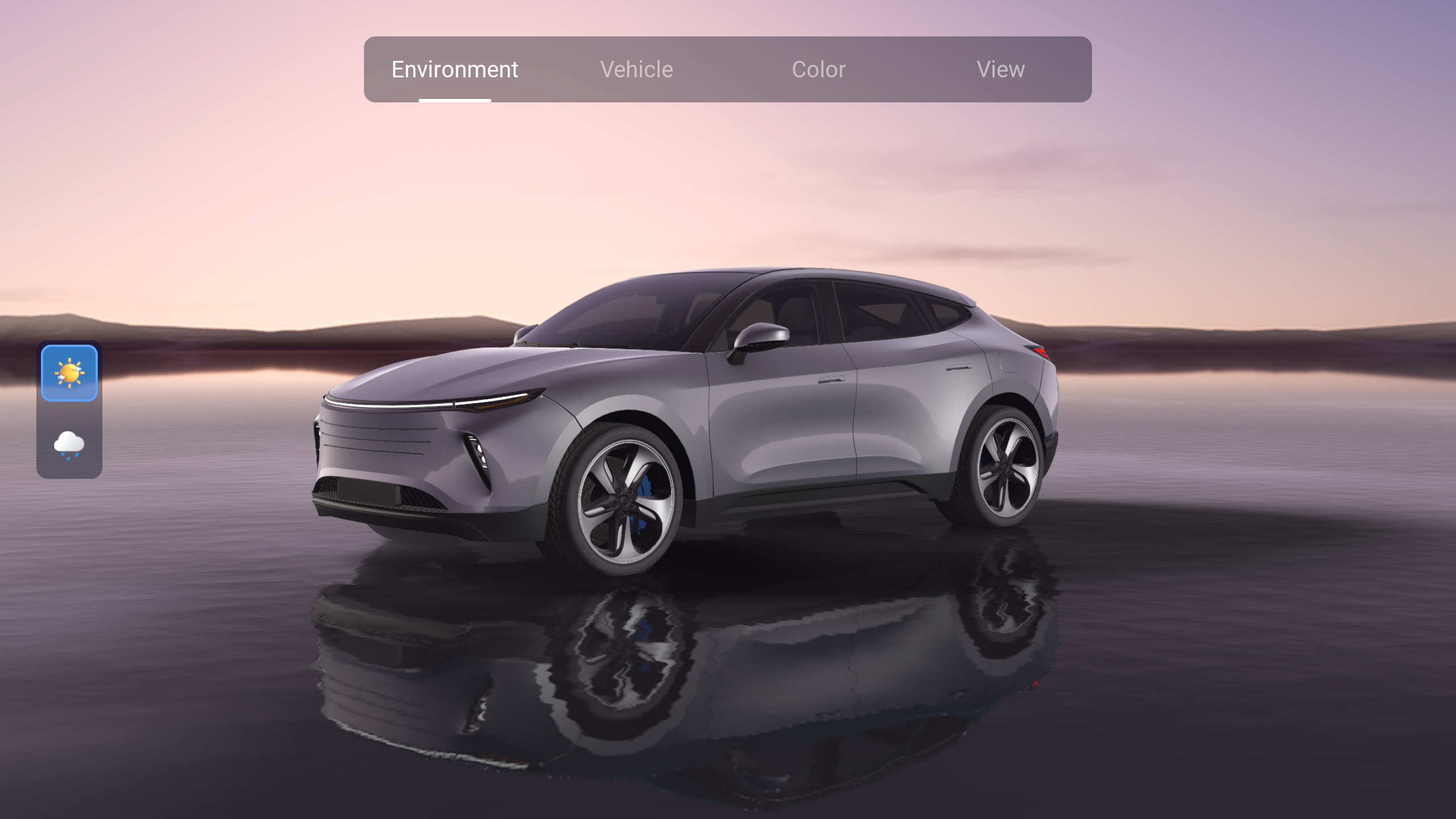
This template requires the Kanzi Particles Kanzi Engine plugin (see Requirements) to enable the rain particle system.
3D vehicle visualization
The template provides a detailed, modular 3D car with independently animatable parts:
Four doors (front-left, front-right, rear-left, rear-right), each with glass, mirror, and interior geometry
Hood with standard and rain-wet paint variants
Trunk with lights and interior geometry
Windshield wiper
Four wheels (front-left, front-right, rear-left, rear-right), each with brake caliper, brake disc, hub, tire, and wheel mask geometry
Front and rear light groups: headlights, daytime running lights (DRLs), fog lights, turn signals, brake lights, and reflectors
Charge ports on both sides, indicating an electric vehicle
Interior cabin with an instrument cluster display screen
Interactive UI controls
A 2D HUD overlaid on the 3D viewport provides five control panels, all using a consistent toggle button style:
UI Controls Color: carpaint selector with six options (Black, Blue, Green, Orange, Silver, and White)
UI Controls Environment: weather and lighting mode selector with Day and Rain options
UI Controls Vehicle: toggles for doors (open/close), head lights (on/off), and trunk (open/close)
UI Controls View: camera view selector with three positions (Exterior Far, Exterior Near, and Interior)
UI Navigation: main navigation menu with tab groups for Color, Environment, Vehicle, and View
Panels transition with an Activity Slide In/Slide Out animation when the user switches between tabs.
Camera views
The CameraRoot state manager manages three camera positions, accessed through a Scroll View 2D node with a Viewport inside:
Camera Position Toggled - Far: wide exterior view of the whole car
Camera Position Toggled - Near: close-up exterior view
Camera Position Toggled - Interior: view from inside the cabin
Environmental effects
The scene surrounds the car with a controllable environment:
HDRI environment maps: Environment_Morning for day mode and Environment_Rain for wet and overcast conditions
BG_Mix_Sky background shader blending two separate environments
DefaultBlit_Fog material for atmospheric depth fog applied through the Render Pass
Directional lights inside the Environment node
Dynamic water and rain
The Rain environment mode activates a layered set of wet-weather effects:
DynamicWater_NormalRendering_Rain and DynamicWater_NormalRendering_Water use a Flipbook material with an animation rendering normals off-screen
DynamicWater_PhysicallyBased_Material uses the animated normal maps (DynamicWater_Normal_Rain and DynamicWater_Normal_Water) for wave and rain ripple effects
PhysicallyBased_Windows_Rain and PhysicallyBasedClearCoat_Rain materials add rain streaks to windows and carpaint
Particle System - Rain uses the Kanzi Particles plugin with a box-volume emitter, gravity and wind affectors, and a per-second emission count, all driven by compute shaders
Advanced rendering
The template uses physically based rendering (PBR) throughout:
PhysicallyBasedClearCoat for standard carpaint
PhysicallyBasedClearCoat_Rain for carpaint with rain effects
Specialized materials for every car surface: Chrome, Mirror, Plastic, Plastic_Gloss, Rim, Rim_Rough, Rubber, Tire, Windows, Windows_Rain, Normal_Brake_Disc, and Calipers
Planar reflections provide accurate ground-plane reflections:
A Car_Reflection prefab duplicates the car model geometry for a separate reflection render pass
A Reflection pass captures the realtime car reflection and renders it into a CarReflection render target texture
The DynamicWater_PhysicallyBased_Material uses the generated CarReflection texture as input for the planar reflections
State managers
Eight state managers coordinate the scene:
State manager |
Purpose |
|---|---|
Background State Manager |
Controls the sky and backdrop state. |
Car State Manager |
Controls car part animation and overall state. |
Car Color State Manager |
Switches the carpaint color across all body materials. |
CameraRoot State Manager |
Manages the active camera position (Far, Near, or Interior). |
DynamicWater State Manager |
Switches the ground plane between flat, rain, and water states. |
Main Viewport State Manager |
Controls the weather and fog. |
UI Toggle State Manager |
Manages UI Toggle Button visibility. |
Activity UI - Fade to Left |
Drives the UI panel transition animation. |
Prism Graph
The SSR Prism Graph defines a render pipeline through a visual node editing tool. It sets up the following three branches in the graph and combines them in a Blit Node:
Scene Rendering: renders the scene
Scene Reflection: renders part of the scene that should be reflected on the surface of the water
Scene Depth: renders the scene depth to add a fog effect in the final Blit Node
Kanzi Particles plugin
The template uses the Kanzi Particles Kanzi Engine plugin. The plugin extends Kanzi Engine to simulate and render particle systems (the rain particle system in this template) using GPU compute shaders.