VPA Template
VPA template is a Kanzi project template that demonstrates virtual person avatar rendering with interactive character animation. The template displays a rigged, physically based character on a podium in an interior environment, with a 2D HUD for selecting characters and controlling playback.
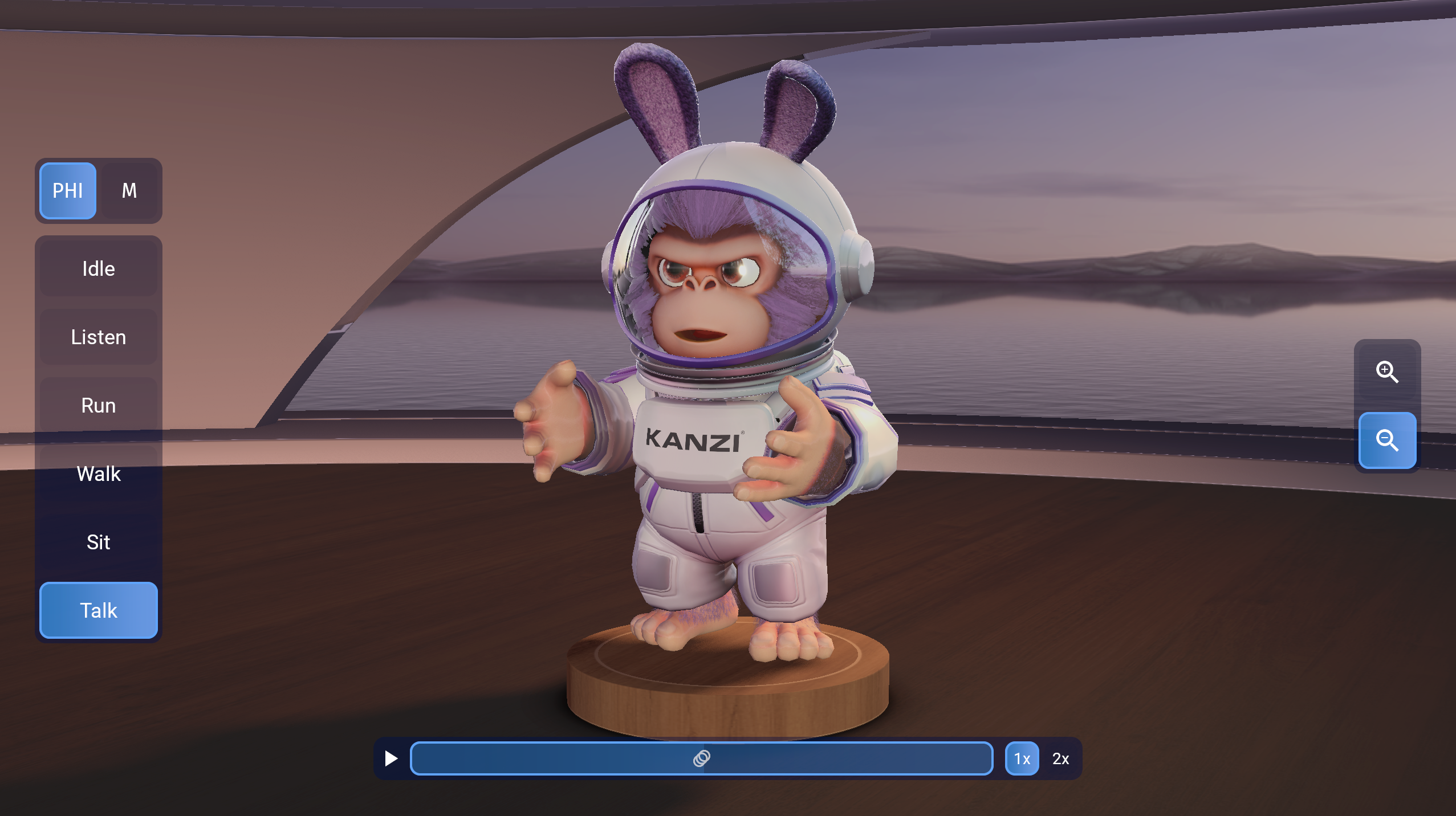
This template is available from Kanzi Studio 4.1.0.
3D character scene
The template renders two interchangeable character models in a staged interior environment:
PHI: a rigged character (
PHI_Rig5.glb) with full skeletal animation, facial morph targets, and physically based materialsM: an alternative character model (
M_4.fbx) with equivalent rigging and material setup
The scene includes:
PHI_Interior (
PHI_Interior.glb): a realistically lit interior with floor and wall surfacesPHI_Podium (
PHI_Podium.glb): a display podium beneath the character, with a projected shadow using Podium_Shadow_Materialcam_rot: a camera rig that supports interactive orbit rotation around the character
Character materials cover head, body, clothing, and accessories: Skin, Head, Head_Fur, Fur, Eye_L, Ears, Tongue, Suit, Backpack, Chest, and Ears_Inner. Skinned and morph-texture material types drive real-time skeletal deformation and facial expression blending.
IBL (Image-Based Lighting) uses the Environment_Morning cubemap with pre-filtered irradiance and specular textures for accurate character lighting.
Animation system
Six animation clips are available for the PHI character:
Idle: default standing pose
Listening: attentive listening pose
Running: locomotion animation
Sitting: seated pose
Speaking: speech gesture animation
Walking: walk cycle animation
Five animation clips are available for the M character:
Greet: hand-waving animation
Idle: idle pose
Listen: attentive listening pose
Agree: agreeing animation
Disagree: disagreeing animation
Animation data covers 300+ skeletal bone transforms per frame (full hierarchy from hip root to individual finger joints) plus per-frame facial morph weights for expression blending.
Interactive UI controls
A 2D HUD overlaid on the 3D viewport provides three control panels:
Animation Controls: selects the active character (M or PHI) and the animation clip to play
Playback Controls: play/pause toggle, an animation time slider, and a playback speed selector (1× and 2×)
View Controls: adjusts camera orientation using the cam_rot rig
State managers
Seven state managers coordinate the scene:
State manager |
Purpose |
|---|---|
PHI State Manager |
Controls the active animation state for the characters. |
cam_rot State Manager |
Manages the camera rotation state for viewport orbit. |
Toggle Button 2D State Manager |
Controls 2D toggle button visual states in the UI. |
Toggle State Manager |
Manages general toggle states across UI controls. |
UI Slider State Manager_Time |
Controls the animation time slider state. |
M_UI Slider State Manager_Time |
Controls the animation time slider state for the M character variant. |
UI Toggle State Manager |
Manages toggle button visibility in the UI. |
Render pipeline
The Spot Shadows Render Pass prefab drives the pipeline in this order:
Composition Target - Shadows: renders the scene into a shadow composition target, drawing Opaque geometry followed by Transparent geometry
Composition Target Render Pass - Get Light: captures the spot light contribution for shadow composition
Blit - Tonemap: applies tonemapping to the final composited output
Object source buckets separate geometry by rendering requirements: Opaque and Transparent.