Kanzi 3.9.16 release notes
Changes
Updated the following third-party libraries:
Zlib from 1.2.13 to 1.3.2.
LibPNG from 1.6.37 to 1.6.55.
FreeType from 2.12.1 to 2.14.3. FreeType updated its internal TrueType interpreter. This can introduce subtle differences to text rendering.
HarfBuzz from 8.3.0 to 13.2.1. This update changes text shaping behavior, which can cause small differences in text layout.
Platforms
The DRM/GBM platform now matches the GBM surface format to the requested EGL config. Previously, the format was always GBM_FORMAT_XRGB8888.
Rendering
Added dynamic batching for compatible meshes. Dynamic batching reduces draw calls by rendering compatible meshes in batches. Enable Dynamic Batching for meshes that you want to batch and render them using the new dynamic batching render passes. Kanzi Studio also provides Dynamic Shaders and Dynamic UBO Shaders tools for adapting material shaders for dynamic batching.
The following figure combines two separate examples: the batch count in a scene example and application CPU usage in a 30 FPS performance test.
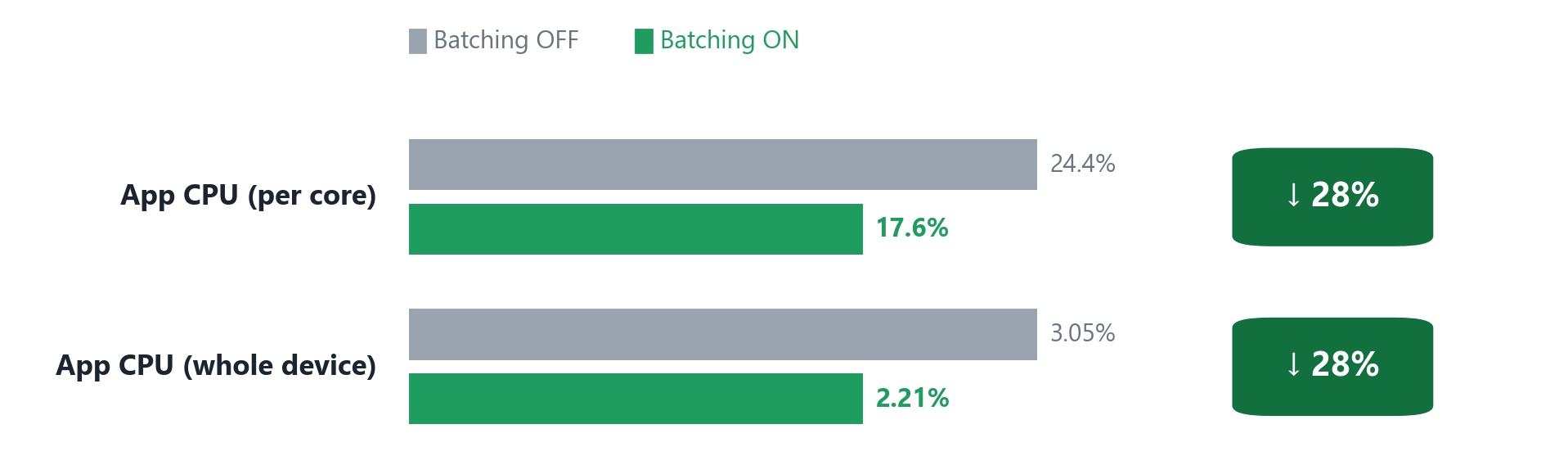
Dynamic batching reduced the batch count in the scene example and application CPU usage in the separate performance test.
Added support for Temporal Anti-Aliasing (TAA) for 3D content.
Select Performance TAA, Default TAA, or Quality TAA based on the required image quality and available rendering resources. Quality TAA improves the stability of stationary fine seams and slowly rotating silhouettes, but uses more memory bandwidth and graphics memory. You can select a TAA Profile and control motion vector generation for individual nodes.
Use TAA Result Depth Source to provide depth without TAA jitter for depth-based post-processing, such as depth of field. See Using Temporal Anti-Aliasing and Selecting a TAA mode.
Kanzi Studio now supports ASTC compression for cubemap textures. The six cubemap faces use shared image properties, which you configure through the NegZ Image property. See Compressing cubemap textures with ASTC.
Text
Added support for FreeType font fallback.

Use Font UScriptCode and Fallback Font Family to configure fonts for text that contains multiple writing systems. Use Extended for writing systems not listed in Font UScriptCode. To display emoji alongside body text, add a Font Family that contains emoji to Fallback Font Family and set its Font UScriptCode to Common. Private Use Area (PUA) characters use fonts in the primary Font Family.
See Using font fallback.
Added support for rendering color emoji with the FreeType font engine.

Kanzi renders color glyphs from CBDT, SBIX, and COLRv0 fonts. Fonts that use SVG or COLRv1 can be imported, but their glyphs are rendered with grayscale outlines. Color emoji rendering is not available with iType.
Kanzi Studio tools
Added the following tools to the Tools menu in Kanzi Studio:
Dynamic Shaders and Dynamic UBO Shaders adapt material shaders for regular and UBO dynamic batching, respectively. You can select variables that need separate values for each mesh, update the selection, and revert the shader changes. See Using the shader conversion tools.
Animation Bake bakes skeletal animations from FBX models into EXR textures for GPU skinning and imports the generated resources into your project.
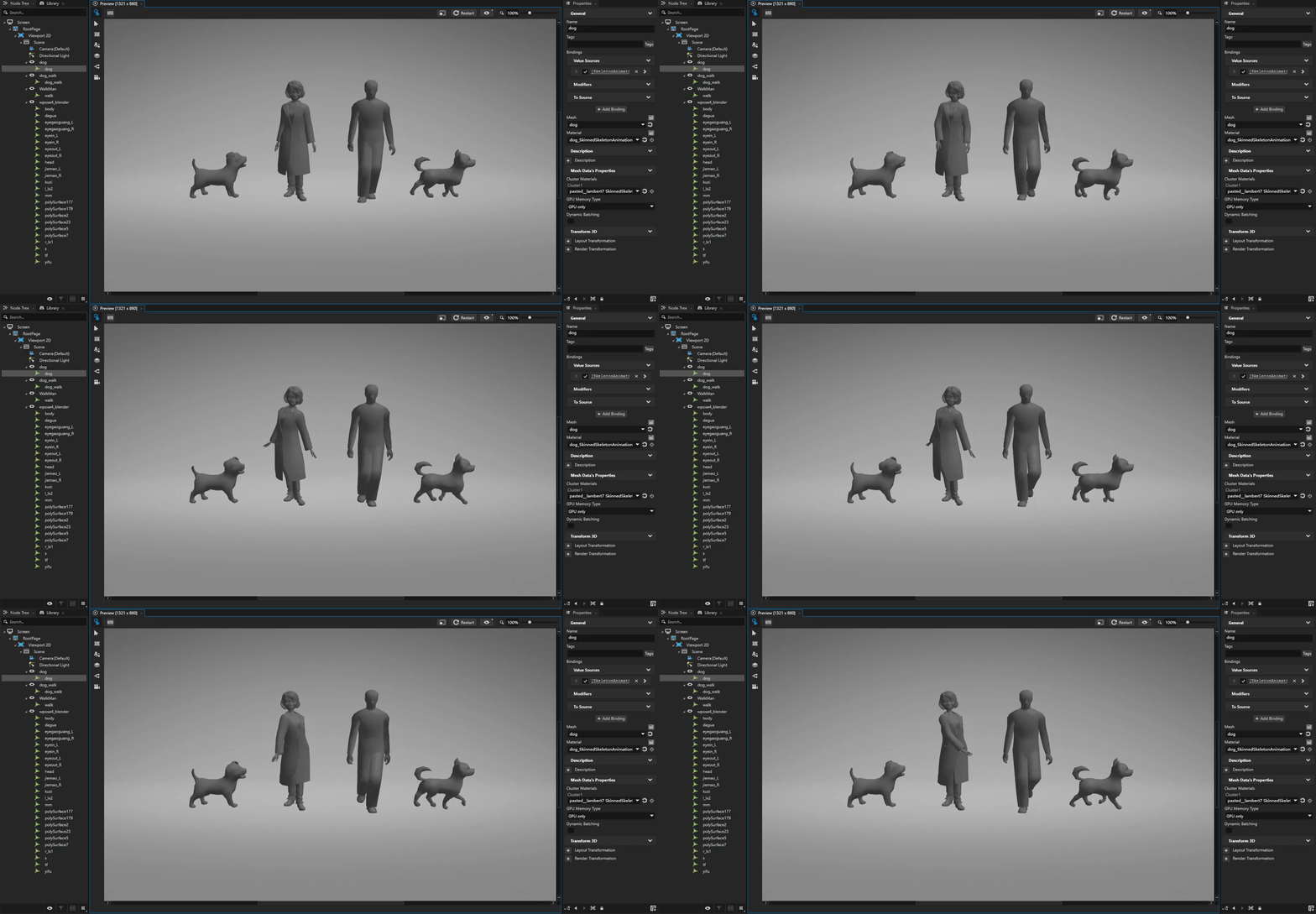
See Using Animation Bake.
Binding check exports property binding expressions, states, and node paths from the current solution to an Excel report for review. See Checking property bindings.
Image Atlas combines project images into an atlas and generates a JSON file with image regions. When you import an EXR-only atlas, the tool updates matching skeletal animation materials to use the atlas.
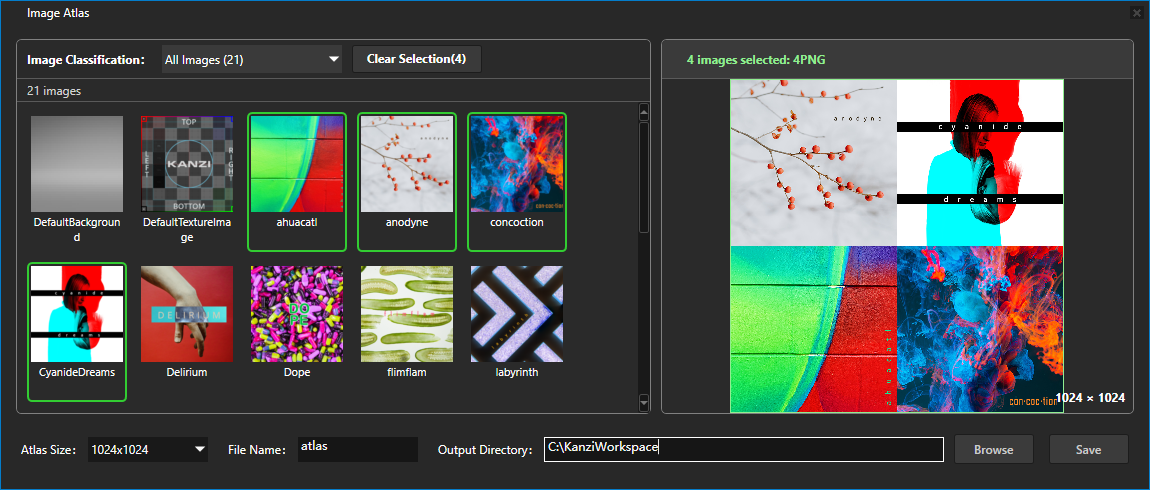
See Using Image Atlas.
Documentation
Added the Using Kanzi AI tools section with documentation for the Kanzi API MCP server and the Kanzi Documentation MCP server. Use these servers to connect your AI assistant to Kanzi API references and user documentation.
Updated the Kanzi Documentation MCP server to a unified endpoint at
https://docs.mcp.kanzi.comthat supports all loaded Kanzi versions. The mcpb file for Claude Desktop is now available at https://docs.kanzi.com/mcp/kanzi-docs-mcp.zip. See Kanzi Documentation MCP server.Overhauled the search and AI-assistant experience on the docs.kanzi.com Documentation site so you can find what you need faster and with more accurate, grounded information. Search now returns results from across the entire Kanzi documentation: Kanzi framework, feature packs, and tools. You can now narrow your search to specific documentation sets or Kanzi versions. The new Ask Kanzi AI assistant answers your questions grounded in the same documentation and API references, with the page you are reading (and any text you have selected) used as context for follow-up questions. For details on how to use search, see Searching Documentation.
The Kanzi API MCP server can now enumerate types by inheritance. The new
list_derived_typestool lists every type that derives from a base type — for example, all node types that derive fromNode— as a complete, version-specific list. Theget_type_hierarchytool shows a type’s base types and direct subtypes, and thelist_typestool lists the types in an API set or namespace. Your AI assistant can now answer questions such as “list all node types in Kanzi”, which keyword search alone could not. See Kanzi API MCP server.You can now set up both Kanzi MCP servers in one step by letting your AI coding agent configure itself. Paste a single instruction into the agent, and it registers both servers with no manual configuration. This works with Claude Code, VS Code, Cursor, Windsurf, Codex, and any other tool that supports MCP.
See Quick setup.
The Kanzi MCP servers no longer keep a selected Kanzi version between calls. Each query tool now takes an optional
versionargument, andset_kanzi_versionandset_versionconfirm that a version is available rather than switching to it. Tell your AI assistant which Kanzi version you work with, and it passes the version on each call. This comes from the2026-07-28revision of the Model Context Protocol, which the servers implement alongside the earlier revisions that existing AI assistants use. See Kanzi Documentation MCP server and Kanzi API MCP server.
Kanzi Engine
Fixed the issue where a Trajectory List Box 3D crashed when a data source bulk-replaced its items while the list was scrolled to an item near the end. (FMW-993)
Fixed incorrect multitouch input handling on the QNX Screen platform. Multi-finger gestures reported wrong touch states and coordinates, touches beyond ten simultaneous contacts were dropped, and stationary contacts generated spurious move events. Kanzi now tracks each touch point independently and reports touch state correctly. (INTE-1275)
Fixed the issue where an Activity node did not report its status when an Activity Host activated or deactivated that Activity node without animations. This happened, for example, when you changed the prefab of the active Activity. The Activity node sent none of the
ActivityConcept::ActivityActivatedMessage,ActivityConcept::ActivityDeactivatedMessage, andActivityConcept::StatusChangedMessagemessages. Because of this, the Activated and Deactivated Activity triggers did not run. (FMW-1334)The same issue also left an Activity node stuck in the Activating status. This happened when the State Manager of its prefab had a state group that the Activity Status property controls. That group was missing a state for one of the Activity Status values, so it entered its first state without a transition and nothing reported the status. The Activity Host then kept waiting for an activation that never completed.
An Activity Host now also updates which Activity it reports as active before it sends these messages. A handler of an Activity status message that activates or deactivates an Activity node therefore sees the up-to-date state of its Activity Host.
Added support for aligning Text Block 2D child nodes by their typographic baseline in a Stack Layout 2D node. Enable the Baseline Alignment property to align horizontally arranged text that uses different font sizes. See Aligning Text Block 2D nodes by baseline.(CH-1)
Optimized Draw Objects Render Pass to avoid redundant Object List traversal and render state generation, reducing CPU workload.(CH-8)
Fixed an issue on Wayland platforms where a Kanzi application could fail to create an EGL window surface when the requested non-legacy surface color space was not supported. Kanzi now retries creating the surface using the
Legacycolor space and provides more detailed warning and error messages for color space compatibility issues. See Using the legacy color workflow. (CH-10)Fixed an issue where continuous touch input could cause the screen to become unresponsive or freeze.(CH-18)
Fixed the issue where
ResourceManager::waitcould hang indefinitely during GL suspend when main-thread bookkeeping was stale, causing Kanzi to hang during shutdown (ANR). (CH-20)Fixed the issue where the frame rate compensation mechanism in the idle state affects the stability of animation frame intervals. (CH-32)
Fixed the issue where
ResourceManager::waitcould hang indefinitely during GL suspend when main-thread bookkeeping was stale, causing Kanzi to hang during shutdown (ANR). (CH-35)Fixed the issue where support dynamic switching between pinch and pan gestures when the touch point count changes. (CH-36)
Optimized Dynamic Batching Render Pass to avoid occasional frame-time spikes caused by unnecessary render state creation. (CH-44)
Kanzi Java API
Fixed a memory leak caused by registration of message handlers through
Node::addTunnelingMessageHandlermethod.Fixed a memory leak that occurred when objects of Kanzi native classes were created.
Kanzi Studio
Fixed the issue that caused Kanzi Studio to crash on startup on some computers. (CH-48)