Kanzi tools
Use Kanzi Studio tools to prepare resources and check bindings in your project. For example, you can convert shaders for dynamic batching, bake skeletal animations into textures, review property bindings in a report, or combine images into an atlas.
You can access these tools from the Tools menu in Kanzi Studio:
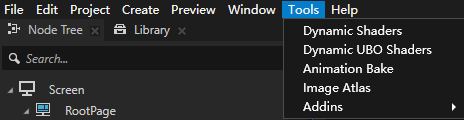
Dynamic Shaders and Dynamic UBO Shaders. See Converting shaders for dynamic batching.
Animation Bake. See Baking skeletal animations.
Binding check. See Checking property bindings.
Image Atlas. See Creating image atlases.
Converting shaders for dynamic batching
Use Dynamic Shaders and Dynamic UBO Shaders to adapt material shaders for meshes for which Dynamic Batching is enabled. Select the tool that matches the dynamic batching render pass:
For regular dynamic batching, in the Kanzi Studio main menu, select Tools > Dynamic Shaders.
For UBO dynamic batching, in the Kanzi Studio main menu, select Tools > Dynamic UBO Shaders.
The tools convert selected shader variables to batched arrays so that meshes in the same batch can use separate values. You can update the selected variables or revert the shader changes made by the tool.
Shader conversion is part of configuring dynamic batching. You must also enable dynamic batching for the meshes, configure the corresponding render pass, and match Batch Uniform Count to the shader array sizes.
Baking skeletal animations
Use Animation Bake to bake skeletal animations from FBX models into EXR textures for GPU skinning. You can define actions by their frame ranges, such as idle, walk, and turn.
The tool generates animation textures and JSON configuration files, imports the resources, and configures the materials for the generated meshes in Prefabs.
See Using Animation Bake.
Checking property bindings
Use Binding check to collect property bindings from the current solution and export an Excel report. The report contains binding expressions, states, and node paths that you can use to locate and review bindings.
The check does not change bindings. Use the report and Log to determine whether a binding needs attention.
Creating image atlases
Use Image Atlas to combine project images into one atlas. The tool supports PNG, JPG, and EXR images and generates a JSON file that records each image’s position and dimensions.
You can also combine the EXR textures generated by Animation Bake. When you import an EXR-only atlas, the tool updates matching skeletal animation materials to use the atlas.
See Using Image Atlas.