Known issues
Known issues in Kanzi Engine
Some parts of Kanzi API are written in C. In the future Kanzi releases we will continue the effort of converting the API to C++.
When linking applications to the libraries provided with SDK without sources generates warning about missing debug information.
Clipping of rotated child 2D nodes is ignored because of performance reasons. For example, if an Image node has a child Image node, and you rotate the child Image node, the parent Image node does not clip the child Image node.
Current limitation of the Kanzi Engine is that if a 2D node is forced to render to a render target (for example, Viewport 2D with rotation), clipping is applied even when you disable clipping in a 2D node.
A bug in V8 causes a memory leak the size of a pointer. If you do not use scripting in your Kanzi application, you can remove the V8 library.
When you change the Samples property of a Render Target Texture you have to restart the Preview to apply the change.
When the glyph cache texture in Kanzi Studio is full, the application performance decreases in Kanzi Studio. This does not affect the performance of your Kanzi application when you build it and appropriately adjust the size of the glyph cache texture for your target platform. See Glyph cache texture size.
The
Node2D_pluginexample prints warnings when you run it in the Preview.Kanzi application freezes when user scrolls a Trajectory List Box 3D with negative item spacing absolute value of which is higher than the width of list box items.
Setting the recognition threshold for the pinch gesture using the
PinchManipulator::setScaleRecognitionThresholdandPinchManipulator::setRotationRecognitionThresholdfunctions does not work.When you add to a main project a subproject that has Code Behind, Kanzi does not correctly add the Code Behind library of the subproject to the application of the main project.
Workaround:
In the
<MainProjectName>/Application/CMakeLists.txtafter the# CodeBehind libssection, for each subproject that has Code Behind, add:# CodeBehind libs set(<SubprojectName>_CodeBehind_lib_dir "${CMAKE_CURRENT_SOURCE_DIR}/<relative-path-to-subproject>/<SubprojectName>/CodeBehind") if(EXISTS "${<SubprojectName>_CodeBehind_lib_dir}") add_subdirectory("${<SubprojectName>_CodeBehind_lib_dir}" "${<SubprojectName>_CodeBehind_lib_dir}/lib") include_directories(${<SubprojectName>_CodeBehind_lib_dir}/include) target_link_libraries(<MainProjectName> <SubprojectName>_CodeBehind) endif()And replace:
<MainProjectName>with the name of the main project.<SubprojectName>with the name of the subproject.
In the
<MainProjectName>/Application/src/<MainProjectName>.cpp, for each subproject that has Code Behind:Add the
code_behind_template_module.hppheader:#if defined(CODE_BEHIND_TEMPLATE_API) && !defined(ANDROID) && !defined(KANZI_API_IMPORT) #include <code_behind_template_module.hpp> #endif
To the
registerMetadataOverridefunction add:#if defined(CODE_BEHIND_TEMPLATE_API) && !defined(ANDROID) && !defined(KANZI_API_IMPORT) CodeBehindTemplateModule::registerModule(getDomain()); #endif
And replace:
CODE_BEHIND_TEMPLATE_APIwith<SUBPROJECTNAME>_CODE_BEHIND_API.code_behind_template_modulewith<SubprojectName>_code_behind_module.CodeBehindTemplateModulewith<SubprojectName>CodeBehindModule.
When an Activity Host node reactivates an Activity node, Kanzi does not restore the focus to the correct node in that Activity node.
Workaround:
In the Activity Host and Activity nodes add the Focus Scope Type property and use its default value.
In the Activity node create an On Attached trigger.
In the On Attached trigger create a Try Set Focus action.
In the Try Set Focus action set the Target Item to the node to which you want to set the focus when the Activity Host node reactivates that Activity node.
Note that with this workaround you set the focus to a specific node, instead of the last-focused node in an Activity node.
Continuous focus navigation is not available because each focus change cancels the key handling in the
FocusNavigationManipulator.When you disable a focused node by setting the Node::EnabledProperty to false, Kanzi removes the focus from that node.
When you create a Prefab Placeholder 3D node, in some cases Kanzi selects a prefab that it cannot instantiate. This can cause undefined behavior and the Preview to show incorrect content.
Workaround:
Press F8 to exit the Preview.
In the Prefab Placeholder 3D node set the prefab to the correct prefab.
Press F5 to start the Preview.
Known issues in Kanzi Studio
Kanzi installer fails to install VC++ 2017 x64 redistributable if you have already installed it on top of VC++ 2015 x64 or x86 redistributable.
Workaround: Manually run the VC++ 2017 x64 redistributable installer and select to the option to repair the installation. The easiest way to do this is to run the Add or Remove Programs, click modify next to the VC++ 2017 x64 redistributable, and then repair.
When you import the same dds file twice, Kanzi Studio creates an invalid texture and shows invalid content in the Image property dropdown menus.
Workaround: Update the file in Windows Explorer, or delete the dds file and its texture before importing them again.
The device driver for the AMD Radeon R9 M370X included in the Boot Camp update 6.0 causes the Preview to not work. To fix the issue, use the Windows Device Manager to roll back to the previous version of the driver.
Importing fbx files which contain animations that use custom pivot points, can cause Kanzi Studio to terminate. This is caused by a defect in the FBX importer provided in the Autodesk’s FBX SDK.
After the import fails, open the Kanzi Studio project:
In the Library > Resource Files > 3D Assets select the fbx file that caused Kanzi Studio to terminate.
In the Properties disable the Convert Pivot Points property.

When disabled, Kanzi Studio ignores the custom pivot points in the fbx file, which can affect the rotation and scale animations for nodes that use custom pivot points.
When enabled, Kanzi Studio resets the pivot points to the default positions without making visual changes to animations. This is the recommended setting because Kanzi Studio does not support custom pivot points.
Custom pivot points contain an additional transform which Kanzi Studio bakes into a single transform. In some cases, custom pivot points do not contain any data, so disabling this option does not affect the content.
In the Library > Resource Files > 3D Assets right-click the fbx file that caused Kanzi Studio to terminate, and select Import 3D Asset File to import the file.

Kanzi Studio does not support importing of animated pivot points.
Kanzi Studio does not support these glTF 2.0 features:
Double-sided materials
Point and line primitives
Samplers with differing wrap modes for S and T dimensions. Kanzi Studio uses the wrap mode for S dimension for both.
OpenGL ES (IMG) graphics API is not stable enough to be used for development. Use the IMG graphics API only for testing. For content development use the OpenGL. Set the Default Preview OpenGL ES Wrapper in the Edit > User Preferences > Advanced > Default Preview OpenGL ES Wrapper.
When you run Kanzi Studio in Parallels or VMWare Fusion, the IMG Preview OpenGL ES Wrapper does not work because of a bug in the IMG wrapper.
Workaround: Use the GL wrapper.
Kanzi Studio is compatible only with screen DPI settings set to 100%.
When you close the Node Tree window, the selection in the window does not update correctly.
Thumbnails are not rendered correctly for all assets.
Copy-pasting in the Node Tree a Scene prefab that contains a skinned mesh does not work.
Workaround: Drag and drop the Scene prefab from the Prefabs to the location in your project where you want to use it.
When you use the keyboard to move the free camera in the Preview, the Camera tool Reset Camera command does not correctly reset the camera.
Workaround: Use the mouse to rotate the camera and then use the Reset Camera command in the Preview.
When you reload the changes from a referenced Kanzi Studio project that is opened in another instance of Kanzi Studio, Kanzi Studio can become unstable.
Workaround: Close the referenced project before you reload the changes in the project where the project is referenced.
When a node contains multiple instances of the same prefab, you cannot create a binding from the node that contains these prefabs to the properties of nodes inside an instance of that prefab.
Workaround: Make the properties to which you want to bind available in the root of the prefab and create the bindings in the root of the prefab instance. See Customizing instances of a node prefab.
When you change the value of the Prefab Template property of a Prefab View, Kanzi fails to show the default values of the properties of the prefab template. This happens when you change the value of the property in any other way than by setting it in the Properties, such as when you use a state manager or application code. The same issue occurs when you change the value of the Render Pass Prefab property in a Render Pass View.
Workaround: In Kanzi Studio add to the Prefab View or Render Pass View the properties of each prefab template or render pass prefab that you set the Prefab View or Render Pass View to use.
Kanzi Studio does not support setting the Mesh Material property of a primitive mesh to a material from a referenced project.
Workaround: Use the Material (Model3D.Material) property to set the material. The value of the Material property overrides the value of the Mesh Material property.
When you disable or delete a To Source binding, the Preview does not show the result of the disabling or deleting.
Workaround: To see the result, restart the Preview.
When you create a Kanzi Studio project using the Application with data source plugin template, Kanzi Studio shows that the Kanzi Engine plugin that defines the data source is invalid.
Workaround: In the Library > Kanzi Engine Plugins right-click the plugin and select Update Kanzi Engine Plugin.
In the Activity Browser, when you change the ActivityPath property of an Activity node to an Activity prefab from a referenced Kanzi Studio project, Kanzi Studio does not update the ActivityPath property.
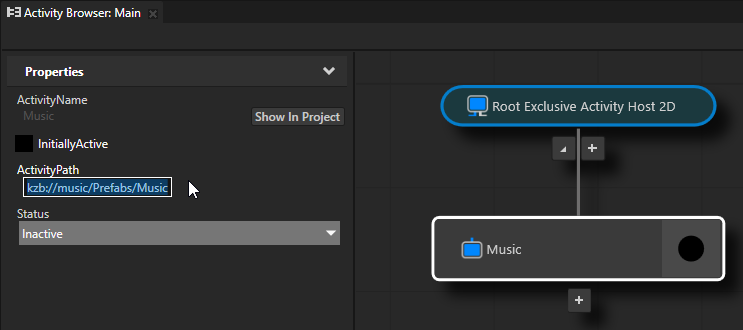
Workaround:
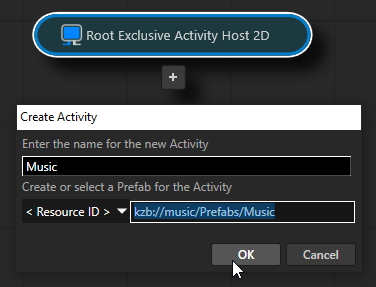
To set the prefab path when you create an Activity node in the Activity Browser, in the Create Activity window, in the Create or select a Prefab for the Activity field enter the kzb URL of the Activity prefab that you want to use.
To modify the prefab path for an already existing Activity node, drag the Activity prefab that you want to use from a referenced Kanzi Studio project to the Activity node in the Activity Browser.
When you select a referenced Kanzi Studio project in a multi-project solution, the Activity Browser fails to add Activity nodes.
Workaround: While adding an Activity node in the Activity Browser, make sure you have selected the main Kanzi Studio project of your multi-project solution.
Known issues in the Kanzi SDK
JavaScript is not supported in Kanzi applications on Android.
The Coin example does not run on the x86/x86_64 Android emulator.
Known issues on platforms
When you use QNX 7.0.0 and update your QNX software through the QNX Software Center, the compilation of Kanzi applications fails with error
Kanzi-3_6_5-qnx700_screen_aarch64-es3-freetype-static/Engine/include/kanzi/core/cpp/cstdio.hpp:42:12: error: 'std::snprintf' has not been declared
QNX introduced this error in an update of their software development platform where the
std::snprintfis missing in header files.Workaround: To remove the compilation error, add to the preprocessor flags the
-DKZ_USE_C99_SNPRINTFdefinition.