Image transfer
Image transfer rasterises the selected node, optionally including its subtree, to PNG or JPG and imports it as a Library texture in Kanzi. Image transfer is the most flexible fallback, but it bakes the designer intent into a raster. Use it deliberately.
Selection contract
Any single Figma node with bounds.
What gets transferred
The Figma plugin:
Calls
exportAsyncwith the chosen format (PNG default, JPG optional).Encodes the bytes via
figma.base64Encodefor an efficient wire payload.Sends an IMAGE block.
The Kanzi Studio plugin decodes the base64, writes the file under the project Images/ folder (in a Figma-specific subfolder), and creates the node type chosen in the Placement option below.
Options panel
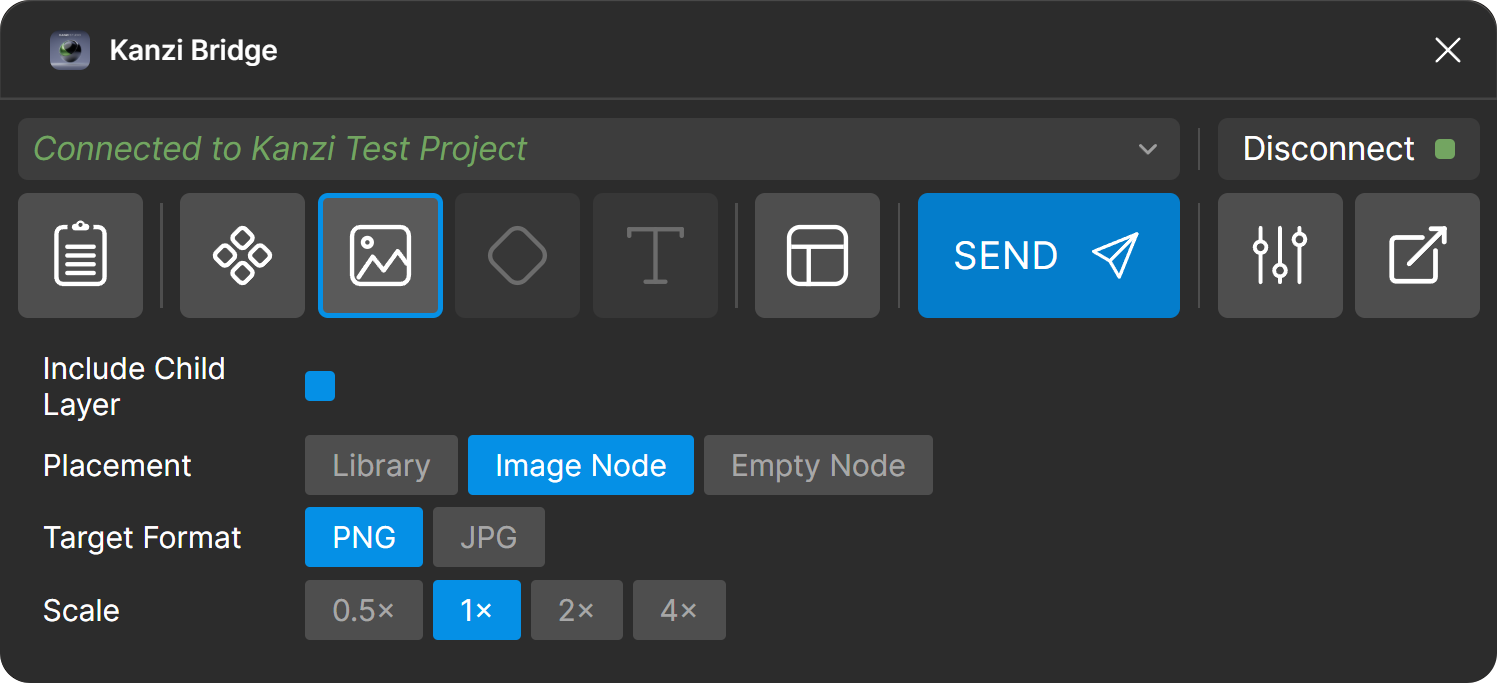
The options appear in the Figma plugin in this order:
Option |
Values |
|---|---|
Include Child Layer |
Toggle. On by default. When on, the selected layer and its children are flattened into one image. When off, only the selected layer is rasterised. |
Placement |
Choose how the imported image is added to the Kanzi project:
|
Target Format |
PNG (default): preserves the alpha channel. JPG: smaller file, no alpha channel. |
Scale |
0.5x, 1x (default), 2x, 4x. Controls the export resolution relative to the Figma layer size. |
Warning
JPG has no alpha channel. Transparent Figma pixels are flattened against an opaque white background in the exported JPG. To preserve transparency, use PNG.
Note
The [KZ_BAK] and [KZ_BAK_TINT] tags are set and cleared in the Layout options panel, not here. See Layout transfer. Tags route the affected subtree through Image transfer with extra Kanzi-side machinery (a wrapper prefab plus per-instance overrides).