Selection rules
Every transfer mode reads your Figma selection and decides whether it can accept the selection as input. If a transfer-mode button is disabled, your current selection does not satisfy that mode’s selection contract. This page explains the contracts and lists every selection-to-mode mapping.
Transfer modes overview
Kanzi Figma Importer groups transfers into four broad categories, each with its own selection contract:
Mode |
Selection contract |
|---|---|
Clipboard |
Any single layer, or a multi-selection. The plugin reads the metadata of one source layer and sends it in one packet. Use Clipboard to apply several property values to a Kanzi node in one click. With a multi-selection, Kanzi Figma Importer uses the lowest layer in the tree as the source. |
Library Asset |
Walks the selected subtree for Figma variables, colour styles, text styles, and component variants. Registers them as Library Assets in Kanzi (PropertyTypes, FVC entries, States). See Library Assets (FVC pipeline). |
Single (Shape / Text / Image) |
Specific layer types only (rectangle, ellipse, text, etc.). Multi-select of the same layer type is allowed; Kanzi Figma Importer sends each selected node as its own block in Kanzi Studio. Mixing types disables the button. |
Layout (experimental) |
Walks the full tree and routes each descendant to its best-fit Kanzi node type automatically (Shape, Text, Image2D, prefab placeholder). Tags refine the routing. See Layout transfer. Layout accepts every layer type; any single shape, text, or image selection can also be transferred via Layout. |
Per-transfer rules
Rules are listed in the same order the buttons appear in the plugin.
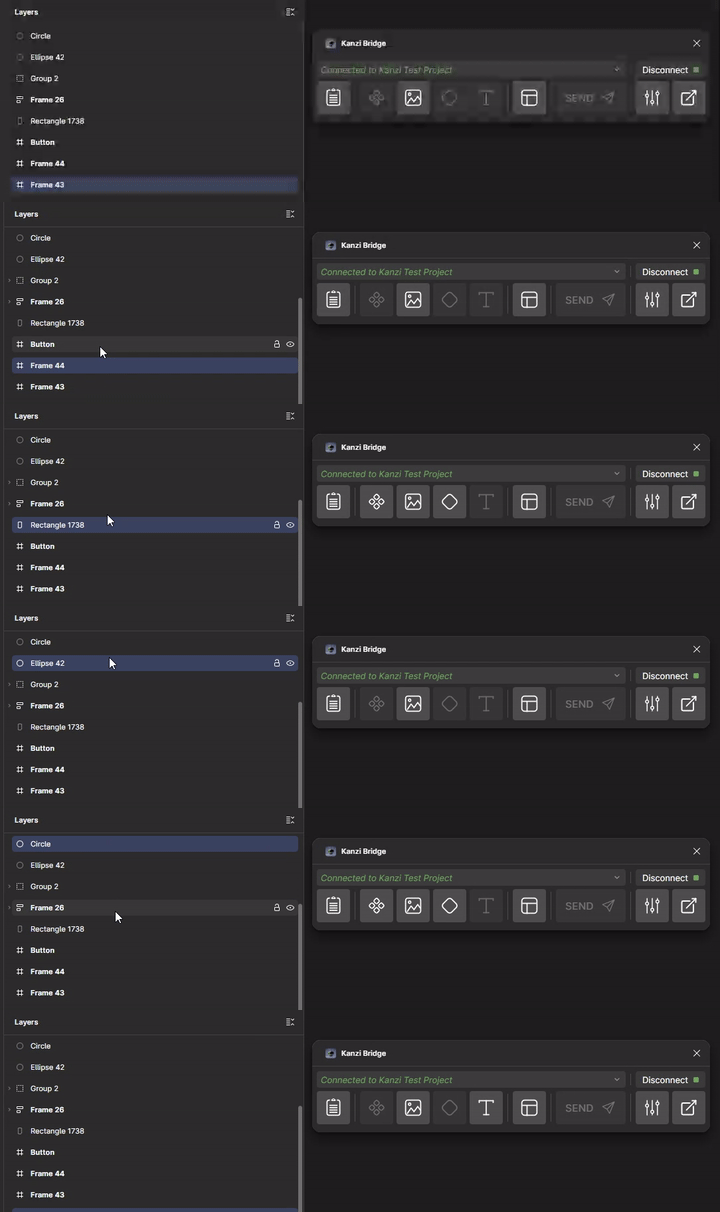
Clipboard
Any single node, or a multi-selection. Kanzi Figma Importer reads available metadata from one source layer and applies it to the layer currently selected in Kanzi Studio with one button click. With a multi-selection, Kanzi Figma Importer uses the lowest layer in the tree as the source.
Library Asset
Any parent node of a subtree. Kanzi Figma Importer walks descendants for Figma variables, colour styles, text styles, and component variants.
The options panel lists every detected asset. Deselect any you do not want to transfer before clicking Send.
All chosen assets are emitted alongside any other transfer in the same batch. Variables, styles, and states are created and bound in Kanzi automatically.
Image
Any node with bounds is transferable.
The
[KZ_BAK]and[KZ_BAK_TINT]tags apply only when the selection is transferred via Layout. Setting a bake tag on a frame inside a Layout transfer routes that subtree through Image transfer with extra wrapper machinery. See Layout transfer.
Shape
Primitives: RECTANGLE, ELLIPSE, POLYGON, STAR. These remain fully parametric in Kanzi; fill, stroke, and corner radii stay editable.
Frame-as-shape: a FRAME with at least one visible fill or stroke maps to a rounded rectangle in Kanzi.
SDF path: VECTOR, BOOLEAN_OPERATION, LINE, ARROW. Each is converted to a signed-distance-field texture and rendered as a Kanzi Shape. In Figma these are primitives; Kanzi Figma Importer treats them as SDF-only because their geometry cannot be reduced to the parametric primitive uniforms. SDF results are less flexible at runtime: the geometry is baked into a texture.
Each node sends a separate Shape transfer (multi-select is a batch).
Text
All selected nodes must be TEXT layers.
Layout (experimental)
Warning
Layout transfer is experimental. The common shape, text, image, and component cases work, but composite-specific routing and deeply nested re-imports may cause issues. Some imports require manual cleanup.
Selected nodes can be any Figma type. Layout walks the tree and dispatches each descendant to its best-fit Kanzi pipeline.
Frames, components, instances, groups, and variant sets are mapped to prefabs or placeholders. Other layer types inside the subtree are transferred through their own pipelines (
Image2Dfor image fills,TextBlock2Dfor text, Shape for vector children, prefab placeholders for components and instances).The
[KZ_BAK],[KZ_BAK_TINT],[KZ_BTN],[KZ_TGL], and[KZ_SDF]tags only steer routing reliably when the selection is transferred through Layout.
Multi-selection
Shape, Text, Image: every selected layer must have the same type. Kanzi Figma Importer sends each selected node as its own block in Kanzi Studio.
Clipboard: one packet, with the metadata of the lowest layer in the tree.
Library Asset: deduplicated across the selection. The same variable or style is not emitted twice.
Layout: the full subtree of every selected container is walked.
Selection → enabled modes (quick lookup)
Selection |
Clipboard |
Asset |
Image |
Shape |
Text |
Layout |
Notes |
|---|---|---|---|---|---|---|---|
Single RECTANGLE / ELLIPSE / POLYGON / STAR |
Yes |
Yes (*) |
Yes |
Yes |
Yes |
Primitive shape. Stays parametric in Kanzi when sent via Shape. Layout also accepts the layer. |
|
Single VECTOR / BOOLEAN_OPERATION / LINE / ARROW |
Yes |
Yes (*) |
Yes |
Yes (SDF) |
Yes |
Routed through the SDF path when sent via Shape. Layout also accepts the layer. |
|
Single FRAME (with fill or stroke) |
Yes |
Yes (*) |
Yes |
Yes |
Yes |
Frame-as-shape, or full layout if it has children. |
|
Single FRAME (no paint) |
Yes |
Yes (*) |
Yes |
Yes |
Pure container. Goes through Layout. |
||
Single COMPONENT / INSTANCE / GROUP |
Yes |
Yes (*) |
Yes |
||||
Single variant set ( |
Yes |
Yes |
Yes (partial) |
Variant pipeline is partial. See Release notes. |
|||
Single TEXT |
Yes |
Yes (*) |
Yes (SDF) |
Yes |
Yes |
Text-as-Shape via SDF (also via |
|
Multi-select same type |
Yes |
Yes (dedup) |
Yes (per layer) |
Yes (per layer) |
Yes (per layer) |
Yes |
Single-type modes send one block per selected layer. |
Multi-select mixed types |
Yes (dedup) |
Yes |
Only Asset and Layout work on mixed selections; single-type modes stay off. |
* Library Asset enables whenever the selected subtree contains Figma variables, colour styles, text styles, or component variants.