Library Assets (FVC pipeline)
Figma variables are not flattened into one-off literals. They transfer as a complete Kanzi library asset structure: a FigmaVariableCollection (FVC) node, a StateManager, per-mode states, and one PropertyType per variable. Any imported node that uses a variable is then auto-bound to the matching PropertyType.
Note
The FVC pipeline is not exclusive to Library Asset transfer. Any transfer mode (Shape, Text, Image, Layout) that references a Figma variable triggers FVC setup automatically. Library Asset transfer is the explicit way to register variables, styles, and variants without sending any layer content; the other modes create FVC entries whenever a bound variable appears in their payload.
Use this page to:
Understand the FVC node and how it ties variables to runtime state changes.
Trace how a Figma variable becomes a Kanzi PropertyType.
Debug a missing or unexpected auto-binding.
The structure
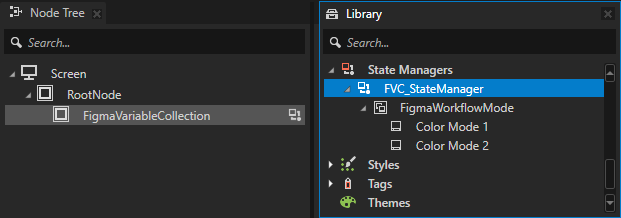
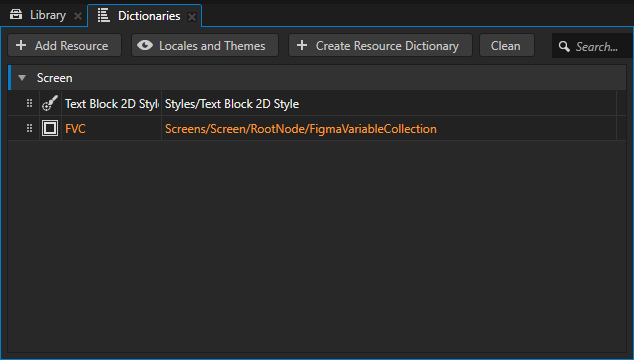
When a transfer references a Figma variable for the first time, Kanzi Figma Importer creates one FVC node under Screen/RootNode and one FVC StateManager in the Library. Both are reused across every Figma file your project imports from. Each Figma file gets its own StateGroup inside the shared StateManager, with one state per Figma mode. Each Figma variable becomes one PropertyType under the Library:
Screen/RootNode/
  <FigmaVariableCollection node>             (one node, shared across every Figma file)

Library/StateManagerLibrary/
  FVC_StateManager                            (one StateManager, shared across every Figma file)
    <File_A>_<Collection>_StateGroup          (one StateGroup per Figma file x collection)
      State: <Mode A1>
      State: <Mode A2>
    <File_B>_<Collection>_StateGroup
      State: <Mode B1>
      State: <Mode B2>

Library/PropertyTypeLibrary/
  FigmaWorkflow.Color.Color_Brand_Primary     (one PropertyType per variable)
  FigmaWorkflow.Color.Color_Surface
  ...
Variables from multiple Figma files share the same FVC node and the same FVC StateManager. The file-namespace prefix in the PropertyType name plus the per-file StateGroup keep their values cleanly separated.
PropertyType naming
Format: <FileNs>.<TypeNs>.<VarLeaf>. See the structure block above for examples.
FileNsis the Figma file name with non-[A-Za-z0-9_]characters stripped. The file namespace prevents collisions when a Kanzi project consumes variables from several files.Categorygroups PropertyTypes by Figma file in the Inspector.Controller property:
<FileNs>.Mode.
Variable types supported
Figma type |
Kanzi value type |
Editor in Inspector |
|---|---|---|
|
|
Colour picker |
|
|
Slider (auto-applied) |
|
|
Checkbox |
|
|
Text field (only for text content) |
DefaultValue is sourced from the first listed mode in Figma. The Figma “default mode” does not have a stable API, so the order of modes is used.
Auto-binding
The controller property drives the StateGroup. The StateGroup writes mode values onto the FVC node. Bindings on imported nodes target the PropertyType through the FVC alias, so the StateGroup writes propagate to every bound node automatically.
When an imported node has a Figma property bound to a variable, Kanzi Figma Importer creates a Kanzi alias binding on the corresponding Kanzi property:
Figma binding |
Kanzi binding target |
|---|---|
|
|
|
|
|
|
Per-corner |
|
Per-side |
|
TEXT |
|
The binding is idempotent. Re-imports update the existing binding instead of duplicating it. Renaming a variable in Figma does not break existing bindings, because bindings are tracked by Figma variable ID, not by name.
File rename detection
When the same Figma file arrives with a different file name, the Inspector shows “File renamed: X > Y”. This is detection only. Automatic PropertyType rename is not yet supported.
Variable user-edit detection
On every transfer the plugin stores the imported value of each variable in the metadata blob on the sentinel node (per mode, in initialValuesByMode). On the next transfer the plugin compares three values per variable, per mode:
the initial value stored in the metadata blob,
the current value on the FVC node,
the incoming value from Figma.
When the current value differs from the initial and the incoming value also differs from the current, the variable is reported as a user edit under the FVC Variables sub-header in the Inspector, with the usual Override or Keep choice. See Query mode.
Note
Component variants (State=Default, State=Hover) also produce a StateManager, but they transfer through the Layout pipeline, not through the FVC pipeline.