Kanzi Studio plugin overview
The Kanzi Studio plugin reviews imported assets before they are added to your project. Most transfers arrive as a staged block. Review what is about to be added, resolve any conflicts, then commit the block. Clipboard mode is the exception: the properties arrive in the Clipboard view, where you choose per-property which to apply to the selected Kanzi node. Staging keeps the Kanzi project free of unwanted changes.
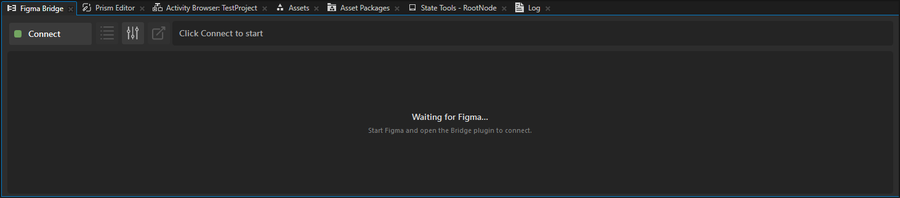
To open the panel, in Kanzi Studio select Figma Importer (Experimental) > Figma Bridge from the main menu. The same menu also has a Documentation entry that opens this online user guide. Both entries are disabled until a project is open. The panel is single-instance: selecting Figma Bridge again focuses the existing panel rather than opening a second one.
Panel anatomy
The panel has four regions, top to bottom:
Region |
Contents |
|---|---|
Experimental banner (top) |
An amber strip reading “This is an EXPERIMENTAL version — not for production use; behavior may change.” This is expected; Kanzi Figma Importer is an experimental product. |
Header |
Mode toggle (Clipboard or Query), Settings button, Jump-To-Figma shortcut, and the status bar (description on the left, step and ETA progress on the right). |
Available Figma files list (only visible during the connection process) |
Lists every Figma file that currently has the Figma plugin running, with a monitor icon (Desktop) or cloud icon (Online tunnel). Click an entry to pair. |
Mode body |
The Clipboard view or the Query view (Inspector and staged blocks), depending on the mode toggle. |
View modes
The panel has two view modes, toggled from the header. The mode toggle is independent of the connection state.
|
Clipboard mode. Live property preview from the last Clipboard packet. Apply writes the selected properties to the currently selected Kanzi node. |
|
Query mode. Selection-aware view that shows the Inspector for staged blocks: per-property conflict rows, Override or Keep choice, version history. |


What to read next
Clipboard mode for the per-property paste workflow.
Query mode for the staged-block review workflow.
Library Assets (FVC pipeline) for the FVC pipeline that hosts Figma variables and modes.
Figma metadata node and re-imports for how Kanzi Figma Importer tracks re-imports through the metadata node.
Debug Log panel for diagnosing failed transfers.
Settings for per-project preferences and history management.