Bindless Raytracing Advanced example
This example demonstrates how to use bindless rendering with ray tracing to produce raytraced shadows and reflections in a real-time 3D scene.
Requirements
Vulkan 1.2 or later with the following device extensions enabled:
VK_KHR_acceleration_structureVK_KHR_ray_queryVK_KHR_buffer_device_address
Getting the example
To get the example, in the Kanzi Studio Quick Start window, click Examples. Next to the BindlessRaytracingAdvanced example, click  .
.
Kanzi Studio downloads the example to the <KanziWorkspace>/Examples/BindlessRaytracingAdvanced directory.
Content of the example
The example showcases the currently supported raytraced shadow and reflection capabilities in Kanzi, both of which leverage the bindless rendering feature. The plant in the scene demonstrates alpha-aware GBuffer and raytracing. Thanks to bindless, masked geometry is correctly captured in the GBuffer and contributes to shadow and reflection rays without requiring separate render passes. The provided shaders are PBR compatible and intentionally kept simplified.
Setting up a project with ray tracing or bindless
Note
Ray tracing and bindless rendering are experimental features. They can change or be removed in future releases.
To enable ray tracing or bindless rendering in your own project:
Open the project and in the main menu select Project > Properties.
In the Properties expand the Preview category and set Preview Graphics API Configuration to Vulkan.
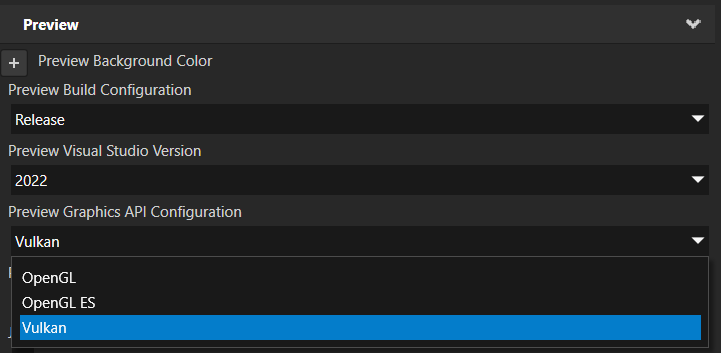
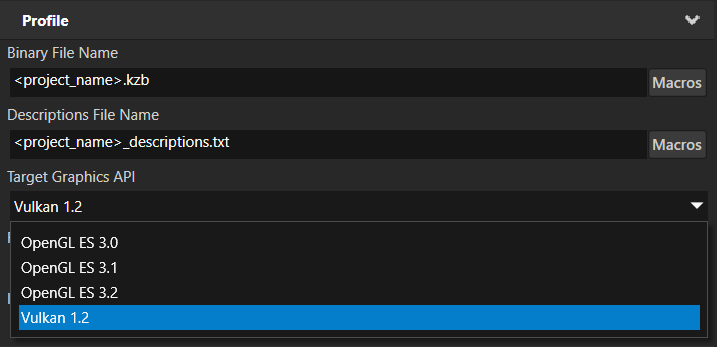
In the Properties expand the Profile category and set Target Graphics API to Vulkan 1.2.
Running the example
Open the example in Kanzi Studio. The Preview renders the scene with raytraced shadows and reflections when the host GPU meets the requirements listed above.
If the GPU or driver does not meet the Vulkan 1.2 requirement or does not support ray tracing, Kanzi skips unsupported features.
Technical details
Render pass prefab
The example extends the default render pass prefab with several additional passes:
Build Acceleration Structure — builds the bottom-level and top-level acceleration structures from the scene geometry. This pass must run before any ray queries are issued.
Raytraced Shadows — a compute pass that traces a shadow ray from each GBuffer fragment toward a given light source and writes the result into a shadow render target. The example provides the
RaytracedShadowsMaterialcompute material as a ready-to-use starting point. The shadow texture is then sampled in the lighting pass to attenuate the direct light contribution.Raytraced Reflections — a compute pass that renders a reflection texture by tracing reflection rays from the GBuffer surface normals. The resulting texture can be blended into the final image during the rasterization pass.
Both the raytraced shadow and raytraced reflection passes must be placed under the Gather Lights render pass in the render pass hierarchy. This ensures they have access to the light data collected by Gather Lights and can correctly evaluate shadows and reflections for all active lights in the scene.
Both passes also require the GBuffer to be populated before they run with depth, normals, and roughness data. Velocity is optional and used for the shadow denoiser. The example uses bindless rendering, so the GBuffer is alpha-aware. Masked geometry such as the plant is correctly captured in the GBuffer and contributes to shadow and reflection rays, producing accurate silhouettes without requiring separate render passes for alpha-tested geometry.
The provided shaders are PBR compatible and intentionally kept simplified. They can be highly optimized and adjusted to the specific needs of a project.
Bindless
The shared bindless infrastructure lives in <kanzi/bindless/common.glsl>. It declares the following structs and utilities that are available to any shader that includes it:
kzGPUSceneMeshInfo— device addresses for the per-mesh vertex streams: positions, normals, tangents, UVs, and indices.kzGPUSceneInstanceInfo— per-instance world/object transforms, index offset, and material and mesh IDs.kzGPUSceneInfo— top-level pointers to the mesh, instance, and material info arrays.kzGPUSceneTextures2D— the bindless 2D texture array, indexed by the texture IDs stored in the material struct.Helper functions
fetchPosition,fetchNormal,fetchTangent,fetchUV— typed accessors that transparently handle both float32 and float16 vertex data.
For practical usage examples, see the shaders in the Shaders/ directory of the example: RaytracingUtils.glsl, GBufferVelocity.frag.glsl, RaytracedShadows.comp.glsl, and RaytracedReflections.comp.glsl.
kzGPUSceneMaterialInfo is a user-defined shader struct in BindlessMaterialDefinition.glsl that you can freely modify to include whichever material properties your project needs. It specifies which per-material data is packed into the bindless buffer. The field names in kzGPUSceneMaterialInfo must exactly match the corresponding material property names. If a name does not match, the bindless update cannot find the property and Kanzi zeroes the field. Currently only one kzGPUSceneMaterialInfo definition is supported per project.