Package Manager
The Package Manager is a tool for sharing and managing reusable software components and assets, and for supporting cross-platform application and plugin development. It allows you to install, update, and remove project dependencies, such as:
Kanzi Engine libraries and headers
Kanzi Engine plugins
Kanzi Studio plugins
Asset packages
Note
The Package Manager is available since Kanzi 4.1.
Installing the Package Manager
The Kanzi installer installs the Package Manager as an optional post-install step. See Installing Kanzi Package Manager.
Once the Package Manager installation is complete, it has:
Installed Conan 2.10.0.
Added Conan remotes:
kanzi-conan-external: official Kanzi release packages
kanzi-community-packages: community packages
Added the necessary Conan profiles and configurations required by Kanzi.
Installed the Package Manager Kanzi Studio plugin.
After a successful installation, the Package Manager appears in the Kanzi Studio main menu.
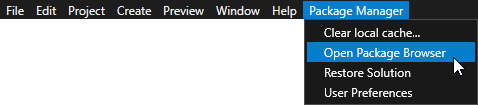
Package Manager plugin for Kanzi Studio
The Package Manager for Kanzi Studio provides a graphical interface for working with Conan repositories and packages. With the plugin, you do not need to manually use command-line instructions or edit configuration files.
Supported package types
The plugin recognizes different package types and processes them as follows:
Adds Kanzi Engine plugins as project dependencies.
Adds Kanzi Studio plugins as dependencies of the current Kanzi Studio instance.
Adds asset packages as asset sources for the current Kanzi Studio instance.
Automatic package detection
The plugin automatically detects changes in the packages.json file and notifies you about required updates to the libraries of your Kanzi Studio project.
Kanzi Engine plugins in asset packages
The plugin lets you add Kanzi Engine plugins as dependencies in asset packages. When you import such an asset package, Kanzi automatically adds the required Kanzi Engine plugins to the project.
Package Manager-aware application templates
The Kanzi Studio application templates support two ways of providing Kanzi Engine and its dependencies, and you choose between them with a single CMake setting:
SDK workflow (default) - resolves Kanzi Engine from the Kanzi SDK installed on your computer.
Package Manager workflow - resolves Kanzi Engine and its dependencies as Conan packages through the Package Manager.
Select the workflow with the KANZI_RESOLVER CMake variable when you configure the project:
cmake(default) uses the installed Kanzi SDK.kpmuses the Package Manager.
For example, to build a project with the Package Manager workflow, configure it with -DKANZI_RESOLVER=kpm. To switch workflows later, reconfigure the project with the other value.
Since Kanzi 4.1, this switch is built into the standard application templates, which replace the separate Conan-specific templates used in earlier versions.
Note
On Android, the Kanzi Studio project carries the equivalent Gradle property kanzi.resolver (cmake or kpm); the template’s Gradle build uses the same choice.
Migrating your project to a newer Kanzi version
When you install a new version of Kanzi, you can migrate your projects to use it.
To migrate a project to a newer Kanzi version:
Install the newer Kanzi version. You can install it side by side with your existing version.
Open your project in the newer Kanzi Studio.
If the newer version contains breaking changes, follow the migration guide for that version. See Kanzi 4.1.0 migration guide.
When you open a project created with an earlier Kanzi Studio, the newer Kanzi Studio displays a dialog asking you to confirm the migration of the project. After you confirm, Kanzi Studio updates the project to the newer version.
Note
When you migrate a project, Kanzi Studio automatically updates the project’s
packages.jsonso that it fetches its dependencies from the same Kanzi version that Kanzi Studio uses.If you publish your own Kanzi Engine plugins or asset packages, re-deploy them for the new Kanzi version before you migrate. Otherwise the update has no matching package to point
packages.jsonat.
Known issues
The Package Manager installer currently overwrites Conan config in the Conan cache, which include Conan profiles, templates and extensions. If you have existing elements in the configuration that match those needed by Kanzi, the installer overwrites them when you install the Package Manager.
Kanzi Package Manager uses only the default Conan 2 cache path; it does not configure a custom path. If you already have Conan 2 installed and have not configured a custom cache path, you share that default cache with Kanzi Package Manager. Although rare, this can cause package reference collisions or let Kanzi Package Manager modify content already in the cache.
Troubleshooting
In some cases, the Package Manager installer can fail or hang. If that happens:
Clear the Conan cache on your computer, located at
C:\Users\<admin>\.conan2\.Re-run the Kanzi SDK installer to reinstall the Package Manager.
See also
Using Package Manager Kanzi Studio plugin
Using Package Manager to create and deploy an asset package
Using Package Manager to create and deploy an Engine plugin