Using binary shaders
By default Kanzi uses online shaders, which Kanzi Studio exports to a kzb file as source code. When you start a Kanzi application on a target device, the application loads and compiles the shaders using the driver. This compilation increases the loading time of the application.
Use cached binary shaders to reduce the loading time of a Kanzi application.
Note
Kanzi 4.0 no longer supports offline compiled binary shaders.
Caching shader binaries
On performance-constrained platforms, shader compilations can considerably slow down the application startup and decrease runtime performance. You can use a shader binary cache primed with the set of shaders that your application requires. This way, your application does not have to compile shaders from source at runtime.
To cache shader binaries, in the application configuration:
Set the directory where you want to store the shader binary cache. See ShaderBinaryCacheDirectory.
Enable the caching. See ShaderBinaryCacheEnabled.
(Optional) To guard against hash collisions, during development, you can set your application to store the shader source code and perform a full string comparison to make sure that the shaders are identical. If two shaders produce the same hash value, the application logs a warning. See ShaderBinaryCacheCollisionCheck.
(Optional) When your application is ready for production, you can make the shader binary cache read-only. See ShaderBinaryCacheReadOnly.
For example, either:
In the
application.cfgconfiguration file, add# Set the shader binary cache directory to /tmp/shader-cache/. ShaderBinaryCacheDirectory = "/tmp/shader-cache/" # Enable the caching of shader binaries. ShaderBinaryCacheEnabled = true
In the C++ application in the
Application::onConfigurefunction, add// Set the shader binary cache directory to /tmp/shader-cache/. configuration.shaderBinaryCacheDirectory = "/tmp/shader-cache/"; // Enable the caching of shader binaries. configuration.shaderBinaryCacheEnabled = true;
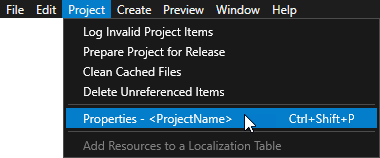
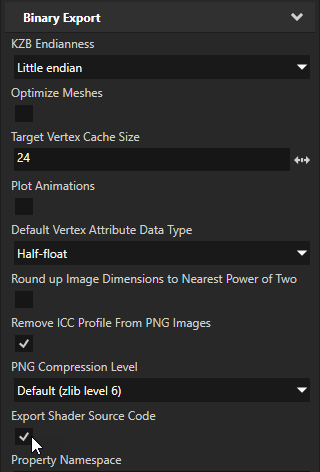
The caching of shader binaries requires that Kanzi Studio exports the source code of the shaders to the kzb file. In Kanzi Studio, in the Project > Properties, make sure that the Export Shader Source Code property is enabled. This is the default value.