Color grading sepia
Color grading enables control over the visual tone of a scene by selectively adjusting colors across different luminance ranges. This effect allows you to use pre-defined set of properties to achieve sepia-toned image effect using the Color Grading effect as a base.
Sepia is a classic color grading effect that transforms the full color spectrum of an image into varying shades of reddish-brown, mimicking the chemical process used in early photography.
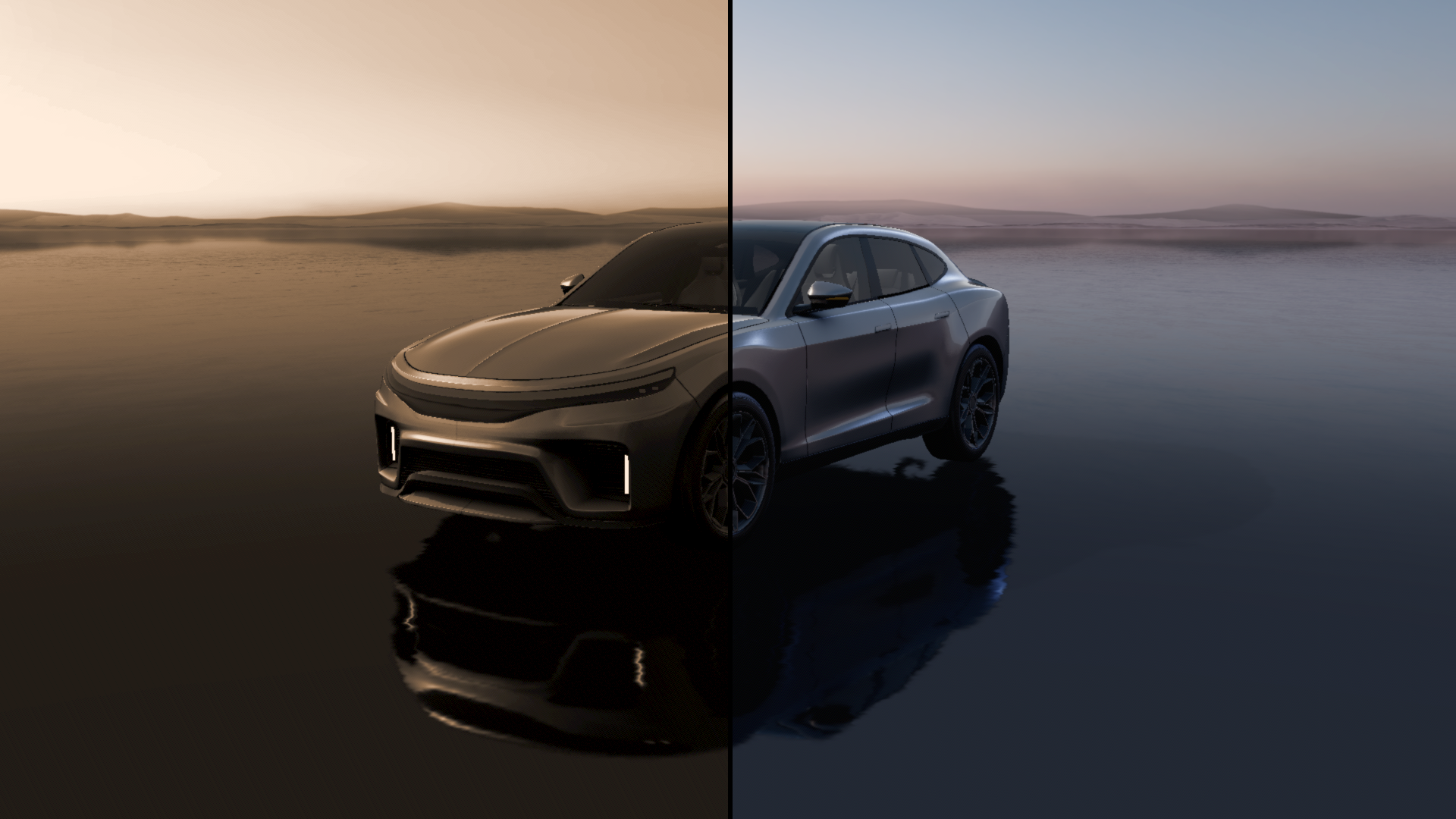
Color grading properties
Property |
Type |
Range |
Description |
|---|---|---|---|
Effect Strength |
Float |
0 - 1 |
Controls the overall intensity of the post-processing effect. |
Highlight Range |
Vector2 |
|
Defines the luminance range considered as highlights in the image. |
Hue Saturation Value |
Vector3 |
|
Adjusts the global hue, saturation, and value of the image. |
Shadow Range |
Vector2 |
|
Defines the luminance range considered as shadows in the image. |
Highlight Color |
Color |
The color tint applied to the highlight regions of the image. |
|
Midtone Color |
Color |
The color tint applied to the midtone regions of the image. |
|
Shadow Color |
Color |
The color tint applied to the shadow regions of the image. |