ステップ1 - データソースを定義する
このチュートリアルのこのステップでは、データソースを定義する Kanzi Engine プラグインを作成します。データソースを使用して、アプリケーションにデータを提供します。
チュートリアルを入手する
チュートリアルを入手するには、Kanzi Studio Quick Start ウィンドウで Projects をクリックし、Tutorials タブを選択します。Data sources チュートリアルの横にある  をクリックします。
Kanzi Studio はチュートリアルを <KanziWorkspace>/Tutorials ディレクトリにダウンロードします。以下が含まれています。
<KanziWorkspace>/Tutorials/Data sources/Assetsディレクトリにあるチュートリアルのアセット。<KanziWorkspace>/Tutorials/Data sources/Startディレクトリにあるチュートリアルの開始地点プロジェクト。Tool_projectディレクトリには、データソースを定義するユーザーインターフェースを持つ Kanzi Studio プロジェクトが含まれています。このデータソースからのデータを使用して、Kanzi Studio プロジェクトで定義されたユーザーインターフェースを制御します。Applicationディレクトリには、Kanzi Studio プロジェクトのユーザーインターフェースのデータソースを定義するためのテンプレートが含まれています。
<KanziWorkspace>/Tutorials/Data sources/Completedディレクトリにある完成したチュートリアル。
データソースを定義する
データソースを定義するには:
ファイルエクスプローラーで、
<KanziWorkspace>/Tutorials/Data sources/Assets/TinyXML-2ディレクトリからtinyxml2.cppとtinyxml2.hファイルを<KanziWorkspace>/Tutorials/Data sources/Start/Application/src/plugin/srcディレクトリにコピーします。このチュートリアルでは、
TinyXML-2ライブラリを使用して、データソースとして使用するXMLファイルを処理します。<KanziWorkspace>/Tutorials/Data sources/Start/Application/src/plugin/CMakeLists.txtで、setコマンドにtinyxml2.cppとtinyxml2.hファイルを追加します。set(sources_plugin src/tinyxml2.cpp src/tinyxml2.h src/xmldatasource.cpp src/xmldatasource.hpp src/xmldatasource.rc src/xmldatasource_module.cpp src/xmldatasource_module.hpp)
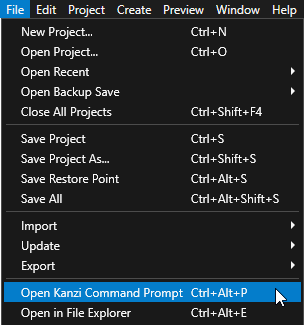
Kanzi Studio で、File > Open Kanzi Command Prompt を選択します。
Kanzi Command Prompt は、Kanzi 環境変数が設定された Windows コマンドプロンプトを開き、Kanzi のバージョンに対して Kanzi Command Prompt を開きます。
Kanzi Command Prompt を使用すると、絶対パスを使用したり環境変数を設定したりせずに、Kanzi のユーティリティや、Gradle、CMake などのビルドツールにアクセスできます。
ヒント
Kanzi Command Prompt は、Rightware ディレクトリの Windows スタートメニューで見つけることができます。
Kanzi のバージョンが複数インストールされている場合は、そのコマンドプロンプトで作業したい Kanzi のバージョンに対応する Kanzi Command Prompt を起動するようにしてください。
<KanziWorkspace>/Tutorials/Data sources/Start/Applicationディレクトリ内の Kanzi Command Prompt で、チュートリアルアプリケーション用の Visual Studio ソリューションを生成するスクリプトを実行します。generate_cmake_vs2022_solution.bat
このスクリプトは、
<KanziWorkspace>/Tutorials/Data sources/Start/Application/build_vs2022ディレクトリにアプリケーション用の Visual Studio ソリューションを生成します。Visual Studioで
<KanziWorkspace>/Tutorials/Data sources/Start/Application/build_vs<Version>/XML_data_source_start.slnVisual Studioソリューションを開きます。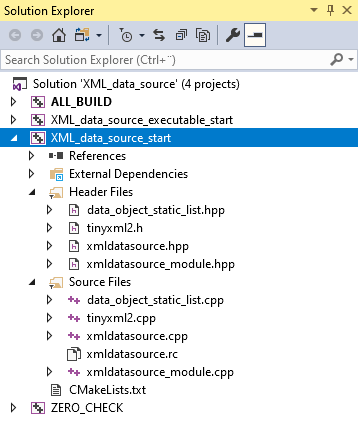
Visual Studio の XML_data_source_start プロジェクトで、
xmldatasource.hppファイルに次の変更を加えてください。XMLDataSource クラスのパブリックセクションに、データソースが使用するXMLファイルを設定できるプロパティタイプを作成します。
リプレイス (Replace)
class XML_DATA_SOURCE_API XMLDataSource : public DataSource
{
public:

    KZ_METACLASS_BEGIN(XMLDataSource, DataSource, "CustomDataSourceType")
    KZ_METACLASS_END()

...

};
以下に置き換えます。
class XML_DATA_SOURCE_API XMLDataSource : public DataSource
{
public:
    // Create the XmlFilename property type. You use this property type to tell the data source plugin which XML file to read.
    static PropertyType<string> XmlFilenameProperty;

    KZ_METACLASS_BEGIN(XMLDataSource, DataSource, "XML_data_source")
        // Add the property you created to the class metadata.
        KZ_METACLASS_PROPERTY_TYPE(XmlFilenameProperty)
    KZ_METACLASS_END()

...

};
Application::initialize関数の後の保護されたセクションで宣言します。ユーザーが選択したXMLファイルを解析するためのヘルパー関数
parseFileアプリケーションのkzbファイルをロードした後に Kanzi が呼び出す関数
class XML_DATA_SOURCE_API XMLDataSource : public DataSource
{

...

protected:

...
    // Declare the function that parses the XML file and creates data objects from its content.
    void parseFile(vector<char> fileData);

    // Kanzi calls onLoaded after loading the kzb file of the application.
    void onLoaded() override;
...
};
Visual Studio で
xmldatasource.cppファイルに追加します。XML の処理に必要なヘッダーファイルをインクルードします。
// Provides the functionality to process XML.
#include "tinyxml2.h"
xmldatasource.hppヘッダーファイルで作成したプロパティタイプのメタデータを定義します。このプロパティを使用して、どの XML ファイルからデータを取得するかをデータソースプラグインに指示します。
// Define the metadata for the property type you use to tell the data source plugin which XML file to read.
PropertyType<string> XMLDataSource::XmlFilenameProperty(kzMakeFixedString("XMLdatasource.XMLDataSourceFile"), "", 0, false,
                                                        KZ_DECLARE_EDITOR_METADATA
                                                        (
                                                            // Set the name of the property the way it is shown in Kanzi Studio.
                                                            metadata.displayName = "XML Data Source File";
                                                            // Set the tooltip for the property.
                                                            metadata.tooltip = "Sets which XML file the data source plugin reads.";
                                                            // Select the editor which is used to edit the value of this property type.
                                                            // BrowseFileTextEditor editor contains a text box with a Browse button next to it.
                                                            metadata.editor = "BrowseFileTextEditor";
                                                        ));
メタデータを定義する前に、データソースファイルの XML 要素の type 属性で指定されるタイプに基づきデータオブジェクトを作成する関数を作成します。
// Add a data object of the type specified by the type attribute in the XML element. Get the initial value
// from the text parameter.
DataObjectSharedPtr addDataObject(Domain* domain, const char* type, const char* name, const char* text)
{
    shared_ptr<DataObject> object;
    // Create an integer data object from the int type attributes.
    if (type && strcmp(type, "int") == 0)
    {
        int value = 0;
        if (text)
        {
            value = atoi(text);
        }
        object = DataObjectInt::create(domain, name, value);
    }
    // Create a float data object from the float and real type attributes.
    else if (type && (strcmp(type, "real") == 0 || strcmp(type, "float") == 0))
    {
        double value = 0;
        if (text)
        {
            value = atof(text);
        }
        object = DataObjectReal::create(domain, name, value);
    }
    // Create a Boolean data object from the bool and boolean type attributes.
    else if (type && (strcmp(type, "bool") == 0 || strcmp(type, "boolean") == 0))
    {
        bool value = false;
        if (text)
        {
            value = (strcmp(text, "true") == 0);
        }
        object = DataObjectBool::create(domain, name, value);
    }
    // Create a string data object from the string type attributes.
    else if (type && strcmp(type, "string") == 0)
    {
        string value;
        if (text)
        {
            value = text;
        }
        object = DataObjectString::create(domain, name, value);
    }
    else
    {
        // If the type attribute is not set, create a generic data object.
        // This is used to create the hierarchy in the data source.
        object = DataObject::create(domain, name);
    }
    return object;
}
addDataObject関数の後に、メモリ内のXML構造の内容をデータオブジェクトに変換する関数を作成します。// Convert to data objects the content of the XML structure in memory. You use these data objects to // construct the data object tree of the data source. // - The second parameter sets the node where this pass places new data objects. // - The third parameter sets the pointer to the location where the conversion and parsing is progressing (within the // XML in the memory, the child element in the XML). static void addDataObjectsRecursively(Domain* domain, DataObjectSharedPtr parent, const tinyxml2::XMLElement* xml) { // Check whether the current element in the XML file has the type attribute set. const tinyxml2::XMLAttribute* typeAttribute = xml->FindAttribute("type"); // Get value of the type attribute. const char* type = 0; if (typeAttribute) { type = typeAttribute->Value(); } // Create the data object based on the value of the type attribute. DataObjectSharedPtr object = addDataObject(domain, type, xml->Name(), xml->GetText()); // Add the data object as a child to the parent data object. parent->addChild(object); // Traverse the tree in the XML file to add data objects for each child element of the current XML element. for (const tinyxml2::XMLElement* child = xml->FirstChildElement(); child; child = child->NextSiblingElement()) { // Recurse. addDataObjectsRecursively(domain, object, child); } }
addDataObject関数の前に、ユーザーが XML Data Source File プロパティで設定できる XML ファイルをディスクからメモリにロードする関数を作成します。// Declare the addDataObjectsRecursively function. static void addDataObjectsRecursively(Domain* domain, DataObjectSharedPtr object, const tinyxml2::XMLElement* xml); // Parse the XML file and create data objects from its content. void XMLDataSource::parseFile(vector<char> fileData) { // Clear the previous data object tree. m_root.reset(); // Parse the XML document from the memory and release the open file. tinyxml2::XMLDocument doc; tinyxml2::XMLError error = doc.Parse(fileData.data(), fileData.size()); // If the plugin successfully loads the file set in the XML Data Source File property, create data objects. if (error == tinyxml2::XML_SUCCESS) { // Get the root XML element. const tinyxml2::XMLElement* element = doc.RootElement(); // Create the root data object of the data source. m_root = DataObject::create(getDomain(), "Root"); do { // Populate the child data objects of the root data object. addDataObjectsRecursively(getDomain(), m_root, element); // Handle all sibling elements of the root XML element. element = element->NextSiblingElement(); } while (element); notifyModified(); } }
parseFile関数の前に、データソースとして使用するファイルの内容をメモリに読み込む関数を作成します。// Read the contents of the XML file into memory. vector<char> readFileContents(string_view filename) { ReadOnlyDiskFile file(filename); vector<char> data(static_cast<size_t>(file.size())); file.read(reinterpret_cast<byte*>(data.data()), data.size()); return data; }
readFileContents関数の後に、アプリケーションの kzb ファイルをロードした後に Kanzi が呼び出す関数を実装します。// Kanzi calls onLoaded after loading the kzb file of the application. void XMLDataSource::onLoaded() { // If you do not set the value of the XML Data Source File property, the plugin does not do anything. string filename = getProperty(XmlFilenameProperty); if (!filename.empty()) { // Call the function that reads the contents of the XML file into memory, and pass the return value // to the function that parses the XML file and creates data objects from its content. parseFile(readFileContents(filename)); } }
データソースの更新
データのソースとして使用するファイルの変化を毎秒チェックすることにより、データソースを更新する機能を追加します。
データソースを更新するには:
xmldatasource.hppにこれらの変更を加えてください。private セクションで、データソース内の変化を追跡するためのスレッドと関数を導入します。置き換え
private:

    // Introduce the pointer to the root data object of the data source.
    DataObjectSharedPtr m_root;
以下に置き換えます。
private:

    // Declare the function that starts the thread which monitors and reads the XML file.
    void startWorkerThread(string_view filename);

    // Declare the function that stops the thread which monitors and reads the XML file.
    void stopWorkerThread();

    // Declare the function that is executed in the thread which monitors and reads the XML file.
    // You pass a copy of the string for the filename because it is used in a different thread.
    void workerThreadCallback(string filename);

    // Introduce the pointer to the root data object of the data source.
    DataObjectSharedPtr m_root;

    // Introduce the thread for monitoring and reading the XML file.
    thread m_workerThread;

    // Introduce the exit flag for the worker thread.
    atomic<bool> m_workerThreadExitCondition;
protected セクションでコンストラクタを修正し、ワーカースレッドの終了フラグを初期化します。置き換え
// Constructor.
explicit XMLDataSource(Domain* domain, string_view name):
    DataSource(domain, name)
{
}
以下に置き換えます。
// Constructor.
explicit XMLDataSource(Domain* domain, string_view name):
    DataSource(domain, name),
    m_workerThreadExitCondition(false)
{
}
create関数の定義後の public セクションでデストラクタを宣言します。public: ... // Destructor ~XMLDataSource();
xmldatasource.cppにこれらの変更を加えてください。データソースとして使用するファイルをモニタリングする関数で使われるヘッダーファイルをインクルードします。
// Provides the system utility function to get the timestamp of the file.
#include <sys/stat.h>
parseFile関数の前に、データソースとして使用するファイルを監視および読み取る関数を作成します。// Helper function to get the file modification time. static time_t getFileModificationTime(const char* filename) { time_t result = 0; struct stat fs; if (stat(filename, &fs) == 0) { result = fs.st_mtime; } return result; } // Start the thread that monitors and reads the XML file. void XMLDataSource::startWorkerThread(string_view filename) { kzAssert(!m_workerThread.joinable()); m_workerThread = thread(&XMLDataSource::workerThreadCallback, this, string(filename)); } // Stop the thread that monitors and reads the XML file. void XMLDataSource::stopWorkerThread() { m_workerThreadExitCondition = true; if (m_workerThread.joinable()) { m_workerThread.join(); } m_workerThreadExitCondition = false; } // This thread function checks once every second whether the XML file has been modified. // The function reads the contents of the XML file and submits a task to the UI thread to parse the file contents // into the data source structure. void XMLDataSource::workerThreadCallback(string filename) { TaskDispatcher* taskDispatcher = getDomain()->getTaskDispatcher(); // Initialize the previous modification time to an invalid value. time_t oldModificationTime = static_cast<time_t>(-1); for (;;) { if (!filename.empty()) { time_t newModificationTime = getFileModificationTime(filename.c_str()); if (oldModificationTime != newModificationTime) { // Read the contents of the file into memory. // You read the file contents on this thread to avoid blocking the UI thread with a long operation. vector<char> data = readFileContents(filename); // Submit a task that parses the XML file and constructs the data source. // You must do this in the UI thread because you can manipulate data source objects // and other UI objects only in the UI thread. taskDispatcher->submit(bind(&XMLDataSource::parseFile, this, kanzi::move(data))); oldModificationTime = newModificationTime; } } // Sleep for one second. this_thread::sleep_for(chrono::milliseconds(1000)); // If the UI thread sets the exit flag, exit. if (m_workerThreadExitCondition) { break; } } }
DataSource::onLoaded関数を修正して、XMLファイルを監視および読み取るスレッドのシャットダウンと開始を含めてください。// Kanzi calls onLoaded after loading the kzb file of the application. void XMLDataSource::onLoaded() { // The Kanzi Studio Preview can call the onLoaded function multiple times whenever // the user edits properties of the data source or refreshes the data source. // Shut down the thread that monitors and reads the XML file. stopWorkerThread(); ... if (!filename.empty()) { ... // Start the thread that monitors and reads the XML file. startWorkerThread(filename); } }
DataSource::onLoaded関数の前に、デストラクタを定義します。// Destructor XMLDataSource::~XMLDataSource() { // Shut down the thread that monitors and reads the XML file. stopWorkerThread(); }
データソースプラグインのビルド
プラグインの作成が完了したら、プラグインの dll をビルドします。このチュートリアルの次のステップでは、Kanzi Studio プロジェクトでこのプラグインを使用して、XML ファイルからアプリケーション用のデータを取得します。
データソースプラグインをビルドするには:
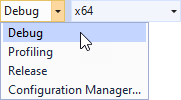
使用したいソリューション構成を選択してください。
開発中は、Debug 構成を選択します。製品版を作成する準備ができたら、Release 構成を選択します。
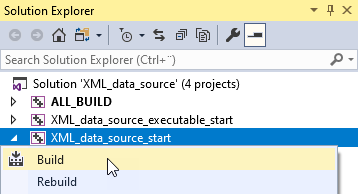
ソリューションエクスプローラーで、XML_data_source_start プロジェクトを右クリックし、「ビルド」を選択します。
Visual Studio は、
<ProjectName>/Application/lib/<PlatformName>/<ConfigurationName>および<ProjectName>/Application/build_vs<Version>/runtime/<ConfigurationName>ディレクトリにプラグイン DLL をビルドします。Kanzi Studio は、<ProjectName>/Application/libディレクトリのプラグイン DLL を使用します。