ステップ3 - ロケールをロードし、プレハブをインスタンス化する
このステップでは、Kanzi Engine APIを使用してアプリケーション内のロケールのロケールパックをロードし、Kanzi アプリケーションでユーザーがロケールボタンをクリックしたときに、左から右および右から左のロケール用のボタンとレイアウトを含むプレハブをインスタンス化します。
ロケールパックをロードする
このセクションでは、Kanzi Engine APIを使用して、アプリケーション内のロケールのロケールパックをロードします。選択されたロケールに対して正しいレイアウトで正しい IVI Grid および LocaleButton プレハブをインスタンス化するためにAPIを使用します。
ロケールパックをロードするには:
<ProjectName>/Application/bin/Locale_packsディレクトリのファイルエクスプローラーで、binaries.cfgファイルをテキストエディタで開き、そのファイルにこれらのロケール用のロケールパックを含む Arabic および Hebrew kzb ファイルを追加します。各行に1つのkzbファイルの名前のみを追加してください。binaries.cfgファイルには、すでに Japanese、Chinese、および Korean kzb ファイルが含まれています。ja-JP ko-KR zh-ZH ar-AR he-HE
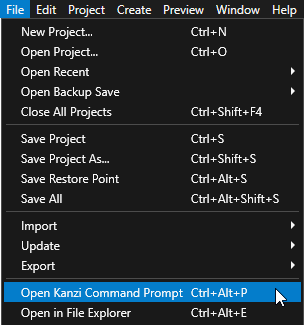
Kanzi Studio で、File > Open Kanzi Command Prompt を選択します。
Kanzi Command Prompt は、Kanzi 環境変数が設定された Windows コマンドプロンプトを開き、Kanzi のバージョンに対して Kanzi Command Prompt を開きます。
Kanzi Command Prompt を使用すると、絶対パスを使用したり環境変数を設定したりせずに、Kanzi のユーティリティや、Gradle、CMake などのビルドツールにアクセスできます。
ヒント
Kanzi Command Prompt は、Rightware ディレクトリの Windows スタートメニューで見つけることができます。
Kanzi のバージョンが複数インストールされている場合は、そのコマンドプロンプトで作業したい Kanzi のバージョンに対応する Kanzi Command Prompt を起動するようにしてください。
<KanziWorkspace>/Tutorials/Localization/Completed/Applicationディレクトリ内の Kanzi Command Prompt で、チュートリアルアプリケーション用の Visual Studio ソリューションを生成するスクリプトを実行します。generate_cmake_vs2022_solution.bat
このスクリプトは、
<KanziWorkspace>/Tutorials/Localization/Completed/Application/build_vs2022ディレクトリにアプリケーション用の Visual Studio ソリューションを生成します。Visual Studioで
<KanziWorkspace>/Tutorials/Localization/Completed/Application/build_vs<Version>/Localization.slnVisual Studioソリューションを開きます。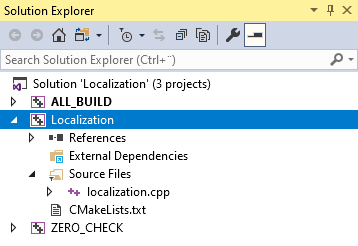
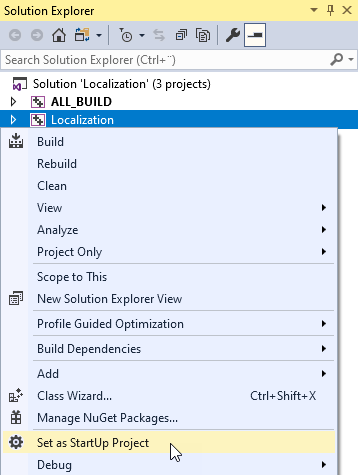
Visual Studioのソリューションエクスプローラーで、Localization プロジェクトを右クリックし、Set as StartUp Project を選択します。
Arabic と Hebrew のロケール名を含むセットを作成し、アプリケーション内で名前を設定しロケールを制御するために Kanzi Studio で作成したプロパティタイプを取得します。
ロケールを追加する際には、セットを使用してロケールが右から左へのロケールセットに含まれているかどうかを確認します。
localization.cpp ファイル内で、次の後に:
class LocalizationApplication : public ExampleApplication
{
    // Optional type for the string custom property types.
    using OptionalStringDynamicPropertyType = OptionalDynamicPropertyType<string>;
アド (Add)
// Create a set which contains the names of the right-to-left locales.
set<string> m_rtlLocales;

// Get the custom property type for setting the name of the locale in the
// LocaleButton node. You created this custom property type in the Kanzi Studio project.
OptionalStringDynamicPropertyType m_localeNameProperty;

// Get the custom property type for setting the locale in the application.
// You created this custom property type in the Kanzi Studio project.
OptionalStringDynamicPropertyType m_localeIdProperty;
Application::onProjectLoaded関数では、Locales ノードと LocaleSelector ノード、名前とロケールを設定するためのカスタムプロパティタイプを取得し、Arabic と Hebrew ロケールを右から左へのロケールセットに追加します。Application::onProjectLoaded関数の内容を次のように置き換えます:void onProjectLoaded() override { // Get the IVI Grid node so that you can add a message filter to it. Node2DSharedPtr iviGrid = getRoot()->lookupNode<Node2D>("IVI Grid"); // Get the custom property type for setting the name of the locale in the LocaleButton node. This custom property type is defined in the Kanzi Studio project. m_localeNameProperty = DynamicPropertyType<string>::tryCreate("Localization.LocaleName"); // Get the custom property type for setting the locale in the application. This custom property type is defined in the Kanzi Studio project. m_localeIdProperty = DynamicPropertyType<string>::tryCreate("Localization.LocaleID"); // Add a message filter to the IVI Grid node to find out when user clicks any of the locale buttons in the LocaleSelector node. iviGrid->addMessageFilter(ButtonConcept::ClickedMessage, bind(&LocalizationApplication::onLocaleButtonClicked, this, placeholders::_1)); // Add the right-to-left locales to the set. You use this set to identify which locales are right-to-left and use the correct IVI Grid layout // for the selected locale. m_rtlLocales.insert("ar-AR"); m_rtlLocales.insert("he-HE"); }
前に貼り付けたコードブロックの下で、
Application::onProjectLoaded関数内でロケールパックからローカライズされたリソースをロードします。// Set the name of the directory where you stored the locale packs. const string localePacksDirectory = "Locale_packs"; // Read the binaries.cfg file that contains the list of the kzb files that contain the locale packs. string configFileName = localePacksDirectory + "/binaries.cfg"; ReadOnlyDiskFile binariesConfigFile(configFileName); string binariesConfigContents = readAsText(binariesConfigFile); stringstream binariesConfigFileStream(binariesConfigContents); string localeId; // Load the localized resources stored in the each locale pack kzb file stored in the binaries.cfg file. while (getline(binariesConfigFileStream, localeId)) { // Remove whitespace. trim(localeId); // Create the path for the kzb file. string localizationKzbFilePath = "./" + localePacksDirectory + "/" + localeId + ".kzb"; // Add the kzb file to the Kanzi resource manager. ResourceManager* resourceManager = getResourceManager(); resourceManager->addKzbFile(localizationKzbFilePath); // Get the locale dictionary. string dictionaryUrl = "kzb://localization/Locales/" + localeId; ResourceDictionarySharedPtr localeDictionary = getResourceManager()->acquireResource<ResourceDictionary>(dictionaryUrl); // From the LocaleDisplayName resource ID in the localization table of the locale get the name of the locale that you want to show in the UI. TextResourceSharedPtr localeDisplayName = localeDictionary->acquire<TextResource>(ResourceID("LocaleDisplayName")); // Get the LocaleSelector Stack Layout 2D node which positions the LocaleButton Toggle Button 2D nodes. StackLayout2DSharedPtr localeSelector = getRoot()->lookupNode<StackLayout2D>("./IVI Grid/IVI Grid LeftToRight/Locales/LocaleSelector"); // Check whether the locale is in the rtlLocales set. if (m_rtlLocales.count(localeId) > 0) { // Get the LocaleButton RightToLeft prefab and set up the button before you add it to the LocaleSelector node. Node2DSharedPtr localeButton = createLocaleButton("kzb://localization/Prefabs/LocaleButton RightToLeft", localeDictionary, localeDisplayName, localeId); // Add the LocaleButton node to the LocaleSelector node. localeSelector->addChild(localeButton); } else { // Get the LocaleButton LeftToRight prefab and set up the button before you add it to the LocaleSelector node. Node2DSharedPtr localeButton = createLocaleButton("kzb://localization/Prefabs/LocaleButton LeftToRight", localeDictionary, localeDisplayName, localeId); // Add the LocaleButton node to the LocaleSelector node. localeSelector->addChild(localeButton); } }
createLocaleButton関数を定義し、アプリケーションが左から右または右から左のロケールを読み込むかに応じて、左から右または右から左の LocaleButton プレハブを返します。Application::onProjectLoaded関数の後に追加します:Node2DSharedPtr createLocaleButton(string url, ResourceDictionarySharedPtr localeDictionary, TextResourceSharedPtr localeDisplayName, string localeId) { // Get and instantiate the LocaleButton RightToLeft prefab used for the buttons that set right-to-left locales. // When you use the full kzb resource URL, start the path with kzb:// followed by the project name and the location of the resource. PrefabTemplateSharedPtr localeButtonPrefab = getResourceManager()->acquireResource<PrefabTemplate>(url); Node2DSharedPtr localeButton = localeButtonPrefab->instantiate<Node2D>("LocaleButton_" + localeId); // Use the LocaleName property to show the name of the locale in the UI. localeButton->setProperty(*m_localeNameProperty, localeDisplayName->getText()); // Set the LocaleID property. You get the value of this property when the user clicks a LocaleButton and use it to change the application to that locale. localeButton->setProperty(*m_localeIdProperty, localeId); // Add the Index in Group property so that the Locales Toggle Button Group 2D node automatically sets the index of the toggle button. localeButton->setProperty(ButtonConcept::IndexInGroupProperty, -1); // Set the style of the Text Block 2D node in the LocaleButton so that it sets the correct font for the LocaleDisplayName of the locale. // Use this approach only to apply a style from the locale pack without changing the locale in the application. StyleSharedPtr style = localeDictionary->acquire<Style>(ResourceID("LocaleStyle")); localeButton->setStyle(style); return localeButton; }
createLocaleButton関数の後に、LocaleButton ノードからのボタンクリックメッセージ用のonLocaleButtonClickedイベントハンドラを実装します。ユーザーが LocaleButton ボタンをクリックすると、このイベントハンドラは既存のレイアウトを削除し、正しい IVI Grid ノードレイアウトをインスタンス化して追加し、アプリケーションのロケールを設定します。void onLocaleButtonClicked(ButtonConcept::ClickedMessageArguments& messageArguments) { // Get the value of the LocaleID property from the button the user clicked. string localeId = messageArguments.getSource()->getProperty(*m_localeIdProperty); // Check whether the selected locale is right-to-left or left-to-right. bool rtl = m_rtlLocales.count(localeId) > 0; // Set the path variable to the Locales Toggle Button Group 2D node in the IVI Grid layout for the selected locale. string pathToNewParent = rtl ? "IVI Grid/IVI Grid RightToLeft/Locales" : "IVI Grid/IVI Grid LeftToRight/Locales"; // Store the existing Stack Layout 2D node with the LocaleButton Toggle Button 2D nodes. StackLayout2DSharedPtr localeSelector = messageArguments.getSource()->lookupNode<StackLayout2D>(".."); // Remove the existing locale selector node from the tree. Node2DSharedPtr oldLocaleSelectorParent = localeSelector->lookupNode<Node2D>(".."); oldLocaleSelectorParent->removeChild(*localeSelector); // Set the locale of the application to the locale whose button the user selected. getScreen()->setLocale(localeId); // Get the Locales Toggle Button Group 2D node and add the LocaleSelector Stack Layout 2D node to it. ToggleButtonGroup2DSharedPtr toggleButtonGroup = getRoot()->lookupNode<ToggleButtonGroup2D>(pathToNewParent); toggleButtonGroup->addChild(localeSelector); }
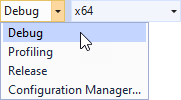
使用したいソリューション構成を選択し、アプリケーションを実行します。
開発中は、Debug 構成を選択します。製品版を作成する準備ができたら、Release 構成を選択します。
アプリケーションで Arabic および Hebrew のロケールをクリックすると、アプリケーションはそのロケールに適したレイアウトをインスタンス化します。
次の作業
このチュートリアルでは、すでにローカライズされた Kanzi アプリケーションを右から左へのロケールに対応させる方法と、Kanzi Engine APIを使用して、左から右および右から左のロケール用のレイアウトを設定するプレハブをインスタンス化する方法を学びました。これで、次のことができます。
Kanzi アプリケーションのローカライズについて詳しく学びます。チュートリアル: アプリケーションをローカライズする および ローカライズ (Localization) を参照してください。
Kanzi Engine API を使用して Kanzi アプリケーションにロジックを追加する方法を学びます。チュートリアル: Hello world! および チュートリアル: Kanzi Engine API の高度な使用法 を参照してください。
関連項目
Kanzi アプリケーションをローカライズする方法について詳しくは、ローカライズ (Localization) を参照してください。
kzbファイルについて詳しく知るには、kzb ファイル をご覧ください。
Kanzi がリソースをどのように扱うかについて学ぶには、リソース管理 (Resource management) を参照してください。
リソースディクショナリの使用方法について詳しくは、リソース (Resources) を参照してください。
アプリケーションでフォントを使用する方法の詳細については、フォントのインポート を参照してください。