ステップ3 - ロケールパックをロードする
このステップでは、Kanzi Engine APIを使用して、このチュートリアルの前のステップで作成したロケールパックを Kanzi アプリケーションにロードします。
Kanzi Engine APIを使用してロケールパックをロードします。
このセクションでは、Kanzi Engine APIを使用して、前のセクションで作成したロケールパックをロードします。アプリケーションは起動時にロケールパックを初期化し、Application/bin/Locale_packs ディレクトリに保存されているすべてのロケールのロケールパックからリソースをロードするトリガーを発生させます。
ロケールパックをロードするには:
<KanziWorkspace>/Tutorials/Localization/Start/Application/bin/Locale_packsディレクトリのファイルエクスプローラーで、binaries.cfgファイルを作成します。ロードしたいロケールパックを含む各 kzb ファイルの場所と名前をファイルに追加します。各行に1つの kzb ファイル名のみを追加してください。例えば、Japanese、Korean、および Chinese ロケール用のロケールパックがあり、Japanese ロケールに ja-JP ロケール名を使用し、Korean ロケールに ko-KR を、Chinese ロケールに zh-ZH を使用した場合、
binaries.cfgファイルを作成し、テキストエディタで開き、これらのロケールパックファイルの名前をbinaries.cfgファイルに追加し、ファイルを保存します。ja-JP ko-KR zh-ZH
Kanzi Studio で、File > Open Kanzi Command Prompt を選択します。
Kanzi Command Prompt は、Kanzi 環境変数が設定された Windows コマンドプロンプトを開き、Kanzi のバージョンに対して Kanzi Command Prompt を開きます。
Kanzi Command Prompt を使用すると、絶対パスを使用したり環境変数を設定したりせずに、Kanzi のユーティリティや、Gradle、CMake などのビルドツールにアクセスできます。
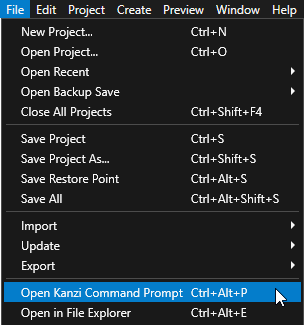
ヒント
Kanzi Command Prompt は、Rightware ディレクトリの Windows スタートメニューで見つけることができます。
Kanzi のバージョンが複数インストールされている場合は、そのコマンドプロンプトで作業したい Kanzi のバージョンに対応する Kanzi Command Prompt を起動するようにしてください。
<KanziWorkspace>/Tutorials/Localization/Start/Applicationディレクトリ内の Kanzi Command Prompt で、チュートリアルアプリケーション用の Visual Studio ソリューションを生成するスクリプトを実行します。generate_cmake_vs2022_solution.bat
このスクリプトは、
<KanziWorkspace>/Tutorials/Localization/Start/Application/build_vs2022ディレクトリにアプリケーション用の Visual Studio ソリューションを生成します。Visual Studioで、
<KanziWorkspace>/Tutorials/Localization/Start/Application/build_vs<Version>/Localization_start.slnVisual Studioソリューションを開きます。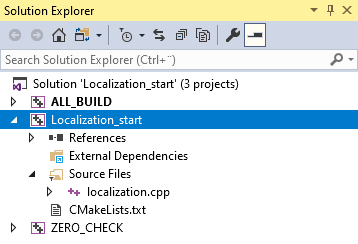
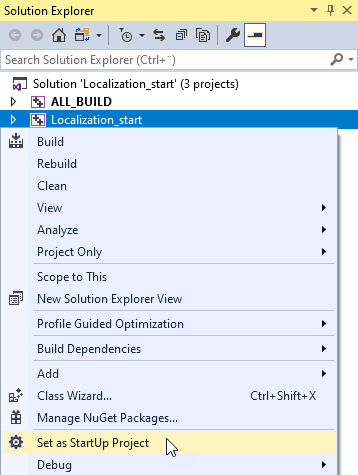
Visual Studioのソリューションエクスプローラーで、Localization_start プロジェクトを右クリックし、Set as StartUp Project を選択します。
このチュートリアルでは、Kanzi Studio プロジェクトで定義されたカスタムプロパティタイプを使用します。これらのカスタムプロパティタイプにアクセスするには、
DynamicPropertyTypeを作成し、Kanzi Studio プロジェクトで使用するのと同じ名前を使用してください。LocalizationApplicationクラスの localization.cpp ファイルに、以下を追加します。class LocalizationApplication : public ExampleApplication {
LocalizationApplicationクラスのApplication::onProjectLoaded関数で、Locale_packsディレクトリに保存されているロケールパック kzb ファイルのリソースをロードし、ロケールをプロジェクトに追加するイベントハンドラを実装します。// Set the name of the directory where you stored the locale packs. static const string localizationFolderName = "Locale_packs"; // Get the Screen node in the kzb file. // You use the Screen node to access all the other nodes and resources in the kzb file. ScreenSharedPtr screen = getScreen(); // Domain is a collection of all subsystems and contains the Kanzi resource manager. // You need to get the resource manager to access the resources in the kzb file. ResourceManager* resourceManager = getDomain()->getResourceManager(); // Get the LocaleSelector node which contains the locale selection buttons. // Access alias target nodes using the # sign followed by the name of the alias. Node2DSharedPtr localeSelector = screen->lookupNode<Node2D>("#LocaleSelector"); // Get the LocaleButton prefabricated template used for the buttons that set the locale. // Get the reference to the template using the kzb URL. // When you use the full path of a resource, start the path with kzb:// // followed by the project name and the location of the resource. PrefabTemplateSharedPtr localeButtonPrefab = resourceManager->acquireResource<PrefabTemplate>("kzb://localization/Prefabs/LocaleButton"); // Get the custom property type for setting the name of the locale in the // LocaleButton node. You created this custom property type in the Kanzi Studio project. DynamicPropertyType<string> localeNameProperty = DynamicPropertyType<string>("Localization.LocaleName"); // Get the custom property type for setting the locale in the application. // You created this custom property type in the Kanzi Studio project. DynamicPropertyType<string> localeIdProperty = DynamicPropertyType<string>("Localization.LocaleID"); // Read the binaries.cfg file that contains the list of the kzb files // that contain the locale packs. string configFileName = localizationFolderName + "/binaries.cfg"; ReadOnlyDiskFile binariesConfigFile(configFileName); string binariesConfigContents = readAsText(binariesConfigFile); stringstream binariesConfigFileStream(binariesConfigContents); string localeId; // Load the resources stored in the locale pack kzb files. while (getline(binariesConfigFileStream, localeId)) { trim(localeId); // Create the path for the kzb file. string localizationKzbFilePath = localizationFolderName + "/" + localeId + ".kzb"; // Add the kzb file to the Kanzi resource manager. getResourceManager()->addKzbFile(localizationKzbFilePath); string dictionaryUrl = "kzb://localization/Locales/" + localeId; ResourceDictionarySharedPtr localeDictionary = getResourceManager()->acquireResource<ResourceDictionary>(dictionaryUrl); // Instantiate the LocaleButton prefab. Node2DSharedPtr localeButton = localeButtonPrefab->instantiate<Node2D>("LocaleButton_" + localeId); // Get the name of the locale that is shown in the application from the // resource ID LocaleDisplayName stored in the localization table in the locale pack. TextResourceSharedPtr localeDisplayNameResource = localeDictionary->acquire<TextResource>(ResourceID("LocaleDisplayName")); // Set the LocaleName property so that the Text Block 2D node in the button shows the name of the locale. localeButton->setProperty(localeNameProperty, localeDisplayNameResource->getText()); // Set the LocaleID property so that when you click the button the application changes to that locale. localeButton->setProperty(localeIdProperty, localeId); // Set the style of the Text Block 2D node in the button so that it sets // the correct font for the LocaleDisplayName of the locale. // Use this approach only to apply a style from the locale pack without changing the locale // in the application. optional<string> localeStyle = localeDictionary->find(ResourceID("LocaleStyle")); StyleSharedPtr style = getResourceManager()->acquireResource<Style>(*localeStyle); localeButton->setStyle(style); // Add the LocaleButton node to the LocaleSelector node. localeSelector->addChild(localeButton); }
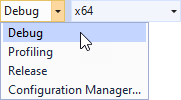
使用したいソリューション構成を選択し、アプリケーションを実行します。
開発中は、Debug 構成を選択します。製品版を作成する準備ができたら、Release 構成を選択します。
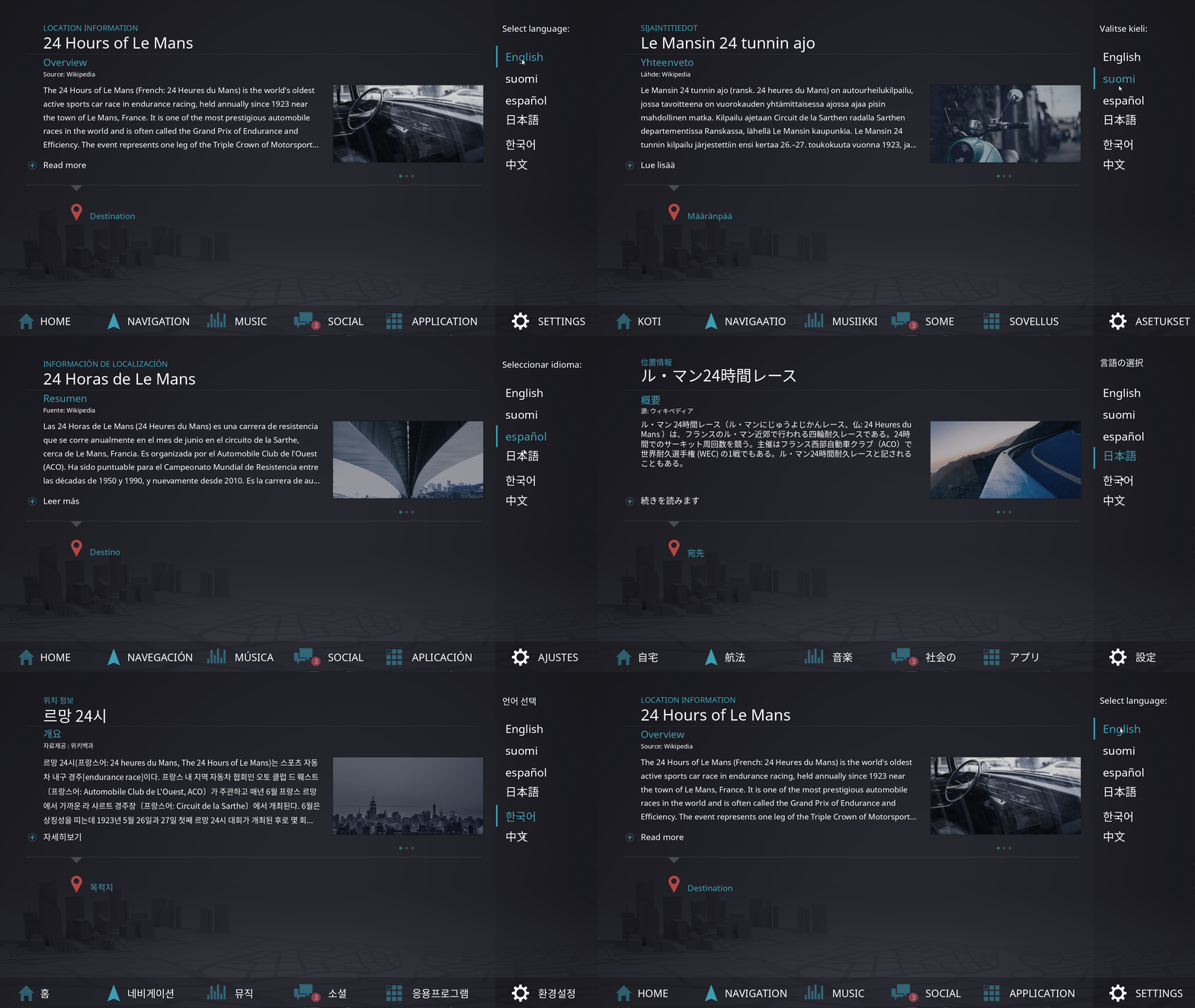
アプリケーションでは、Kanzi が binaries.cfg ファイルにリストされている kzb ファイルからロケールパックをロードし、LocaleSelector ノードで各ロケールに対して1つの LocaleButton プレハブをインスタンス化します。
次の作業
このチュートリアルでは、Kanzi アプリケーションをローカライズし、ロケール用にローカライズされたリソースのみを含む追加の kzb ファイルをアプリケーションで使用する方法を学びました。このチュートリアルをさらに進めるには、ローカライゼーションテーブルのPOTテンプレートファイルを使用して、この Kanzi アプリケーションのコンテンツを追加の言語に翻訳することができます。さらに、他のリソースタイプを作成し、異なるロケールに対して異なるリソースを作成することもできます。例えば、いくつかのアニメーションを作成し、それぞれを異なるロケールに使用することができます。
Kanzi アプリケーションのローカライズに関するすべての詳細を確認してください。ローカライズ (Localization) を参照してください。
Kanzi アプリケーションを右から左へのロケールにローカライズする方法を学びます。チュートリアル: 右から左へのロケール向けにアプリケーションをローカライズする を参照してください。
Kanzi Engine API を使用して Kanzi アプリケーションにロジックを追加する方法を学びます。チュートリアル: Hello world! および チュートリアル: Kanzi Engine API の高度な使用法 を参照してください。
ロケールごとにアニメーションを作成します。チュートリアル: キーフレームアニメーションを作成する を参照してください。
関連項目
Kanzi アプリケーションをローカライズする方法について詳しくは、ローカライズ (Localization) を参照してください。
kzbファイルについて詳しく知るには、kzb ファイル をご覧ください。
Kanzi がリソースをどのように扱うかについて学ぶには、リソース管理 (Resource management) を参照してください。
リソースディクショナリの使用方法について詳しくは、リソース (Resources) を参照してください。
アプリケーションでフォントを使用する方法の詳細については、フォントのインポート を参照してください。
アプリケーションでステートマネージャーを使用する方法について詳しくは、ステートマネージャー (State Managers) を使用する場合 を参照してください。
Kanzi Studio プロジェクトの管理について詳しく学ぶには、プロジェクト (Projects) を参照してください。
Kanzi アプリケーションの作成について詳しくは、チュートリアル を参照してください。
Kanzi Studio の機能について詳しく知るには、...を使用する をご覧ください。