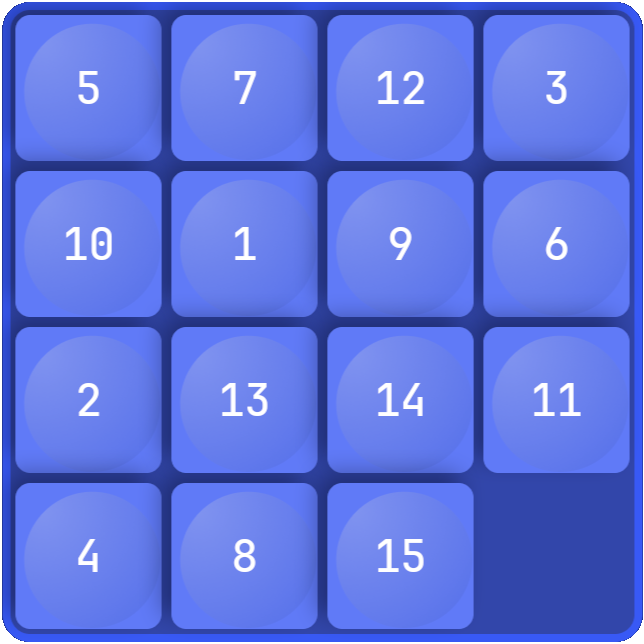
ステップ 4 - グリッドをランダム化する
このステップでは、Luaスクリプトで独自の関数を定義する方法を学びます。まず、ヘルパー関数を定義し、次にこれらの関数を使用してグリッド内のピースの初期位置をランダム化します。
グリッドをランダム化するには、
整数の配列を返す関数を定義します。
Luaでは、関数を宣言するには
functionキーワードを使用します。スクリプトに関数を
grid:removeAllChildren()の前に追加します。注釈
この関数は、配列をインデックス1から開始します。これはLuaでは慣習的ですが、必須ではありません。Kanzi Engine 関数、例えば
getChildは、インデックスを0から開始することに注意してください。-- Declare a function that returns a list of integers from 1 to length. local function createArray(length) -- Initialize a variable that contains an empty array. local array = {} -- Fill the array with integers. for i = 1,length do array[i] = i end return array end
createArray関数の後に、与えられた整数の配列をランダム化する関数を定義します。組み込みのLua Mathライブラリを使用できます。
-- Declare a function that randomizes the array argument with Fisher-Yates shuffle.
local function shuffleArray(array)
    -- Loop backward from array length to 2.
    for i = #array, 2, -1 do
        -- Use the Lua Math library to create a random integer.
        local j = math.random(i) -- j is in range [1,i]
        -- Swap the array items at index i and j.
        array[i], array[j] = array[j], array[i]
    end
end
すべてのパズル構成が解ける15パズルであるとは限りません。与えられた順列が解けるパズルを表しているかどうかを確認する関数を定義します。パズルが解けない場合、この関数は順列を修正します。この関数を
shuffleArray関数の後に追加してください。-- Declare a function that modifies the given permutation to make it a solvable puzzle. local function makeSolvable(permutation) local n = #permutation -- Count the number of inversions in the permutation. local inversions = 0 for i = 1,n do for j = i+1,n do if permutation[i] > permutation[j] then inversions = inversions + 1 end end end -- If the puzzle is not solvable, swap two adjacent pieces to fix it. if inversions % 2 == 1 then permutation[1], permutation[2] = permutation[2], permutation[1] end end
ランダム化されたグリッドを取得するには、グリッド作成のヘルパー関数を使用してください。
...

-- Remove all grid items that were created in the project or by the earlier
-- executions of the script.
grid:removeAllChildren()

-- Create a random permutation.
local permutation = createArray(PieceCount)
shuffleArray(permutation)
-- Ensure that the permutation is a solvable puzzle.
makeSolvable(permutation)

...
スクリプトのグリッドを埋める部分を修正して、置換を適用するようにしてください。
...

-- Create the grid children.
for i = 1,PieceCount do
    -- Create a grid item.
    local piece = piecePrefab:instantiate("piece_" .. i)

    -- Assign the number to the piece.
    piece:setProperty(PieceIndexProperty, i)

    -- Set the grid coordinates of the new node.
    local p = permutation[i]
    -- Use integer division to get the row index and modulo to get the column index.
    local row = (p-1) // ColumnCount
    local column = (p-1) % ColumnCount

...
スクリプトを保存し、プレビュー で  をクリックすると、スクリプトはグリッドに15個のピースをランダムな順序で配置します。