Kanzi 3.7 迁移指南
使用此迁移指南将 Kanzi 应用程序从 Kanzi 3.6.6 更新到 Kanzi 3.7。
Kanzi 库
Kanzi 库现在仅适用于 Visual Studio 2015 和 2017。要将您的 Kanzi 3.6.6 项目迁移到 Kanzi 3.7 并使用 Visual Studio 2017 配置:
在 Visual Studio 中打开工程的 Visual Studio 解决方案:
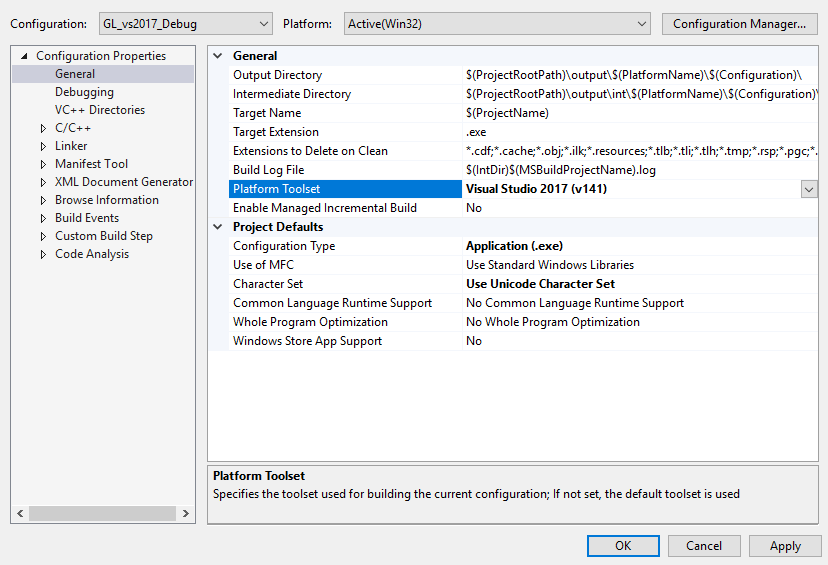
在 Solution Explorer 中右键点击工程,选择属性> 通用> 平台工具集 (Properties > General > Platform Toolset),并确保选中了 Visual Studio 2017 v141 编译器。如果您的项目包含 Kanzi Engine 插件,请对插件和可执行项目执行此操作。
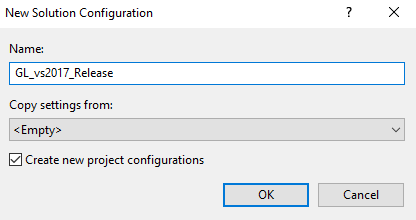
在配置管理器中创建 2017 配置。
例如,打开配置管理器,在活动解决方案配置下拉菜单中选择 <New …>,将配置命名为 GL_vs2017_Release,点击 OK,并在配置管理器中将所有工程设置为使用 GL_vs2017_Release 配置。

在 Visual Studio 中,构建您要使用的插件的所有配置。
在 Kanzi Studio 中打开 Kanzi Studio 项目,并让 Kanzi Studio 将项目转换为当前版本。
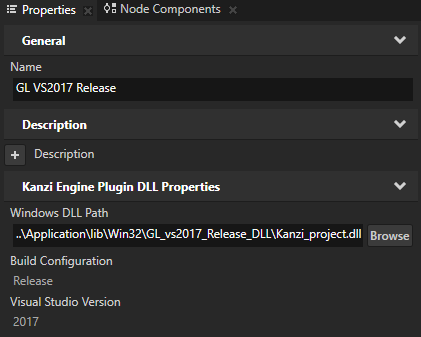
在 Kanzi Studio 中,在 Library > Kanzi Engine Plugins 中选择插件的 GL VS2013 Debug 和 Release 版本,并在 Properties 中设置插件。
例如:对于 Library > Kanzi Engine Plugins 中的 GL VS2017 Release 插件,选择 GL VS2013 Release 插件,并在 Properties 中设置:
Name 到 GL VS2017 Release。
Windows DLL Path 到
..\Application\lib\Win32\GL_vs2017_Release_DLL\<ProjectName>.dll
Bindings changes
绑定中的更改要求您更新所有使用 BindingSharedPtr 对象的代码,以使用 AbstractBindingSharedPtr 对象,并分配任何类型的绑定。大多数绑定变为单向 Binding 或 ExpressionBinding (执行操作的绑定)对象。特定的绑定创建函数提供了等同于传统绑定创建函数的简写。
Focus manager 更改
Focus Scope 属性(
FocusManager::FocusScopeProperty)现已弃用。要将节点设为焦点范围,请使用 Focus Scope Type 属性并将其设置为 Group (FocusManager::FocusScopeTypeProperty)。焦点栅栏不再是不可聚焦的焦点范围。要将节点变为焦点栅栏,使用 Focus Scope Type 属性并将其设置为 Fence。确保将焦点栅栏节点设为可聚焦,通过添加并启用 Focusable 属性(
Node::FocusableProperty)。Node::trySetActiveFocus()函数不再返回布尔值,而是返回您调用它的节点,或者如果该节点是焦点范围节点,则返回其子节点之一。默认情况下,所有节点的 Focusable 属性(
Node::FocusableProperty)现在已禁用。例外情况是 Button、Toggle Button、List Box、Scroll View 和 Slider 节点,这些节点的 Focusable 属性默认情况下已启用。将焦点围栏逻辑从
Focus Scope Type 属性已启用 (
FocusManager::FocusScopeProperty) 和 Focusable 属性已禁用 (Node::FocusableProperty)至 (To)
Focus Scope Type 属性设置为 Fence (
FocusManager::FocusScopeTypeProperty设置为FocusManager::Fence),并启用 Focusable 属性(Node::FocusableProperty)。
Resource manager 更改
对这些 Resource Manager 函数进行了更改:
将
ResourceManager::getResourcePathFromURL()替换为detail::stripProjectName()。将
getRelativePathFromAbsolutePath()移动到detail命名空间下,并将其参数类型从更新为static kzString ResourceManager::getRelativePathFromAbsolutePath(kzString absolutePath)至 (To)
string getRelativePathFromAbsolutePath(string_view absolutePath)
字形、字体和文本更改
对字形、字体和文本功能进行了以下更改:
将类
KzuTextManager替换为kanzi::GlyphCacheManager和kanzi::FontManager。移除类
KzuTextRenderer、KzuTextManager、KzuTruetypeSystem和KzuConfiguredFont,并将部分功能移至kanzi::TextFormat和kanzi::FontManager。从 Text Block 节点中移除了 Constrain Content Height (
TextBlockConcept::ConstrainContentHeightProperty) 属性。要截断文本,请使用 Overflow 属性。Constrain Content Height 属性仅在文本超过 Text Block 节点的高度时截断文本。在 Kanzi 3.7 中,Overflow 属性在文本超过 Text Block 节点的宽度或高度时截断文本。Kanzi Studio 会自动转换项目中的 Text Block 节点。要在自动项目转换后实现相同的渲染效果,当您将 Overflow 属性设置为非默认值并通过将 Constrain Content Height 属性设置为禁用来禁用文本截断时,必须对 Text Block 节点进行调整。Kanzi Studio 转换器会移除 Constrain Content Height 属性,但不会移除 Overflow 属性,该属性在转换后启用文本截断。
在 Kanzi 3.7 中,要设置字体光栅化引擎、创建字体、访问字体加载器和访问字形缓存管理器,请使用 kanzi::FontManager。
Kanzi 3.6.6 |
Kanzi 3.7 |
|---|---|
|
|
|
|
|
|
|
|
|
|
|
|
|
|
|
|
|
|
|
|
|
|
消息调度器更改
将 KzuMessageDispatcher 类转换为 C++ 并进行了以下更改:
将功能拆分为
kanzi::MessageDispatcher和kanzi::Timer类。更新了
MessageArguments和ScrollView类,以使用chrono::time_points作为时间戳,而不是chrono::milliseconds。MessageArguments::setTimestamp()现在将chrono::steady_clock::time_point作为时间戳参数,而MessageArguments::getTimestamp()现在返回时间戳参数,而不是chrono::milliseconds。删除了直接消息路由。
Kanzi 3.6.6 |
Kanzi 3.7 |
|---|---|
|
|
|
|
|
|
|
|
|
|
|
|
|
|
|
|
|
|
渲染更改
移动或重命名了这些枚举:
Kanzi 3.6.6 |
Kanzi 3.7 |
|---|---|
|
|
|
|
|
|
|
|
|
|
|
|
|
|
|
|
|
|
|
|
|
|
Kanzi 不再支持 Legacy Render Pass (deprecated)。
插件元数据更改
统一了插件元数据属性的注册语法。如果您使用旧语法,Kanzi 会发出警告。
Kanzi 3.6.6 |
Kanzi 3.7 |
|---|---|
|
|
|
|
|
|
|
|
|
|
|
|
|
|
|
|
其他更改
从 Kanzi Engine API 中移除了
kzc_vector*、kzc_matrix*和kzc_etc。将
KzEventQueue替换为EventQueue。这在您收集事件时会对EventSources引入更改。Core 和 coreui 库现在被构建为单独的 dll 文件。因此,以下项目已更新:
KANZI_API不再定义。使用KANZI_CORE_API用于 core,使用KANZI_COREUI_API用于 coreui。Kanzi 应用程序必须包含
kzcore_<ConfigurationName>.dll。要导出
createModule()方法,Kanzi 应用程序使用自己的CUSTOM_COMPONENT_API_EXPORT,而不是使用KANZI_API_IMPORT。要检查 Kanzi Engine 是否被构建为 dll,应用程序必须使用
KANZI_API_IMPORT。
由于转换为 C++,这些项目已更改:
Kanzi 3.6.6
Kanzi 3.7
kzcVector2kanzi::Vector2kzcVector3kanzi::Vector3kzcVector4kanzi::Vector4kzcMatrix3x3kanzi::Matrix3x3kzcMatrix4x4kanzi::Matrix4x4kzcPlanekanzi::PlanekzcRaykanzi::RaykzcRectanglekanzi::Rectangle<T>kzuMessageDispatcherkanzi::MessageDispatcherkanzi::Timer更改了这些枚举以进行输入转换配置:
Kanzi 3.6.6
Kanzi 3.7
KZS_INPUT_TRANSLATE_NONETranslateNoneKZS_INPUT_TRANSLATE_POINTER_TO_TOUCHTranslatePointerToTouchKZS_INPUT_TRANSLATE_POINTER_TO_TOUCH_PRESERVETranslatePointerToTouchPreserveKZS_INPUT_TRANSLATE_TOUCH_TO_POINTERTranslateTouchToPointerKZS_INPUT_TRANSLATE_TOUCH_TO_POINTER_PRESERVETranslateTouchToPointerPreserve将此功能替换为标准定义:
Kanzi 3.6.6
Kanzi 3.7
kzsThreadkanzi::threadkanzi::condition_variablekzcSortkanzi::sortkzcRandomkanzi::default_random_enginekanzi::uniform_int_distributionkanzi::uniform_real_distributionRectangle<T>::overlaps()函数现在捕获一个矩形包含在另一个矩形内的情况。移除了此功能:
文件 (File)
函数
kzc_solve.hppvoid kzcSolveQuadratic()void kzcSolveNormalizedQuadratic()kzc_integrate.hppvoid kzcIntegrateExponentialDecay()移动了几个图形后端头文件。新位置通常是以下目录之一:
kanzi/core.ui/graphicskanzi/core.ui/graphics2dkanzi/core.ui/graphics3d