教程:开始使用 Kanzi Android framework (droidfw)
在本教程中,您将学习如何使用 Kanzi Android framework (droidfw) 开始开发 Android 应用程序。您将学习如何:
在 Android 视图中显示一个 Kanzi 预设。
使用 Kanzi Java API 访问和修改应用程序。
创建一个 Android 活动,并在该活动中显示 Kanzi 内容。
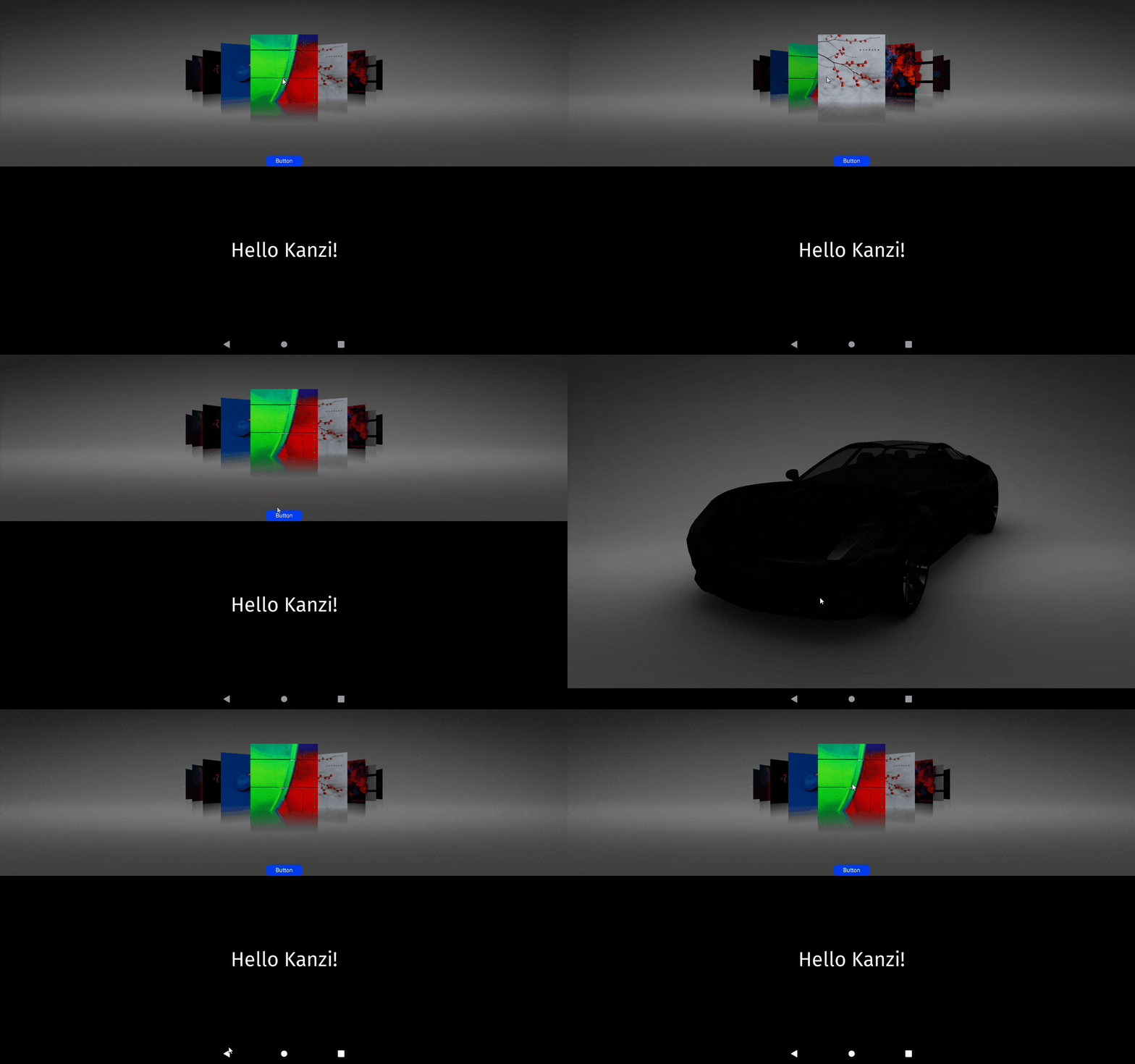
视频显示教程的结果。
本教程假设您熟悉开发 Android 应用程序、Java 编程语言,并且了解使用 Kanzi Studio 的基础知识。熟悉 Kanzi Studio 的最佳入门点是 教程:开始使用 Kanzi Studio。
在开始本教程之前,确保将您的 Kanzi 开发环境为 Android 设置好。请参阅 使用 Kanzi 进行 Android 应用程序开发的要求。
本教程中的资源需要 OpenGL ES 3.0。要了解如何在 Android 模拟器中启用 OpenGL ES 3.0,请参阅 在 Android 模拟器中启用 OpenGL ES 3.0。
获取教程
要获取该教程,请在 Kanzi Studio 的 Quick Start 窗口中点击 Projects,然后选择 Tutorials 选项卡。在 Android Getting Started 教程旁点击  。
。
Kanzi Studio 会将教程下载到 <KanziWorkspace>/Tutorials 目录。您可以在 <KanziWorkspace>/Tutorials/Android Getting Started/Completed 目录中找到完成的教程。
在 Android 视图中显示一个 Kanzi 预设。
在本节中,您将在 Kanzi Studio 中创建一个应用程序,在 Kanzi Studio 中创建内容,并在 Android 视图中显示该内容。
要在 Android 视图中显示 Kanzi 预设:
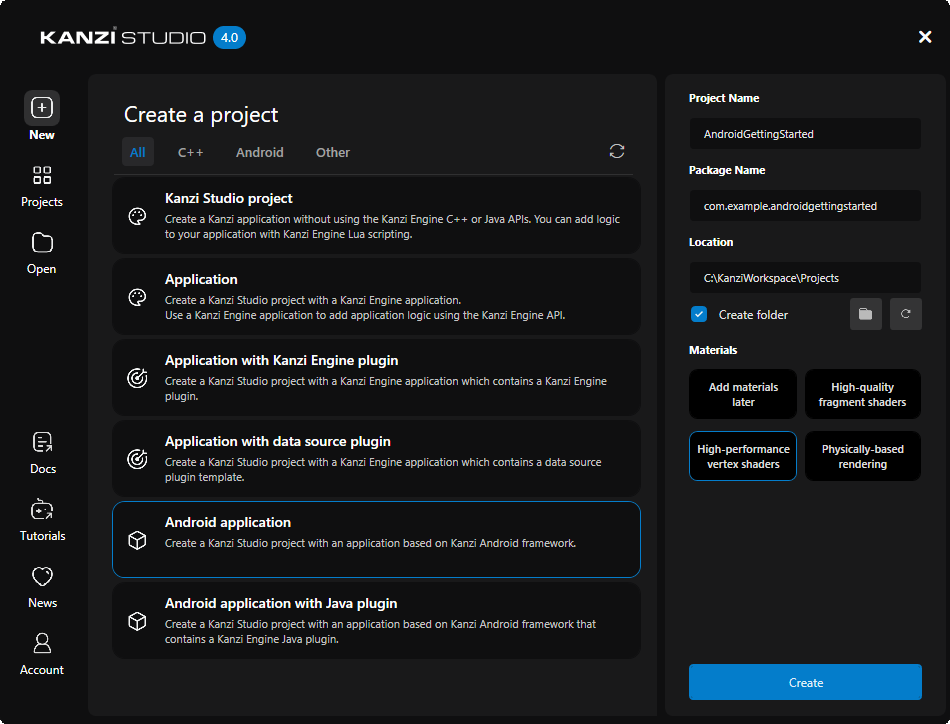
在 Kanzi Studio 中创建一个工程。在 Kanzi Studio 的 Quick Start 窗口中点击 New,然后:
将 Project Name 设置为 AndroidGettingStarted
选择 Android application 工程模板
Android application 模板创建一个包含 Kanzi Android 框架应用程序的 Kanzi Studio 项目。
当您想为 Android 平台创建应用程序,并计划广泛使用 Android API 和服务时,请使用 Kanzi Android framework (droidfw)。
Kanzi Android framework (droidfw) 是一个专用于开发 Android Kanzi 应用程序的框架。它公开了 Kanzi Java API,使您可以完全使用 Java 或 Kotlin 编写应用程序和插件代码。您不需要编写任何 C++ 或 JNI 代码,但仍然可以使用本机 Kanzi 插件。Kanzi Android framework (droidfw) 提供与 Android UI 的强大集成,包括对多个同时基于 Kanzi 的视图的支持,以及 Kanzi 和 Android UI 元素的灵活组合。Kanzi Android framework (droidfw) 与 Android Choreographer 集成,在 Android UI 线程中运行 Kanzi 主循环任务。这使您可以从应用程序代码中使用 Kanzi Java API,而无需调度机制。
创建要在 Android 应用程序的 Kanzi 视图中显示的内容。
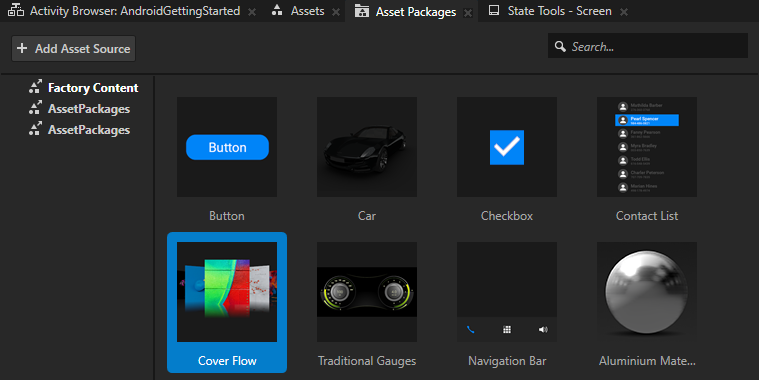
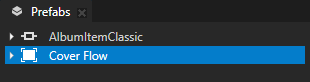
例如:在 Kanzi Studio 中,从 Asset Packages 将 Cover Flow 拖到 Preview。
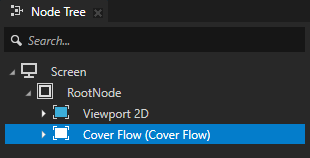
Kanzi Studio 会创建一个预设,并在 Node Tree 中的 Screen > RootNode 节点中将其实例化。
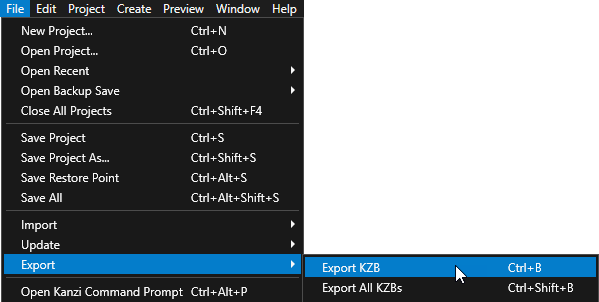
在 Kanzi Studio 中,选择 File > Export > Export KZB。
在 Android Studio 中打开
AndroidGettingStarted/Application/configs/platforms/android_gradle项目,启动虚拟 Android 设备或将您的 Android 设备连接到计算机,然后运行应用程序。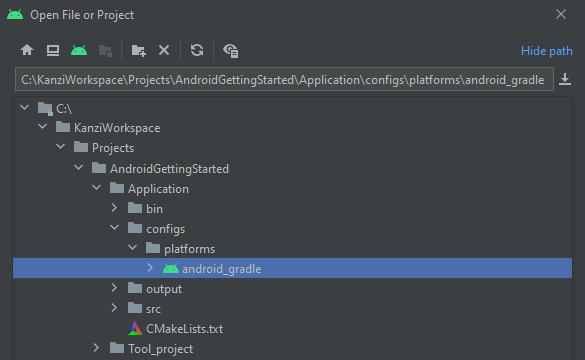

在 app > res > layout > activity_main.xml 中,startupPrefabUrl 属性中的 StartupPrefab 指的是 Node Tree 中的节点。
小技巧
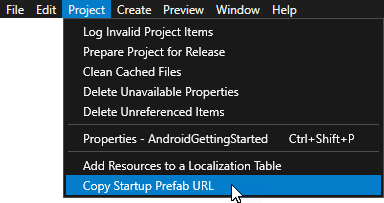
要将启动预设的 URL 复制到剪贴板中,在 Kanzi Studio 主菜单中,选择 Project > Copy Startup Prefab URL。
<?xml version="1.0" encoding="utf-8"?>
<androidx.constraintlayout.widget.ConstraintLayout xmlns:android="http://schemas.android.com/apk/res/android"
    xmlns:app="http://schemas.android.com/apk/res-auto"
    xmlns:tools="http://schemas.android.com/tools"
    android:layout_width="match_parent"
    android:layout_height="match_parent"
    tools:context=".MainActivity">

    <com.rightware.kanzi.KanziSurfaceView
        android:id="@+id/androidgettingstartedview"
        android:layout_width="match_parent"
        android:layout_height="match_parent"
        app:name="AndroidGettingStarted"
        app:kzbPathList="androidgettingstarted.kzb"
        app:startupPrefabUrl="kzb://androidgettingstarted/StartupPrefab" />
   </androidx.constraintlayout.widget.ConstraintLayout>
使用 Kanzi Java API 修改内容。
在本节中,您使用 Kanzi Java API 来修改 Android 应用程序中的 Kanzi 内容。
您可以在 Android 应用程序的多个活动或片段中的多个视图中使用 Kanzi。使用 Kanzi 时,Android 应用程序会使用相同的 Kanzi 实例和资源。
要使用 Kanzi Java API 修改内容:
在 Android Studio 中的 app > res > layout > activity_main.xml:
创建另一个
KanziSurfaceView。为视图使用唯一名称。
例如,将
android:id设为@+id/textblock。设置视图,使它们占用相等的屏幕空间。
<?xml version="1.0" encoding="utf-8"?>
<androidx.constraintlayout.widget.ConstraintLayout xmlns:android="http://schemas.android.com/apk/res/android"
    xmlns:app="http://schemas.android.com/apk/res-auto"
    xmlns:tools="http://schemas.android.com/tools"
    android:layout_width="match_parent"
    android:layout_height="match_parent"
    tools:context=".MainActivity">

    <com.rightware.kanzi.KanziSurfaceView
        android:id="@+id/androidgettingstartedview"
        android:layout_width="match_parent"
        android:layout_height="0dp"
        app:kzbPathList="androidgettingstarted.kzb"
        app:layout_constraintTop_toTopOf="parent"
        app:layout_constraintBottom_toTopOf="@id/textblock"
        app:layout_constraintVertical_weight="1"
        app:name="TextBlock"
        app:startupPrefabUrl="kzb://androidgettingstarted/StartupPrefab" />

    <com.rightware.kanzi.KanziSurfaceView
        android:id="@+id/textblock"
        android:layout_width="match_parent"
        android:layout_height="0dp"
        app:kzbPathList="androidgettingstarted.kzb"
        app:layout_constraintBottom_toBottomOf="parent"
        app:layout_constraintVertical_weight="1"
        app:layout_constraintTop_toBottomOf="@+id/androidgettingstartedview"
        app:name="AndroidGettingStarted" />
</androidx.constraintlayout.widget.ConstraintLayout>
在 app > java > com.example.androidgettingstarted > MainActivity.java 中创建您想在应用程序中显示的 Kanzi 内容。
例如,创建一个 Text Block 2D 节点,显示 Hello Kanzi!。
导入提供您要创建的内容功能的 Kanzi 类。
import com.rightware.kanzi.Node;
import com.rightware.kanzi.ObjectRef;
import com.rightware.kanzi.TextBlock2D;
获取对您的视图的引用。
替换 (Replace)
KanziView view = findViewById(R.id.androidgettingstartedview);
通过
KanziView view = findViewById(R.id.textblock);
在
KanziViewListener.onAttachedToWindow回调中创建一个显示 Hello Kanzi! 的 Text Block 2D 节点:public void onAttachedToWindow(View view, Domain domain) { // Create a Text Block 2D node named "Text Block 2D". ObjectRef<TextBlock2D> textBlockRef = TextBlock2D.create(domain, "Text Block 2D"); TextBlock2D textBlock = textBlockRef.get(); // Set the Text Block 2D node as the root of the Kanzi view. ((KanziView) view).setRoot(textBlock); // Position the Text Block 2D node in the center of the Kanzi view. textBlock.setProperty(Node.HorizontalAlignmentProperty, Node.HorizontalAlignment.Center); textBlock.setProperty(Node.VerticalAlignmentProperty, Node.VerticalAlignment.Center); // Set the size of the font of the Text Block 2D node. textBlock.setProperty(TextBlock2D.SizeProperty, 90.0f); // Set the text that the Text Block 2D node shows. textBlock.setText("Hello Kanzi!"); }
默认情况下,Kanzi 仅在附加 Kanzi 视图时初始化
KanziRuntime和Domain。这使您能够在KanziViewListener.onAttachedToWindow或更高版本中使用 Kanzi Java API。或者,要立即访问 Kanzi Java API,请设置应用程序以获取其对KanziRuntime的引用。
当您从 Android Studio 运行应用程序时,您可以看到两个 Kanzi 视图,每个视图占据设备屏幕的一半。

创建另一个 Android 活动
在本节中,您将创建另一个 Android 活动和一个控件以转到该活动。
要创建另一个 Android 活动:
在 Kanzi Studio 中创建一个预设,其中包含您想在另一个 Android 活动中显示的内容:
在 Kanzi Studio 中,从 Asset Packages 将 Car 拖到 Prefabs。
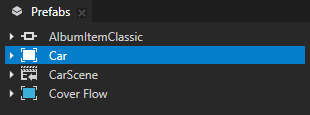
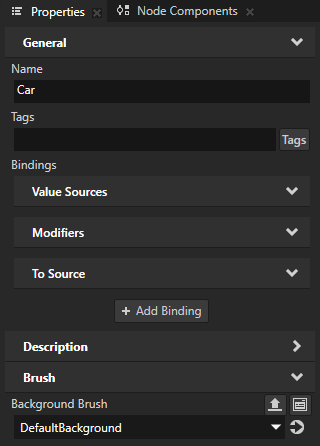
在 Prefabs 中选择 Car 预设,在 Properties 中添加 Background Brush 属性,并将其设置为 DefaultBackground 纹理画笔。
在 Android Studio 中创建一个 Android 活动:
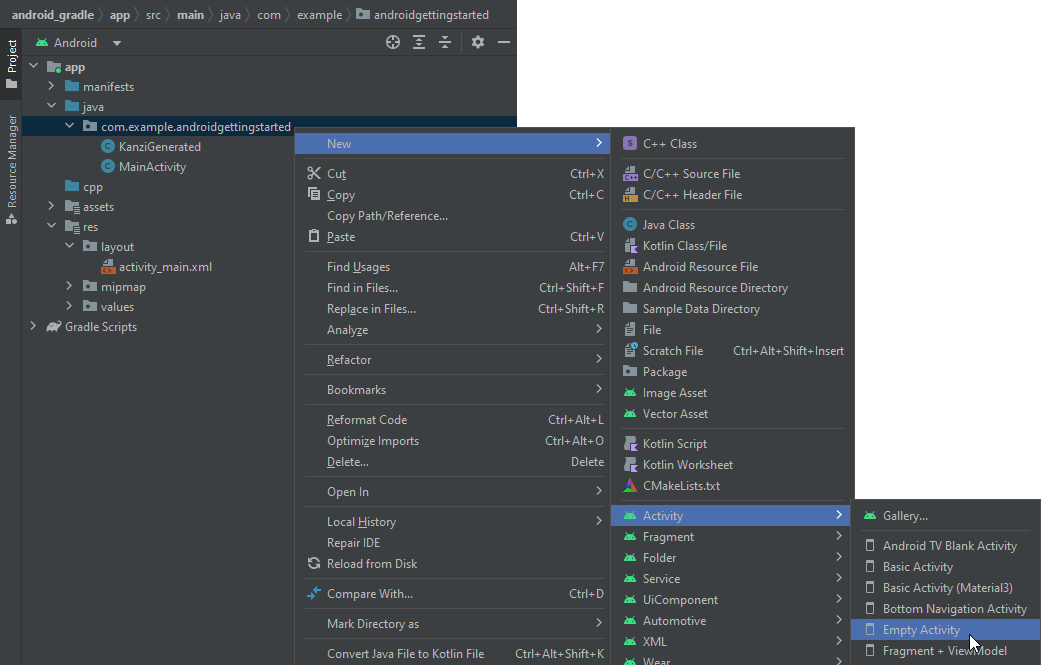
右键单击 app > java > com.example.androidgettingstarted,然后选择 New > Activity > Empty Activity。
将活动命名为
SecondActivity,然后单击 Finish。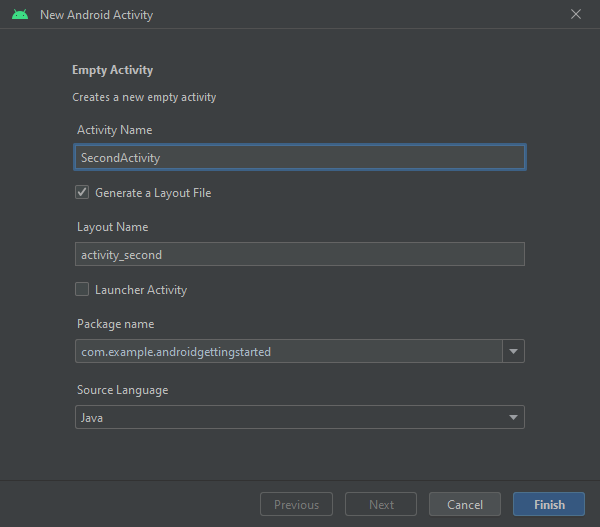
在 app > res > layout > activity_second.xml 中,将 Kanzi 视图添加到约束布局中。
<com.rightware.kanzi.KanziSurfaceView
    android:layout_width="match_parent"
    android:layout_height="match_parent"
    tools:context=".SecondActivity"
    app:kzbPathList="androidgettingstarted.kzb"
    app:startupPrefabUrl="kzb://androidgettingstarted/Prefabs/Car" />
确保将
startupPrefabUrl中的 kzb URL 指向您要在此活动中显示的预设。创建控件以转换到活动:
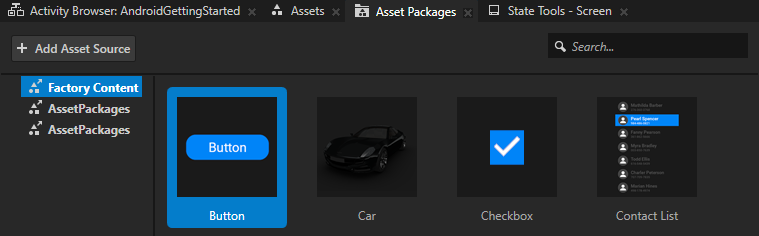
在 Kanzi Studio 中,从 Asset Packages 将 Button 拖到 RootNode。
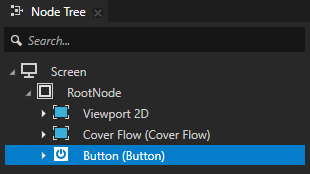
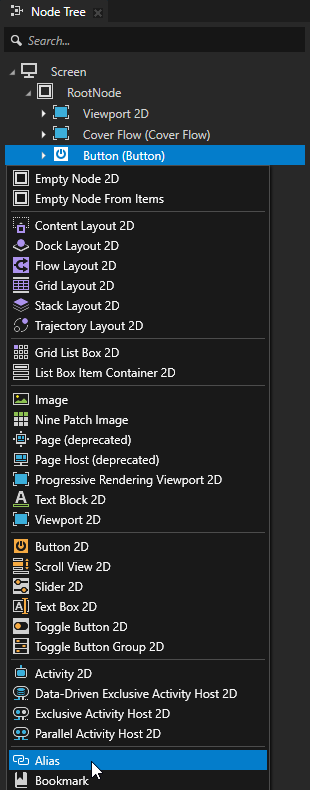
在 Node Tree 按 Alt 并右键单击 中,Button 并选择 Alias。
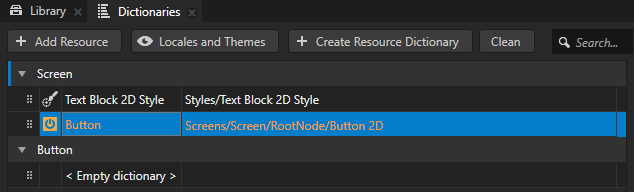
在 Kanzi Studio 中,选择 File > Export > Export KZB。
在 Android Studio 中的 app > java > com.example.androidgettingstarted > MainActivity.java:
导入这些类:
import com.rightware.kanzi.Node2D;
import com.rightware.kanzi.Button2D;

import android.content.Intent;
在
onCreate函数的末尾添加:// Get a reference to the androidgettingstartedview view. KanziView view2 = findViewById(R.id.androidgettingstartedview); view2.addListener(new KanziViewListener() { @Override public void onAttachedToWindow(View view, Domain domain) { } @Override public void onStartupPrefabLoaded(View view, Domain domain) { // Get the RootNode root node. Node2D root = ((KanziView) view).getRoot(); // Get and set up the button to transition to the SecondActivity. Button2D button = root.lookupNode("#Button"); // Position the Button node in the bottom of the Kanzi view. button.setProperty(Node.VerticalAlignmentProperty, Node.VerticalAlignment.Bottom); // Set the Button node to go to the second activity when user clicks the button. button.addMessageFilter(Button2D.ClickMessage, messageArguments -> { Intent intent = new Intent(((View) view).getContext(), SecondActivity.class); startActivity(intent); }); } });
Kanzi 异步加载视图的启动预设,并在加载和实例化预设完成时调用回调
KanziViewListener.onStartupPrefabLoaded。如果您打算修改启动预设,请在此回调中进行。
当您从 Android Studio 运行应用程序时,要过渡到第二个活动,请点击按钮。
接下来该做什么?
在本教程中,您已了解如何使用 Kanzi Android framework (droidfw) 来:
使用 Kanzi Java API 访问和修改节点。
在 Android 中创建一个 Kanzi 视图,并在该视图中显示 Kanzi 内容。
创建一个 Android 活动,并在该活动中显示 Kanzi 内容。
要详细了解如何使用 Kanzi Android framework (droidfw) 和 Java API,请参阅:
另请参阅
要了解有关为 Android 开发 Kanzi 应用程序的更多信息,请参阅 为 Android 开发 Kanzi 应用程序。
要了解有关使用 Java Kanzi Engine API 的更多信息,请参阅 使用 Java 和 Kotlin。