使用 Lua 定义数据源
使用 Lua 数据源,您可以在 Kanzi Studio 中使用 Lua 编程语言,在设计的同时定义并模拟应用程序的外部数据依赖项。
备注
Kanzi Studio 中的 Lua 数据源是一项实验性功能,您的反馈对我们非常重要。要提交反馈,请使用此 反馈表单。
与 Lua 脚本一样,Lua 数据源会在 kzb 文件中记录对 kzlua 插件的依赖。您的应用程序必须能够在运行时加载该插件。请参阅 部署 Lua 插件。
创建 Lua 数据源
要创建 Lua 数据源:
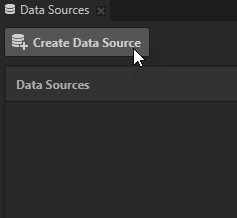
在 Data Sources 窗口中单击 Create Data Source。
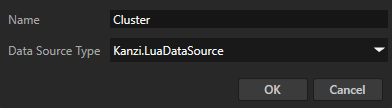
在 Create Data Source 窗口中设置:
将 Name 更改为您想要用于此数据源的名称。
Data Source Type 设置为 Kanzi.LuaDataSource。
单击 OK。
在 Data Sources 窗口中,单击
 ,并将 Lua Data Script 属性的值设置为定义您的 Lua Data Source 数据结构的 Lua 数据脚本。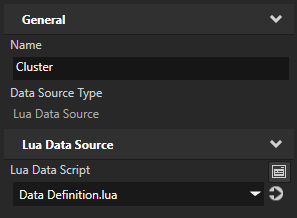
创建返回根数据对象的 Lua 数据脚本。
与在 Execute Lua Action 中使用的常规 Lua 脚本不同,您的 Lua 数据脚本必须返回一个根
DataObject,其中包含您的 Lua 数据源的数据定义。小技巧
您可以在 Lua 数据脚本中将数据对象定义为全局变量,以便其他脚本可以轻松访问和修改这些数据。
例如:
-- Define a root data object, containing all the data.
local rootDataObject = DataObject:create("cluster", {
    speed = 100,
    rpm = 2300,
    notifications = {
        { notification = "Service Due"},
        { notification = "Oil Change Needed"},
        { notification = "Dirty Air Filter"},
    },
})

-- Store all data objects in a global table for easier access from simulation scripts.
globalData = {}

for child in rootDataObject:iterateChildren() do
    globalData[child:getName()] = child
end

-- Return the root data object.
return rootDataObject
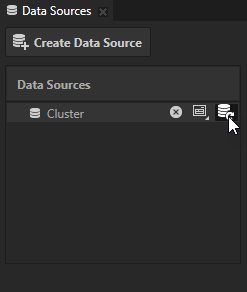
在 Data Sources 窗口中,单击数据源旁边的
 以从该数据源创建数据对象。
Lua Data Source 执行您的数据脚本后,您可以在工程中使用该脚本定义的数据对象。请参阅 使用数据对象。
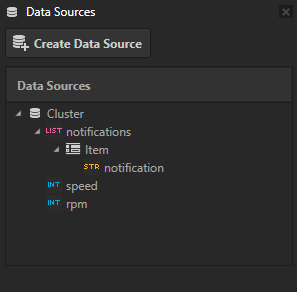
模拟数据
您可以使用 Execute Lua Action 在 Kanzi Studio 工程中模拟数据流。有关如何将 Lua 逻辑添加到应用程序中,请参阅 使用 Lua。
小技巧
您可以使用触发器条件在应用程序中禁用模拟。请参阅 为触发器添加条件。
例如:
在您的 Kanzi Studio 工程中定义一个新的可继承布尔属性类型。
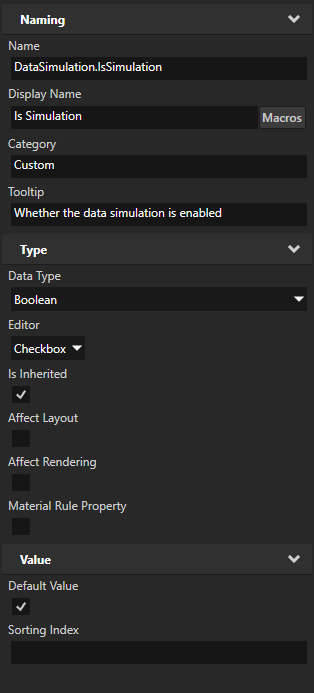
将此属性添加到工程的根节点。
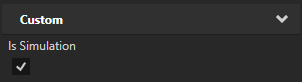
将此属性的值用作执行模拟 Lua 脚本的触发器的条件。
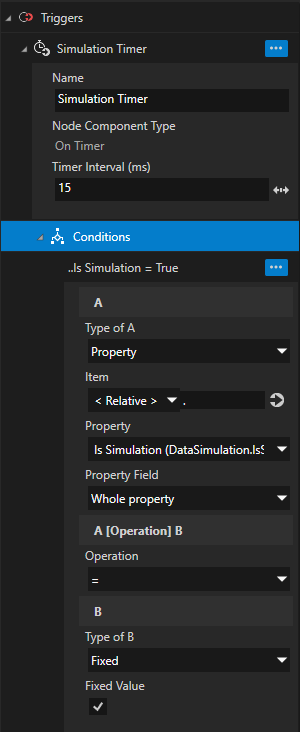
例如,使用 On Timer 触发器模拟随时间变化的数据更新:
-- Initialize global timestamp variable for simulating data update over time.
if timestamp == nil then
    timestamp = 0
end

-- Simulate speed and RPM changes.
local modifier = math.sin(timestamp)

local speed = math.floor(90 + modifier * 30)
local rpm = math.floor(2000 + modifier * 1000)

-- Use globally defined data table to simulate the data update.
if globalData then
    globalData.speed:setValue(speed)
    globalData.rpm:setValue(rpm)
end

-- Advance time.
timestamp = timestamp + 0.01
在您的应用程序代码中,覆盖根节点上此属性的值以禁用模拟脚本。
例如:
void onProjectLoaded() override
{
    // Project file has been loaded from .kzb file.

    // Project sets "DataSimulation.IsSimulation" property on a Root Node, which is used in triggers conditions to enable simulation scripts.
    // To disable the simulation, set this property value to false on a Root Node.
    DynamicPropertyType<bool> isSimulationProperty("DataSimulation.IsSimulation");

    const auto rootNode = getScreen()->getChild(0);
    kzAssert(rootNode);

    // Disable data simulation.
    rootNode->setProperty(isSimulationProperty, false);
 }
使用在 Lua 脚本中定义的数据对象,从应用程序提供真实的数据值。
// Define a DataObjectList to provide actual list data.
class NotificationsDataObject : public DataObjectList
{
public:

    ...

    // Follow the same data structure as the one you defined in Lua.
    DataObjectSharedPtr getItemTemplate() override
    {
       auto item = DataObject::create(getDomain(), "item");
       item->addChild(DataObjectString::create(getDomain(), "notification"));
       return item;
    }
 };
void onProjectLoaded() override
{
    ...

    // Use data model defined by the Lua Data Source. Retrieve the Data Context from the Root Node.
    auto dataContext = dynamic_pointer_cast<DataContext>(rootNode->getProperty(DataContext::DataContextProperty));
    kzAssert(dataContext);

    // Store the data objects to update.
    m_speedData = dynamic_pointer_cast<DataObjectInt>(dataContext->lookupDataContext("speed"));
    kzAssert(m_speedData);

    m_rpmData = dynamic_pointer_cast<DataObjectInt>(dataContext->lookupDataContext("rpm"));
    kzAssert(m_rpmData);

    // For list data, replace the existing simulation data object list with the actual data object list.
    auto simulationNotificationsDataObject = dynamic_pointer_cast<DataObjectList>(dataContext->lookupDataContext("notifications"));
    kzAssert(simulationNotificationsDataObject);

    auto rootDataObject = dataContext->getData();
    kzAssert(rootDataObject);

    rootDataObject->removeChild(*simulationNotificationsDataObject);
    rootDataObject->addChild(notificationsData);

    // Notify that the data context has been modified.
    dataContext->notifyModified();

    getMainLoopScheduler().appendTask(UserStage, kzMakeFixedString("UpdateData"), MainLoopScheduler::TaskRecurrence::Recurring,
        [this](auto)
        {
            this->updateSpeedAndRPMData();
        }
    );
}