Bindings expressions 参考
在这里,您可以找到可添加到节点、渲染通道、材质类型、样式和状态管理器绑定中的绑定表达式的参考。请参阅 渲染 (Rendering)、材质类型和材质、使用 styles 和 状态机 (State Manager)。
蓝色类型标记由绑定控制的属性。
当您为属性创建绑定时,来自该绑定的值将覆盖您在 Properties 中为该属性设置的值。
小技巧
在 Kanzi Studio 的 Properties 窗口中,带有 Bindings 的属性以蓝色字体标记,并且旁边显示 Binding 图标  :
:
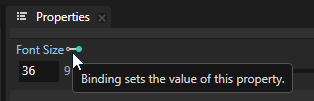
橙色字体标记具有多个覆盖源的属性:
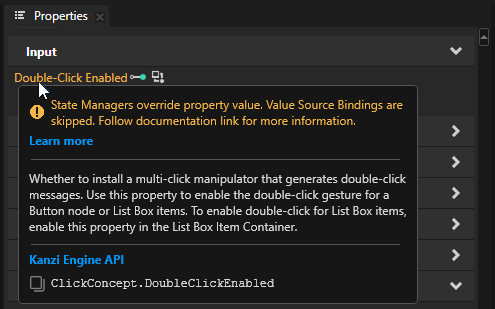
如果一个属性有多个覆盖源,只有优先级最高的那个会生效。请参阅 属性系统。
使用绑定时请记住:
只有绑定到相似数据类型才有效。例如,您只能将颜色绑定到颜色,vector2 绑定到 vector2,等等。请参阅 类型转换。
绑定取最后一个表达式的值,无论是赋值、一元还是二元运算,又或者只是常量值或变量本身。
在绑定中,您可以在四种基本类型之间转换字符串:整数、浮点、布尔值和字符串。
整数、浮点数和布尔值之间的转换为隐式,并取决于使用该值的属性类型。与字符串之间的相互转换为显式。
语法
()(小括号)
使用小括号进行分组以及包含表达式和参数,并控制执行顺序。
# Containing expressions: calculate the modulo of two values
mod(23, 27)
# Grouping expressions: first add 2 and 4, then divide the result by 3,
# and return 2
A = (2 + 4) / 3
# First add the FOV property to the Render Transformation Scale X property field,
# then divide the result of the multiplication by 2
({../Camera/Fov} + {../Box/RenderTransformation}.scaleX) / 2
运算符
=(分配)
分配一个值给变量。
语法 |
|
||||
参数 |
|
||||
示例 |
# Assigns the value 2.0 to the variable A.
A = 2.0
# Assigns the value 4.0 to the variable B.
B = 4.0
|
?(条件)
条件运算符接受三个输入参数。如果第一个参数 (condition) 计算结果为 true,则运算符计算第二个参数 (expression1) 并返回其值。如果第一个参数计算结果为 false,则运算符计算第三个参数 (expression2) 并返回其值。
语法 |
|
||||||
参数 |
|
||||||
返回 |
与参数的类型相同 |
||||||
示例 |
# Returns the value of A.
A = 2.0
B = 4.0
(A < B) ? A : B
|
算术运算符
+(addition)
将两个或更多的值相加,或者将多个字符串组合到一个字符串中。
语法 |
|
||||
参数 |
当使用加法运算符时,请记住:
|
||||
返回 |
|
||||
示例 |
A = 2.0
B = 4

# Returns 6.0
A + B
A = "Hello "
B = "Kanzi!"

# Returns "Hello Kanzi!"
A + B
A = 3
B = true

# Returns 4
A + B
A = Vector2(0.5, 0.5)
B = 0.1

# Returns Vector2(0.6, 0.6)
A + B
|
-(subtraction)
从第一个参数的值中减去第二个参数的值。作为一个取反运算符,它返回的结果相当于将该值乘以 -1。
语法 |
|
||||
参数 |
当使用减法运算符时,请记住:
|
||||
返回 |
|
||||
示例 |
A = 2.0
B = 4

# Returns -2.0
A - B
A = Vector2(0.5, 0.5)
B = 0.1

# Returns Vector2(0.4, 0.4)
A - B
|
*(乘法)
乘以参数的值。
语法 |
|
||||
参数 |
使用乘法运算符时,请注意,
|
||||
返回 |
|
||||
示例 |
A = 2.0
B = 4

# Returns 8.0
A * B
A = 3
B = true

# Returns 3
A * B
A = Vector2(0.5, 0.5)
B = Vector2(0.2, 0.4)

# Returns Vector2(0.1, 0.2)
A * B
|
/(除)
将第一个参数的值除以第二个参数的值。
语法 |
|
||||
参数 |
当使用除法运算符时,请记住:
|
||||
返回 |
|
||||
示例 |
A = 2.0
B = 4

# Returns 0.5
A / B
A = Vector2(0.5, 0.5)
B = Vector2(0.2, 0.4)

# Returns Vector2(2.5, 1.25)
A / B
|
关系运算符
==(等于)
检查两个值是否相等。
语法 |
|
||||
参数 |
|
||||
返回 |
BOOLEAN |
||||
示例 |
A = 2.0
B = 4.0

# Returns false
A == B
|
!=(不等于)
检查两个值是否不相等。
语法 |
|
||||
参数 |
|
||||
返回 |
BOOLEAN |
||||
示例 |
A = 2.0
B = 4.0

# Returns true
A != B
|
> (大于)
检查第一个参数的值是否大于第二个参数的值。对于两个字符串,检查第一个字符串在字母顺序中是否位于第二个字符串之后。
语法 |
|
||||
参数 |
|
||||
返回 |
BOOLEAN |
||||
示例 |
A = 2.0
B = 4.0

# Returns false
A > B
# Returns true
"Rob Krar" > "Anna Frost"
|
< (小于)
检查第一个参数的值是否小于第二个参数的值。对于两个字符串,检查第一个字符串在字母顺序上是否位于第二个字符串之前。
语法 |
|
||||
参数 |
|
||||
返回 |
BOOLEAN |
||||
示例 |
A = 2.0
B = 4.0

# Returns true
A < B
# Returns false
"Rob Krar" < "Anna Frost"
|
>=(大于或等于)
检查第一个参数的值是否大于或等于第二个参数的值。
语法 |
|
||||
参数 |
|
||||
返回 |
BOOLEAN |
||||
示例 |
A = 2.0
B = 4.0

# Returns false
A >= B
|
<=(小于或等于)
检查第一个参数的值是否小于或等于第二个参数的值。
语法 |
|
||||
参数 |
|
||||
返回 |
BOOLEAN |
||||
示例 |
A = 2.0
B = 4.0

# Returns true
A <= B
|
逻辑运算符
&&(逻辑与)
比较两个表达式:
如果两个表达式的计算结果都为 true,则返回 true。
如果一个或两个表达式的计算结果为 false,则返回 false。
语法 |
|
||||
参数 |
|
||||
返回 |
BOOLEAN |
||||
示例 |
A = 2.0
B = 4.0

# Returns false
A < B && B < 1
|
||(逻辑或)
比较两个表达式:
如果一个或两个表达式的计算结果为 true,则返回 true。
如果两个表达式的计算结果均为 false,则返回 false。
语法 |
|
||||
参数 |
|
||||
返回 |
BOOLEAN |
||||
示例 |
A = 2.0
B = 4.0

# Returns true
A < B || B < 1
|
!(逻辑非)
反转表达式的布尔值:
如果表达式计算结果为 false,则返回 true。
如果表达式计算结果为 true,则返回 false。
语法 |
|
||
参数 |
|
||
返回 |
BOOLEAN |
||
示例 |
A = 2.0
B = 4.0

# Returns true
!(A > B)
|
按位运算符
~(按位非)
反转整数的二进制表示的位:
为 0 的位变为 1。
为 1 的位变为 0。
对整数 \(x\) 进行按位非操作返回 \(-(x + 1)\)。
该操作使用补码来表示负整数。二进制数的第一位是符号位:
如果第一位是 0,则数字为正数。
如果第一位是 1,则该数字为负数。
语法 |
|
||
参数 |
|
||
返回 |
int |
||
示例 |
# Binary: 01010
A = 10

# Returns -11 (binary signed two's complement: 10101)
~A
# Binary signed two's complement: 10110
A = -10

# Returns 9 (binary: 01001)
~A
|
&(按位与)
对两个整数的二进制表示的每对对应位执行逻辑与操作:
如果两个位都是1,则结果二进制表示中的位为1。
如果一个或两个位为 0,则结果二进制表示中的位为 0。
X |
Y |
X & Y |
|---|---|---|
0 |
0 |
0 |
0 |
1 |
0 |
1 |
0 |
0 |
1 |
1 |
1 |
该操作使用补码来表示负整数。二进制数的第一位是符号位:
如果第一位是 0,则数字为正数。
如果第一位是 1,则该数字为负数。
语法 |
|
||||
参数 |
|
||||
返回 |
int |
||||
示例 |
# Binary: 1010
A = 10
# Binary: 1100
B = 12

# Returns 8 (binary: 1000)
A & B
# Binary signed two's complement: 10110
A = -10
# Binary: 01100
B = 12

# Returns 4 (binary: 00100)
A & B
|
|(按位或)
对两个整数的二进制表示的每对对应位执行逻辑或操作:
如果一个或两个位为1,则结果二进制表示中的位为1。
如果两个位都是 0,则结果二进制表示中的位为 0。
X |
Y |
X | Y |
|---|---|---|
0 |
0 |
0 |
0 |
1 |
1 |
1 |
0 |
1 |
1 |
1 |
1 |
该操作使用补码来表示负整数。二进制数的第一位是符号位:
如果第一位是 0,则数字为正数。
如果第一位是 1,则该数字为负数。
语法 |
|
||||
参数 |
|
||||
返回 |
int |
||||
示例 |
# Binary: 1010
A = 10
# Binary: 1100
B = 12

# Returns 14 (binary: 1110)
A | B
# Binary signed two's complement: 10110
A = -10
# Binary: 01100
B = 12

# Returns -2 (binary signed two's complement: 11110)
A | B
|
^(按位异或)
对两个整数的二进制表示的每对对应位执行逻辑异或 (XOR) 操作:
如果位不同,结果二进制表示中的位为 1。
如果位相同,结果二进制表示中的位为 0。
X |
Y |
X ^ Y |
|---|---|---|
0 |
0 |
0 |
0 |
1 |
1 |
1 |
0 |
1 |
1 |
1 |
0 |
该操作使用补码来表示负整数。二进制数的第一位是符号位:
如果第一位是 0,则数字为正数。
如果第一位是 1,则该数字为负数。
语法 |
|
||||
参数 |
|
||||
返回 |
int |
||||
示例 |
# Binary: 1010
A = 10
# Binary: 1100
B = 12

# Returns 6 (binary: 0110)
A ^ B
# Binary signed two's complement: 10110
A = -10
# Binary: 01100
B = 12

# Returns -6 (binary signed two's complement: 11010)
A ^ B
|
<<(按位左移)
执行整数二进制表示的符号扩展左移,移动的位数由给定的位数决定。
将 \(x\) 左移 \(y\) 位:
将 \(y\) 个最右边的 0 位添加到 \(x\) 的二进制表示中。
移除 \(x\) 的二进制表示中的最左边 \(y\) 位。
这意味着将 \(x\) 左移 \(y\) 位相当于将 \(x\) 乘以 2 的 \(y\) 次幂:
该操作使用补码来表示负整数。二进制数的第一位是符号位:
如果第一位是 0,则数字为正数。
如果第一位是 1,则该数字为负数。
语法 |
|
||||
参数 |
|
||||
返回 |
int |
||||
示例 |
# Binary: 0011
value = 3
shift = 2

# Returns 12 (binary: 1100)
value << shift
# Binary signed two's complement: 11101
value = -3
shift = 2

# Returns -12 (binary signed two's complement: 10100)
value << shift
|
>>(按位右移)
将整数的二进制表示按给定的位数向右执行符号扩展移位。
将 \(x\) 右移 \(y\) 位:
移除 \(x\) 的二进制表示中的最右边 \(y\) 位。
在 \(y\) 的左侧添加 \(x\) 的二进制表示中最左边位的副本。
这意味着将 \(x\) 右移 \(y\) 位相当于将 \(x\) 除以 2 的 \(y\) 次幂:
该操作将结果向下取整。
该操作使用补码来表示负整数。二进制数的第一位是符号位:
如果第一位是 0,则数字为正数。
如果第一位是 1,则该数字为负数。
语法 |
|
||||
参数 |
|
||||
返回 |
int |
||||
示例 |
# Binary: 1100
value = 12
shift = 2

# Returns 3 (binary: 0011)
value >> shift
# Binary signed two's complement: 10100
value = -12
shift = 2

# Returns -3 (binary signed two's complement: 11101)
value >> shift
|
常数
Color4
使用 Color4() 常量来创建一个颜色值。
您可以将浮点数或 Vector 4D 属性转换为颜色值。请参阅 color4。
要了解如何访问颜色属性中的属性字段,请参阅 颜色属性字段绑定。
要了解如何在颜色空间之间转换颜色值,请参阅 颜色函数。
要了解如何在线性色彩工作流中设置绑定表达式中的颜色值,请参阅 颜色属性绑定。
语法 |
|
||||||||
参数 |
|
||||||||
返回 |
颜色 |
||||||||
示例 |
# Sets the color to white and opaque.
Color4(1, 1, 1, 1)
# Sets the color to white and opaque. Alternative syntax.
Color(1, 1, 1, 1)

# Sets the color to red with 70% transparency.
Color4(1, 0, 0, 0.7)

# Sets the color to red and opaque.
Color4(1, 0, 0, 1)
# Invalid expression, one argument is missing.
Color4(0.1, 1, 0.4)
|
Matrix3
使用 Matrix3() 常量创建一个 3x3 矩阵。
您可以:
将二维变换转换为3x3矩阵。请参阅 matrix3x3。
将 3x3 矩阵转换为 2D 变换。请参阅 extractSRT2D。
语法 |
|
||
参数 |
|
||
返回 |
矩阵 3x3 |
||
示例 |
# Creates a 3x3 identity matrix.
Matrix3(1, 0, 0,  0, 1, 0,  0, 0, 1)
# Returns a 2D transformation with the Translation X and
# Translation Y property fields set to 100:
# Srt2D(1, 1, 0, 100, 100).
extractSRT2D(Matrix3(1, 0, 0,  0, 1, 0,  100, 100, 1))
|
Matrix4
使用 Matrix4() 常量创建一个 4x4 矩阵。
您可以:
将 3D 变换转换为 4x4 矩阵。请参阅 matrix4x4。
将 4x4 矩阵转换为 3D 变换。请参阅 extractSRT3D。
语法 |
|
||
参数 |
|
||
返回 |
4x4 矩阵 (Matrix 4x4) |
||
示例 |
# Creates a 4x4 identity matrix.
Matrix4(1, 0, 0, 0,  0, 1, 0, 0,  0, 0, 1, 0,  0, 0, 0, 1)
# Returns a 3D transformation with the Rotation X
# property field set to 90, and the Translation X and
# Translation Y property fields set to 2:
# Srt3D(1, 1, 1,  90, 0, 0,  2, 2, 0).
extractSRT3D(Matrix4(1, 0, 0, 0,  0, 0, 1, 0,  0, -1, 0, 0,  2, 2, 0, 1))
|
Srt2D
使用 Srt2D() 常量对具有 Render Transformation 或 Layout Transformation 属性的 2D 节点应用变换。在 Binding Editor 中,将 Property 设置为 Layout Transformation 或 Render Transformation。
您可以:
将 3x3 矩阵转换为 2D 变换。请参阅 extractSRT2D。
将二维变换转换为3x3矩阵。请参阅 matrix3x3。
要了解如何访问二维变换属性中的属性字段,请参阅 Transformation 属性字段绑定。
语法 |
|
||||||||||
参数 |
|
||||||||||
返回 |
SRT 变换 2D,计算绑定 2D 节点的缩放、旋转和平移的变换。 |
||||||||||
示例 |
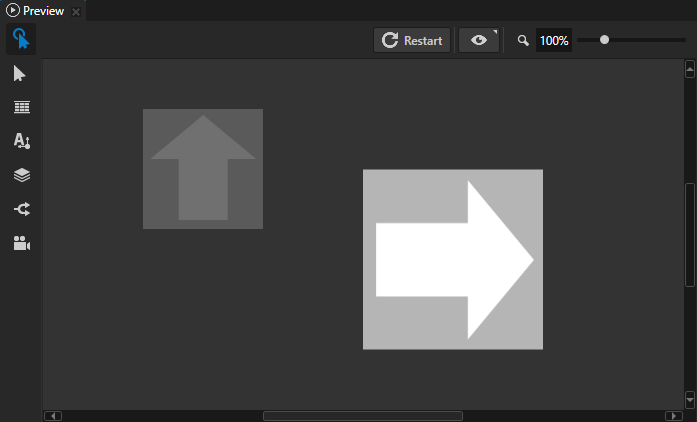
# Applies the transformation to the bound 2D node using the Layout Transformation
# or Render Transformation property, depending on which of these properties you
# set in the Binding Editor:
# - Scales the node to 150% percent on both axes
# - Rotates the node clockwise 90 degrees
# - Translates the node 400 pixels on the x axis, and 60.5 pixels on the y axis.
Srt2D(1.5, 1.5, 90.0, 400.0, 60.5)
|
Srt3D
使用 Srt3D() 常量对具有 Render Transformation 或 Layout Transformation 属性的 3D 节点应用转换。在 Binding Editor 中,将 Property 设置为 Layout Transformation 或 Render Transformation。
您可以:
将 4x4 矩阵转换为 3D 变换。请参阅 extractSRT3D。
将 3D 变换转换为 4x4 矩阵。请参阅 matrix4x4。
要了解如何访问 3D 变换属性中的属性字段,请参阅 Transformation 属性字段绑定。
语法 |
|
||||||||||||||||||
参数 |
|
||||||||||||||||||
返回 |
SRT Transformation 3D,计算绑定3D节点的缩放、旋转和平移的变换。 |
||||||||||||||||||
示例 |
# Applies the transformation to the bound 3D node using the Layout Transformation
# or Render Transformation property, depending on which of these properties you
# set in the Binding Editor:
# - Scales the node to 70% on all axes
# - Rotates the node counter-clockwise 30 degrees on the x axis,
#   60 degrees on the y axis, and 30 degrees on the z axis
# - Translates the node by 2.5 device-independent units on all axes
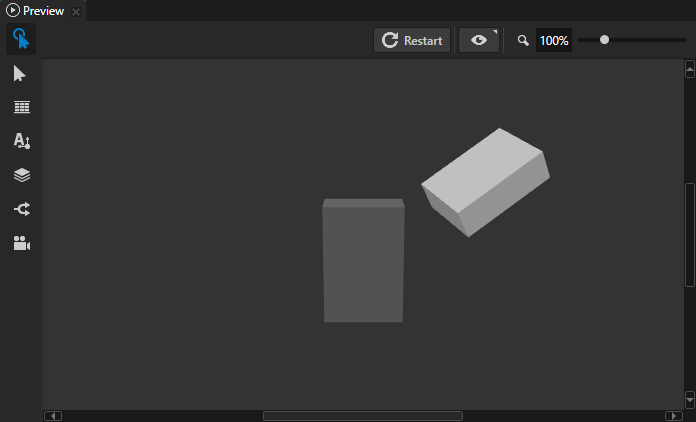
Srt3D(0.7, 0.7, 0.7,  -30.0, -60.0, -30.0,  2.5, 2.5, 2.5)
|
Vector2
使用 Vector2() 常量绑定具有两个属性字段的向量属性。
您可以将浮点属性转换为二维向量属性。请参阅 vector2。
要了解如何访问 Vector 2D 属性中的属性字段,请参阅 属性字段绑定。
语法 |
|
||||
参数 |
|
||||
返回 |
Vector 2D |
||||
示例 |
# In the Binding Editor set the Property to a property that uses the Vector 2D
# data type.
# For example, to set in the bound node the Horizontal Margin property:
# - Left property field to 100
# - Right property field to 50
Vector2(100, 50)
|
Vector3
使用 Vector3() 常量绑定具有三个属性字段的向量属性。
您可以将浮点属性转换为三维向量属性。请参阅 vector3。
要了解如何访问 Vector 3D 属性中的属性字段,请参阅 属性字段绑定。
语法 |
|
||||||
参数 |
|
||||||
返回 |
Vector 3D |
||||||
示例 |
# In the Binding Editor set the Property to a property that uses the Vector 3D
# data type.
# For example, to set in the bound Point Light node the Point Light Attenuation
# property:
# - Constant property field to 1.2
# - Linear property field to 0.01
# - Quadratic property field to 0.02
Vector3(1.2, 0.01, 0.02)
|
Vector4
使用 Vector4() 常量绑定具有四个属性字段的向量属性。
您可以将浮点或颜色属性转换为 Vector 4D 属性。请参阅 vector4。
要了解如何访问 Vector 4D 属性中的属性字段,请参阅 属性字段绑定。
语法 |
|
||||||||
参数 |
|
||||||||
返回 |
向量 4D |
||||||||
示例 |
# In the Binding Editor set the Property to a property that uses the Vector 4D
# data type.
# For example, to set in the bound Pipeline State render pass the Scissor Area
# property:
# - X to 0.2 to set the horizontal offset of the area to 20% of the width of the
#   Viewport 2D
# - Y to 0.1 to set the vertical offset of the area to 10% of the height of the
#   Viewport 2D
# - Width to 0.6 to make the area 60% of the width of the Viewport 2D
# - Height to 0.8 to make the area 80% of the height of the Viewport 2D
Vector4(0.2, 0.1, 0.6, 0.8)
|
类型转换
bool
将值转换为布尔值。
整数、浮点数和布尔值之间的转换为隐式,并取决于使用该值的属性类型。与字符串之间的相互转换为显式。
语法 |
|
||
参数 |
|
||
返回 |
BOOLEAN |
||
示例 |
# Converts the boolean value "True" to integer 1, adds it to the integer 41,
# and assigns the result to the variable A. Returns integer 42.
A = 41 + bool("True")
|
color4
将值转换为颜色。当从浮点数转换时,将浮点值设置为颜色属性的红色、绿色、蓝色和 alpha 通道。
要了解如何访问颜色属性中的属性字段,请参阅 颜色属性字段绑定。
要了解如何在颜色空间之间转换颜色值,请参阅 颜色函数。
要了解如何在线性色彩工作流中设置绑定表达式中的颜色值,请参阅 颜色属性绑定。
语法 |
|
||
参数 |
|
||
返回 |
颜色 |
||
示例 |
# Returns Color4(0.5, 0.5, 0.5, 0.5).
# This expression is equivalent to:
# color = Color4(0, 0, 0, 0)
# color.r = 0.5
# color.g = 0.5
# color.b = 0.5
# color.a = 0.5
# sRGBToLinear(color)
color4(0.5)
# Converts the value of the Text property in the Text Box 2D node to a float and
# returns a color where each channel is set to the value of that float.
color4(float({@../Text Box 2D/TextConcept.Text}))
# Converts the value of the MyVector4 property to a color.
color4({@../MyVector4})
|
float
将值转换为浮点值。
整数、浮点数和布尔值之间的转换为隐式,并取决于使用该值的属性类型。与字符串之间的相互转换为显式。
语法 |
|
||
参数 |
|
||
返回 |
float |
||
示例 |
# Converts the string "5" to a float, adds it to the integer 5,
# and assigns the result to the variable A. Returns float 10.000000.
A = 5 + float("5")
# Implicitly converts boolean value True to float, adds it to the float 5.1,
# and assigns the result to the variable B. Returns float 6.1.
B = 5.1 + True
|
int
将值转换为整数。
整数、浮点数和布尔值之间的转换为隐式,并取决于使用该值的属性类型。与字符串之间的相互转换为显式。
语法 |
|
||
参数 |
|
||
返回 |
整数 (Integer) |
||
示例 |
# Explicitly converts the string "5" to an integer, adds it to the integer 5,
# and assigns the result to the variable A. Returns integer 10.
A = 5 + float("5")
# Implicitly converts boolean value True to integer, adds it to the integer 5,
# and assigns the result to the variable B. Returns integer 6.
B = 5 + True
# Explicitly converts float 5.5 to an integer, adds it to the integer and
# assigns the result to the variable C. Returns integer 7.
C = 2 + float(5.5)
|
matrix3x3
将二维变换转换为3x3矩阵。
语法 |
|
||
参数 |
|
||
返回 |
矩阵 3x3 |
||
示例 |
# Converts the Render Transformation property value of a 2D node to a 3x3 matrix.
matrix3x3({@./Node2D.RenderTransformation})
# Returns Matrix3(0, 1, 0,  -1, 0, 0,  200, 50, 1).
matrix3x3(Srt2D(1, 1, 90, 200, 50))
|
matrix4x4
将 3D 转换转换为 4x4 矩阵。
语法 |
|
||
参数 |
|
||
返回 |
4x4 矩阵 (Matrix 4x4) |
||
示例 |
# Converts the Render Transformation property value of a 3D node to a 4x4 matrix.
matrix4x4({@./Node3D.RenderTransformation})
# Returns Matrix4(1, 0, 0, 0,  0, 0, 1, 0,  0, -1, 0, 0,  1, 2, 0, 1).
matrix4x4(Srt3D(1, 1, 1,  90, 0, 0,  1, 2, 0))
|
string
将值转换为字符串。
整数、浮点数和布尔值之间的转换为隐式,并取决于使用该值的属性类型。与字符串之间的相互转换为显式。
语法 |
|
||
参数 |
|
||
返回 |
string |
||
示例 |
# Converts the integer 5 to a string, concatenates it to the string
# "Five is written as ", and assigns the result to the variable A.
# Returns string "Five is written as 5".
A = "Five is written as " + string(5)
# Converts the value of the variable A to a string, concatenates it
# to the string "Number of fingers on two hands is ", and assigns the result
# to the variable B. Returns string "Number of fingers on two hands is 10".
A = 10
B = "Number of fingers on two hands is " + string(A)
|
vector2
将浮点数转换为具有两个属性字段的向量属性。将浮点值设置为向量属性的两个属性字段。
语法 |
|
||
参数 |
|
||
返回 |
Vector 2D |
||
示例 |
# Returns Vector2(0.5, 0.5).
vector2(0.5)
# In the Binding Editor set the Property to a property that uses the Vector 2D
# data type.
# For example, to set in the bound 2D node the Horizontal Margin property Left
# and Right property fields to the value of the MyFloat property:
vector2({@../MyFloat})
|
vector3
将浮点数转换为具有三个属性字段的向量属性。将浮点值设置为向量属性的所有属性字段。
语法 |
|
||
参数 |
|
||
返回 |
Vector 3D |
||
示例 |
# Returns Vector3(0.5, 0.5, 0.5).
vector3(0.5)
# In the Binding Editor set the Property to a property that uses the Vector 3D
# data type.
# For example, to set in the bound Point Light node the Point Light Attenuation
# property Constant, Linear, and Quadratic property fields to the value of the
# MyFloat property:
vector3({@../MyFloat})
|
vector4
将值转换为具有四个属性字段的向量属性。当从浮点数转换时,将浮点值设置为向量属性的所有属性字段。
语法 |
|
||
参数 |
|
||
返回 |
向量 4D |
||
示例 |
# Returns Vector4(0.5, 0.5, 0.5, 0.5).
vector4(0.5)
# In the Binding Editor set the Property to a property that uses the Vector 4D
# data type. The binding sets all property fields of the bound property to the
# value of the MyFloat property.
vector4({@../MyFloat})
# In the Binding Editor set the Property to a property that uses the Vector 4D
# data type. The binding sets the bound property to the value of the Brush Color
# property in the same node.
vector4({@./ColorBrush.Color})
|
函数
获取
通过查找传递给 acquire 函数的资源 ID 来获取资源。
资源 ID 必须位于您使用 acquire 函数的节点的资源字典中,或其某个祖先节点的资源字典中:
如果资源尚未加载到应用程序内存中,
acquire函数将加载该资源。如果资源 ID 未定义,
acquire函数将返回一个空值。
请参阅 使用资源字典。
例如,您可以创建一个绑定,从数据源获取文本资源的资源 ID,加载文本资源,并设置一个 Text Block 节点以显示该文本资源的内容。如果您对该文本资源进行本地化,Text Block 会自动显示应用程序当前区域设置的资源值。如果您更改数据源中的数据,绑定函数将获取资源 ID 指向的资源,并更新文本。
请参阅 使用绑定加载资源。
语法 |
|
||
参数 |
|
||
返回 |
资源 |
||
示例 |
# Gets a text resource with a resource ID that you set in a custom property type
# MyCustomProperty whose data type is Text.
# For example, to show in a Text Block node the text to which the resource ID
# in MyCustomProperty points, bind the Text property of that Text Block node
# to this expression.
acquire({@./MyProject.MyCustomProperty})
# Gets a text resource with a resource ID that you set in a data object name
# whose data type is string.
# For example, to show in a Text Block node the text to which the resource ID
# in name points, bind the Text property of that Text Block node to this
# expression.
acquire({DataContext.item.name})
# If the node that has this binding has the key focus, returns a brush with the
# resource ID Focused Brush. Otherwise returns a brush with the resource ID
# Default Brush.
# For example, to visually indicate when a 2D node has focus, bind the Background
# Brush property of that node to this expression.
{@./Node.Focused} ? acquire("Focused Brush") : acquire("Default Brush")
|
动画化
将属性值绑定到您在 Animation Data 项中定义的分段函数。请参阅 在绑定中使用分段函数。
animate 需要两个参数:您要绑定 Animation Data 项的属性,以及定义分段函数的 Animation Data 项的资源 ID 或 kzb URL,该函数用于设置绑定属性的值。
使用资源 ID 时,您必须将 Animation Data 项放置到资源字典中,以便包含绑定的节点可以访问它。请参阅 使用资源字典。
例如,您可以使用 Animate 函数将仪表中的指针在 0 到 100 之间的移动速度设置得比在大于 100 的值时更快。
语法 |
|
||||
参数 |
|
||||
示例 |
# Uses the Speed property to move along the animation curve
# of the Animation Data item with the resource ID Speed curve.
animate({@./Speed}, "Speed curve")
# Uses the Speed property to move along the animation curve
# of the Animation Data item with the kzb URL Speed curve.
animate({@./Speed}, "kzb://cluster/Animation Data/Speed curve")
|
continueIf
确定是否继续执行绑定:
如果传递给函数的表达式计算为
false,则停止执行绑定,并且不修改目标属性的值。如果传递给函数的表达式计算为
true,则继续执行绑定。
例如,使用此函数以避免在绑定从数据源接收到无效输入时更新节点的属性。
语法 |
|
||
参数 |
|
||
示例 |
# If the value of the Text property in the Text Box 2D node represents a
# positive number, this binding writes that value to its target property.
# If the value of the Text property does not represent a positive number,
# this binding does not change the value of its target property.
textInput = {@../Text Box 2D/TextConcept.Text}
continueIf(int(textInput) > 0)
textInput
# If the value of the speed data object is a positive integer, this binding
# writes that value to its target property.
# If the value of the speed data object is negative, this binding does
# not change the value of its target property.
continueIf({DataContext.gauges.speed} >= 0)
{DataContext.gauges.speed}
# If the magnitude of the Layout Transformation Scale of the 3D node to which
# you add this binding is less than 5, returns a color value.
# For example, you can bind the Ambient Color property of a 3D node to this
# binding expression.
maxScale = 5

scaleX = {@./Node3D.LayoutTransformation}.scaleX
scaleY = {@./Node3D.LayoutTransformation}.scaleY
scaleZ = {@./Node3D.LayoutTransformation}.scaleZ

scale = sqrt(scaleX * scaleX + scaleY * scaleY + scaleZ * scaleZ)

continueIf(scale < maxScale)

color = linearTosRGB(Color4(0.0, 0.5, 0.8, 1))
color
|
格式 (Format)
将值格式化为字符串。例如,使用此函数设置 Text Block 节点如何显示属性值。请参阅 格式化属性值的显示。
语法 |
|
||||
参数 |
|
||||
返回 |
string |
||||
示例 |
# Inserts the values of the 'Node.Width' and 'Node.Height'
# properties to the format string.
format("The size of this node is: {}x{}", {@./Node.Width}, {@./Node.Height})
# Formats a floating point value to two decimal places.
format("The width of this node is: {:.2}", {@./Node.Width})
# Sets the order of arguments in the format string.
speed = {DataContext.gauges.speed}
battery = {DataContext.gauges.battery}
format("Speed: {1}. Battery: {0}", battery, speed)
|
访问器函数
getCurrentValue
获取您要绑定的属性的当前值。使用此函数修改您绑定的属性的值。
语法 |
|
返回 |
目标属性的当前值 |
示例 |
# Binds a property to half of the current value of that property.
getCurrentValue() * 0.5
# Binds a property field of the property, which you set as the target property
# in the Binding Editor, to the Translation X property field of the same
# property.
# For example, to bind the Render Transformation Translation Y property field
# of a node to the Render Transformation Translation X property field, in the
# Binding Editor set the Property to Render Transformation
# and Property Field to Translation Y.
getCurrentValue().translationX
|
getField
获取向量或矩阵中的元素。
语法 |
|
||||
参数 |
|
||||
返回 |
float:向量或矩阵中的元素 |
||||
示例 |
# Gets the value of the third element in the matrix: 2.0.
myMatrix = Matrix3(0, 1, 2,  3, 4, 5,  6, 7, 8)
getField(myMatrix, 2)
# Gets the value of the second element in the matrix: 1.0.
myVector = Vector4(0, 1, 2, 3)
getField(myVector, 1)
|
setField
设置向量或矩阵中元素的值。
语法 |
|
||||||
参数 |
|
||||||
示例 |
# Sets the value of the sixth element in the matrix to 0.
# After the operation the value of the matrix is (0, 1, 2,  3, 4, 0,  6, 7, 8)
myMatrix = Matrix3(0, 1, 2,  3, 4, 5,  6, 7, 8)
setField(myMatrix, 5, 0)
|
getRow
获取矩阵中的行向量。
语法 |
|
||||
参数 |
|
||||
返回 |
Vector3,Vector4:矩阵中的行。 |
||||
示例 |
# Gets the value of the third row in the matrix: Vector3(2, 5, 8).
myMatrix = Matrix3(0, 1, 2,  3, 4, 5,  6, 7, 8)
getRow(myMatrix, 2)
|
setRow
在矩阵中设置行向量。
语法 |
|
||||||
参数 |
|
||||||
示例 |
# Sets the value of the third row in the matrix to Vector3(9, 10, 11).
# After the operation the value of the matrix is
#    0,  3,  6,
#    1,  4,  7,
#    9, 10, 11
myMatrix = Matrix3(0, 1, 2,  3, 4, 5,  6, 7, 8)
setRow(myMatrix, 2, Vector3(9, 10, 11))
|
getColumn
获取矩阵中的列向量。
语法 |
|
||||
参数 |
|
||||
返回 |
Vector3, Vector4:向量或矩阵中的列。 |
||||
示例 |
# Gets the value of the third column in the matrix: Vector3(6, 7, 8).
myMatrix = Matrix3(0, 1, 2,  3, 4, 5,  6, 7, 8)
getColumn(myMatrix, 2)
|
setColumn
在矩阵中设置列向量。
语法 |
|
||||||
参数 |
|
||||||
示例 |
# Sets the value of the third column in the matrix to Vector3(9, 10, 11).
# After the operation the value of the matrix is
#    0,  3,  9,
#    1,  4, 10,
#    2,  5, 11
myMatrix = Matrix3(0, 1, 2,  3, 4, 5,  6, 7, 8)
setColumn(myMatrix, 2, Vector3(9, 10, 11))
|
数学函数
abs(绝对值)
计算数值或变量的绝对值。数值的绝对值始终为正。
语法 |
|
||
参数 |
|
||
返回 |
与参数 |
||
示例 |
# Returns 5.2
abs(-5.2)
|
ceil(ceiling)
计算大于或等于参数值的最近整数值。
语法 |
|
||
参数 |
|
||
返回 |
与参数 |
||
示例 |
# Returns 3.0
ceil(2.06)
# Returns 16.0
ceil(15.92)
# Returns -2
ceil(-2.06)
|
限制 (Clamp)
将值限制在两个值之间。clamp 返回与 min(max(value, low), high) 相同的值。
语法 |
|
||||||
参数 |
当您使用
|
||||||
返回 |
整数、浮点数和布尔值之间的转换为隐式。 |
||||||
示例 |
# Returns 1.0
clamp(1, 4, 0.5)
# Returns 0.0
clamp(false, 1, -0.5)
# Returns Vector2(1.0, 4.0)
clamp(Vector2(1, 2), Vector2(3, 5), Vector2(0, 4))
# Returns Vector2(3.0, 2.0)
clamp(Vector2(1, 2), 3, Vector2(3, 2))
|
下限
计算小于或等于参数值的最近整数值。
语法 |
|
||
参数 |
|
||
返回 |
与参数 |
||
示例 |
# Returns 0.000000
floor(0.8)
# Returns 1.000000
floor(1.5)
# Returns 15.000000
floor(15.92)
# Returns -12.000000
floor(-11.9)
|
最大值 (maximum)
确定两个值中的较大者,并返回较大的值。
语法 |
|
||||
参数 |
使用
|
||||
返回 |
|
||||
示例 |
# Returns 5
max(2, 5)
# Returns -2.1
max(-10, -2.1)
# Returns Vector2(3.0, 2.0)
max(Vector2(3.0, 1.0), 2)
|
最小值 (minimum)
确定两个值中的较小者,并返回较小的值。
语法 |
|
||||
参数 |
使用
|
||||
返回 |
|
||||
示例 |
# Returns 2
min(2, 5)
# Returns -10.0
min(-10, -2.1)
# Returns Vector2(2.0, 1.0)
min(Vector2(3.0, 1.0), 2)
|
mod(模数)
计算模数,模数是使用模数同余函数将一个数值除以另一个数值之后的余数。
请参阅 rem(余数)。
语法 |
|
||||
参数 |
使用
|
||||
返回 |
|
||||
示例 |
# Returns 3
mod(13, 5)
# Returns 2
mod(-13, 5)
# Returns Vector2(0.0, 1.0)
mod(Vector2(4.0, 1.0), 2)
|
pow(幂)
计算指数表达式。这是一种将数字自乘的高效方法。
语法 |
|
||||
参数 |
使用
|
||||
返回 |
|
||||
示例 |
# Is equivalent to 2*2*2*2*2 and returns 32
pow(2, 5)
# Returns Vector2(9.0, 4.0)
pow(Vector2(3.0, 2.0), 2)
|
rem(余数)
计算一个数值除以另一个向零四舍五入的数值后的余数。
请参阅 mod(模数)。
语法 |
|
||||
参数 |
使用
|
||||
返回 |
|
||||
示例 |
# Returns 3
rem(13, 5)
# Returns -3
rem(-13, 5)
# Returns Vector2(2.0, 1.0)
rem(Vector2(5.0, 4.0), 3)
|
四舍五入
计算最近的整数。
语法 |
|
||
参数 |
|
||
返回 |
与参数 |
||
示例 |
# Returns 1.0
round(0.8)
# Returns 2.0
round(1.5)
# Returns 0.0
round(0.1)
|
标志
计算数字或变量的符号值:
如果数字为负,则结果为 -1。
如果数字是 0,则结果是 0。
如果数字为正,则结果为 1。
语法 |
|
||
参数 |
|
||
返回 |
与参数 |
||
示例 |
# Returns -1
sign(-5.2)
# Returns 0
sign(0)
# Returns 1
sign(5.2)
# Returns Vector2(1, -1)
sign(Vector2(10,-10))
|
平方根 (square root)
计算一个数字的平方根。一个数字的平方根值总是正数。
语法 |
|
||
参数 |
|
||
返回 |
与参数的类型相同,区别在于对于整数值,将返回浮点值 |
||
示例 |
# Returns 5.0
sqrt(25)
|
三角函数
acos(反余弦)
计算一个值的反余弦。
语法 |
|
||
参数 |
|
||
返回 |
浮点数:角度(以度为单位) |
||
示例 |
# Returns 60.0
acos(0.5)
|
asin(反正弦)
计算一个值的反正弦。
语法 |
|
||
参数 |
|
||
返回 |
浮点数:角度(以度为单位) |
||
示例 |
# Returns 30.0
asin(0.5)
|
atan(反正切)
计算一个值的反正切。
语法 |
|
||
参数 |
|
||
返回 |
浮点数:角度(以度为单位) |
||
示例 |
# Returns 45.0
atan(1)
|
atan2(双参数反正切)
计算两个数的反正切。
语法 |
|
||||
参数 |
|
||||
返回 |
浮点数:角度(以度为单位) |
||||
示例 |
# Returns 26.565050
atan2(1, 2)
|
cos(余弦)
计算一个角度的余弦值。
语法 |
|
||
参数 |
|
||
返回 |
浮点数在范围 -1..1 之间。 |
||
示例 |
# Returns 0.866025
cos(30)
|
正弦 (sine)
计算一个角度的正弦值。
语法 |
|
||
参数 |
|
||
返回 |
浮点数在范围 -1..1 之间。 |
||
示例 |
# Returns 0.5
sin(30)
|
sinc (sine cardinal)
计算角度的非归一化正弦卡尔迪纳尔。
语法 |
|
||
参数 |
|
||
返回 |
float:
|
||
示例 |
# Returns 0.636620
sinc(90)
|
正切 (tangent)
计算一个角的正切值。
语法 |
|
||
参数 |
|
||
返回 |
float |
||
示例 |
# Returns 0.577350
tan(30)
|
插值函数
linearStep
在两个值之间执行线性插值。linearStep 返回与 clamp(0, 1, (value - low) / (high - low)) 相同的值。
语法 |
|
||||||
参数 |
当您使用
|
||||||
返回 |
|
||||||
示例 |
# Returns 0.0
linearStep(1, 4, 0.5)
# Returns 0.64 (7/11)
linearStep(-3, 8, 4.0)
# Returns Vector2(0.625, 0.75)
linearStep(Vector2(0.0, 0.2), Vector2(0.8, 0.6), 0.5)
|
混合
通过用一个值在两个值之间进行加权,在两个值之间执行线性插值。Kanzi 使用此函数计算结果:value1 * (1 - weight) + value2 * weight。
语法 |
|
||||||
参数 |
使用
|
||||||
返回 |
|
||||||
示例 |
# Returns 2.5
mix(1, 4, 0.5)
# Returns Vector2(0.4, 0.4)
mix(Vector2(0.0, 0.2), Vector2(0.8, 0.6), 0.5)
# Returns a color property value that is the result of the linear
# interpolation between the values of the Diffuse Color property
# of the Sphere and Box nodes. The expression uses the Value
# property of the Slider node to set the weight.
mix({#Sphere/Diffuse}, {#Box/Diffuse}, {#Slider/RangeConcept.Value})
|
smoothStep
当 low < value < high 时,使用 value 在 low 和 high 值之间执行平滑 Hermite 插值。
smoothStep 返回的值与以下相同:
t = clamp((value - low) / (high - low), 0.0, 1.0)
t * t * (3.0 - 2.0 * t)
当您需要具有平滑过渡的阈值函数时,使用 smoothstep 插值。
请参阅 smootherStep。
语法 |
|
||||||
参数 |
使用
|
||||||
返回 |
|
||||||
示例 |
# Returns 0.104
smoothStep(0, 1, 0.2)
# Returns Vector2(0.683594, 0.843750)
smoothStep(Vector2(0.0, 0.2), Vector2(0.8, 0.6), 0.5)
|
smootherStep
当 low < value < high 时,使用 value 在 low 和 high 值之间执行 S 型 Hermite 插值。
smootherStep 返回的值与以下相同:
t = clamp((value - low) / (high - low), 0.0, 1.0)
t * t * t * (t * (t * 6.0 - 15.0) + 10.0)
当您需要具有平滑过渡的阈值函数时,使用 smootherstep 插值。
请参阅 smoothStep。
语法 |
|
||||||
参数 |
使用
|
||||||
返回 |
|
||||||
示例 |
# Returns 0.05792
smootherStep(0, 1, 0.2)
# Returns Vector2(0.724792, 0.896484)
smootherStep(Vector2(0.0, 0.2), Vector2(0.8, 0.6), 0.5)
|
步进
将一个值与阈值进行比较。
语法 |
|
||||
参数 |
使用
|
||||
返回 |
例如,对于 float:
|
||||
示例 |
# Returns 1.0
step(2, 5)
# Returns 0.0
step(0.0, -0.1)
# Returns 1.0
step(1.0, 1.0)
|
向量函数
长度 (magnitude)
计算向量的长度(或大小)。
语法 |
|
||
参数 |
|
||
返回 |
float |
||
示例 |
# Returns 1
length(Vector3(1, 0, 0))
# Returns 1.414214
length(Vector2(1, 1))
|
normalize
计算归一化向量或单位向量,该向量与输入向量具有相同的方向,但长度为1。
语法 |
|
||
参数 |
|
||
返回 |
与参数 |
||
示例 |
# Returns Vector3(1, 0, 0)
normalize(Vector3(5, 0, 0))
|
叉积 (vector product)
计算两个 Vector3 或 Vector4 值的向量积。
语法 |
|
||||
参数 |
对于 Vector4,该操作会忽略最后一个或 |
||||
返回 |
与参数的类型相同 |
||||
示例 |
# Returns Vector3(0, -3, 3)
cross(Vector3(1, 0, 0), Vector3(3, 3, 3))
|
点积 (scalar product)
计算两个相同长度向量的标量积。
语法 |
|
||||
参数 |
|
||||
返回 |
float |
||||
示例 |
# Returns 18.0
dot(Vector3(2, 2, 2), Vector3(3, 3, 3))
|
矩阵和变换函数
创建旋转
使用四元数数据类型在 Layout Transformation 或 Render Transformation 属性中创建旋转。四元数数据类型用于旋转属性字段。请参阅 创建绕 X 轴的旋转、创建绕 Y 轴的旋转、创建绕 Z 轴的旋转、旋转 (Rotate)、绕 X 轴旋转、绕 Y 轴旋转、绕 Z 轴旋转。
语法 |
|
||||||
参数 |
|
||||||
返回 |
quaternion |
||||||
示例 |
# Rotates the bound node:
# - 45 degrees clockwise on the X axis
# - 35 degrees clockwise on the Y axis
# - 30 degrees clockwise on the Z axis
createRotation(-45, -35, -30)

|
创建绕 X 轴的旋转
使用四元数数据类型在 X 轴上创建 Layout Transformation 或 Render Transformation 属性的旋转。四元数数据类型用于旋转属性字段。请参阅 创建旋转、创建绕 Y 轴的旋转、创建绕 Z 轴的旋转、旋转 (Rotate)、绕 X 轴旋转、绕 Y 轴旋转、绕 Z 轴旋转。
语法 |
|
||
参数 |
|
||
返回 |
quaternion |
||
示例 |
# Rotates the bound node 55 degrees clockwise on the X axis.
createRotationX(-55)

|
创建绕 Y 轴的旋转
使用四元数数据类型在 Y 轴上创建 Layout Transformation 或 Render Transformation 属性的旋转。四元数数据类型仅用于旋转属性字段。请参阅 创建旋转、创建绕 X 轴的旋转、创建绕 Z 轴的旋转、旋转 (Rotate)、绕 X 轴旋转、绕 Y 轴旋转、绕 Z 轴旋转。
语法 |
|
||
参数 |
|
||
返回 |
quaternion |
||
示例 |
# Rotates the bound node 55 degrees clockwise on the Y axis.
createRotationY(-55)

|
创建绕 Z 轴的旋转
使用四元数数据类型在 Z 轴上创建 Layout Transformation 或 Render Transformation 属性的旋转。四元数数据类型仅用于旋转属性字段。请参阅 创建旋转、创建绕 X 轴的旋转、创建绕 Y 轴的旋转、旋转 (Rotate)、绕 X 轴旋转、绕 Y 轴旋转、绕 Z 轴旋转。
语法 |
|
||
参数 |
|
||
返回 |
quaternion |
||
示例 |
# Rotates the bound node 55 degrees counterclockwise on the Z axis.
createRotationZ(55)

|
提取 X 欧拉角
从 Layout Transformation 或 Render Transformation 属性中提取 X 欧拉角。您可以使用 extractEulerX 用于旋转属性字段。extractEulerX 接受四元数数据类型值作为参数并返回浮点数据。当您在 SRT3D 属性中设置一个角度时,该角度以四元数数据类型存储。由于 extractEulerX 函数从四元数中提取角度,因此返回的欧拉角与最初在 SRT3D 属性中设置的角度不同。两个角度定义相同的旋转。请参阅 提取 Y 欧拉角、提取 Z 欧拉角、创建旋转、创建绕 X 轴的旋转、创建绕 Y 轴的旋转、旋转 (Rotate)、绕 X 轴旋转、绕 Y 轴旋转、绕 Z 轴旋转。
语法 |
|
||
参数 |
|
||
返回 |
float |
||
示例 |
# Extracts the X Euler angle from a rotation property field
# of the Layout Transformation property.
extractEulerX({@./Node3D.LayoutTransformation}.rotation)
# Extracts the X Euler angle from the rotation property field
# of the Layout Transformation property and binds the value
# of the X Euler angle to the Rotation Y property field.
a = extractEulerX({@./Node3D.LayoutTransformation}.rotation)
createRotation(0, a, 0)
|
提取 Y 欧拉角
从 Layout Transformation 或 Render Transformation 属性中提取 Y 欧拉角。您可以在旋转属性字段中使用 extractEulerY。extractEulerY 以四元数数据类型值作为参数并返回浮点数据。
当您在 SRT3D 属性中设置角度时,该角度以四元数数据类型存储。因为 extractEulerX 函数从四元数中提取角度,所以返回的欧拉角与最初在 SRT3D 属性中设置的角度不同。这两个角度定义了相同的旋转。
请参阅 提取 X 欧拉角、提取 Z 欧拉角、创建旋转、创建绕 X 轴的旋转、创建绕 Y 轴的旋转、旋转 (Rotate)、绕 X 轴旋转、绕 Y 轴旋转、绕 Z 轴旋转。
语法 |
|
||
参数 |
|
||
返回 |
float |
||
示例 |
# Extracts the Y Euler angle from a rotation property field
# of the Layout Transformation property.
extractEulerY({@./Node3D.LayoutTransformation}.rotation)
|
提取 Z 欧拉角
从 Layout Transformation 或 Render Transformation 属性中提取 Z 欧拉角。您可以在旋转属性字段中使用 extractEulerZ。extractEulerZ 将四元数数据类型值作为参数并返回浮点数据。
当您在 SRT3D 属性中设置角度时,该角度以四元数数据类型存储。因为 extractEulerX 函数从四元数中提取角度,所以返回的欧拉角与最初在 SRT3D 属性中设置的角度不同。这两个角度定义了相同的旋转。
请参阅 提取 X 欧拉角、提取 Y 欧拉角、创建旋转、创建绕 X 轴的旋转、创建绕 Y 轴的旋转、旋转 (Rotate)、绕 X 轴旋转、绕 Y 轴旋转、绕 Z 轴旋转。
语法 |
|
||
参数 |
|
||
返回 |
float |
||
示例 |
# Extracts the Z Euler angle from a rotation property field
# of the Layout Transformation property.
extractEulerZ({@./Node3D.LayoutTransformation}.rotation)
|
extractSRT2D
从 3x3 矩阵中提取 2D 变换。
语法 |
|
||
参数 |
|
||
返回 |
Srt2D |
||
示例 |
# Returns a 2D transformation with the Translation X and
# Translation Y property fields set to 100:
# Srt2D(1, 1, 0, 100, 100).
extractSRT2D(Matrix3(1, 0, 0,  0, 1, 0,  100, 100, 1))
|
extractSRT3D
从 4x4 矩阵中提取 3D 变换。
语法 |
|
||
参数 |
|
||
返回 |
Srt3D |
||
示例 |
# Returns a 3D transformation with the Rotation X
# property field set to 90, and the Translation X and
# Translation Y property fields set to 2:
# Srt3D(1, 1, 1,  90, 0, 0,  2, 2, 0).
extractSRT3D(Matrix4(1, 0, 0, 0,  0, 0, 1, 0,  0, -1, 0, 0,  2, 2, 0, 1))
|
inverse
计算矩阵或 SRT 的逆矩阵,或四元数的逆。Kanzi 使用四元数数据类型作为 Layout Transformation 和 Render Transformation 属性的旋转属性字段。
语法 |
|
||
参数 |
|
||
返回 |
|
||
示例 |
# Returns Matrix3(0.5, 0.0, 0.0,  0.0, 0.5, 0.0,  0.0, 0.0, 1.0)
inverse(Srt2D(2, 2, 0, 0, 0))
# Returns the inverse matrix of the Render Transformation rotation of
# the Box node.
inverse({@../Box/Node3D.RenderTransformation}.rotation)
|
旋转 (Rotate)
创建整个 SRT3D 旋转属性字段。您可以将 SRT3D 数据类型与 Layout Transformation 和 Render Transformation 属性一起使用。请参阅 绕 X 轴旋转、绕 Y 轴旋转、绕 Z 轴旋转、创建旋转、创建绕 X 轴的旋转、创建绕 Y 轴的旋转、创建绕 Z 轴的旋转、getCurrentValue。
语法 |
|
||||
参数 |
|
||||
返回 |
quaternion |
||||
示例 |
# Rotates the bound node:
# - 45 degrees counterclockwise on the X axis
# - 35 degrees clockwise on the Y axis
# - 30 degrees clockwise on the Z axis
rotate(getCurrentValue().rotation, Vector3(45, -35, -30))

|
绕 X 轴旋转
在 X 轴上创建整个 SRT3D 旋转属性字段。您可以将 SRT3D 数据类型与 Layout Transformation 和 Render Transformation 属性一起使用。请参阅 旋转 (Rotate)、创建旋转、创建绕 X 轴的旋转、创建绕 Y 轴的旋转、创建绕 Z 轴的旋转、getCurrentValue。
语法 |
|
||||
参数 |
|
||||
返回 |
quaternion |
||||
示例 |
# Rotates the bound node 45 degrees clockwise on the X axis.
rotateX(getCurrentValue().rotation, -45)

|
绕 Y 轴旋转
在 Y 轴上创建整个 SRT3D 旋转属性字段。您可以将 SRT3D 数据类型与 Layout Transformation 和 Render Transformation 属性一起使用。请参阅 旋转 (Rotate)、创建旋转、创建绕 X 轴的旋转、创建绕 Y 轴的旋转、创建绕 Z 轴的旋转、getCurrentValue。
语法 |
|
||||
参数 |
|
||||
返回 |
quaternion |
||||
示例 |
# Rotates the bound node 45 degrees clockwise on the Y axis.
rotateY(getCurrentValue().rotation, -45)

|
绕 Z 轴旋转
在 Z 轴上创建整个 SRT3D 旋转属性字段。您可以将 SRT3D 数据类型与 Layout Transformation 和 Render Transformation 属性一起使用。请参阅 旋转 (Rotate)、创建旋转、创建绕 X 轴的旋转、创建绕 Y 轴的旋转、创建绕 Z 轴的旋转、getCurrentValue。
语法 |
|
||||
参数 |
|
||||
返回 |
quaternion |
||||
示例 |
# Rotates the bound node 45 degrees counterclockwise on the Z axis.
rotateZ(getCurrentValue().rotation, 45)

|
转换
使用矩阵或 SRT 来变换向量。
语法 |
|
||||
参数 |
|
||||
返回 |
与 |
||||
示例 |
# Returns Vector3(3.0, -2.0, 2.0)
myMatrix = Matrix4(1, 0, 0, 0,  0, 0, 1, 0,  0, -1, 0, 0,  1, 0, 0, 1)
transform(myMatrix, Vector3(2, 2, 2))
# Returns the transformation of Vector2(2, 2) by the Render Transformation
# property of the node.
transform({@./Node2D.RenderTransformation}, Vector2(2, 2))
# You can bind the 3D transformation of a node to this binding expression.
value = getCurrentValue()
transform = transform(value, Vector3(2, 2, 2))
value.translationX = transform.vectorX
value.translationY = transform.vectorY
value.translationZ = transform.vectorZ
value
例如,Vector2 通过 Srt2D 的变换遵循此方程,其中 \(S\) 是缩放,\(R\) 是旋转,\(T\) 是平移:
\[ \begin{align}\begin{aligned}transform(Srt2D(SX, SY, R, TX, TY), Vector2(X, Y))\\\begin{split}= \begin{pmatrix}
SX * (cos(R) * X - sin(R) * Y) + TX\\
SY * (sin(R) * X + cos(R) * Y) + TY
\end{pmatrix}\end{split}\end{aligned}\end{align} \]
这是该方程的矩阵表示:
\[\begin{split}\begin{bmatrix}
SX * cos(R) & -SY * sin(R) & TX\\
SY * sin(R) & SY * cos(R) & TY \\
0 & 0 & 1
\end{bmatrix} * \begin{bmatrix}
X\\
Y\\
1
\end{bmatrix}\end{split}\]
|
转置
计算矩阵的转置。
语法 |
|
||
参数 |
|
||
返回 |
与输入参数相同的类型 |
||
示例 |
# Returns Matrix3(1, 4, 7,  2, 5, 8,  3, 6, 9)
transpose(Matrix3(1, 2, 3,  4, 5, 6,  7, 8, 9)
|
颜色函数
hslToSrgb
将值从 HSL 色彩空间转换为 sRGB 色彩空间。此函数不转换颜色值的 alpha 通道。
例如,使用此函数将来自数据源的 HSL 颜色值转换为 sRGB 颜色空间,然后再将节点的 Brush Color 属性设置为该颜色。
语法 |
|
||
参数 |
|
||
返回 |
如果参数是 Vector4,则返回 Vector4。如果参数是 Vector3,则返回 Vector3。 |
||
示例 |
# Returns Vector3(1, 0, 0))
sourceColor = Vector3(0, 1, 0.5)
rgbVector = hslToSrgb(sourceColor)
rgbVector
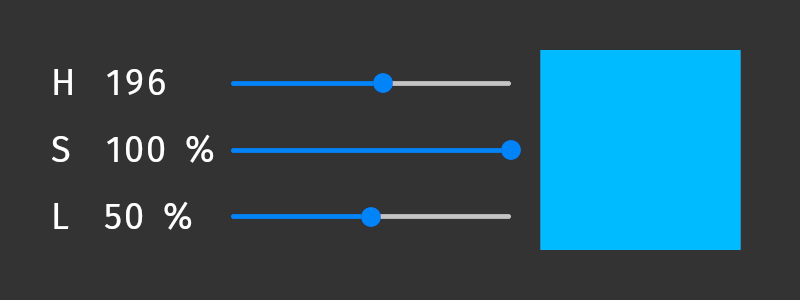
# Interprets the values of three sliders as hue, saturation, and lightness
# values and converts the resulting HSL color through sRGB color space to
# linear color space.
# For example, to fill an Empty Node 2D node with the color, bind the
# Brush Color property of that node to this binding expression.
#
hslVec = Vector4(0, 0, 0, 1)
# Get the hue from the value of a slider whose range is 0 .. 360.
hslVec.x = {@../Hue Slider/RangeConcept.Value} / 360
# Get the saturation from the value of a slider whose range is 0 .. 100.
hslVec.y = {@../Saturation Slider/RangeConcept.Value} / 100
# Get the lightness from the value of a slider whose range is 0 .. 100.
hslVec.z = {@../Lightness Slider/RangeConcept.Value} / 100
# Convert the color from HSL to sRGB color space.
srgbColor = Color4(hslToSrgb(hslVec))
# Convert the color from sRGB to linear color space.
sRGBToLinear(srgbColor)
# Interprets the translation of a 3D node as an HSL color and converts that
# color to sRGB.
# For example, when you bind the Ambient Color property of a 3D node to this
# binding expression, the color changes when you move the node along the 3D
# axes within the range 0 .. 10:
# - Hue changes along the x axis.
# - Saturation increases along the y axis.
# - Lightness increases along the z axis.

x = {@./Node3D.RenderTransformation}.translationX
y = {@./Node3D.RenderTransformation}.translationY
z = {@./Node3D.RenderTransformation}.translationZ

position = Vector3(0, 0, 0)
position.x = abs(x) / 10
position.y = abs(y) / 10
position.z = abs(z) / 10

rgbVector = hslToSrgb(position)

output = Color4(0, 0, 0, 1)
output.r = rgbVector.x
output.g = rgbVector.y
output.b = rgbVector.z

sRGBToLinear(output)
|
linearTosRGB
将值从线性色彩空间转换为sRGB色彩空间。此函数不转换颜色值的alpha通道。
例如,在着色器期望 sRGB 颜色的材质类型中,将此函数用于统一绑定。
语法 |
|
||
参数 |
|
||
返回 |
与输入参数相同的类型 |
||
示例 |
# Converts the value of the Diffuse Color property from linear color space to
# sRGB color space.
# When you bind in a material type a color uniform to this binding expression,
# Kanzi writes the color value to the render state and uses it as the value of
# the color uniform when rendering the nodes that use the material type.
linearTosRGB({./Diffuse})
|
premultiplyColor
将颜色中 RGB 通道的值乘以 alpha 通道的值:
Color4(color.r * color.a, color.g * color.a, color.b * color.a, color.a)
语法 |
|
||
参数 |
|
||
返回 |
与输入参数相同的类型 |
||
示例 |
# Premultiplies the color that you bind to this binding expression.
premultiplyColor(getCurrentValue())
|
srgbToHsl
将值从 sRGB 色彩空间转换为 HSL 色彩空间。此函数不会转换颜色值的 alpha 通道。
例如,使用此函数在 Text Block 节点中显示颜色的饱和度值。
要访问 HSL 颜色值 hslVector 的组件,请使用:
hslVector.x用于色调。hslVector.y用于饱和度。hslVector.z用于亮度。
语法 |
|
||
参数 |
|
||
返回 |
如果参数是 Vector4 或 Color4,则返回 Vector4。如果参数是 Vector3,则返回 Vector3。 |
||
示例 |
# Returns Vector4(0.25, 1, 0.5, 1) which represents the color
# hsla(90, 100%, 50%, 1).
sourceColor = Color4(0.5, 1, 0, 1)
sRGBColor = linearTosRGB(sourceColor)
hslVector = srgbToHsl(sRGBColor)
hslVector
# Converts the value of the Brush Color property in the parent node from linear
# color space to HSL color space and prints the saturation value of the color in
# percentage. For example, you can bind this expression to the Text property of
# a Text Block node.
srgbColor = linearTosRGB({@../ColorBrush.Color})
hslVector = srgbToHsl(srgbColor)
string(int(hslVector.y * 100)) + "%"
|
sRGBToLinear
将值从 sRGB 色彩空间转换为线性色彩空间。此函数不转换颜色值的 alpha 通道。
例如,使用此函数将值转换为线性色彩空间,然后再将该值分配给颜色属性的红色、绿色或蓝色通道。
语法 |
|
||
参数 |
|
||
返回 |
与输入参数相同的类型 |
||
示例 |
# Returns the RGBA color (0, 192, 64, 255).
# This expression is equivalent to Color4(0, 0.75, 0.25, 1).
color = Color4(0, 0, 0, 1)
color.g = sRGBToLinear(0.75)
color.b = sRGBToLinear(0.25)
color
# Assigns the value of custom property MyFloatPropertyType to the
# red color channel of a color property.
#
# Get the current value of the target color property.
color = getCurrentValue()
# Convert the value of MyFloatPropertyType from sRGB color space to
# linear color space and assign it to the red color channel of the
# color property.
color.r = sRGBToLinear({@./MyFloatPropertyType})
# Return the color.
color
# Converts the value of the Ambient Color property from sRGB color space to
# linear color space.
# When you bind in a material type a color uniform to this binding expression,
# Kanzi writes the color value to the render state and uses it as the value of
# the color uniform when rendering the nodes that use the material type.
sRGBToLinear(getAmbient())
|
范围函数 (Range functions)
范围属性类型存储一组值。在绑定中使用范围来:
从范围中读取各个值。
同时操作多个值。
将多个值写入数组输出。
createView
创建一个范围的视图。该视图引用输入范围的值,但其长度是有限的。
您可以为同一个 range 创建多个视图。当您迭代视图时,迭代指的是输入 range 中的位置。
请参阅 光照统一绑定。
语法 |
|
||||||
参数 |
|
||||||
返回 |
一个范围,指的是输入范围的值,但其长度限制为输入 |
||||||
示例 |
# This is the default PointLightColor uniform binding in a material type that uses
# lights. The binding creates a view over the range of Point Light nodes in the
# scene and accesses the Point Light Color property of each Point Light node in that
# view. The length of the view is determined by the number of Point Light nodes
# supported by the material type.
pointLightsView = createView<OutputSize>({##RenderPass/DrawObjectsRenderPass.PointLights})
{pointLightsView ... PointLightColor}
# Modify the default PointLightColor uniform binding in a material type that uses
# lights. Set the length of the view over the range of Point Light nodes to the
# value of the MyLengthProperty set in a node that uses the material type that has
# this binding.
# This binding uses the createView(range, length) syntax where length can be
# a variable or constant value.
length = {./MyLengthProperty}
pointLightsView = createView({##RenderPass/DrawObjectsRenderPass.PointLights}, length)
{pointLightsView ... PointLightColor}
# Modify the default PointLightColor uniform binding in a material type that uses
# lights. Set the length of the view over the range of Point Light nodes to 2.
# This binding uses the createView<constantLength>(range) syntax where constantLength
# is a constant value.
pointLightsView = createView<2>({##RenderPass/DrawObjectsRenderPass.PointLights})
{pointLightsView ... PointLightColor}
|
评估
将范围迭代器转换为该范围的评估。使用此函数逐步遍历存储在范围属性中的值集合。
evaluate 函数推进范围迭代器,并返回推进前范围迭代器中的位置。
对于范围迭代器中的位置,evaluate 函数不会修改迭代器,而是返回下一个迭代位置。
使用 splitString 函数创建一个范围迭代器进行评估。
语法 |
|
||
参数 |
|
||
返回 |
范围:输入范围的评估 |
||
示例 |
# Returns "two".
myRange = splitString("one,two,three", ",")
evaluate(myRange)
string(evaluate(myRange))
# Sets the 2D Render Transformation property Translation property fields
# to the values that the user enters in the Text Box 2D node.
# For example, "100, 50" sets the Render Transformation property:
# - Translation X property field to 100
# - Translation Y property field to 50
renderTransformation = getCurrentValue()
stringRange = splitString({@../Text Box 2D/TextConcept.Text}, ",")
renderTransformation.translationX = float(stringRange)
evaluate(stringRange)
renderTransformation.translationY = float(stringRange)
renderTransformation
# This example is equivalent to the previous example.
renderTransformation = getCurrentValue()
stringRange = splitString({@../Text Box 2D/TextConcept.Text}, ",")
x = evaluate(stringRange)
y = evaluate(stringRange)
renderTransformation.translationX = float(x)
renderTransformation.translationY = float(y)
renderTransformation
|
splitString
将文本字符串拆分为子字符串集合,并将该集合作为范围迭代器返回,您可以使用该迭代器逐步遍历子字符串集合。使用 评估 函数一次返回一个子字符串。
请参阅 使用绑定将文本拆分为多个部分。
语法 |
|
||||
参数 |
|
||||
返回 |
范围 |
||||
示例 |
# Returns "two".
myRange = splitString("one,two,three", ",")
evaluate(myRange)
string(evaluate(myRange))
# Returns "three".
myRange = splitString("one, two, three", ", ")
evaluate(myRange)
evaluate(myRange)
string(myRange)
|
网格函数
网格是存储顶点和索引数据的资源。使用网格函数可以访问网格的 GPU 缓冲区和维度,例如,当您要将网格的顶点缓冲区作为存储缓冲区绑定到 Compute Render Pass,或使用顶点数或索引数来驱动绘制参数时。
缓冲区访问函数返回支持网格的某个顶点特性或索引缓冲区的 GPU 缓冲区资源。如果输入不包含网格资源,或者所请求的特性不存在,这些函数将返回空缓冲区资源。
meshGetIndexBuffer
以 GPU 缓冲区资源的形式获取网格的索引缓冲区。例如,使用此函数将网格的索引缓冲区绑定到 Compute Render Pass,以便计算着色器能够读取或处理这些索引。
语法 |
|
||
参数 |
|
||
返回 |
GPU 缓冲区资源 如果输入参数不包含网格资源,或者网格没有索引缓冲区,则返回空缓冲区资源。 |
||
示例 |
# Gets the index buffer of a mesh resource that you set in the
# custom property type MyMeshPropertyType.
meshGetIndexBuffer({./MyMeshPropertyType})
# Gets the index buffer of the mesh used by a sibling Model3D node.
meshGetIndexBuffer({@../Model/Model3D.Mesh})
|
meshGetIndexCount
获取网格索引缓冲区中的索引数。例如,使用此函数来驱动处理网格索引的 Compute Render Pass 的调度尺寸,或设置间接绘制的绘制数。
语法 |
|
||
参数 |
|
||
返回 |
整数 (Integer) 如果输入参数不包含网格资源,或者网格没有索引缓冲区,则返回 0。 |
||
示例 |
# Gets the number of indices in a mesh resource that you set in the
# custom property type MyMeshPropertyType.
meshGetIndexCount({./MyMeshPropertyType})
|
meshGetNormalBuffer
获取存储网格顶点法线的 GPU 缓冲区。例如,使用此函数将网格的法线缓冲区作为输入绑定到执行逐顶点光照或表面分析的 Compute Render Pass。
语法 |
|
||
参数 |
|
||
返回 |
GPU 缓冲区资源 如果输入参数不包含网格资源,或者网格没有法线顶点特性,则返回空缓冲区资源。 |
||
示例 |
# Gets the normal buffer of a mesh resource that you set in the
# custom property type MyMeshPropertyType.
meshGetNormalBuffer({./MyMeshPropertyType})
|
meshGetPositionBuffer
获取存储网格顶点位置的 GPU 缓冲区。例如,使用此函数将网格的位置缓冲区作为输入绑定到执行顶点变换、剔除或几何分析的 Compute Render Pass。
语法 |
|
||
参数 |
|
||
返回 |
GPU 缓冲区资源 如果输入参数不包含网格资源,或者网格没有位置顶点特性,则返回空缓冲区资源。 |
||
示例 |
# Gets the position buffer of a mesh resource that you set in the
# custom property type MyMeshPropertyType.
meshGetPositionBuffer({./MyMeshPropertyType})
# Gets the position buffer of the mesh used by a sibling Model3D node.
meshGetPositionBuffer({@../Model/Model3D.Mesh})
|
meshGetTangentBuffer
获取存储网格顶点切线的 GPU 缓冲区。例如,使用此函数将网格的切线缓冲区作为输入绑定到执行法线贴图或其他切线空间操作的 Compute Render Pass。
语法 |
|
||
参数 |
|
||
返回 |
GPU 缓冲区资源 如果输入参数不包含网格资源,或者网格没有切线顶点特性,则返回空缓冲区资源。 |
||
示例 |
# Gets the tangent buffer of a mesh resource that you set in the
# custom property type MyMeshPropertyType.
meshGetTangentBuffer({./MyMeshPropertyType})
|
meshGetUVBuffer
获取存储网格指定 UV 通道的顶点纹理坐标的 GPU 缓冲区。例如,使用此函数将网格的 UV 缓冲区作为输入绑定到处理纹理空间数据的 Compute Render Pass。
语法 |
|
||||
参数 |
|
||||
返回 |
GPU 缓冲区资源 如果输入参数不包含网格资源、通道索引为负数,或者网格在指定通道上没有 UV 顶点特性,则返回空缓冲区资源。 |
||||
示例 |
# Gets the first UV buffer of a mesh resource that you set in the
# custom property type MyMeshPropertyType.
meshGetUVBuffer({./MyMeshPropertyType}, 0)
# Gets the second UV buffer of the mesh used by a sibling Model3D node.
meshGetUVBuffer({@../Model/Model3D.Mesh}, 1)
|
meshGetVertexCount
获取网格中的顶点数。例如,使用此函数驱动处理逐顶点数据的 Compute Render Pass 的调度大小,或者设置非索引绘制的绘制数量。
语法 |
|
||
参数 |
|
||
返回 |
整数 (Integer) 如果输入参数不包含网格资源,则返回 0。 |
||
示例 |
# Gets the number of vertices in a mesh resource that you set in the
# custom property type MyMeshPropertyType.
meshGetVertexCount({./MyMeshPropertyType})
|
纹理函数 (Texture functions)
纹理是可用于渲染以表示图像的资源。使用纹理函数访问纹理的属性。
textureGetAddressingMode
获取纹理的寻址模式,您可以使用以下任一方式进行设置:
在纹理资源中的 Wrap Mode 属性。
Composition Target 渲染通道中的 Addressing Mode 属性。
例如,使用此函数获取纹理的寻址模式,当您想将该寻址模式用作其他绑定中决策的输入时。
语法 |
|
||
参数 |
|
||
返回 |
整数:
|
||
示例 |
# Gets the addressing mode of a texture resource that you set
# in the custom property type MyTexturePropertyType.
textureGetAddressingMode({./MyTexturePropertyType})
# Gets the addressing mode of the first Result Texture of sibling
# Composition Target render pass named Compose.
textureGetAddressingMode({@../Compose/CompositionTargetRenderPass.ResultTexture0})
|
textureGetAnisotropyLevel
获取纹理的各向异性级别,该级别是您在纹理资源中使用 Anisotropy 属性设置的。 例如,当您想将该各向异性级别用作其他绑定中决策的输入时,使用此函数获取纹理资源的各向异性级别。
语法 |
|
||
参数 |
|
||
返回 |
整数:
|
||
示例 |
# Gets the anisotropy level of a texture resource that you set in
# the custom property type MyTexturePropertyType.
textureGetAnisotropyLevel({./MyTexturePropertyType})
|
textureGetDepthCompareFunction
获取 Render Target Texture 资源的深度比较函数,您将 Composition Target 渲染通道的结果纹理渲染到该资源。例如,当您想将纹理资源的深度比较函数用作其他绑定中决策的输入时,使用此函数获取该函数。
语法 |
|
||
参数 |
|
||
返回 |
整数:
|
||
示例 |
# Gets the depth compare function of a Render Target Texture resource that you set
# in the custom property type MyRenderTargetTexturePropertyType.
textureGetDepthCompareFunction({./MyRenderTargetTexturePropertyType})
# Gets the depth compare function of the Result Depth Texture of sibling
# Composition Target render pass named Compose.
textureGetDepthCompareFunction({@../Compose/CompositionTargetRenderPass.ResultDepthTexture})
|
textureGetFilterMode
获取您可以使用以下任一方式设置的纹理的过滤模式:
在纹理资源中的 Minification Filter 属性。
Composition Target 渲染通道中的 Filter Mode 属性。
例如,使用此函数获取纹理资源的过滤模式,当您想将该过滤模式用作其他绑定中决策的输入时。
语法 |
|
||
参数 |
|
||
返回 |
整数:
|
||
示例 |
# Gets the value of the Minification Filter property of a texture resource that
# you set in the custom property type MyTexturePropertyType.
textureGetFilterMode({./MyTexturePropertyType})
# Gets the filter mode of the first Result Texture of sibling
# Composition Target render pass named Compose.
textureGetFilterMode({@../Compose/CompositionTargetRenderPass.ResultTexture0})
|
textureGetHeight
获取纹理的高度。例如,使用此函数当您想要使用纹理资源的高度来设置节点的高度时。
语法 |
|
||
参数 |
|
||
返回 |
整数 (Integer) 如果输入参数不包含纹理资源,则返回 -1。 |
||
示例 |
# Gets the height of a texture resource that you set in the custom property type
# MyTexturePropertyType.
textureGetHeight({./MyTexturePropertyType})
# Gets the height of the texture shown in the Image node which is a sibling of
# the node to which you add the binding.
textureGetHeight({@../Image/Image2D.Image})
|
textureGetMipmapMode
获取纹理的 mipmap 模式,您可以使用纹理资源或 Composition Target 渲染通道中的 Mipmap Mode 属性设置该模式。例如,当您想将纹理资源的 mipmap 模式用作其他绑定中决策的输入时,使用此函数获取该 mipmap 模式。
语法 |
|
||
参数 |
|
||
返回 |
整数:
|
||
示例 |
# Gets the mipmap mode of a texture resource that you set in
# the custom property type MyTexturePropertyType.
textureGetMipmapMode({./MyTexturePropertyType})
# Gets the mipmap mode of the first Result Texture of sibling
# Composition Target render pass named Compose.
textureGetMipmapMode({@../Compose/CompositionTargetRenderPass.ResultTexture0})
|
textureGetMultisampleLevel
获取 Render Target Texture 资源的多重采样级别。例如,使用此函数获取渲染目标纹理的多重采样级别,当您想将该多重采样级别用作其他绑定中决策的输入时。
只有当目标平台支持隐式多重采样时,多重采样级别才有意义。Composition Target 渲染通道使用的渲染缓冲区多重采样在向 Single Texture 资源执行 blit 操作的过程中解析样本,因此结果纹理不是多重采样的。请参阅 使用多重采样。
语法 |
|
||
参数 |
|
||
返回 |
整数:
|
||
示例 |
# Gets the multisample level of a Render Target Texture resource that you set in
# the custom property type MyRenderTargetTexturePropertyType.
textureGetMultisampleLevel({./MyRenderTargetTexturePropertyType})
|
textureGetPixelFormat
获取纹理的像素格式。例如,使用此函数在您希望将该像素格式用作其他绑定中决策输入时获取纹理资源的像素格式。
语法 |
|
||
参数 |
|
||
返回 |
整数 (Integer) 返回值对应于 如果输入参数不包含纹理资源,则返回 -1。 |
||
示例 |
# Gets the pixel format of a texture resource that you set in
# the custom property type MyTexturePropertyType.
textureGetPixelFormat({./MyTexturePropertyType})
# Gets the pixel format of the first Result Texture of sibling
# Composition Target render pass named Compose.
textureGetPixelFormat({@../Compose/CompositionTargetRenderPass.ResultTexture0})
|
textureGetSize
获取纹理的大小。例如,使用此函数当您想使用纹理资源的大小来设置节点的大小时。
语法 |
|
||
参数 |
|
||
返回 |
Vector2 如果输入参数不包含纹理资源,则返回 Vector2(-1.0f, -1.0f)。 |
||
示例 |
# Gets the size of a texture resource that you set in the custom property type
# MyTexturePropertyType.
textureGetSize({./MyTexturePropertyType})
|
textureGetWidth
获取纹理的宽度。例如,当您想使用纹理资源的宽度来设置节点的宽度时,使用此函数。
语法 |
|
||
参数 |
|
||
返回 |
整数 (Integer) 如果输入参数不包含纹理资源,则返回 -1。 |
||
示例 |
# Gets the width of a texture resource that you set in the custom property type
# MyTexturePropertyType.
textureGetWidth({./MyTexturePropertyType})
# Gets the width of the texture shown in the Image node which is a sibling of
# the node to which you add the binding.
textureGetWidth({@../Image/Image2D.Image})
|
通用绑定表达式
变量
在绑定表达式中,您可以使用变量。
# Assigns the value 1 to the variable 'A', and binds the value of
# the variable to the selected property.
A = 1
# Same as above, but using an alternative syntax.
A = (1)
属性绑定
要将一个属性绑定到另一个属性,请在花括号中输入:
包含您要绑定的属性的节点的相对路径。
正斜杠。
源属性的名称。
小技巧
当在绑定表达式中使用 @ 符号并将其放在节点路径前面时,Kanzi Studio:
检查路径是否有效,如果路径无效,则在 Binding Editor 中显示错误消息。
每当节点树中源节点和目标节点之间的位置发生变化时,更新绑定表达式中的路径。
使用 @ 符号,您只能在同一个预设内创建绑定,而不能在预设之间创建绑定。
您可以将属性名称从 Properties 拖动到 Binding Editor。
您可以对属性值和属性字段值使用运算符和小括号。
语法 |
|
||||
参数 |
|
||||
示例 |
# Binds to the Layout Width property of the current node.
{@./Node.Width}
# Binds to the FOV property of the Camera node.
{@../Camera/Fov}
# Same as above, but Kanzi Studio does not track the location of the target node.
{../Camera/Fov}
# Binds to the Vertical Margin property of the Box node.
{@../Box/LayoutVerticalMargin}
# Multiplies the FOV property with the Layout Transformation Scale x
# property field.
{@../Camera/Fov} * {../Box/LayoutTransformation}.scaleX
# Binds each vector of a property to the Render Transformation property
# Translation X and Translation Y property fields of the current node.
# In the Binding Editor set the Target Property to a property that uses the
# Vector2D data type. For example, use the Horizontal Margin property.
x = {@./Node3D.RenderTransformation}.translationX
y = {@./Node3D.RenderTransformation}.translationY
myVector = Vector2(0.0, 0.0)
myVector.vectorX = x
myVector.vectorY = y
myVector
|
属性字段绑定
要将属性绑定到属性的属性字段,请输入:
在大括号中:节点的相对路径、正斜杠和属性名称。
一个句号。
属性字段的名称。
颜色和变换属性具有特殊的属性字段名称。请参阅 颜色属性字段绑定 和 Transformation 属性字段绑定。
对于其他属性的属性字段,使用 N 或 VectorN,其中 N 是 X、Y、Z 或 W,表示属性在 Kanzi Studio Properties 窗口中列出的顺序:
描述 (Description) |
属性字段标签 |
属性字段 |
|---|---|---|
第一个属性字段 |
X |
x,vectorX |
第二个属性字段 |
Y |
y,vectorY |
第三个属性字段 |
Z |
z,vectorZ |
第四个属性字段 |
W |
w,vectorW |
您可以对属性值和属性字段值使用运算符和小括号。
要将同一节点中一个属性的属性字段绑定到该属性的另一个属性字段,使用 getCurrentValue 函数获取该属性的值。
语法 |
|
||||||
参数 |
|
||||||
示例 |
# Point Light and Spot Light nodes have an attenuation property that
# has three property fields: Constant, Linear, and Quadratic.
# For example, for the Point Light Attenuation:
# To bind to the first property field (Constant)
{@../Light/PointLightAttenuation}.x
# To bind to the second property field (Linear)
{@../Light/PointLightAttenuation}.y
# To bind to the third property field (Quadratic)
{@../Light/PointLightAttenuation}.z
# Binds to the Horizontal Padding property Left property field of the Text node.
{@../Text/TextConcept.HorizontalPadding}.x
# Binds to the Vertical Margin property Bottom property field of the Image node.
{@../Image/Node.VerticalMargin}.vectorX
# Binds to the Vertical Margin property Top property field of the Image node.
{@../Image/Node.VerticalMargin}.vectorY
# Binds to the MyProject.MyProperty property Y property field of the parent node.
{@../MyProject.MyProperty}.y
|
颜色属性字段绑定
要将属性绑定到颜色属性字段,请使用这些名称:
描述 (Description) |
属性字段标签 |
属性字段 |
|---|---|---|
红色通道值 |
R |
r,colorR |
绿色通道值 |
G |
g,colorG |
蓝色通道值 |
B |
b,colorB |
Alpha 通道值 |
A |
a,colorA |
语法 |
|
||||||
参数 |
|
||||||
示例 |
# Binds to the Point Light Color property R property field
# (value of the red color channel) of the Point Light node.
{@../Point Light/PointLightColor}.r
# Binds to the Brush Color property G property field
# (value of the green color channel) of the parent node.
{@../ColorBrush.Color}.colorG
# Assigns the value of custom property MyFloatPropertyType to the
# red color channel of a color property.
#
# Get the current value of the target color property.
color = getCurrentValue()
# Convert the value of MyFloatPropertyType from sRGB color space to
# linear color space and assign it to the red color channel of the
# color property.
color.r = sRGBToLinear({@./MyFloatPropertyType})
# Return the color.
color
|
Transformation 属性字段绑定
要将属性绑定到转换属性字段,请使用这些名称:
描述 (Description) |
属性字段标签 |
属性字段 |
|---|---|---|
3D 节点围绕 X、Y 和 Z 轴旋转的值,您可以使用旋转函数进行设置。请参阅 创建旋转、创建绕 X 轴的旋转、创建绕 Y 轴的旋转、创建绕 Z 轴的旋转、旋转 (Rotate)、绕 X 轴旋转、绕 Y 轴旋转 和 绕 Z 轴旋转。 |
Rotation |
旋转 (Rotation) |
2D 节点围绕 Z 轴旋转的角度值 |
Rotation R |
RotationZ |
节点沿 X 轴缩放的比例值 |
Scale X |
ScaleX |
节点沿 Y 轴缩放的比例值 |
Scale Y |
ScaleY |
节点沿 Z 轴缩放的比例值 |
Scale Z |
ScaleZ |
节点在 X 轴上的位置值 |
Translation X |
x,translationX |
节点在 Y 轴上的位置值 |
Translation Y |
y,translationY |
节点在 Z 轴上的位置值 |
Translation Z |
z,translationZ |
语法 |
|
||||||
参数 |
|
||||||
示例 |
# Binds to the Render Transformation property Translation X property field
# of the Image node.
{@../Image/Node2D.RenderTransformation}.x
# Binds to the Layout Transformation property Scale Y property field
# of the Box node.
{../Box/LayoutTransformation}.scaleY
# Multiplies the FOV property of the Camera node with the Render
# Render Transformation property Scale X property field of the
# Box node.
{../Camera/Fov} * {../Box/RenderTransformation}.scaleX
# Binds each vector of a property to the Render Transformation property
# Translation X and Translation Y property fields of the current node.
# In the Binding Editor set the Target Property to a property that uses the
# Vector2D data type. For example, use the Horizontal Margin property.
x = {@./Node3D.RenderTransformation}.translationX
y = {@./Node3D.RenderTransformation}.translationY
myVector = Vector2(0.0, 0.0)
myVector.vectorX = x
myVector.vectorY = y
myVector
# Gets the value of the Translation X property field of the
# transformation property that you bind to this expression.
getCurrentValue().translationX
|
预设件根绑定
节点预设或渲染通道预设可以包含一个节点或渲染通道的树结构,每个都有其自己的属性。当您编辑预设或其任何实例中的节点或渲染通道时,您会更改该预设的所有实例中的那些节点或渲染通道。然而,您可以通过覆盖默认预设中的值来定制预设的单个实例以具有单独的值。例如,当您为联系人列表条目创建一个预设时,您希望为每个联系人列表条目显示不同的姓名、号码和照片。
要将某个预设件中任意节点或渲染通道的属性绑定到该预设件实例的根中的属性,请在绑定表达中,在花括号中输入 ##Template,后跟一个正斜杠和您要绑定的预设件实例根中的属性名称。
例如,使用 ##Template 绑定语法,当您在 Button 预设中有一个 Text Block 节点,并且您希望在该预设的不同实例中显示不同的文本时。
小技巧
您可以让 Kanzi Studio 为您创建一个预设根绑定。当您选择预设中的任何节点或渲染通道预设中的任何渲染通道时,在 Properties 中单击属性旁边的  ,Kanzi Studio:
从该属性创建一个自定义属性。
将该自定义属性添加到预设件,并在该预设件的每个实例中,将该自定义属性按照常用属性显示。
在节点或渲染通道中创建
##Template绑定到预设根中的自定义属性。
请参阅 自定义预设件的实例。
语法 |
|
||
参数 |
|
||
示例 |
# Binds to the MyProject.ContactNameText property in the root of the prefab
# instance.
{##Template/MyProject.ContactNameText}
|
别名绑定
要将属性绑定到别名,请在花括号中输入 # 符号,后跟别名名称、正斜杠以及别名所指向的项的属性名称。请参阅 使用别名。
语法 |
|
||||
参数 |
|
||||
示例 |
# Binds to the Layout Width property of the target node of the alias named Grid.
{#Grid/Node.Width}
# Multiplies the FOV property of the target node of the alias named MainCamera
# with the Render Transformation property Scale X property field.
{#MainCamera/Fov} * {../Box/RenderTransformation}.scaleX
|
数据源绑定
要将数据对象绑定到属性或属性字段,请在大括号中输入 DataContext,后跟一个句点,然后是您要绑定属性或属性字段的数据对象。使用句点访问子数据对象。
语法 |
|
||
参数 |
|
||
示例 |
# Binds the property value of the item to the speed data object
# which is a child data object of the gauges data object
# in the data context of the item.
{DataContext.gauges.speed}
# Binds the data context itself. For example, use this if you want to
# use the current data context as the property value.
{DataContext}
|
Grid Layout 绑定
要使用绑定在 Grid Layout 节点中设置列和行的大小,请在引号中输入每个值,后跟分号:
使用浮点数来指定行或列的大小是固定的。这与您在 Properties 中将 Columns 或 Rows 属性的值设置为 Fixed 并定义此列或行的大小时相同。
添加星号前缀以指定行或列的大小是成比例的。这与您在 Properties 中将 Columns 或 Rows 属性的值设置为 Proportional 并定义该列或行所占的 Grid Layout 的比例时相同。
将定义留空以指定 Grid Layout 节点自动设置行或列的大小。这与您在 Properties 中将 Columns 或 Rows 属性的值设置为 Automatic 时相同。
语法 |
|
||
参数 |
|
||
示例 |
# This binding to the Columns property sets the width of each of the three columns
# to a fixed size:
# - The width of the first column is 2.0.
# - The width of the second column is 3.0.
# - The width of the third column is 4.0.
"2.0;3.0;4.0;"
# This binding to the Rows property sets the height of each of the three rows
# to the fixed size 5.0.
"5.0;5.0;5.0;"
# This binding to the Rows property sets the height of the two rows to the height
# of their content.
";;"
# This binding to the Columns property sets the width of the columns in relation
# to the total width of the Grid Layout node:
# - The width of the first column is 1/6 of the width of the Grid Layout node.
# - The width of the second column is 2/6 of the width of the Grid Layout node.
# - The width of the third column is 3/6 of the width of the Grid Layout node.
"*1.0;*2.0;*3.0;"
|
材质类型绑定表达式
材质类型中的绑定使您能够:
无需编辑着色器代码即可修改着色器统一变量的值。请参阅 Uniform bindings。
将绑定的结果存储到临时变量中,以便您可以在其他绑定中引用。请参阅 临时变量绑定。
Uniform binding functions
在材质类型中,顶点和片段着色器定义了可以在该材质中使用的uniforms和属性类型。当使用特定材质类型渲染3D节点时,uniform绑定允许 Kanzi 将值写入渲染状态,并将这些值用于uniforms和属性类型。
请参阅 着色器 uniform 和 Uniform bindings。
为了减少内存消耗并提高性能,Kanzi 提供了最常用着色器统一变量的绑定函数。Kanzi 每帧执行所有使用这些函数的绑定。
getAmbient
在统一绑定表达式中,获取 Ambient Color 属性的值。
getAmbient() 是 Ambient 着色器统一变量的默认绑定。
语法 |
|
返回 |
颜色:Ambient Color 属性的值。 |
getCameraPosition
在统一绑定表达式中,获取世界空间中的相机位置。
getCameraPosition() 是 kzCameraPosition 着色器统一变量的默认绑定。
语法 |
|
返回 |
Vector 3D:相机在世界空间中的位置。 |
getCameraWorldMatrix
在统一绑定表达式中,获取将点或矩阵从局部空间转换到视图(相机)空间的矩阵。
getCameraWorldMatrix() 是 kzCameraWorldMatrix 着色器统一变量的默认绑定。
kzCameraWorldMatrix uniform 是预乘矩阵 kzCameraMatrix * kzWorldMatrix,其中:
kzCameraMatrix从世界空间转换到视图(相机)空间。kzWorldMatrix从局部空间转换到世界空间。请参阅 getWorldMatrix。
语法 |
|
返回 |
4x4 矩阵:将点或矩阵从局部空间转换到视图(相机)空间的矩阵。 |
getNormalMatrix
在统一绑定表达式中,获取将对象法线从局部空间转换到世界空间的矩阵。
getNormalMatrix() 是 kzNormalMatrix 着色器统一变量的默认绑定。
语法 |
|
返回 |
4x4 矩阵:将对象法线从局部空间转换到世界空间的矩阵。 |
getCameraNormalMatrix
在统一绑定表达式中,获取矩阵以将对象法线从局部空间转换到视图(相机)空间。
getCameraNormalMatrix() 是 kzCameraNormalMatrix 着色器统一变量的默认绑定。
kzCameraNormalMatrix uniform 是预乘矩阵 kzCameraMatrix * kzNormalMatrix,其中:
kzCameraMatrix从世界空间转换到视图(相机)空间。kzNormalMatrix从局部空间转换到世界空间。请参阅 getNormalMatrix。
语法 |
|
返回 |
4x4 矩阵:将对象法线从局部空间转换到视图(相机)空间的矩阵。 |
getProjectionCameraWorldMatrix
在统一绑定表达式中,获取将点或矩阵从局部空间转换到屏幕空间的矩阵。
getProjectionCameraWorldMatrix() 是 kzProjectionCameraWorldMatrix 着色器统一变量的默认绑定。
kzProjectionCameraWorldMatrix uniform 是预乘矩阵 kzProjectionMatrix * kzCameraMatrix * kzWorldMatrix,其中:
kzProjectionMatrix从视图空间转换到屏幕空间。kzCameraMatrix从世界空间转换到视图(相机)空间。kzWorldMatrix从局部空间转换到世界空间。请参阅 getWorldMatrix。
语法 |
|
返回 |
4x4 矩阵:将点或矩阵从局部空间转换到屏幕空间的矩阵。 |
getViewPosition
在统一绑定表达式中,获取可用于计算视图方向的向量。
getViewPosition() 是 kzViewPosition 着色器统一变量的默认绑定。
kzViewPosition uniform 是一个齐次位置向量,您可以将其用作 kzWorldMatrix * vec4(kzPosition.xyz, 1.0) * kzViewPosition.w - kzViewPosition.xyz 来计算视图方向,其中:
kzWorldMatrix将一个点从局部空间转换为世界空间。请参阅 getWorldMatrix。kzViewPosition.w确定向量是空间中的位置 (w==1) 还是方向 (w==0)。
语法 |
|
返回 |
4D 向量:齐次位置向量,您可以使用它来计算视图方向。 |
getWorldMatrix
在统一绑定表达式中,获取将点或矩阵从局部空间转换到世界空间的矩阵。
getWorldMatrix() 是 kzWorldMatrix 着色器统一变量的默认绑定。
语法 |
|
返回 |
4x4 矩阵:将点或矩阵从局部空间转换到世界空间的矩阵。 |
材质类型绑定中的渲染通道属性
在材质类型绑定表达式中,要引用使用材质类型绘制节点的渲染通道中的属性,请在大括号中输入:
##RenderPass正斜杠
要绑定到的渲染通道中的属性名称
请参阅 材质类型绑定。
语法 |
|
||
参数 |
|
||
示例 |
# Binds to the MyProperty property in a render pass that draws nodes using the
# material type that has this binding.
{##RenderPass/MyProperty}
# This binding to a Matrix 4x4 property returns the inverse matrix of the product
# of the Calculated Projection Matrix and Calculated Camera Matrix properties in
# the Draw Objects render pass that draws nodes using the material type that has
# this binding.
projection = {##RenderPass/DrawObjectsRenderPass.ProjectionMatrix}
camera = {##RenderPass/DrawObjectsRenderPass.CameraMatrix}
inverse(projection * camera)
# This binding to a temporary variable property uses the evaluate binding function
# to step through a collection of values stored in the MyColorRange range property
# in the Draw Objects render pass that draws nodes using the material type that
# has this binding. The binding modifies the state of the range iterator in the
# render pass.
evaluate({##RenderPass/MyColorRange})
|
光照统一绑定
在材质类型中,顶点和片段着色器定义了可以在该材质中使用的uniforms和属性类型。当使用特定材质类型渲染3D节点时,uniform绑定允许 Kanzi 将值写入渲染状态,并将这些值用于uniforms和属性类型。
请参阅 使用材料类型 和 渲染 (Rendering)。
灯光属性类型,例如 DirectionalLightColor、SpotLightPosition 和 PointLightAttenuation,支持统一数组。这使您能够使用多个相同类型的灯光。请参阅 光源属性类型的 uniform 数组。
光属性类型的统一绑定根据从使用该属性类型的光源中提取的值在渲染状态中设置统一值。例如,PointLightColor 属性类型的统一绑定根据场景中所有 Point Light 节点中 Point Light Color 属性的各个值设置渲染值,这些节点为使用具有该绑定的材质类型的 3D 节点提供照明。
要获取包含特定类型的每个灯光节点中属性值的范围,请在绑定表达式中输入大括号 ##RenderPass/DrawObjectsRenderPass.[lightType],后跟省略号和灯光节点中属性的名称。
要对一系列灯光执行累积操作,请使用 ... 运算符,然后使用算术运算符。
请参阅 createView。
语法 |
|
||||
参数 |
|
||||
示例 |
# This binding adds in each Point Light node the value 0.5 to the value of
# the Point Light Attenuation property Constant property field.
pointLightsView = createView<OutputSize>({##RenderPass/DrawObjectsRenderPass.PointLights})
{pointLightsView ... PointLightAttenuation} + Vector3(0.5, 0.0, 0.0)
# This binding to a light color uniform halves the value of the Directional
# Light Color property in each Directional Light node.
directionalLightsView = createView<OutputSize>({##RenderPass/DrawObjectsRenderPass.DirectionalLights})
{directionalLightsView ... DirectionalLightColor} * 0.5
# This binding to a light color uniform multiplies in each Directional Light node
# the value of the Directional Light Color property by the value of the Opacity
# property and returns the result range.
rangeA = {##RenderPass/DrawObjectsRenderPass.DirectionalLights ... DirectionalLightColor}
rangeB = {##RenderPass/DrawObjectsRenderPass.DirectionalLights ... Node.Opacity}
rangeA * rangeB
# Get the range that contains the value of the Point Light Color property in each
# Point Light node.
rangeA = {##RenderPass/DrawObjectsRenderPass.PointLights ... PointLightColor}
# Get the range that contains the value of the Opacity property in each
# Point Light node.
rangeB = {##RenderPass/DrawObjectsRenderPass.PointLights ... Node.Opacity}
# Multiply the value of the Opacity property in each Point Light node.
totalOpacity = ...* rangeB
# For each Point Light node multiply the value of the Point Light Color property
# by the multiplied opacity.
rangeA * totalOpacity
|
材质类型绑定中的临时变量
在材质类型中,临时变量绑定使您能够将绑定的结果存储到一个临时变量中。您可以在同一材质类型中的其他绑定中引用此变量。
请参阅 临时变量绑定。
在材质类型绑定表达式中,要引用同一材质类型中临时变量绑定的结果,请在花括号中输入:
##Self正斜杠
临时变量绑定的目标属性名称。
##Self 语法指的是渲染通道使用材质类型绘制节点时使用的属性的渲染值。
语法 |
|
||
参数 |
|
||
示例 |
# Binds to the MyProject.MyProperty property that is the target property
# of a temporary variable binding in the same material type.
{##Self/MyProject.MyProperty}
# This binding to a color property returns the color value obtained from the
# result of a temporary variable binding that targets the MyColorRange range
# property.
colors = splitString(string({##Self/MyColorRange}), " ")
color = Color4(0,0,0,1)
color.r = float(string(evaluate(colors)))
color.g = float(string(evaluate(colors)))
color.b = float(string(evaluate(colors)))
color
|
#(备注)
在包含备注的每一行的开头使用一个井号。您可以在备注中使用任何字符序列。