使用 Java 扩展 Kanzi Engine 的功能。
使用 Kanzi Engine 插件,您可以扩展 Kanzi Engine 的功能,并设置 Kanzi Studio 如何显示您创建的自定义内容:
创建您自己的节点和属性类型。请参阅 创建自定义节点和属性类型。
创建您自己的消息类型,以便 Kanzi Studio 的用户可以将其用作触发器或操作。请参阅 创建自定义消息类型。
设置 Kanzi Studio 如何显示您在 Kanzi Engine 插件中创建的属性类型。请参阅 设置自定义属性类型。
设置您所基于的节点中定义的任何属性类型的默认值。请参阅 设置属性类型的默认值。
创建您自己的操作。请参阅 创建自定义动作。
创建自定义节点和属性类型
在 Java Kanzi Engine 插件中,您可以创建具有自定义属性类型的自定义节点。您可以设置 Kanzi Studio 如何显示并让用户与这些节点交互。
要使用自定义属性类型创建自定义节点:
创建节点类,并为其提供一个元类,以便将有关此类的信息传递给 Kanzi Studio:
public static class MyNode extends Node2D
{
    @Metadata
    @EditorInfo(
        // Set the name that you want to use for your node in Kanzi Studio.
        displayName = "My Node",
        // Set the tooltip that you want to use in the Kanzi Studio Create menu.
        tooltip = "This example custom node uses custom properties.",
        customAttributes =
        {
            // Add the Horizontal Alignment and Vertical Alignment properties to the node.
            @EditorInfoAttribute(key = "AutomaticallyAddedProperties",
                value = "Node.HorizontalAlignment, Node.VerticalAlignment"),
            // Add the State Manager property as a frequently used property,
            // which users can add by clicking the + next to the property name.
            @EditorInfoAttribute(
                key = "FrequentlyAddedProperties", value = "Node.StateManager"),
            // Let the user add the Focusable property using the Add Property
            // context menu or the context tab of the Add Properties window.
            @EditorInfoAttribute(key = "ContextProperties", value = "Node.Focusable"),
        })
    public static Metaclass metaclass = new Metaclass("MyPlugin.MyNode");

    static public ObjectRef<MyNode> create(Domain domain, String name)
    {
        return Node2D.createDerived(domain, name, metaclass);
    }

    private MyNode(Domain domain, long nativeNode, Metaclass metaclass)
    {
        super(domain, nativeNode, metaclass);
    }
class MyNode private constructor(
    domain: Domain,
    nativeNode: Long,
    metaclass: Metaclass
) :
    Node2D(domain, nativeNode, metaclass) {

    companion object {
        @Metadata
        @EditorInfo(
            displayName = "My Node",
            tooltip = "This example custom node uses custom properties.",
            customAttributes = [EditorInfoAttribute(
                key = "AutomaticallyAddedProperties",
                value = "Node.HorizontalAlignment, Node.VerticalAlignment"
            ), EditorInfoAttribute(
                key = "FrequentlyAddedProperties",
                value = "Node.StateManager"
            ), EditorInfoAttribute(key = "ContextProperties", value = "Node.Focusable")]
        )
        var metaclass = Metaclass("MyPlugin.MyNode")

        @JvmStatic
        fun create(domain: Domain?, name: String?): ObjectRef<MyNode> {
            return createDerived(domain, name, metaclass)
        }
创建自定义属性类型及其元数据。
例如:
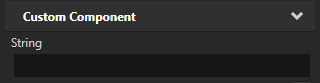
使用一行文本编辑器的字符串属性:
// Creates a string property.
// This example does not set the editor. If you do not set the editor, Kanzi Studio uses
// the default editor for this property type.
@Metadata
@EditorInfo(displayName = "String")
public static final PropertyType<String> StringProperty =
    new PropertyType<>("MyPlugin.String", String.class);
// Creates a string property.
// This example does not set the editor. If you do not set the editor, Kanzi Studio uses
// the default editor for this property type.
@Metadata
@EditorInfo(displayName = "String")
val StringProperty = PropertyType(
    "MyPlugin.String",
    String::class.java
)
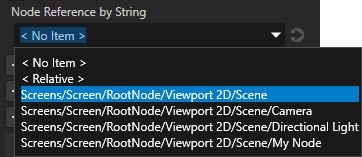
引用 3D 节点的字符串,用户可从下拉菜单中选择节点:
// Creates a string reference to a node.
@Metadata
@EditorInfo(displayName = "Node Reference by String",
    // When you set valueProvider to ProjectObject:Node3D,
    // Kanzi Studio automatically uses the Node 3D selector editor.
    valueProvider = "ProjectObject:Node3D")
public static final PropertyType<String> NodeRefByStringProperty =
    new PropertyType<>("MyPlugin.NodeRefByString", String.class);
// Creates a string reference to a node.
@Metadata
@EditorInfo(
    displayName = "Node Reference by String",
    valueProvider = "ProjectObject:Node3D"
)
val NodeRefByStringProperty = PropertyType(
    "MyPlugin.NodeRefByString",
    String::class.java
)
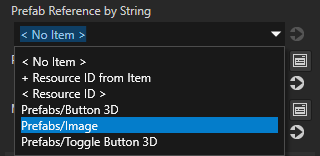
引用预设件的字符串,用户可从下拉菜单中选择预设件:
// Creates a string reference to a prefab resource.
@Metadata
@EditorInfo(displayName = "Prefab Reference by String",
    // When you set valueProvider to ProjectObject:PrefabTemplate,
    // Kanzi Studio automatically uses the Prefab template selector editor.
    valueProvider = "ProjectObject:PrefabTemplate")
public static final PropertyType<String> PrefabRefByStringProperty =
    new PropertyType<>("MyPlugin.PrefabRefByString", String.class);
// Creates a string reference to a prefab resource.
@Metadata
@EditorInfo(
    displayName = "Prefab Reference by String",
    valueProvider = "ProjectObject:PrefabTemplate"
)
val PrefabRefByStringProperty = PropertyType(
    "MyPlugin.PrefabRefByString",
    String::class.java
)
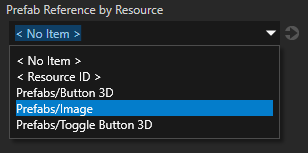
资源引用到用户可以从下拉菜单中选择的预设资源:
// Creates a resource reference to a prefab resource.
@Metadata
@EditorInfo(displayName = "Prefab Reference by Resource",
    // When you set valueProvider to ProjectObject:PrefabTemplate,
    // Kanzi Studio automatically uses the Prefab template selector editor.
    valueProvider = "ProjectObject:PrefabTemplate")
public static final PropertyType<Resource> PrefabRefByResourceProperty =
    new PropertyType<>("MyPlugin.MaterialRefByResource", Resource.class);
// Creates a resource reference to a prefab resource.
@Metadata
@EditorInfo(
    displayName = "Prefab Reference by Resource",
    valueProvider = "ProjectObject:PrefabTemplate"
)
val PrefabRefByResourceProperty = PropertyType(
    "MyPlugin.MaterialRefByResource",
    Resource::class.java
)
资源引用到用户可以从下拉菜单中选择的材料资源:
// Creates a resource reference to a material resource.
@Metadata
@EditorInfo(displayName = "Material Reference by Resource",
    // When you set valueProvider to ProjectObject:Material,
    // Kanzi Studio automatically uses the Material dropdown editor.
    valueProvider = "ProjectObject:Material")
public static final PropertyType<Resource> MaterialRefByResourceProperty =
    new PropertyType<>("MyPlugin.MaterialRefByResource", Resource.class);
// Creates a resource reference to a material resource.
@Metadata
@EditorInfo(
    displayName = "Material Reference by Resource",
    valueProvider = "ProjectObject:Material"
)
val MaterialRefByResourceProperty = PropertyType(
    "MyPlugin.MaterialRefByResource",
    Resource::class.java
)
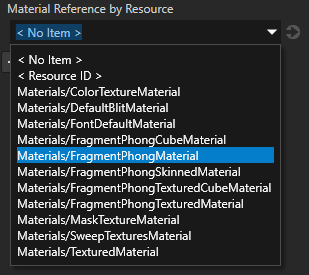
通过在您的插件类中添加
Plugin.registerClasses方法来注册该类。getDomain().getMetaclassRegistry().registerClass(MyNode.class);
domain.metaclassRegistry.registerClass(MyNode::class.java)
构建并安装您的插件。请参阅 将 Kanzi Engine 插件添加到 Kanzi Studio 项目中。。
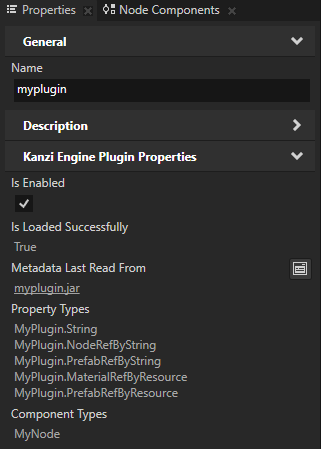
在 Library > Kanzi Engine Plugins 的 Kanzi Studio 中选择您的插件。在 Properties 中,您可以看到自定义属性类型。
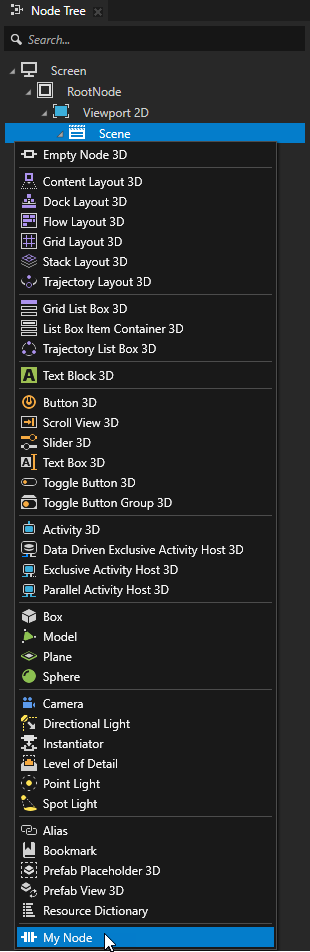
在 Node Tree 按 Alt 并右键单击 中,选择您要创建节点的节点并选择您的节点。
(可选) 默认情况下,Kanzi Studio 将自定义属性作为常用属性添加到您为其创建属性类型的节点中。要设置 Kanzi Studio 建议属性的节点类型,以及 Kanzi Studio 是自动添加属性还是让用户添加属性,请在
EditorInfo中设置EditorInfo.host属性。请参阅 host。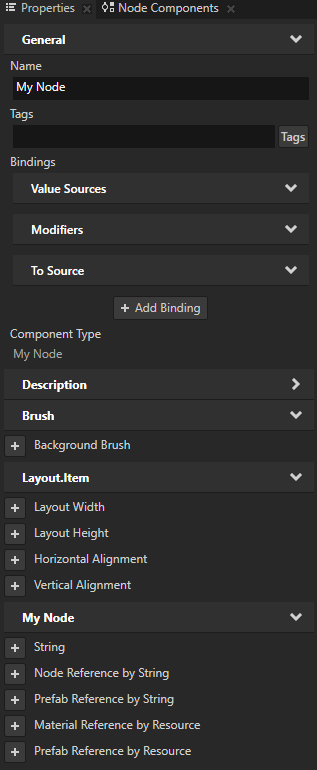
创建自定义消息类型
您可以创建和配置用于向应用程序添加功能的自定义消息类型。例如,使用消息类型使您的节点类型对事件做出反应。
对于您定义的每个自定义消息类型,Kanzi Studio 创建一个消息操作和一个消息触发器类型,分别允许您分派和响应该消息类型。
当您使用 Kanzi Connect 时,您可以使用自定义消息类型来获取有关您的应用程序使用的 Kanzi Connect 服务器或服务的信息。
创建自定义消息触发器
在 Kanzi Engine Java 插件中,您可以创建一个自定义消息类型,该类型作为消息触发器由 Kanzi Studio 显示。消息类型使您能够在某个事件发生时订阅通知。
例如,要允许 Kanzi Studio 用户添加一个名为 On Fuel Level Changed 的消息触发器,当名为 Fuel Indicator 的自定义节点的燃油水平发生变化时触发:
在您的节点类中,创建一个类来保存您的消息类型的参数:
// Represents message arguments of FuelIndicator.OnFuelLevelChanged message type.
@Metadata
public static class OnFuelLevelChangedMessageArguments extends MessageArguments
{
    // Define the metaclass.
    @Metadata
    public static Metaclass metaclass =
        new Metaclass("FuelIndicator.OnFuelLevelChangedMessageArguments");

    // Define the property type to hold the fuel level.
    @Metadata
    public static PropertyType<Integer> FuelLevelProperty =
        new PropertyType<>(Integer.class);

    // Define constructors.
    // A constructor with a long argument, which Kanzi uses to wrap native arguments.
    public OnFuelLevelChangedMessageArguments(long nativeObject)
    {
        super(nativeObject);
    }

    // Any additional constructors for you to use when dispatching messages.
    public OnFuelLevelChangedMessageArguments()
    {
        super();
    }
}
// Represents message arguments of FuelIndicator.OnFuelLevelChanged message type.
@Metadata
class OnFuelLevelChangedMessageArguments : MessageArguments {
    // Define constructors.
    // A constructor with a long argument, which Kanzi uses to wrap native arguments.
    constructor(nativeObject: Long) : super(nativeObject)

    // Any additional constructors for you to use when dispatching messages.
    constructor() : super()

    companion object {
        // Define the metaclass.
        @Metadata
        var metaclass = Metaclass("FuelIndicator.OnFuelLevelChangedMessageArguments")

        // Define the property type to hold the fuel level.
        @Metadata
        var FuelLevelProperty = PropertyType(Int::class.java)
    }
}
定义您的消息类型:
// The message type of the FuelIndicator.OnFuelLevelChanged message.
@Metadata
@EditorInfo(
    // Set the name of the message the way you want to show it in Kanzi Studio.
    displayName = "On Fuel Level Changed",
    // Set the tooltip for the message.
    tooltip = "Fuel Indicator sets off this trigger when its level changes.",
    // Do not show the message in the trigger actions dropdown menu.
    // You show the message as a trigger.
    sendable = "False")
public static final MessageType<OnFuelLevelChangedMessageArguments>
    OnFuelLevelChangedMessage = new MessageType<>(
        "Message.FuelIndicator.OnFuelLevelChanged", MessageRouting.MessageRoutingBubbling,
        OnFuelLevelChangedMessageArguments.class);
// The message type of the FuelIndicator.OnFuelLevelChanged message.
@Metadata
@EditorInfo(
    displayName = "On Fuel Level Changed",
    tooltip = "Fuel Indicator sets off this trigger when its level changes.",
    sendable = "False"
)
val OnFuelLevelChangedMessage = MessageType(
    "Message.FuelIndicator.OnFuelLevelChanged", MessageRouting.MessageRoutingBubbling,
    OnFuelLevelChangedMessageArguments::class.java
)
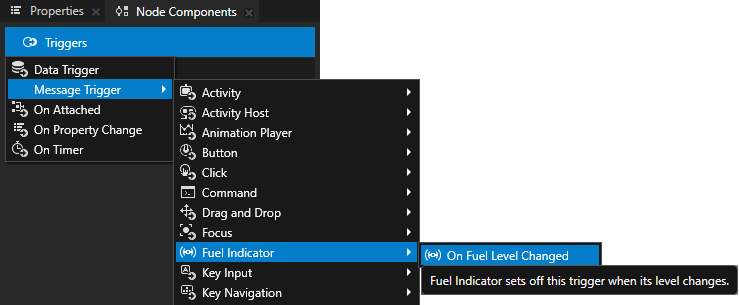
创建一个函数,当燃料水平变化时分派消息:
// Sends a FuelIndicator.OnFuelLevelChanged message.
void onFuelLevelChanged(int fuelLevel)
{
    OnFuelLevelChangedMessageArguments messageArguments =
        new OnFuelLevelChangedMessageArguments();
    messageArguments.setArgument(
        OnFuelLevelChangedMessageArguments.FuelLevelProperty, fuelLevel);
    dispatchMessage(OnFuelLevelChangedMessage, messageArguments);
}
// Sends a FuelIndicator.OnFuelLevelChanged message.
fun onFuelLevelChanged(fuelLevel: Int) {
    val messageArguments = OnFuelLevelChangedMessageArguments()
    messageArguments.setArgument(
        OnFuelLevelChangedMessageArguments.FuelLevelProperty,
        fuelLevel
    )
    dispatchMessage(OnFuelLevelChangedMessage, messageArguments)
}
创建自定义消息操作
在 Kanzi Engine Java 插件中,您可以创建一个自定义消息类型,Kanzi Studio 将其显示为一个操作。
例如,要允许 Kanzi Studio 用户向触发器添加一个名为 Fuel Indicator: Update Level 的操作,该操作显示在 Text Block 3D 节点中名为 Fuel Indicator 的自定义节点的级别:
在您的节点类中,创建一个类来保存您的消息类型的参数:
// Represents the message arguments of the FuelIndicator.UpdateLevel message.
@Metadata
public static class FuelIndicatorUpdateLevelMessageArguments extends MessageArguments
{
    // Define metaclass.
    @Metadata
    public static Metaclass metaclass =
        new Metaclass("FuelIndicator.UpdateLevelMessageArguments");

    // The property type which represents the value of the Fuel Indicator node.
    @Metadata
    public static PropertyType<Integer> FuelIndicatorLevelProperty =
        new PropertyType<>(Integer.class);

    // Returns the value of the Fuel Indicator message argument.
    public int getFuelIndicatorLevel()
    {
        return getArgument(FuelIndicatorLevelProperty);
    }

    // Define constructors.
    // A constructor with a long argument, which Kanzi uses to wrap native arguments.
    public FuelIndicatorUpdateLevelMessageArguments(long nativeObject)
    {
        super(nativeObject);
    }

    // Any additional constructors for you to use when dispatching messages.
    public FuelIndicatorUpdateLevelMessageArguments()
    {
        super();
    }
}
// Represents the message arguments of the FuelIndicator.UpdateLevel message.
@Metadata
class FuelIndicatorUpdateLevelMessageArguments : MessageArguments {
    // Returns the value of the Fuel Indicator message argument.
    val fuelIndicatorLevel: Int
        get() = getArgument(FuelIndicatorLevelProperty)

    // Define constructors.
    // A constructor with a long argument, which Kanzi uses to wrap native arguments.
    constructor(nativeObject: Long) : super(nativeObject)

    // Any additional constructors for you to use when dispatching messages.
    constructor() : super()

    companion object {
        // Define metaclass.
        @Metadata
        var metaclass = Metaclass("FuelIndicator.UpdateLevelMessageArguments")

        // The property type which represents the value of the Fuel Indicator node.
        @Metadata
        var FuelIndicatorLevelProperty = PropertyType(Int::class.java)
    }
}
定义您的消息类型:
// The message type of the FuelIndicator.UpdateLevel message.
@Metadata
@EditorInfo(
    // Set the name of the message the way you want to show it in Kanzi Studio.
    displayName = "Fuel Indicator: Update Level",
    // Do not show the message as a trigger.
    // You show the message in the trigger actions dropdown menu.
    listenable = "False")
public static final MessageType<FuelIndicatorUpdateLevelMessageArguments>
    FuelIndicatorUpdateLevelMessage = new MessageType<>("Message.FuelIndicator.UpdateLevel",
        MessageRouting.MessageRoutingBubbling,
        FuelIndicatorUpdateLevelMessageArguments.class);
// The message type of the FuelIndicator.UpdateLevel message.
@Metadata
@EditorInfo(displayName = "Fuel Indicator: Update Level", listenable = "False")
val FuelIndicatorUpdateLevelMessage = MessageType(
    "Message.FuelIndicator.UpdateLevel",
    MessageRouting.MessageRoutingBubbling,
    FuelIndicatorUpdateLevelMessageArguments::class.java
)
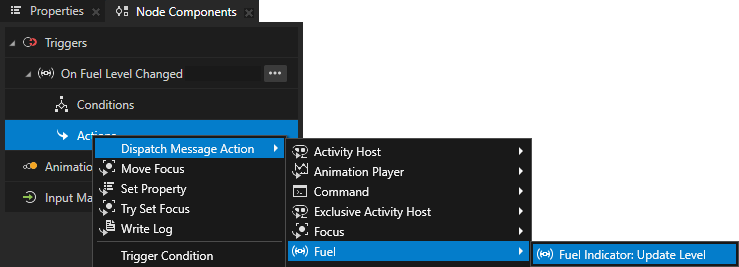
在您的节点类的
initialize()函数中,注册FuelIndicator.UpdateLevel消息的消息处理程序:// The message handler for the FuelIndicator.UpdateLevel message. // Shows the level of the Fuel Indicator in a Text Block 3D node. @Override protected void initialize() { super.initialize(); addMessageHandler(FuelIndicatorUpdateLevelMessage, messageArguments -> { // Get the level of the Fuel Indicator node. mCurrentLevel += messageArguments.getFuelIndicatorLevel(); // Show the level of the Fuel Indicator node in a Text Block 3D node. mTextBlock.get().setText(Integer.toString(mCurrentLevel)); }); }
// The message handler for the FuelIndicator.UpdateLevel message.
// Shows the level of the Fuel Indicator in a Text Block 3D node.
override fun initialize() {
    super.initialize()
    addMessageHandler(
        FuelIndicatorUpdateLevelMessage
    ) { messageArguments: FuelIndicatorUpdateLevelMessageArguments ->
        // Get the level of the Fuel Indicator node.
        mCurrentLevel += messageArguments.fuelIndicatorLevel
        // Show the level of the Fuel Indicator node in a Text Block 3D node.
        mTextBlock.get().text = Integer.toString(mCurrentLevel)
    }
}
创建自定义节点组件
自定义节点组件是一个独立的逻辑片段,您可以在 Kanzi Engine 插件中实现,并可以附加到任何节点上,以便为该节点添加自定义功能。例如,您可以在每次该属性的值更改时,将属性的值打印到 Kanzi Log,或者定义具有可变速度的动画播放。
例如,要创建一个名为 Log Property Value 的自定义节点组件,该组件在该属性的值每次更改时将一个浮点属性类型的值打印到 Kanzi Log:
创建表示自定义节点组件的类并定义其元数据:
// Represents the Log Property Value custom node component.
public static class LogPropertyValueComponent extends NodeComponent
{
    // Create the metadata for the Log Property Value custom node component.
    @Metadata
    @EditorInfo(displayName = "Log Property Value Component",
        tooltip = "Writes the value of a specified property to Kanzi Log every time that "
            + "property changes.",
        category = "Custom Node Components")
    public static Metaclass metaclass = new Metaclass("MyPlugin.LogPropertyValueComponent");

    static public ObjectRef<LogPropertyValueComponent> create(Domain domain, String name)
    {
        return NodeComponent.createDerived(domain, name, metaclass);
    }

    protected LogPropertyValueComponent(Domain domain, long handle, Metaclass metaclass)
    {
        super(domain, handle, metaclass);
    }
// Represents the Log Property Value custom node component.
class LogPropertyValueComponent private constructor(
    domain: Domain?,
    handle: Long,
    metaclass: Metaclass?
) :
    NodeComponent(domain, handle, metaclass) {

    companion object {
        // Create the metadata for the Log Property Value custom node component.
        @Metadata
        @EditorInfo(
            displayName = "Log Property Value Component",
            tooltip = "Writes the value of a specified property to Kanzi Log every time that property changes.",
            category = "Custom Node Components"
        )
        var metaclass = Metaclass("MyPlugin.LogPropertyValueComponent")

        // Declare the metadata for the Logged Property Type property type that you use to set which
        // property the Log Property Value custom node component logs.
        @Metadata
        @EditorInfo(
            displayName = "Logged Property Type",
            tooltip = "The property type whose value you want the node component to log.",
            valueProvider = "PropertyType"
        )
        val LoggedPropertyTypeProperty = PropertyType(
            "LogPropertyValueComponent.LoggedPropertyType",
            String::class.java
        )

        @JvmStatic
        fun create(domain: Domain?, name: String?): ObjectRef<LogPropertyValueComponent> {
            return createDerived(domain, name, metaclass)
        }
实现一个绑定以跟踪属性的变化并记录其值:
@Override
protected void attachOverride()
{
    super.attachOverride();

    // Get the name of the property type that you want to log.
    String loggedPropertyTypeName = getProperty(LoggedPropertyTypeProperty);
    if (loggedPropertyTypeName.isEmpty())
    {
        Log.info("Use the Logged Property Type property to set which property type you "
            + "want to log.");
        return;
    }

    // Get the property type that you want to log and check that it is valid.
    DynamicPropertyType<Float> loggedPropertyType =
        new DynamicPropertyType<>(loggedPropertyTypeName, Float.class);
    if (!loggedPropertyType.isValid())
    {
        Log.warning("LogPropertyValueComponent cannot find the specified property type "
            + "with float data type.");
        return;
    }

    // Add the notification handler for the property type that you want to log.
    AbstractBinding binding = BindingBuilder.createOneWay(".", loggedPropertyType);
    ObjectRef<CallbackBindingProcessor> processorRef =
        CallbackBindingProcessor.create(getDomain(), value -> {
            logPropertyValue(loggedPropertyTypeName, (Float) value);
            return false;
        });

    binding.addProcessor(processorRef.get());

    getNode().setBinding(binding);

    // Print the initial value of the property type that you want to log.
    Float initialPropertyValue = getNode().getOptionalProperty(loggedPropertyType);
    if (initialPropertyValue != null)
    {
        logPropertyValue(loggedPropertyTypeName, initialPropertyValue);
    }
}

private void logPropertyValue(String loggedPropertyTypeName, Float value)
{
    Log.info(getNode().getName() + ":" + loggedPropertyTypeName + " = " + value);
}
override fun attachOverride() {
    super.attachOverride()

    // Get the name of the property type that you want to log.
    val loggedPropertyTypeName = getProperty(LoggedPropertyTypeProperty)
    if (loggedPropertyTypeName.isEmpty()) {
        Log.info(
            "Use the Logged Property Type property to set which property type you want to log."
        )
        return
    }

    // Get the property type that you want to log and check that it is valid.
    val loggedPropertyType = DynamicPropertyType(
        loggedPropertyTypeName,
        Float::class.java
    )
    if (!loggedPropertyType.isValid) {
        Log.warning(
            "LogPropertyValueComponent cannot find the specified property type with float data type."
        )
        return
    }

    // Add the notification handler for the property type that you want to log.
    val binding = BindingBuilder.createOneWay(".", loggedPropertyType)

    val processorRef = CallbackBindingProcessor.create(
        domain,
    { value: Any ->
        logPropertyValue(loggedPropertyTypeName, value as Float)
        false
    })

    binding.addProcessor(processorRef.get())

    node.setBinding(binding)

    // Print the initial value of the property type that you want to log.
    val initialPropertyValue = node.getOptionalProperty(loggedPropertyType)
    initialPropertyValue?.let { logPropertyValue(loggedPropertyTypeName, it) }
}

private fun logPropertyValue(loggedPropertyTypeName: String, value: Float) {
    Log.info(node.name + ":" + loggedPropertyTypeName + " = " + value)
}
使用插件注册该类。
构建并安装您的 Kanzi Engine 插件。请参阅 将 Kanzi Engine 插件添加到 Kanzi Studio 项目中。。
在 Kanzi Studio:
在 Node Tree 中选择您要记录其属性的节点。
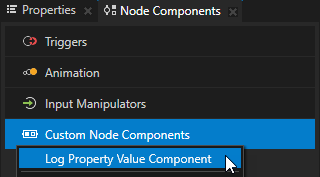
在 Node Components 按 Alt 并右键单击 Custom Node Components 中,选择您创建的 Log Property Value Component 自定义节点组件。
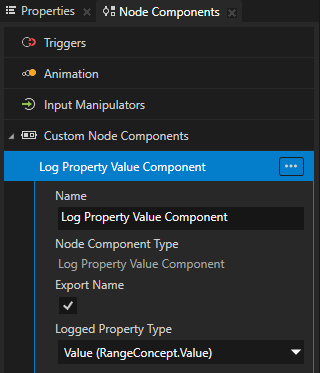
在 Log Property Value Component 中,将 Logged Property Type 属性设置为您要打印到 Kanzi Log 的属性类型。
在 Kanzi Studio 中,当您更改该属性的值时,您可以在 Kanzi Studio Log 窗口中看到日志消息。

设置自定义属性类型
要将您在 Java Kanzi Engine 插件中创建的自定义属性类型的信息传递给 Kanzi Studio,请声明描述这些属性类型的元数据。
元数据使 Kanzi Engine 插件用户能够在 Kanzi Studio 中与插件内容进行交互。
请参阅 在 Kanzi Studio 中显示 Kanzi Engine 插件自定义类型的参考。。
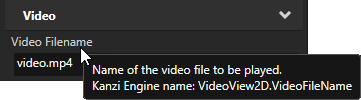
例如,要为自定义属性类型 VideoFileNameProperty 创建元数据以允许 Kanzi Studio 用户选择视频文件:
@Metadata
@EditorInfo(displayName = "Video Filename",
    tooltip = "Name of the video file to be played.", category = "Video",
    editor = "BrowseFileTextEditor", defaultValue = "video.mp4")
public static final PropertyType<String> VideoFileNameProperty =
    new PropertyType<>("MyPlugin.VideoFileName", String.class);
@Metadata
@EditorInfo(
    displayName = "Video Filename",
    tooltip = "Name of the video file to be played.",
    category = "Video",
    editor = "BrowseFileTextEditor",
    defaultValue = "video.mp4"
)
val VideoFileNameProperty: PropertyType<String> = PropertyType(
    "MyPlugin.VideoFileName",
    String::class.java
)
当用户创建一个 VideoView2D 节点时,Kanzi Studio 会在类别 Video 中向节点的属性添加 Video Filename 属性,该属性具有一个带有 Browse 按钮的文本编辑器、一个工具提示,并且默认值设置为 video.mp4。请参阅 在 Properties 窗口中排列属性类别。
属性类型名称不能含有:
属性名称开头或结尾不能使用句点 (.)
空格
制表符
斜线 (/)
反斜杠 ()
井号 (#)
左右大括号 ({})
@ 符号
设置属性类型的默认值
在自定义节点中,您可以设置在构建节点时所基于的节点中定义的任何属性类型的默认值。
例如,如果您的节点继承自 Node2D 类,要将 metadata.NodeMetadata.OpacityProperty 属性类型的默认值设置为 0.44,请在您的节点的 makeEditorInfo 中:
@Metadata
@EditorInfo(displayName = "My Node",
    customAttributes =
    {
        // Set the default value of the Node.Opacity property to 0.44.
        @EditorInfoAttribute(key = "override:Node.Opacity:defaultValue", value = "0.44"),
        // (Optional) Set how Kanzi Studio suggests the use of this property type.
        // If the "host" value of the property in the base node is:
        // - "auto", you can use "auto" or "fixed"
        // - "context", you can use "auto", "context", "fixed", or "freq"
        // - "fixed", you can use "fixed"
        // - "freq", you can use "auto", "fixed", or "freq"
        // For example, to automatically add the Node.Opacity property
        // when a user adds your node.
        @EditorInfoAttribute(key = "override:Node.Opacity:host", value = "auto"),
    })
public static Metaclass metaclass = new Metaclass("MyPlugin.MyNode2");
@Metadata
@EditorInfo(
    displayName = "My Node",
    customAttributes = [EditorInfoAttribute(
        key = "override:Node.Opacity:defaultValue",
        value = "0.44"
    ), EditorInfoAttribute(key = "override:Node.Opacity:host", value = "auto")]
)
var metaclass = Metaclass("MyPlugin.MyNode2")
请参阅 host。
创建自定义动作
在 Java Kanzi Engine 插件中,您可以使用自定义属性类型创建自定义操作。
Kanzi Studio 根据您声明消息类型的父类元数据的 EditorInfo.displayName 属性的值,在创建上下文菜单中对消息类型进行分组。您可以通过设置 EditorInfo.category 属性来覆盖此信息。
要创建自定义操作:
在插件项目中创建一个类。
例如,创建一个名为
LogAction的类。public static class LogAction extends Action { @Metadata @EditorInfo(displayName = "Log Action", category = "Plugin Actions") public static final Metaclass metaclass = new Metaclass("MyPlugin.LogAction"); public static ObjectRef<LogAction> create(Domain domain, String name) { return Action.createDerived(domain, name, metaclass); } protected LogAction(Domain domain, long handle, Metaclass metaclass) { super(domain, handle, metaclass); } @Override public void onInvoke() { Log.info("Hello from Java!"); } }
class LogAction private constructor(domain: Domain?, handle: Long, metaclass: Metaclass?) :
    Action(domain, handle, metaclass) {
    public override fun onInvoke() {
        Log.info("Hello from Java!")
    }

    companion object {
        @Metadata
        @EditorInfo(displayName = "Log Action", category = "Plugin Actions")
        val metaclass = Metaclass("MyPlugin.LogAction")

        @JvmStatic
        fun create(domain: Domain?, name: String?): ObjectRef<LogAction> {
            return createDerived(domain, name, metaclass)
        }
    }
}
使用插件注册该类。