步骤 3 - 加载语言环境并实例化预设
在此步骤中,您使用 Kanzi Engine API 来加载应用程序中语言环境的语言包,并在用户单击 Kanzi 应用程序中的语言环境按钮时实例化包含从左到右和从右到左语言环境的按钮和布局的预设。
加载地区包
在本节中,您使用 Kanzi Engine API 来加载应用程序中语言环境的语言环境包。您使用该 API 实例化正确的 IVI Grid 和 LocaleButton 预设,并为所选语言环境设置正确的布局。
要加载地区包:
在文件资源管理器中的
<ProjectName>/Application/bin/Locale_packs目录中,打开文本编辑器中的binaries.cfg文件,并将包含这些语言环境包的 Arabic 和 Hebrew kzb 文件添加到文件中。每行只添加一个 kzb 文件的名称。binaries.cfg文件已经包含 Japanese、Chinese 和 Korean kzb 文件。ja-JP ko-KR zh-ZH ar-AR he-HE
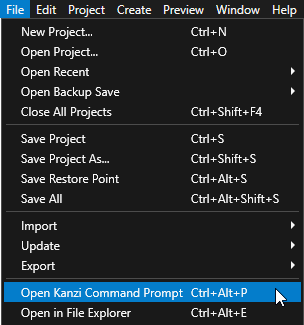
在 Kanzi Studio 中,选择 File > Open Kanzi Command Prompt。
Kanzi Command Prompt 打开 Windows 命令提示符,并为您打开 Kanzi Command Prompt 的 Kanzi 版本设置 Kanzi 环境变量。
使用 Kanzi Command Prompt 访问 Kanzi 实用工具和构建工具(例如 Gradle 和 CMake),而无需使用绝对路径或设置环境变量。
小技巧
您可以在 Windows 开始菜单的 Rightware 目录中找到 Kanzi Command Prompt。
当您安装了多个版本的 Kanzi 时,确保将您要在该命令提示符下使用的 Kanzi 版本的 Kanzi Command Prompt 启动。
在
<KanziWorkspace>/Tutorials/Localization/Completed/Application目录中的 Kanzi Command Prompt 中运行生成教程应用程序的 Visual Studio 解决方案的脚本。generate_cmake_vs2022_solution.bat
此脚本会在
<KanziWorkspace>/Tutorials/Localization/Completed/Application/build_vs2022目录中为该应用程序生成 Visual Studio 解决方案。在 Visual Studio 中打开
<KanziWorkspace>/Tutorials/Localization/Completed/Application/build_vs<Version>/Localization.slnVisual Studio 解决方案。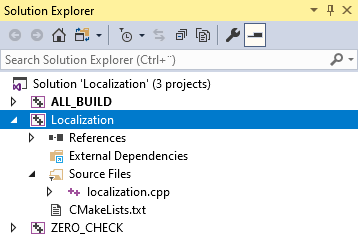
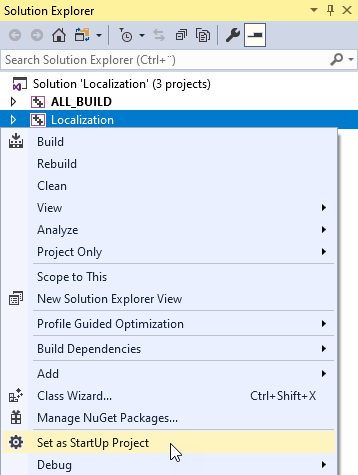
在 Visual Studio 的 Solution Explorer 中,右键点击 Localization 项目并选择 Set as StartUp Project。
创建一个包含 Arabic 和 Hebrew 区域设置名称的集合,并获取您在 Kanzi Studio 中创建的属性类型,以设置名称并控制应用程序中的区域设置。
当您添加地区时,您使用该集合来检查地区是否在从右向左书写地区集合中。
在 localization.cpp 文件中,在:
class LocalizationApplication : public ExampleApplication
{
    // Optional type for the string custom property types.
    using OptionalStringDynamicPropertyType = OptionalDynamicPropertyType<string>;
添加 (Add)
// Create a set which contains the names of the right-to-left locales.
set<string> m_rtlLocales;

// Get the custom property type for setting the name of the locale in the
// LocaleButton node. You created this custom property type in the Kanzi Studio project.
OptionalStringDynamicPropertyType m_localeNameProperty;

// Get the custom property type for setting the locale in the application.
// You created this custom property type in the Kanzi Studio project.
OptionalStringDynamicPropertyType m_localeIdProperty;
在
Application::onProjectLoaded函数中,获取 Locales 和 LocaleSelector 节点,用于设置名称和区域设置的自定义属性类型,并将 Arabic 和 Hebrew 区域设置添加到从右到左的区域设置集中。将
Application::onProjectLoaded函数的内容替换为以下内容:void onProjectLoaded() override { // Get the IVI Grid node so that you can add a message filter to it. Node2DSharedPtr iviGrid = getRoot()->lookupNode<Node2D>("IVI Grid"); // Get the custom property type for setting the name of the locale in the LocaleButton node. This custom property type is defined in the Kanzi Studio project. m_localeNameProperty = DynamicPropertyType<string>::tryCreate("Localization.LocaleName"); // Get the custom property type for setting the locale in the application. This custom property type is defined in the Kanzi Studio project. m_localeIdProperty = DynamicPropertyType<string>::tryCreate("Localization.LocaleID"); // Add a message filter to the IVI Grid node to find out when user clicks any of the locale buttons in the LocaleSelector node. iviGrid->addMessageFilter(ButtonConcept::ClickedMessage, bind(&LocalizationApplication::onLocaleButtonClicked, this, placeholders::_1)); // Add the right-to-left locales to the set. You use this set to identify which locales are right-to-left and use the correct IVI Grid layout // for the selected locale. m_rtlLocales.insert("ar-AR"); m_rtlLocales.insert("he-HE"); }
在您粘贴的前一段代码下,在
Application::onProjectLoaded函数中从语言包加载本地化资源:// Set the name of the directory where you stored the locale packs. const string localePacksDirectory = "Locale_packs"; // Read the binaries.cfg file that contains the list of the kzb files that contain the locale packs. string configFileName = localePacksDirectory + "/binaries.cfg"; ReadOnlyDiskFile binariesConfigFile(configFileName); string binariesConfigContents = readAsText(binariesConfigFile); stringstream binariesConfigFileStream(binariesConfigContents); string localeId; // Load the localized resources stored in the each locale pack kzb file stored in the binaries.cfg file. while (getline(binariesConfigFileStream, localeId)) { // Remove whitespace. trim(localeId); // Create the path for the kzb file. string localizationKzbFilePath = "./" + localePacksDirectory + "/" + localeId + ".kzb"; // Add the kzb file to the Kanzi resource manager. ResourceManager* resourceManager = getResourceManager(); resourceManager->addKzbFile(localizationKzbFilePath); // Get the locale dictionary. string dictionaryUrl = "kzb://localization/Locales/" + localeId; ResourceDictionarySharedPtr localeDictionary = getResourceManager()->acquireResource<ResourceDictionary>(dictionaryUrl); // From the LocaleDisplayName resource ID in the localization table of the locale get the name of the locale that you want to show in the UI. TextResourceSharedPtr localeDisplayName = localeDictionary->acquire<TextResource>(ResourceID("LocaleDisplayName")); // Get the LocaleSelector Stack Layout 2D node which positions the LocaleButton Toggle Button 2D nodes. StackLayout2DSharedPtr localeSelector = getRoot()->lookupNode<StackLayout2D>("./IVI Grid/IVI Grid LeftToRight/Locales/LocaleSelector"); // Check whether the locale is in the rtlLocales set. if (m_rtlLocales.count(localeId) > 0) { // Get the LocaleButton RightToLeft prefab and set up the button before you add it to the LocaleSelector node. Node2DSharedPtr localeButton = createLocaleButton("kzb://localization/Prefabs/LocaleButton RightToLeft", localeDictionary, localeDisplayName, localeId); // Add the LocaleButton node to the LocaleSelector node. localeSelector->addChild(localeButton); } else { // Get the LocaleButton LeftToRight prefab and set up the button before you add it to the LocaleSelector node. Node2DSharedPtr localeButton = createLocaleButton("kzb://localization/Prefabs/LocaleButton LeftToRight", localeDictionary, localeDisplayName, localeId); // Add the LocaleButton node to the LocaleSelector node. localeSelector->addChild(localeButton); } }
定义
createLocaleButton函数,该函数根据应用程序加载的是从左到右还是从右到左的区域设置,返回从左到右或从右到左的 LocaleButton 预设。在Application::onProjectLoaded函数之后添加:Node2DSharedPtr createLocaleButton(string url, ResourceDictionarySharedPtr localeDictionary, TextResourceSharedPtr localeDisplayName, string localeId) { // Get and instantiate the LocaleButton RightToLeft prefab used for the buttons that set right-to-left locales. // When you use the full kzb resource URL, start the path with kzb:// followed by the project name and the location of the resource. PrefabTemplateSharedPtr localeButtonPrefab = getResourceManager()->acquireResource<PrefabTemplate>(url); Node2DSharedPtr localeButton = localeButtonPrefab->instantiate<Node2D>("LocaleButton_" + localeId); // Use the LocaleName property to show the name of the locale in the UI. localeButton->setProperty(*m_localeNameProperty, localeDisplayName->getText()); // Set the LocaleID property. You get the value of this property when the user clicks a LocaleButton and use it to change the application to that locale. localeButton->setProperty(*m_localeIdProperty, localeId); // Add the Index in Group property so that the Locales Toggle Button Group 2D node automatically sets the index of the toggle button. localeButton->setProperty(ButtonConcept::IndexInGroupProperty, -1); // Set the style of the Text Block 2D node in the LocaleButton so that it sets the correct font for the LocaleDisplayName of the locale. // Use this approach only to apply a style from the locale pack without changing the locale in the application. StyleSharedPtr style = localeDictionary->acquire<Style>(ResourceID("LocaleStyle")); localeButton->setStyle(style); return localeButton; }
在包含您要测量性能的函数的 .cpp 文件的
createLocaleButton函数后,针对来自 LocaleButton 节点的按钮点击消息实现onLocaleButtonClicked事件处理程序。当用户点击 LocaleButton 按钮时,此事件处理程序将移除现有布局,实例化并添加正确的 IVI Grid 节点布局,并设置应用程序的区域设置。void onLocaleButtonClicked(ButtonConcept::ClickedMessageArguments& messageArguments) { // Get the value of the LocaleID property from the button the user clicked. string localeId = messageArguments.getSource()->getProperty(*m_localeIdProperty); // Check whether the selected locale is right-to-left or left-to-right. bool rtl = m_rtlLocales.count(localeId) > 0; // Set the path variable to the Locales Toggle Button Group 2D node in the IVI Grid layout for the selected locale. string pathToNewParent = rtl ? "IVI Grid/IVI Grid RightToLeft/Locales" : "IVI Grid/IVI Grid LeftToRight/Locales"; // Store the existing Stack Layout 2D node with the LocaleButton Toggle Button 2D nodes. StackLayout2DSharedPtr localeSelector = messageArguments.getSource()->lookupNode<StackLayout2D>(".."); // Remove the existing locale selector node from the tree. Node2DSharedPtr oldLocaleSelectorParent = localeSelector->lookupNode<Node2D>(".."); oldLocaleSelectorParent->removeChild(*localeSelector); // Set the locale of the application to the locale whose button the user selected. getScreen()->setLocale(localeId); // Get the Locales Toggle Button Group 2D node and add the LocaleSelector Stack Layout 2D node to it. ToggleButtonGroup2DSharedPtr toggleButtonGroup = getRoot()->lookupNode<ToggleButtonGroup2D>(pathToNewParent); toggleButtonGroup->addChild(localeSelector); }
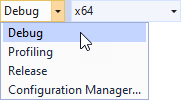
选择您要使用的解决方案配置并运行您的应用程序。
在开发期间,选择 Debug 配置。当您准备好创建生产版本时,选择 Release 配置。
在应用程序中,当您点击 Arabic 和 Hebrew 区域设置时,应用程序会为该区域设置实例化正确的布局。
接下来该做什么?
在本教程中,您学习了如何为从右到左的区域设置准备一个已经本地化的 Kanzi 应用程序,以及如何使用 Kanzi Engine API 来实例化预设占位符节点,这些节点为从左到右和从右到左的区域设置布局。现在您可以:
了解有关本地化 Kanzi 应用程序的更多信息。请参阅 教程:本地化您的应用程序 和 本地化 (Localization)。
了解如何使用 Kanzi Engine API 为您的 Kanzi 应用程序添加逻辑。请参阅 教程:Hello world! 和 教程:Kanzi Engine API 高级使用。
另请参阅
要了解有关如何本地化您的 Kanzi 应用程序的更多信息,请参阅 本地化 (Localization)。
要了解有关 kzb 文件的更多信息,请参阅 kzb 文件。
要了解 Kanzi 如何处理资源,请参阅 资源管理。
要详细了解有关如何使用资源字典的信息,请参阅 资源 (Resources)。
要详细了解有关如何使用应用程序中字体的信息,请参阅 导入字体。