使用 Kanzi 视图和视图适配器
添加 Kanzi 视图
Kanzi 提供了从 Android SurfaceView 和 TextureView 分别派生的 KanziSurfaceView 和 KanziTextureView 视图类型。
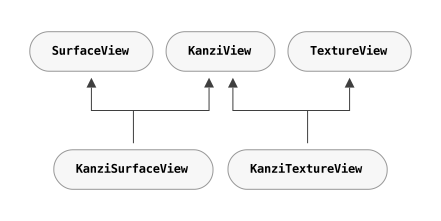
KanziSurfaceView直接渲染到从硬件合成器获得的表面,这使其性能更好。但它有一个限制,即应用程序只能在 Activity 中的其他视图后面或顶部渲染它。KanziTextureView像常规视图一样渲染到纹理。这允许应用程序自由地将其内容与 Android 内容混合,并且您可以移动、变换、动画化,甚至使其半透明。
请参阅 Android SurfaceView vs TextureView 或 创建透明视图。
您可以在 Android 布局中声明一个 Kanzi 视图,并以与常规 Android 视图相同的方式在任何地方填充该视图。
<LinearLayout xmlns:android="http://schemas.android.com/apk/res/android"
   xmlns:app="http://schemas.android.com/apk/res-auto">

   <com.rightware.kanzi.KanziSurfaceView
      android:id="@+id/view1"
      app:name="View1"
      app:kzbPathList="project1.kzb"
      app:startupPrefabUrl="kzb://project1/Prefabs/View1" />
创建多个视图
您可以在应用程序中同时激活多个基于 Kanzi 的视图,并在不同的活动或片段中访问它们。
配置 Kanzi 视图
这些视图类型公开了可以直接从布局中分配的各种配置。
特性 (Attribute) |
使用 |
格式 (Format) |
默认值 (Default Value) |
|---|---|---|---|
|
视图的名称。 |
string |
|
|
以逗号分隔的 kzb 文件列表。当设置时,Kanzi 会在视图附加时自动加载这些文件。您还可以传递一个包含您要加载的 kzb 文件列表的 cfg 文件。 |
string |
|
|
启动预设的 URL。当设置时,Kanzi 异步加载并将此预设实例化为视图的子项。 |
string |
|
|
用于清除表面的颜色。 |
颜色 |
|
|
启用清除表面的标志。 |
BOOLEAN |
|
或者,您可以在膨胀后使用设置器分配这些配置选项。
public class Activity1 extends FragmentActivity {

    @Override
    protected void onCreate(Bundle) {
        ...

        // Inflate the content from the layout.
        setContentView(R.layout.activity1);

        // Get the reference to the view.
        KanziView view = findViewById(R.id.view1);

        // Set the name.
        view.setName("View1");

        // Set the kzb paths
        view.setKzbPathList(new String[]{"project1.kzb"});

        // Set the startup prefab.
        view.setStartupPrefabUrl("kzb://project1/Prefabs/View1");
class CarMenu : FragmentActivity() {

    override fun onCreate(icicle: Bundle?) {
        ...

        // Inflate the content from the layout.
        setContentView(R.layout.activity1)

        // Get the reference to the view.
        val view: KanziView = findViewById(R.id.view1)

        // Set the name.
        view.setName("View1")

        // Set the kzb paths
        view.setKzbPathList(arrayOf("project1.kzb"));

        // Set the startup prefab.
        view.setStartupPrefabUrl("kzb://project1/Prefabs/View1")
也可以在活动 onCreate 函数期间显式加载 kzb 文件。
@Override
protected void onCreate(Bundle) {
   ...

   // Acquire a reference to the KanziRuntime.
   mRuntimeRef = KanziRuntime.acquire(this);

   // Load the kzb.
   try {
       mRuntimeRef.get().loadKzb("project1.kzb");
   } catch (FileNotFoundException e) {
       Log.e(e.getMessage());
       return;
   }

   // Inflate the content from the layout.
   setContentView(R.layout.activity1);
override fun onCreate(icicle: Bundle?) {
   ...

   // Acquire a reference to the KanziRuntime.
   mRuntimeRef = KanziRuntime.acquire(this)

   // Load the kzb.
   try {
       mRuntimeRef.get().loadKzb("project1.kzb")
   } catch (FileNotFoundException e) {
       Log.e(e.getMessage())
       return
   }

   // Inflate the content from the layout.
   setContentView(R.layout.activity1)
创建透明视图
KanziView 可以显示透明内容,从而使该视图后面的内容可见。
要创建透明视图:
要为
KanziView启用透明度,请编辑视图活动的onCreate方法:对于
KanziSurfaceView,调用setZOrderOnTop和setFormat方法。@Override protected void onCreate(Bundle) { ... // Get reference to the view. KanziSurfaceView view = findViewById(R.id.view1); // Add transparency support to the view. view.setZOrderOnTop(true); view.getHolder().setFormat(PixelFormat.TRANSPARENT);
override fun onCreate(icicle: Bundle?) {
    ...

    // Get reference to the view.
    val view = findViewById(R.id.view1);

    // Add transparency support to the view.
    view!!.setZOrderOnTop(true);
    view!!.getHolder().setFormat(PixelFormat.TRANSPARENT);
对于
KanziTextureView,调用setOpaque方法。@Override protected void onCreate(Bundle) { ... // Get reference to the view. KanziTextureView view = findViewById(R.id.view1); // Add transparency support to the view. view.setOpaque(false);
override fun onCreate(icicle: Bundle?) {
    ...

    // Get reference to the view.
    val view = findViewById(R.id.view1);

    // Add transparency support to the view.
    view!!.setOpaque(false);
在 Android 布局文件中,将
KanziView清除颜色更新为具有透明度。app:clearColor="@android:color/transparent"
编辑
application.cfg以要求具有 alpha 位的表面。请参阅 颜色格式。SurfaceBitsAlpha = 8
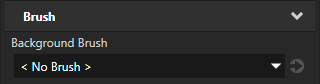
在 Kanzi Studio 中选择显示透明内容的节点,并在 Properties 中将 Background Brush 属性设置为 < No Brush >。
将 Kanzi 附加到现有视图
您可以实例化并附加一个 KanziViewAdapter 到现有的 Android SurfaceView 或 TextureView。
@Override
protected void onCreate(Bundle) {
   ...

   // Get reference to the view.
   SurfaceView view = findViewById(R.id.view1);

   // Instantiate an adapter and assign a view.
   mAdapter = new KanziViewAdapter(view, "View1");

   // Assign a startup prefab.
   view.setStartupPrefabUrl("kzb://project1/Prefabs/View1");
override fun onCreate(icicle: Bundle?) {
    ...

    // Get reference to the view.
    val view = findViewById(R.id.view1)

    // Instantiate an adapter and assign a view.
    mAdapter = KanziViewAdapter(view, "View1");

    // Assign a startup prefab.
    view!!.setStartupPrefabUrl("kzb://project1/Prefabs/View1");
使用 Kanzi 从无视图上下文中
您还可以实例化并使用不带视图的 KanziViewAdapter。例如,从 WallpaperService。
class WallpaperEngine1 extends WallpaperService.Engine {
    KanziViewAdapter mAdapter;

    @Override
    public void onCreate(SurfaceHolder) {
        ...
        // Instantiate an adapter.
        mAdapter = new KanziViewAdapter(getApplicationContext(), "WallpaperEngine1");

        // Assign a startup prefab.
        mAdapter.setStartupPrefabUrl("kzb://project1/Prefabs/Wallpaper");
private inner class WallpaperEngine1 : Engine() {
    private var mAdapter: KanziViewAdapter? = null

    override fun onCreate(surfaceHolder: SurfaceHolder) {
        ...
        // Instantiate an adapter.
        mAdapter = KanziViewAdapter(applicationContext, "WallpaperEngine1")

        // Assign a startup prefab.
        mAdapter!!.setStartupPrefabUrl("kzb://project1/Prefabs/Wallpaper")
访问 Kanzi Java 和 Kotlin API
当您的 Kanzi 视图的节点树被初始化时,Kanzi 会检查该节点树的根节点是否为 Screen 节点。如果根节点不是 Screen 节点,Kanzi 会创建一个 Screen 节点并将节点树附加到该 Screen 节点。Kanzi 使用 Screen 节点来处理 Kanzi 视图中的输入和焦点。
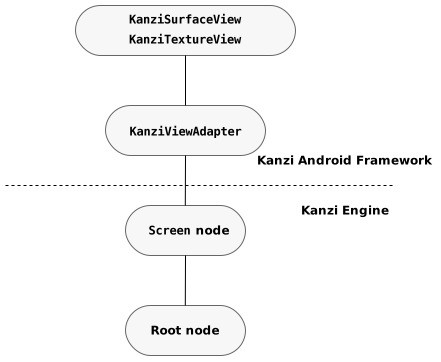
在 Kanzi 视图中,要获取 Screen 节点的子节点,使用 KanziView.getRoot 方法。从这个 Root 节点,您可以使用 Kanzi Java API 访问节点树。
// Get the Root.
Node root = view.getRoot();

// Look up a node using an alias.
Node button = root.lookupNode("#Button");

// Set a property.
button.setProperty(ButtonConceptMetadata.ToggleStateProperty, 0);

// Add a message handler.
button.addMessageHandler(ButtonConceptMetadata.ToggleStateMessage,
                           new Node.MessageSubscriptionFunction() {
                           @Override
                           public void handle(MessageArguments messageArguments) {
                              int toggleState = messageArguments.getArgument(ButtonConceptMetadata.ToggleStateProperty);
                              Log.i("Button State is " + toggleState);
                           }});
// Get the Root.
val root = view.getRoot();

// Look up a node using an alias.
val button = root.lookupNode("#Button");

// Set a property.
button!!.setProperty(ButtonConceptMetadata.ToggleStateProperty, 0);

// Add a message handler.
button.addMessageHandler(ButtonConceptMetadata.ToggleStateMessage,
    Node.MessageSubscriptionFunction { messageArguments ->
        val toggleState =
            messageArguments.getArgument(ButtonConceptMetadata.ToggleStateProperty)
        Log.i(TAG, "Button State is $toggleState")
    })
由于 Kanzi Android framework (droidfw) 在 Android UI 线程中运行,因此可以直接从您的应用程序代码中调用 Kanzi Java API 接口。如果需要从不同的线程使用 Kanzi,可以使用 View.post(Runnable)、TaskDispatcher 或类似功能将任务发布到 Android UI 线程。
使用任务调度器将任务发布到 Android UI 线程:
// This example assumes that your application code has mechanisms to ensure the
// validity of references to the Domain and root Node. For example, you can do this
// by hooking into the lifecycle of the Kanzi view or to the lifetime of a Kanzi
// object.
TaskDispatcher taskDispatcher = getDomain().getTaskDispatcher();

// Submit a task from a non-UI thread.
taskDispatcher.submit(() -> {
    // Look up the Child Node in the node tree.
    Node2D node = rootNode.lookupNode("./Child Node");
    // Set the Visible property of the node.
    node.setProperty(Node2D.VisibleProperty, true);
});
// This example assumes that your application code has mechanisms to ensure the
// validity of references to the Domain and root Node. For example, you can do this
// by hooking into the lifecycle of the Kanzi view or to the lifetime of a Kanzi
// object.
val taskDispatcher = domain.taskDispatcher

// Submit a task from a non-UI thread.
taskDispatcher.submit {
    // Look up the Child Node in the node tree.
    val node = rootNode.lookupNode<Node2D>("./Child Node")
    // Set the Visible property of the node.
    node.setProperty(Node2D.VisibleProperty, true)
}
当没有 Kanzi 视图处于活动状态时,您提交给任务调度程序的任务会处于等待状态。请参阅 在没有视图处于活动状态时提交任务。
要了解有关 Kanzi Java API 的更多信息,请参阅 使用 Java 和 Kotlin。
卸载 Kanzi Engine
当没有包含 Kanzi 内容的活动视图时,您可以从内存中卸载 Kanzi Engine。
KanziRuntime.Reference 类对活动的 KanziRuntime 实例执行引用计数。每个附加的 KanziView 会自动保持一个 KanziRuntime.Reference 到 KanziRuntime,只有在视图分离时才会关闭。
当所有 KanziRuntime.Reference 实例都已关闭时,KanziRuntime 被卸载。
如果 KanziRuntime 已被卸载,则下一次调用 KanziRuntime.acquire 会初始化 KanziRuntime 的新实例,需要重新加载所有 kzb 文件和资源。