使用 Viewport 2D 节点
Viewport 2D 节点既可以渲染 Scene (一种 3D 节点),也可以渲染 2D 节点,例如 Image 或 Button 2D。
您创建 Kanzi Studio 工程时,该工程包含一个 Viewport 2D 节点,其中带有一个包含 Camera 和 Directional Light 的 Scene。对于 Kanzi Engine,Scene 节点始终是 Viewport 2D 节点的第一个子节点。

创建一个 Viewport 2D 节点
要创建 Viewport 2D 节点:
在 Node Tree 或 Prefabs 中,按 Alt 并右键单击 一个 2D 节点,您希望在其中创建一个 Viewport 2D 节点,并选择 Viewport 2D。
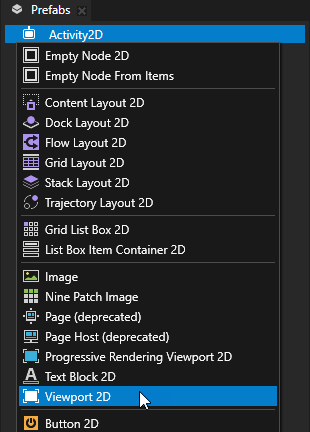
将内容添加到您创建的 Viewport 2D 节点。
例如:
在 Node Tree 或 Prefabs 中,按 Alt 并右键单击 Viewport 2D 节点并选择 Scene。
Kanzi Studio 创建一个包含 Camera 节点和 Directional Light 节点的 Scene 节点。
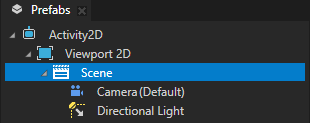
在 Scene 节点中,创建您想要显示的 3D 节点。
请参阅 3D 资产 (3D Assets)。
控制 Kanzi 如何渲染 Viewport 2D 节点。
您可以控制 Kanzi 如何渲染 Viewport 2D 节点。默认情况下,Kanzi 在 Viewport 2D 节点的内容之前渲染背景画刷。
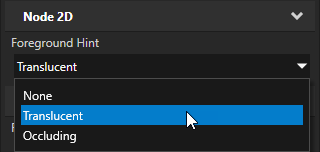
要控制 Kanzi 如何渲染 Viewport 2D 节点,请将 Foreground Hint 属性设置为:
None 在渲染 Viewport 2D 节点之后渲染背景画刷。当 Viewport 2D 节点的内容不透明时使用它。
Translucent 在 Viewport 2D 节点的内容之前渲染背景画刷。这是默认值。当 Viewport 2D 节点中的内容是 alpha 混合时使用它。
Occluding 不渲染背景画刷。当整个 Viewport 2D 节点充满 3D 内容时使用它。
在 API 中使用 Viewport 2D 节点
要创建 Viewport 2D 节点:
// Create a Viewport 2D named Viewport 2D and add it to the RootPage.
Viewport2DSharedPtr viewport2d = Viewport2D::create(domain, "Viewport 2D");
rootNode->addChild(viewport2d);

// To render 3D nodes in a Viewport 2D you need to add a Scene to the Viewport 2D.
// Create a Scene named Scene for 3D nodes and add it to the Viewport 2D.
SceneSharedPtr sceneNode = Scene::create(domain, "Scene for 3D nodes");
viewport2d->setScene(sceneNode);

// Create a Camera named Camera and add it to the Scene.
CameraSharedPtr camera = Camera::create(domain, "Camera");
sceneNode->addChild(camera);

// Create a Point Light named Point light and add it to the Scene.
LightSharedPtr light = Light::createPoint(domain, "Point light");
sceneNode->addChild(light);

// Create a Box mesh named Box and add it to the Scene.
Model3DSharedPtr box = Model3D::createCube(domain, "Box", 1.0f, ThemeBlue);
sceneNode->addChild(box);
有关详细信息,请参阅 Viewport2D 类。
Viewport 2D 属性类型和消息。
有关 Viewport 2D 节点的可用属性类型和消息的列表,请参阅 Viewport 2D。