步骤 1 - 创建带有 C++ 应用程序的项目并打印到调试控制台。
在此步骤中,您首先使用 C++ 应用程序创建一个 Kanzi Studio 项目。然后,您将代码添加到 C++ 应用程序中,以在 Kanzi 调试控制台上打印 Hello world!。
获取教程
要获取该教程,请在 Kanzi Studio Quick Start 窗口中点击 Projects 并选择 Tutorials 选项卡。在 Hello world 教程旁边,点击  。
。
Kanzi Studio 会将教程下载到 <KanziWorkspace>/Tutorials 目录。您可以在 <KanziWorkspace>/Tutorials/Hello world/Completed 目录中找到已完成的教程。
创建含 C++ 应用程序的工程并打印到调试控制台
要创建含 C++ 应用程序的工程并打印到 Kanzi 调试控制台:
在 Kanzi Studio Quick Start 窗口中,点击 New:
从可用工程模板列表中选择 Application 项。
选择工程名称和位置。
例如,将工程命名为 Hello world。
单击 Create。
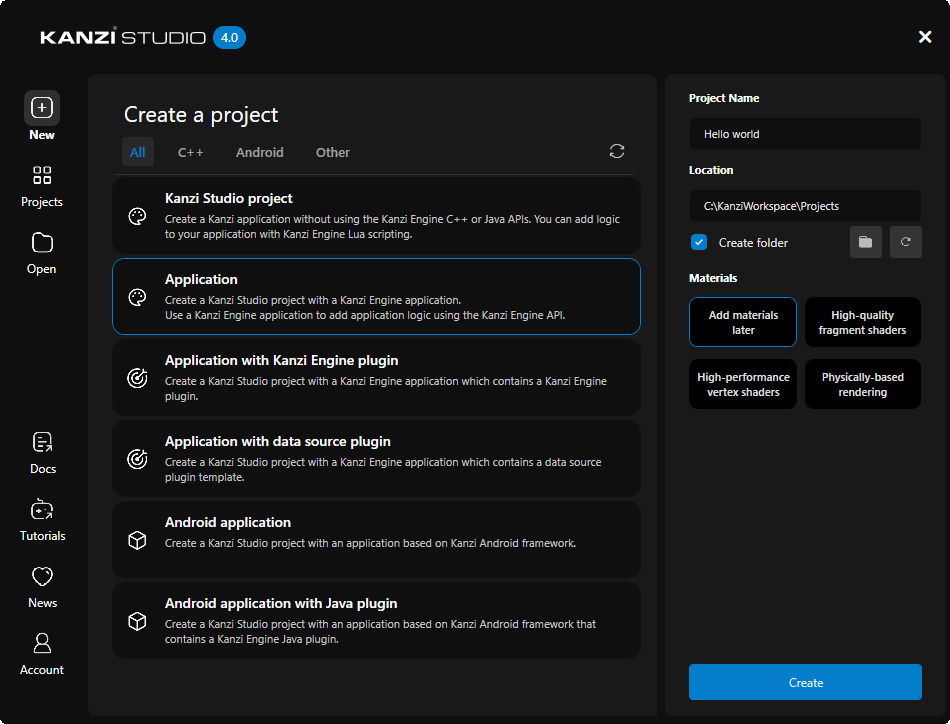
Kanzi 在
<ProjectName>/Tool_project目录中创建一个 Kanzi Studio 项目,并在<ProjectName>/Application目录中创建项目的应用程序代码结构:bin目录包含项目的 kzb 和配置文件。configs目录包含不同平台的配置文件。默认情况下,Kanzi 会为多个不同的平台创建配置文件。开发 Kanzi 应用程序的推荐平台是 Microsoft Visual Studio。请参阅 部署 Kanzi 应用程序。src目录包含您的应用程序的源代码。CMakeLists.txt文件包含 CMake 为 Kanzi 应用程序生成 Visual Studio 解决方案的说明。generate_cmake_vs<Version>_solution.bat是一个脚本,您可以使用它为 Kanzi 应用程序生成一个 Visual Studio 解决方案。该脚本在<ProjectName>/Application/build_vs<Version>目录中生成 Visual Studio 解决方案。
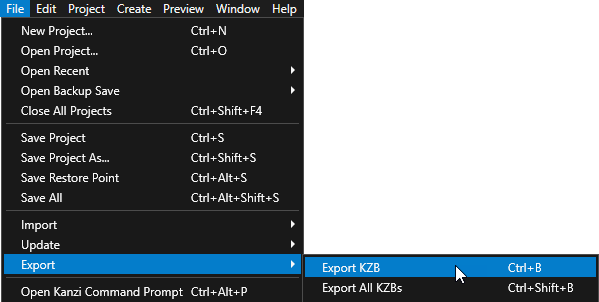
在 Kanzi Studio 中,选择 File > Export > Export KZB。
Kanzi Studio creates the kzb file and configuration files from your Kanzi Studio project. Kanzi Studio stores the exported files in the
<ProjectName>/Application/bindirectory or the location that you set in Project > Properties in the Binary Export Directory property. The kzb file contains all nodes and resources from your Kanzi Studio project, except the resources that you mark in a localization table as locale packs.当您从 Visual Studio 运行您的 Kanzi 应用程序时,您的应用程序会加载 kzb 文件和配置文件。
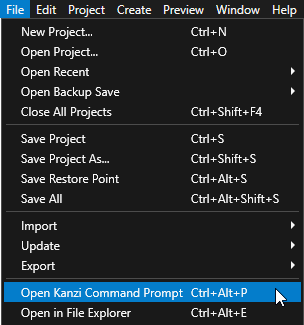
在 Kanzi Studio 中,选择 File > Open Kanzi Command Prompt。
Kanzi Command Prompt 打开 Windows 命令提示符,并为您打开 Kanzi Command Prompt 的 Kanzi 版本设置 Kanzi 环境变量。
使用 Kanzi Command Prompt 访问 Kanzi 实用工具和构建工具(例如 Gradle 和 CMake),而无需使用绝对路径或设置环境变量。
小技巧
您可以在 Windows 开始菜单的 Rightware 目录中找到 Kanzi Command Prompt。
当您安装了多个版本的 Kanzi 时,确保将您要在该命令提示符下使用的 Kanzi 版本的 Kanzi Command Prompt 启动。
在
<ProjectName>/Application目录中的 Kanzi Command Prompt 中,运行生成应用程序的 Visual Studio 解决方案的脚本。generate_cmake_vs2022_solution.bat
此脚本会在
<ProjectName>/Application/build_vs2022目录中为应用程序生成 Visual Studio 解决方案。在 Visual Studio 中,打开
Application/build_vs<Version>/<ProjectName>.slnVisual Studio 解决方案。例如,如果您将 Kanzi Studio 项目命名为 Hello world,则 Visual Studio 解决方案将被称为
Hello_world.sln。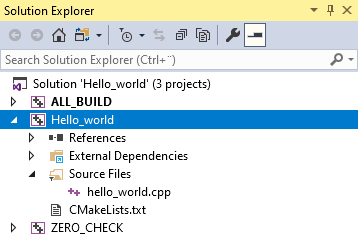
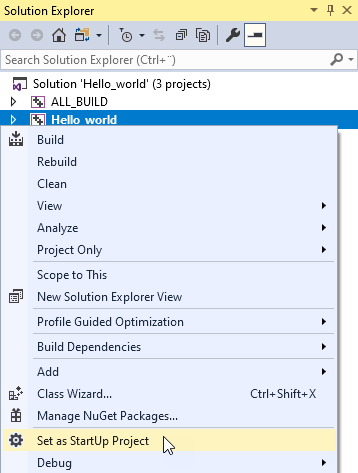
在 Solution Explorer 中,右键点击 Hello_world 工程并选择 Set as StartUp Project。
打开
hello_world.cpp文件。默认情况下,模板会添加
kanzi.hpp头文件,其中包括其他 Kanzi 头文件和 Code Behind 标识符。在本教程中,您不使用 Code Behind。此应用程序类使用
ExampleApplication类,通过处理所需模块的注册来简化应用程序开发。#include <kanzi/kanzi.hpp> // [CodeBehind libs inclusion]. Do not remove this identifier. #if defined(HELLO_WORLD_CODE_BEHIND_API) && !defined(ANDROID) && !defined(KANZI_CORE_API_IMPORT) #include <Hello_world_code_behind_module.hpp> #endif using namespace kanzi; class HelloWorld : public ExampleApplication
要使用记录器打印到 Kanzi 调试控制台,请包含
log.hpp头文件:#include <kanzi/core/log/log.hpp>
将
Application::onProjectLoaded的内容替换为以下代码。当您将函数放置在
Application::onProjectLoaded内时,Kanzi 在加载您的应用程序后调用该函数。void onProjectLoaded() override { // Prints Hello world! to the Kanzi debug console. kzLogInfo(KZ_LOG_CATEGORY_GENERIC, ("Hello world!")); }
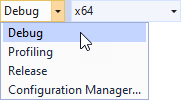
选择您要使用的解决方案配置并运行您的应用程序。
在开发期间,选择 Debug 配置。当您准备好创建生产版本时,选择 Release 配置。
log.hpp::kzLogInfo函数将 Hello world! 打印到 Kanzi 调试控制台。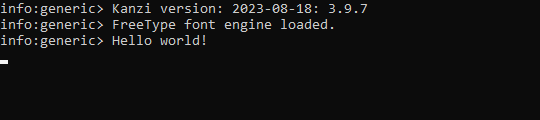
当您在调试模式下运行应用程序时,Kanzi 显示调试控制台。默认情况下,Kanzi Studio 项目包含一个空场景。
当您完成此步骤时,这就是您的 hello_world.cpp 的样子。
#include <kanzi/kanzi.hpp>
#include <kanzi/core/log/log.hpp>
// [CodeBehind libs inclusion]. Do not remove this identifier.
#if defined(HELLO_WORLD_CODE_BEHIND_API) && !defined(ANDROID) && !defined(KANZI_CORE_API_IMPORT)
#include <Hello_world_code_behind_module.hpp>
#endif
using namespace kanzi;
class HelloWorld : public ExampleApplication
{
public:
void onConfigure(ApplicationProperties& configuration) override
{
configuration.binaryName = "hello_world.kzb.cfg";
}
void onProjectLoaded() override
{
    // Prints Hello world! to the Kanzi debug console.
    kzLogInfo(KZ_LOG_CATEGORY_GENERIC, ("Hello world!"));
}
void registerMetadataOverride(ObjectFactory& factory) override
{
ExampleApplication::registerMetadataOverride(factory);
#if defined(HELLO_WORLD_CODE_BEHIND_API) && !defined(ANDROID) && !defined(KANZI_CORE_API_IMPORT)
HelloWorldCodeBehindModule::registerModule(getDomain());
#endif
// [CodeBehind module inclusion]. Do not remove this identifier.
}
};
Application* createApplication()
{
return new HelloWorld;
}