步骤 3 - 实例化预设
在此步骤中,您将学习如何从 Lua 脚本实例化预设。
要将预设件实例化到节点树中:
找到具有
tryAcquireResource的预设。使用
instantiate从预设创建一个节点。使用
addChild将节点添加到节点树中。
-- Find the node with the alias "Grid".
local grid = contextNode:lookupNode("#Grid")
assert(grid)

-- Find the "Piece" prefab.
local piecePrefab = contextNode:tryAcquireResource("kzb://fifteen_puzzle/Prefabs/Piece")

-- Use the piecePrefab to create a node named "New piece".
local node = piecePrefab:instantiate("New piece")

-- Add the node to the grid.
grid:addChild(node)
将拼图块添加到拼图网格中。
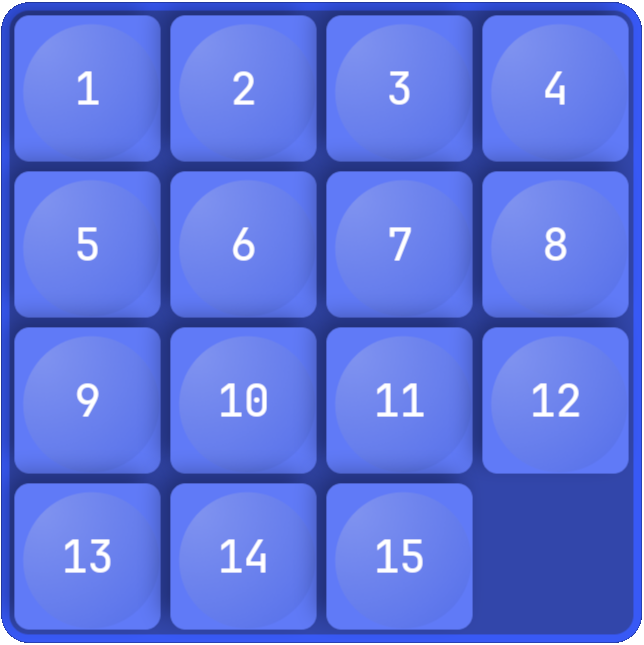
实例化 Piece 预设以按顺序从 1 到 15 填充拼图网格中的 15 个块。您将最后一个网格槽留空,以便可以进行游戏。
要将拼图块添加到拼图网格中,在 Script Editor 中,将 new_game.lua 脚本的内容替换为:
print("Entering new_game.lua")

-- Find the "Grid" node using its alias.
local grid = contextNode:lookupNode("#Grid")
assert(grid)

-- Find the "fifteen_puzzle.PieceIndex" custom property type.
local PieceIndexProperty = PropertyType:find("fifteen_puzzle.PieceIndex")

-- Find the "Piece" prefab.
local piecePrefab = contextNode:tryAcquireResource("kzb://fifteen_puzzle/Prefabs/Piece")

-- Declare the constants for the grid size and number of pieces.
-- The number of pieces is one less than the number of grid slots
-- because you need an empty slot to play the game.
local RowCount = 4
local ColumnCount = 4
local PieceCount = RowCount * ColumnCount - 1

-- Remove all grid items that were created in the project or by the earlier
-- executions of the script.
grid:removeAllChildren()

-- Create the grid child nodes.
for i = 1,PieceCount do
    -- Create a grid item.
    local piece = piecePrefab:instantiate("piece_" .. i)

    -- Assign the number to the piece.
    piece:setProperty(PieceIndexProperty, i)

    -- Set the grid coordinates of the node.
    -- Use integer division to get the row index and modulo to get the column index.
    local row = (i-1) // ColumnCount
    local column = (i-1) % ColumnCount
    piece:setProperty(GridLayout2D.RowProperty, row)
    piece:setProperty(GridLayout2D.ColumnProperty, column)

    -- Add the node to the grid.
    grid:addChild(piece)
end

print("Exiting new_game.lua")
当您保存脚本并在 Preview 中点击  时,脚本会按顺序将网格填充为 15 个从 1 到 15 的部分,并将网格中的最后一个槽留空。