增加属性类型的值。
使用 Value Accumulator 随时间或按帧递增属性类型的值。虽然使用关键帧动画或状态机也可以实现类似的效果,但 Value Accumulator 使您能够:
在应用程序运行时控制增量的大小。
循环值增量。
每帧递增一次值,与帧之间的时间间隔无关。
例如,您可以使用 Value Accumulator 来:
创建一个秒表。请参阅 创建一个秒表。
创建一个计时器。请参阅 创建一个计时器。
在3D模型上移动纹理。例如,要创建移动道路的动画,请参阅 创建移动道路的动画。
旋转 3D 模型。例如,要创建旋转轮子的动画,请参阅 旋转3D模型。
创建一个帧计数器。请参阅 创建帧计数器。
Kanzi 包括一个 Float Value Accumulator、一个 Int Value Accumulator,以及允许您控制 Value Accumulators 播放的消息。
当您想要增加一个数据类型既不是整数也不是浮点数的属性的值时,使用一个中间属性,该属性的数据类型是这两者之一,并创建一个绑定来转换数据类型。例如,当您想要在 Text Block 节点中以字符串形式显示一个属性的变化值时,将 Text 属性绑定到您使用 Value Accumulator 增加的中间属性的值。
创建一个秒表
要创建一个秒表,使用 Int Value Accumulator 来增加整数属性类型的值。
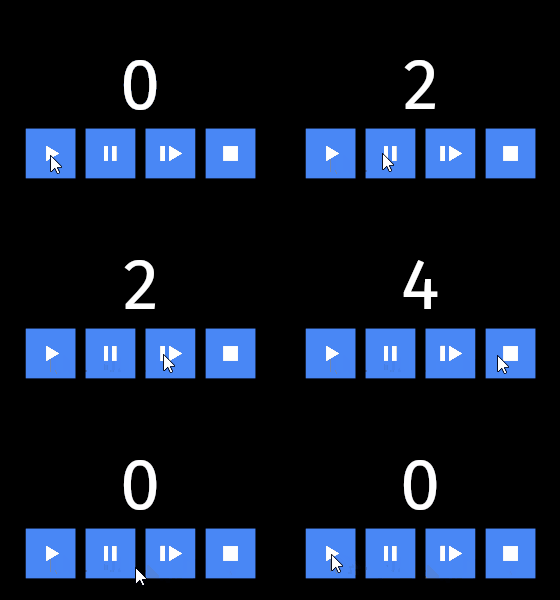
要创建一个秒表:
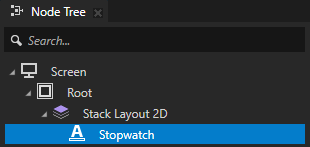
在 Node Tree 中创建一个显示秒表时间的节点。
例如,创建一个 Text Block 节点以显示经过的秒数。
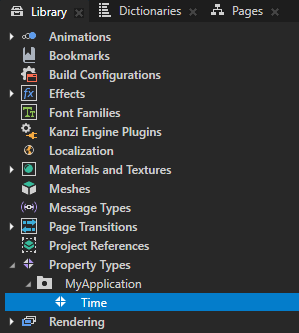
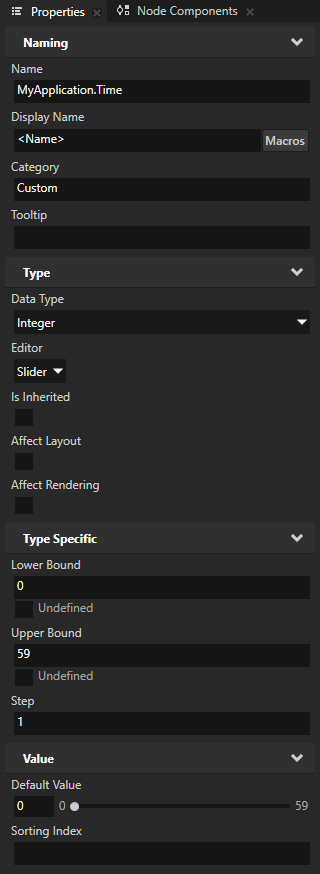
在 Library > Property Types 中创建一个属性类型,其 Data Type 为 Integer,并将该属性类型添加到您在上一步中创建的节点。
您将此属性类型用作 Int Value Accumulator 增量的中间属性。稍后在此过程中,您将创建一个绑定,将此属性的值转换为字符串,以便 Text Block 节点可以显示它。
在 Node Tree 中选择显示秒表时间的节点,在 Node Components 按 Alt 并右键单击 Animation 中,选择 Int Value Accumulator。
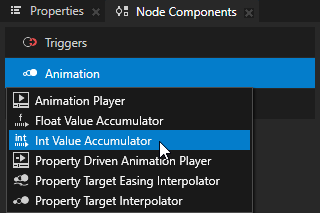
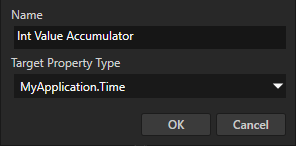
在 Create Int Value Accumulator 对话框中,将 Target Property Type 设置为您想要增加其值的属性。
将其设置为您在此过程中先前创建并添加到此节点的中间属性类型。
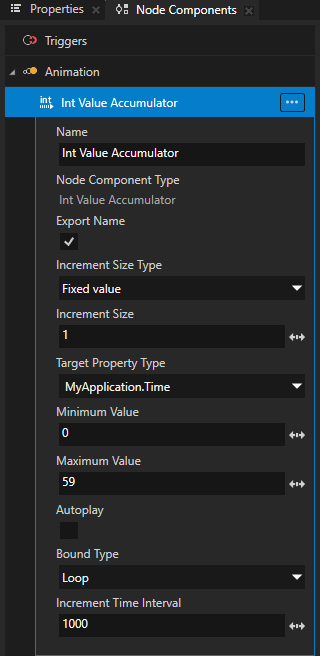
要将 Value Accumulator 配置为创建秒表,请设置:
Increment Size 为每次经过 Increment Time Interval 属性中设置的时间量时,您希望更改属性值的值。
要创建一个显示秒数的秒表,请将其设置为 1。
Minimum Value 到 Value Accumulator 使用的最低值。
请记住,目标属性的最终值是属性的基础值加上值累加器添加的增量总和。
要从0开始计时,请将其设置为0。
将 Maximum Value 设置为值累加器使用的最高值。
请记住,目标属性的最终值是属性的基础值加上值累加器添加的增量总和。
要显示最多59秒,请将其设置为59。
将 Autoplay 设置为禁用。
要手动控制 Value Accumulator 何时更改属性的值,请禁用此属性,并使用 Value Accumulator 消息来启动、暂停、恢复和停止 Value Accumulator。您将在此过程的后面部分添加这些控件。
Bound Type 到您希望值累加器在达到由 Minimum Value 和 Maximum Value 属性设置的增量范围限制时如何处理增量。
要在59秒后自动重新启动秒表,请将其设置为 Loop。
当设置为 Loop 时,值累加器在达到最低值或最高值时将值包裹。 当设置为 Clamp 时,值累加器在达到最高值时不再增加值。
Increment Time Interval 为您希望以毫秒为单位更改属性值的频率。
要每秒更改一次该值,请将其设置为1000。
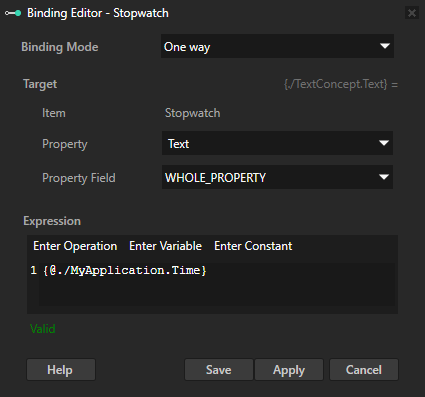
在 Node Tree 中,选择您在此过程开始时创建的 Text Block 节点,在 Properties 中点击 + Add Binding,并在 Binding Editor 中:
将 Property 设置为 Text。
从 Properties 拖动您创建的中间属性类型到 Expression 文本字段。
单击 Save。
您将 Text 属性绑定到其值由 Int Value Accumulator 增加的中间属性类型。绑定将整数转换为 Text Block 节点可以显示的字符串。
控制 Value Accumulator:
在 Node Tree 中创建一个节点,其中包含您要用于启动 Int Value Accumulator 的触发器。
例如,创建一个 Button 2D 节点并使用其 Button: Click 触发器。
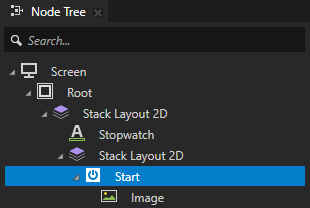
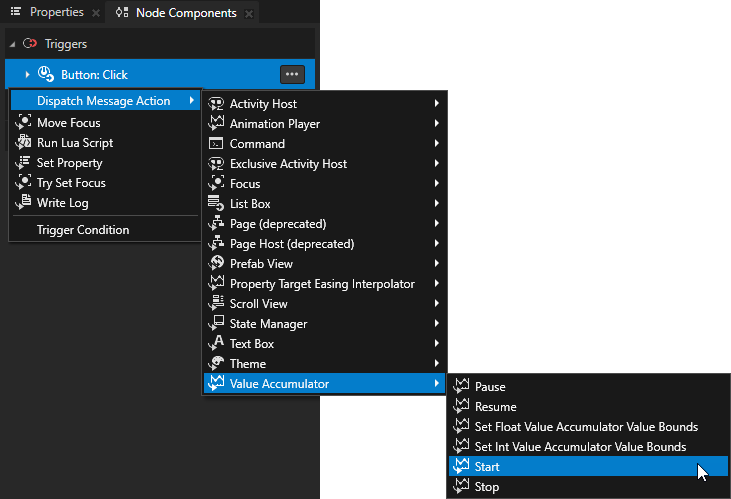
在 Node Tree 中,选择您在上一步中创建的节点,在 Node Components 中选择您要用于启动 Int Value Accumulator 按 Alt 并右键单击 Actions 的触发器,然后选择 Dispatch Message Action > Value Accumulator > Start。
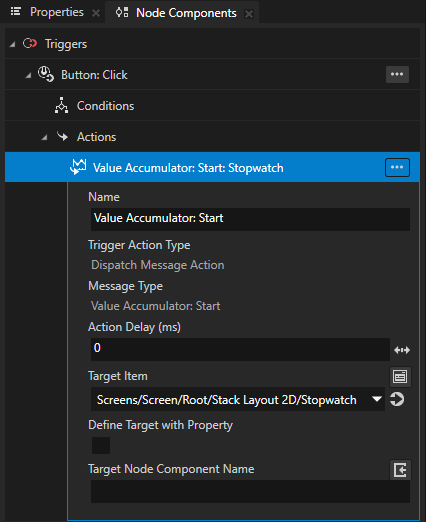
在 Value Accumulator: Start 消息中,将 Target Item 属性设置为您在此过程开始时创建的 Text Block 节点。
为 Int Value Accumulator 创建暂停、恢复和停止控件。重复上一步,但使用以下消息:
Pause
Resume
Stop
请参阅 Value Accumulator 消息。
创建一个计时器
要创建计时器,使用 Int Value Accumulator 来减少整数属性类型的值。
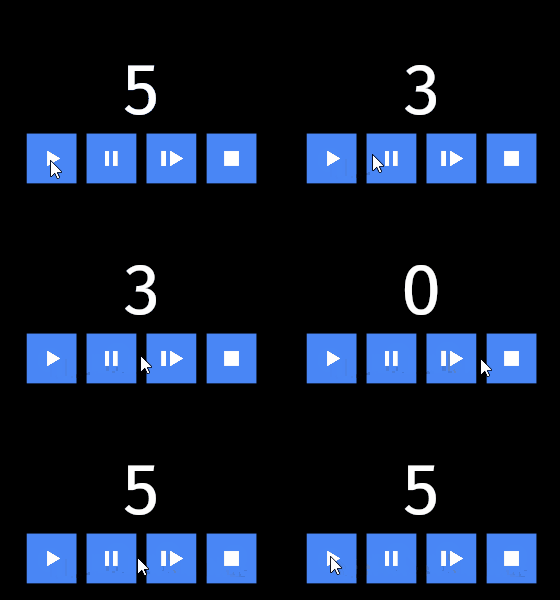
要创建计时器:
创建一个秒表。请参阅 创建一个秒表。
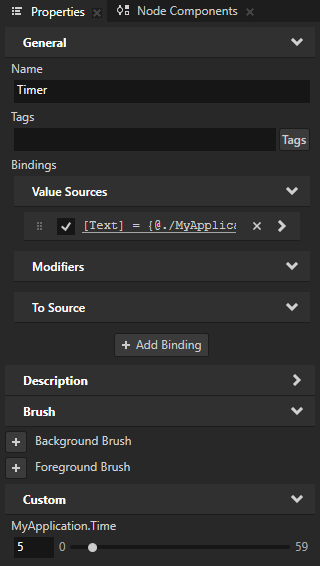
在 Node Tree 中选择显示时间的 Text Block 节点,并在 Properties 中将中间属性的值设置为您希望计时器开始倒计时的时间。
例如,要从 5 秒倒计时,将值设置为 5。
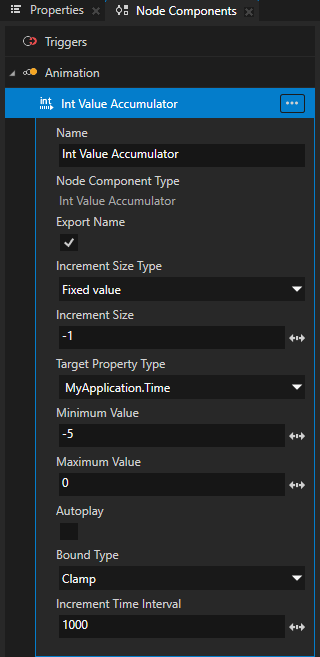
在 Int Value Accumulator 集合中的 Node Components:
Increment Size 为每次经过 Increment Time Interval 属性中设置的时间量时,您希望更改属性值的值。
要创建一个倒计时秒的计时器,请将其设置为 -1。
Minimum Value 到 Value Accumulator 使用的最低值。
请记住,目标属性的最终值是属性的基础值加上值累加器添加的增量总和。
要在0秒时结束计时器,将其设为-5。
将 Maximum Value 设置为值累加器使用的最高值。
请记住,目标属性的最终值是属性的基础值加上值累加器添加的增量总和。
要在5秒时启动计时器,将其设置为0。
Bound Type 到您希望值累加器在达到由 Minimum Value 和 Maximum Value 属性设置的增量范围限制时如何处理增量。
当计时器达到 0 时停止计时器,将其设置为 Clamp。
当设置为 Clamp 时,值累加器在达到最高值时不再增加该值。
创建移动道路的动画
要创建移动道路的动画,使用 Float Value Accumulator 来增加属性字段的值,以更改 Plane 上纹理的位置。

要创建移动道路的动画:
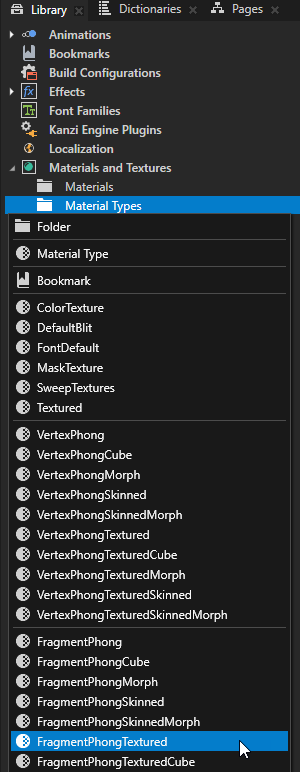
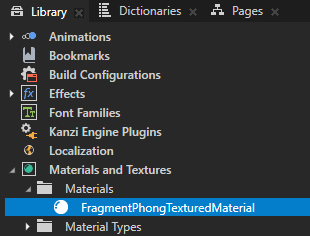
在 Library > Materials and Textures 按 Alt 并右键单击 Material Types 中,选择您要使用的材料以在几何体上显示道路的纹理。
例如,创建 FragmentPhongTextured 材质类型。
在 Assets 窗口中,点击 Import Assets 并导入您想用作道路的图像。

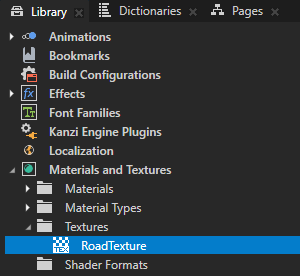
Kanzi Studio 在 Library > Materials and Textures > Textures 中为图像创建一个 Single Texture。
例如,导入此图像。
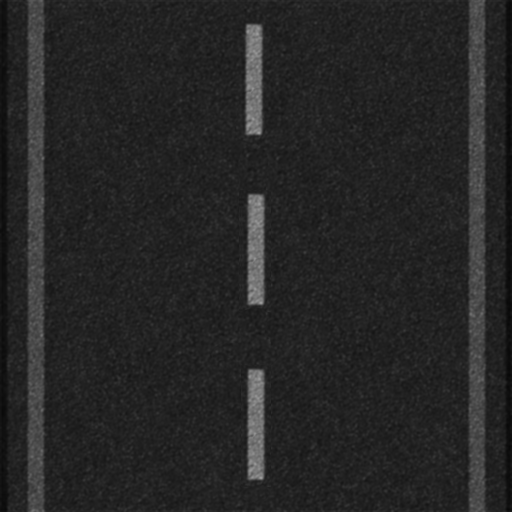
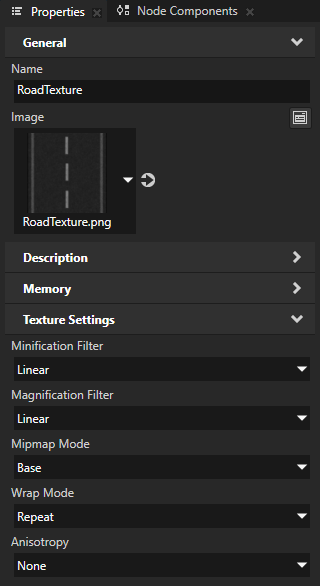
在 Library > Materials and Textures > Textures 中选择显示您导入的图像的纹理,并在 Properties 中将 Wrap Mode 属性设置为 Repeat。
这样可以设置纹理重复以覆盖几何体。
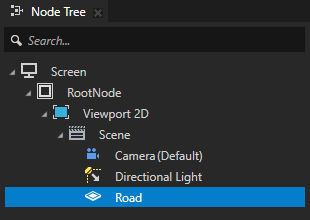
在 Node Tree 中创建一个表示您想要动画化的道路的节点。
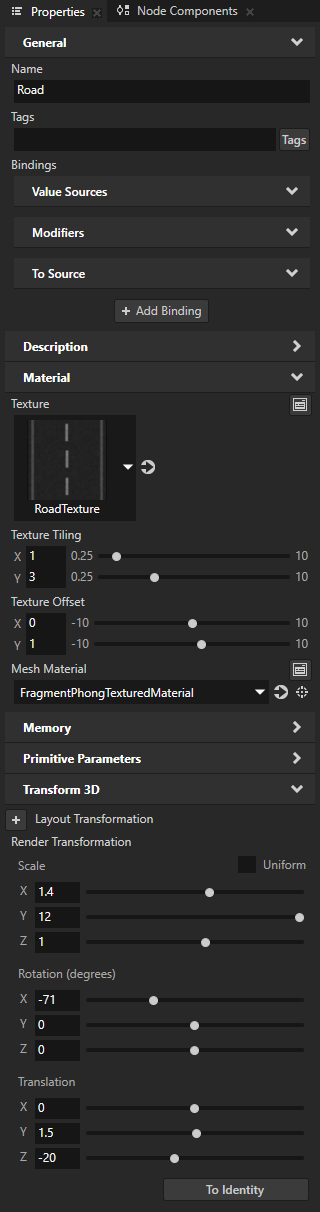
例如,创建一个 Plane 节点,将其设置为使用 FragmentPhongTexturedMaterial 材质,并在节点中添加和设置材质和几何体的属性。
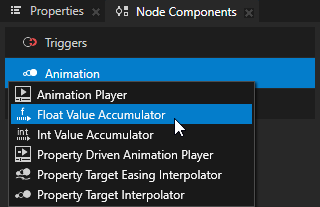
在 Node Components 按 Alt 并右键单击 Animation 中,选择 Float Value Accumulator。
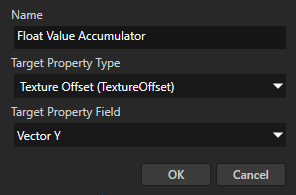
在 Create Float Value Accumulator 对话框中设置:
将 Target Property Type 到您想要增加其属性字段的属性。
要在 Plane 上移动纹理,请将其设置为 Material > Texture Offset 属性。
将 Target Property Field 到您在 Target Property Type 属性中选择的属性类型的属性字段。
要在 y 轴上移动纹理,请将其设置为 Vector Y 属性字段。
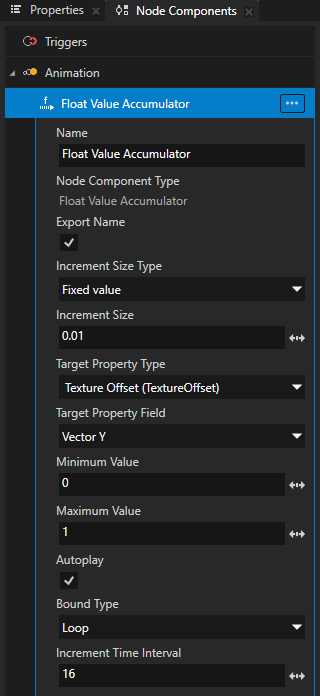
要配置 Value Accumulator 以创建移动道路的动画,请设置:
Increment Size 为您希望在每次经过 Increment Time Interval 属性中设置的时间量时更改属性字段值的值。
要移动 Plane 上的纹理,将其设置为 0.01。要调整动画的速度,请调整此值。
Minimum Value 到 Value Accumulator 使用的最低值。
请记住,目标属性的最终值是属性的基础值加上值累加器添加的增量总和。
要设置 Plane 上纹理的起始位置,请将其设置为 0。
将 Maximum Value 设置为值累加器使用的最高值。
请记住,目标属性的最终值是属性的基础值加上值累加器添加的增量总和。
要设置 Plane 上纹理的结束位置,请将其设置为 1。
Bound Type 到您希望值累加器在达到由 Minimum Value 和 Maximum Value 属性设置的增量范围限制时如何处理增量。
要循环纹理的动画,请将其设置为 Loop。
当设置为 Loop 时,值累加器在达到最低值或最高值时将值包裹。
Increment Time Interval 为您希望更改属性字段值的频率,以毫秒为单位。
为了实现流畅的动画,请保持 Increment Time Interval 属性的值较低,并通过调整 Increment Size 属性的值来调整动画的速度。
例如,将其设为 16。
旋转3D模型
您可以使用 Float Value Accumulator 来旋转 3D 模型。例如,创建一个旋转轮子的动画。
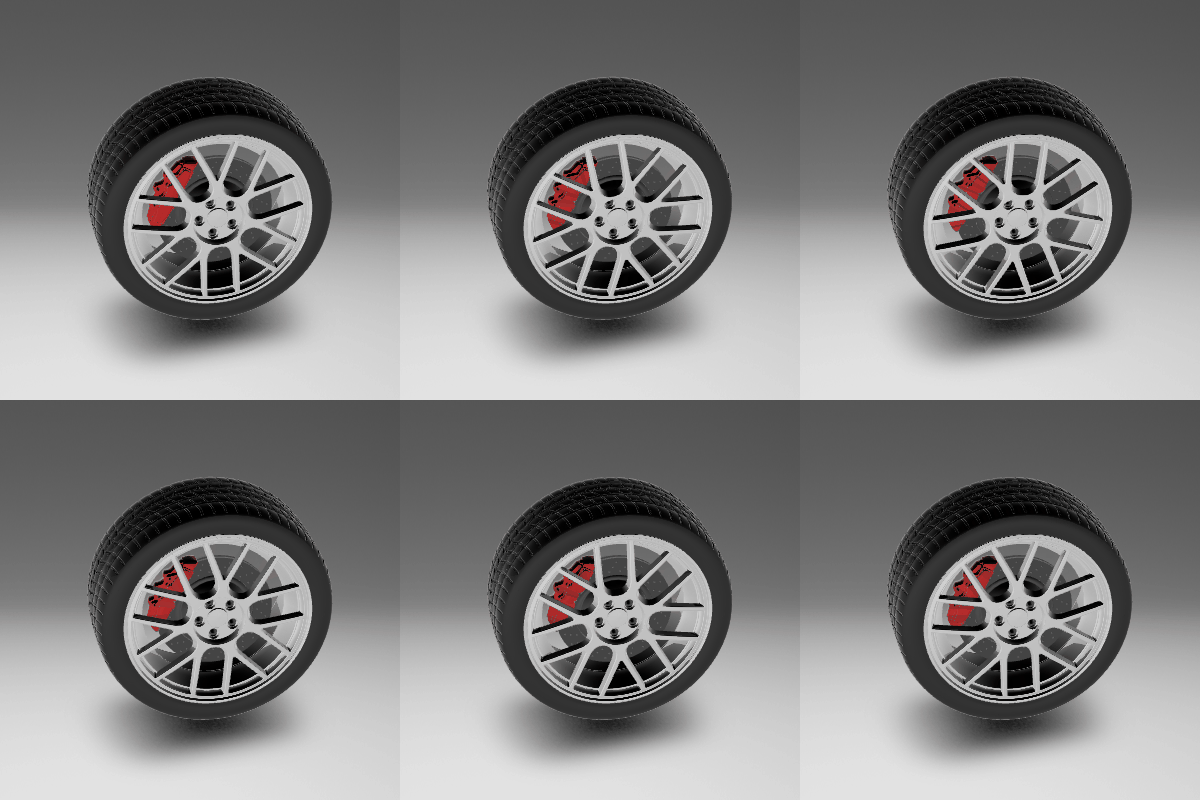
要使用 Value Accumulator 来旋转 3D 模型:
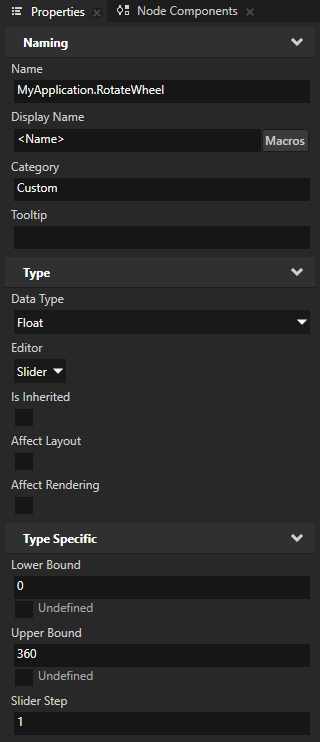
在 Library > Property Types 中创建一个属性类型,其 Data Type 为 Float,并将该属性类型添加到您希望使用 Value Accumulator 旋转的 3D 节点。
您将此属性类型用作 Float Value Accumulator 增量的中间属性。稍后在此过程中,您将创建一个绑定,该绑定使用四元数数据类型创建旋转,您可以在 Layout Transformation 和 Render Transformation 中用于旋转属性字段。
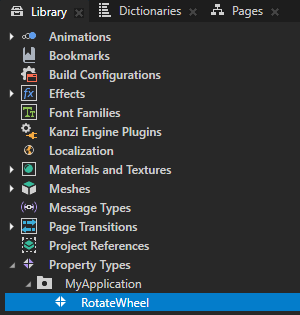
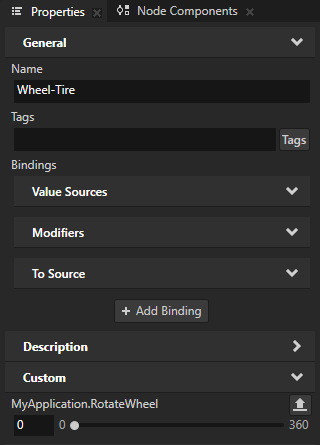
在 Node Tree 中,选择您想要使用 Value Accumulator 旋转的 3D 节点,在 Node Components 按 Alt 并右键单击 Animation 中,选择 Float Value Accumulator。
在 Create Float Value Accumulator 对话框中,将 Target Property Type 设置为您在此过程中先前创建并添加到此节点的属性。
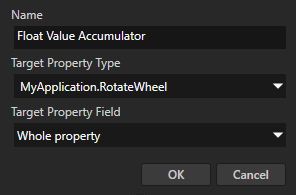
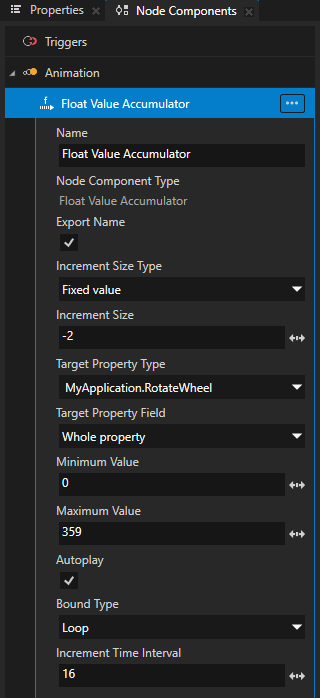
配置 Value Accumulator。例如,设置:
Increment Size 为您希望在每次经过 Increment Time Interval 属性中设置的时间量时更改属性字段值的值。
例如,将其设为 -2。
Minimum Value 到 Value Accumulator 使用的最低值。
请记住,目标属性的最终值是属性的基础值加上值累加器添加的增量总和。
例如,将其设为 0。
将 Maximum Value 设置为值累加器使用的最高值。
请记住,目标属性的最终值是属性的基础值加上值累加器添加的增量总和。
例如,将其设为 359。
Bound Type 到您希望值累加器在达到由 Minimum Value 和 Maximum Value 属性设置的增量范围限制时如何处理增量。
要循环旋转轮子的动画,请将其设置为 Loop。
当设置为 Loop 时,值累加器在达到最低值或最高值时将值包裹。
Increment Time Interval 为您希望更改属性字段值的频率,以毫秒为单位。
为了实现流畅的动画,请保持 Increment Time Interval 属性的值较低,并通过调整 Increment Size 属性的值来调整动画的速度。
例如,将其设为 16。
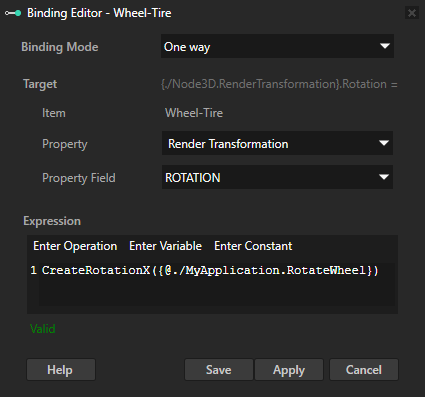
在 Node Tree 中,选择您添加了 Float Value Accumulator 的 3D 节点,在 Properties 中单击 + Add Binding,并在 Binding Editor 中设置:
Property 到 Render Transformation
Property Field 到 ROTATION
在 Expression 中,单击 Enter Operation,选择您希望围绕其旋转节点的轴的 CreateRotation,并从 Properties 中将您创建的中间属性类型拖动到 Expression 文本字段中,作为 CreateRotation 函数的参数。
例如,使用 CreateRotationX 函数围绕其 x 轴旋转节点。
单击 Save。
您在 x 轴上创建旋转,其中使用 Float Value Accumulator 增量的中间属性,并将 Render Transformation 属性字段 ROTATION 绑定到该旋转。
创建帧计数器
要创建帧计数器,请使用 Increment Mode 设置为 Per Frame 的 Int Value Accumulator。在此模式下,无论帧之间经过了多少时间,Value Accumulator 都会每帧递增一次值。

要创建帧计数器:
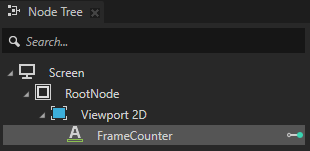
在 Node Tree 中创建一个显示帧数的节点。
例如,创建一个 Text Block 节点以显示帧数。
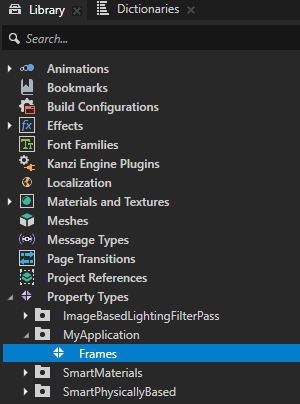
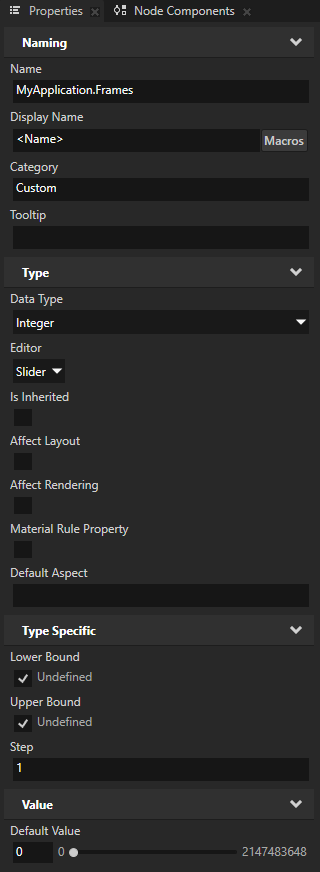
在 Library > Property Types 中创建一个属性类型,其 Data Type 为 Integer,并将该属性类型添加到您在上一步中创建的节点。
您将此属性类型用作 Int Value Accumulator 增量的中间属性。稍后在此过程中,您将创建一个绑定,将此属性的值转换为字符串,以便 Text Block 节点可以显示它。
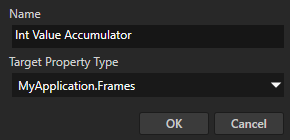
在 Node Tree 中选择显示帧数的节点,在 Node Components 中 按 Alt 并右键单击 Animation,并选择 Int Value Accumulator。
在 Create Int Value Accumulator 对话框中,将 Target Property Type 设置为您想要增加其值的属性。
将其设置为您在此过程中先前创建并添加到此节点的中间属性类型。
要将 Value Accumulator 配置为创建帧计数器,请设置:
Increment Mode 为 Per Frame。
这会将 Value Accumulator 设置为每帧递增一次值,而不论两帧之间经过了多少时间。在此模式下,会忽略 Increment Time Interval 属性。
Increment Size 为您希望在每一帧更改属性值的值。
要在每一帧递增 1,请将其设置为 1。
Minimum Value 到 Value Accumulator 使用的最低值。
请记住,目标属性的最终值是属性的基础值加上值累加器添加的增量总和。
要从 0 开始帧计数器,请将其设置为 0。
将 Maximum Value 设置为值累加器使用的最高值。
请记住,目标属性的最终值是属性的基础值加上值累加器添加的增量总和。
例如,要计数到 1000 帧,请将其设置为 1000。
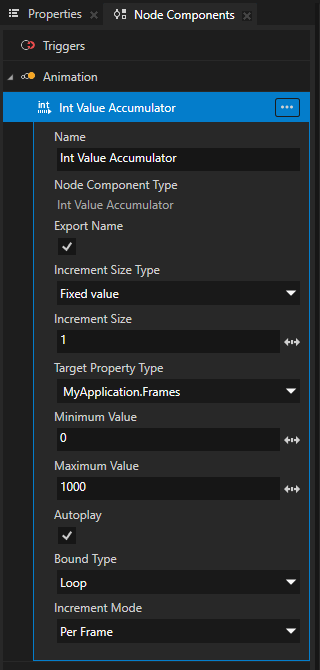
Bound Type 到您希望值累加器在达到由 Minimum Value 和 Maximum Value 属性设置的增量范围限制时如何处理增量。
要在帧计数器达到最大值后重新启动它,请将其设置为 Loop。
当设置为 Loop 时,值累加器在达到最低值或最高值时将值包裹。 当设置为 Clamp 时,值累加器在达到最高值时不再增加值。
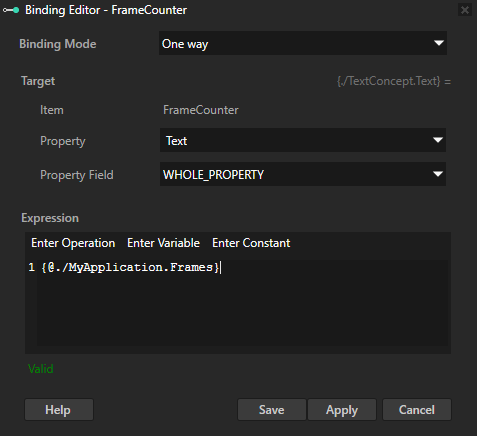
在 Node Tree 中,选择您在此过程开始时创建的 Text Block 节点,在 Properties 中点击 + Add Binding,并在 Binding Editor 中:
将 Property 设置为 Text。
从 Properties 拖动您创建的中间属性类型到 Expression 文本字段。
单击 Save。
您将 Text 属性绑定到其值由 Int Value Accumulator 增加的中间属性类型。绑定将整数转换为 Text Block 节点可以显示的字符串。
在 API 中使用 Value Accumulators
要创建一个 Int Value Accumulator:
// Create an Int Value Accumulator.
IntValueAccumulatorSharedPtr accumulator = IntValueAccumulator::create(domain, "accumulator");

// Set the property type whose value you want to use to set the size of the increment.
accumulator->setIncrementSizeSource(inputValuePropertyType.getName());

// Set the target property type whose values you want to increment.
accumulator->setTargetPropertyType(targetPropertyType.getName());

// Set the frequency of the increments in milliseconds.
accumulator->setIncrementTimeInterval(1);

// Set the minimum and maximum values that, when added to the value of the target property,
// set the lowest and the highest values that the Value Accumulator uses.
accumulator->setMinimumAccumulatedValue(100);
accumulator->setMaximumAccumulatedValue(800);

// Set how you want the Value Accumulator to handle the value of a property when it reaches
// the lowest or the highest value that is defined by adding the value of the target property
// to the minimum and maximum values.
//
// When set to Loop and the Value Accumulator reaches the target property value added to the
// maximum value, the Value Accumulator sets the property value back to the value defined by
// the target property value added to the minimum value.
accumulator->setBoundType(ValueAccumulatorBase::BoundType::Loop);

/// Add the Value Accumulator to the node.
node->addNodeComponent(accumulator);
要创建一个 Float Value Accumulator:
// Create a Float Value Accumulator.
FloatValueAccumulatorSharedPtr accumulator = FloatValueAccumulator::create(domain, "accumulator");

// Set the property type whose value you want to use to set the size of the increment.
accumulator->setIncrementSizeSource(inputValuePropertyType.getName());

// Set the target property type and its property field whose values you want to increment.
accumulator->setTargetPropertyType(targetPropertyType.getName());
accumulator->setTargetPropertyField(PropertyFieldVectorX);

// Set the minimum and maximum values that, when added to the value of the target property,
// set the lowest and the highest values that the Value Accumulator uses.
accumulator->setMinimumAccumulatedValue(0.1f);
accumulator->setMaximumAccumulatedValue(0.8f);

// Set how you want the Value Accumulator to handle the value of a property when it reaches
// the lowest or the highest value that is defined by adding the value of the target property
// to the minimum and maximum values.
//
// When set to Loop and the Value Accumulator reaches the target property value added to the
// maximum value, the Value Accumulator sets the property value back to the value defined by
// the target property value added to the minimum value.
accumulator->setBoundType(ValueAccumulatorBase::BoundType::Loop);

// Add the Value Accumulator to the node.
node->addNodeComponent(accumulator);
要将每帧递增模式与 Int Value Accumulator 一起使用:
// Create an Int Value Accumulator.
auto accumulator = IntValueAccumulator::create(domain, "accumulator");

// Set the property type whose value you want to use to set the size of the increment.
accumulator->setIncrementSizeSource(inputValuePropertyType.getName());

// Set the target property type whose values you want to increment.
accumulator->setTargetPropertyType(targetPropertyType.getName());

// Set the increment mode to PerFrame. In this mode, the Value Accumulator increments the value
// once per frame, ignoring the time delta. This is useful for frame counters.
accumulator->setIncrementMode(ValueAccumulatorBase::IncrementMode::PerFrame);

// Set the minimum and maximum values for the accumulated value.
accumulator->setMinimumAccumulatedValue(0);
accumulator->setMaximumAccumulatedValue(100);

// Set the bound type to Loop so the value wraps around when it reaches the maximum.
accumulator->setBoundType(ValueAccumulatorBase::BoundType::Loop);

// Add the Value Accumulator to the node.
node->addNodeComponent(accumulator);