Kanzi ビューとビューアダプターを使用する
Kanzi ビューを追加する
Kanzi は、Androidの SurfaceView および TextureView からそれぞれ派生した KanziSurfaceView および KanziTextureView ビュータイプを公開します。
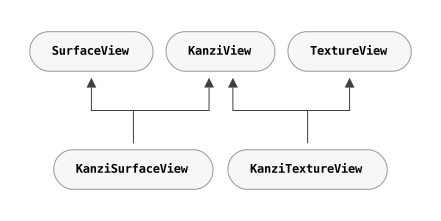
KanziSurfaceViewは、ハードウェアコンポーザーから取得したサーフェスに直接レンダリングするため、パフォーマンスが向上します。しかし、アプリケーションはアクティビティ内の他のビューの背後または上にのみレンダリングできるという制約があります。KanziTextureViewは通常のビューのようにテクスチャにレンダリングします。これにより、アプリケーションはそのコンテンツをAndroidコンテンツと自由に混合でき、移動、変形、アニメーション、さらには半透明にすることも可能です。
Android SurfaceView vs TextureView または 透明なビューを作成する を参照してください。
Kanzi ビューを Android レイアウトで宣言し、通常の Android ビューと同様にそのビューをどこにでもインフレートできます。
<LinearLayout xmlns:android="http://schemas.android.com/apk/res/android"
   xmlns:app="http://schemas.android.com/apk/res-auto">

   <com.rightware.kanzi.KanziSurfaceView
      android:id="@+id/view1"
      app:name="View1"
      app:kzbPathList="project1.kzb"
      app:startupPrefabUrl="kzb://project1/Prefabs/View1" />
複数のビューを作成する
アプリ内で複数の Kanzi ベースのビューを同時にアクティブにし、異なるアクティビティやフラグメントでそれらにアクセスすることができます。
Kanzi ビューの設定
これらのビュータイプは、レイアウトから直接割り当てることができるさまざまな構成を公開します。
アトリビュート (Attribute) |
ノード自体とそのすべてのチャイルドノードが静的であるかまたは特定時点の後に静的になる場合は、 |
フォーマット (Format) |
デフォルトバリュー (Default Value) |
|---|---|---|---|
|
ビューの名前。 |
ストリング (String) |
|
|
カンマ区切りのkzbファイルのリスト。設定すると、Kanzi はビューがアタッチされたときにこれらのファイルを自動的にロードします。また、ロードしたいkzbファイルのリストを含むcfgファイルを渡すこともできます。 |
ストリング (String) |
|
|
スタートアッププレハブのURL。設定されると、Kanzi はこのプレハブを非同期でロードし、ビューの子としてインスタンス化します。 |
ストリング (String) |
|
|
サーフェスをクリアするために使用される色。 |
カラー (Color) |
|
|
サーフェスのクリアを有効にするフラグ。 |
Boolean |
|
または、インフレーション後にこれらの構成オプションをセッターで割り当てることができます。
public class Activity1 extends FragmentActivity {

    @Override
    protected void onCreate(Bundle) {
        ...

        // Inflate the content from the layout.
        setContentView(R.layout.activity1);

        // Get the reference to the view.
        KanziView view = findViewById(R.id.view1);

        // Set the name.
        view.setName("View1");

        // Set the kzb paths
        view.setKzbPathList(new String[]{"project1.kzb"});

        // Set the startup prefab.
        view.setStartupPrefabUrl("kzb://project1/Prefabs/View1");
class CarMenu : FragmentActivity() {

    override fun onCreate(icicle: Bundle?) {
        ...

        // Inflate the content from the layout.
        setContentView(R.layout.activity1)

        // Get the reference to the view.
        val view: KanziView = findViewById(R.id.view1)

        // Set the name.
        view.setName("View1")

        // Set the kzb paths
        view.setKzbPathList(arrayOf("project1.kzb"));

        // Set the startup prefab.
        view.setStartupPrefabUrl("kzb://project1/Prefabs/View1")
アクティビティ onCreate 関数中にkzbファイルを明示的にロードすることも可能です。
@Override
protected void onCreate(Bundle) {
   ...

   // Acquire a reference to the KanziRuntime.
   mRuntimeRef = KanziRuntime.acquire(this);

   // Load the kzb.
   try {
       mRuntimeRef.get().loadKzb("project1.kzb");
   } catch (FileNotFoundException e) {
       Log.e(e.getMessage());
       return;
   }

   // Inflate the content from the layout.
   setContentView(R.layout.activity1);
override fun onCreate(icicle: Bundle?) {
   ...

   // Acquire a reference to the KanziRuntime.
   mRuntimeRef = KanziRuntime.acquire(this)

   // Load the kzb.
   try {
       mRuntimeRef.get().loadKzb("project1.kzb")
   } catch (FileNotFoundException e) {
       Log.e(e.getMessage())
       return
   }

   // Inflate the content from the layout.
   setContentView(R.layout.activity1)
透明なビューを作成する
KanziView は、背後のコンテンツを表示できる透明なコンテンツを表示することができます。
透明なビューを作成するには、以下のようにします。
KanziViewの透明性を有効にするには、ビューアクティビティのonCreateメソッドを編集します。KanziSurfaceViewのために、setZOrderOnTopメソッドとsetFormatメソッドを呼び出します。@Override protected void onCreate(Bundle) { ... // Get reference to the view. KanziSurfaceView view = findViewById(R.id.view1); // Add transparency support to the view. view.setZOrderOnTop(true); view.getHolder().setFormat(PixelFormat.TRANSPARENT);
override fun onCreate(icicle: Bundle?) {
    ...

    // Get reference to the view.
    val view = findViewById(R.id.view1);

    // Add transparency support to the view.
    view!!.setZOrderOnTop(true);
    view!!.getHolder().setFormat(PixelFormat.TRANSPARENT);
KanziTextureViewに対してsetOpaqueメソッドを呼び出します。@Override protected void onCreate(Bundle) { ... // Get reference to the view. KanziTextureView view = findViewById(R.id.view1); // Add transparency support to the view. view.setOpaque(false);
override fun onCreate(icicle: Bundle?) {
    ...

    // Get reference to the view.
    val view = findViewById(R.id.view1);

    // Add transparency support to the view.
    view!!.setOpaque(false);
Androidレイアウトファイルで、
KanziViewのクリアカラーを透明に更新してください。app:clearColor="@android:color/transparent"
application.cfgを編集して、アルファビットを持つサーフェスを必要とするようにします。カラーフォーマット (Color format) を参照してください。SurfaceBitsAlpha = 8
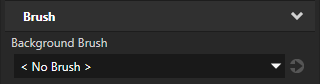
Kanzi Studio で透明なコンテンツを表示するノードを選択し、Properties で Background Brush プロパティを < No Brush > に設定します。
既存のビューに Kanzi をアタッチする
KanziViewAdapter を既存の Android SurfaceView または TextureView にインスタンス化してアタッチできます。
@Override
protected void onCreate(Bundle) {
   ...

   // Get reference to the view.
   SurfaceView view = findViewById(R.id.view1);

   // Instantiate an adapter and assign a view.
   mAdapter = new KanziViewAdapter(view, "View1");

   // Assign a startup prefab.
   view.setStartupPrefabUrl("kzb://project1/Prefabs/View1");
override fun onCreate(icicle: Bundle?) {
    ...

    // Get reference to the view.
    val view = findViewById(R.id.view1)

    // Instantiate an adapter and assign a view.
    mAdapter = KanziViewAdapter(view, "View1");

    // Assign a startup prefab.
    view!!.setStartupPrefabUrl("kzb://project1/Prefabs/View1");
ビューのないコンテキストから Kanzi を使用する
ビューなしで KanziViewAdapter をインスタンス化して使用することもできます。たとえば、WallpaperService からです。
class WallpaperEngine1 extends WallpaperService.Engine {
    KanziViewAdapter mAdapter;

    @Override
    public void onCreate(SurfaceHolder) {
        ...
        // Instantiate an adapter.
        mAdapter = new KanziViewAdapter(getApplicationContext(), "WallpaperEngine1");

        // Assign a startup prefab.
        mAdapter.setStartupPrefabUrl("kzb://project1/Prefabs/Wallpaper");
private inner class WallpaperEngine1 : Engine() {
    private var mAdapter: KanziViewAdapter? = null

    override fun onCreate(surfaceHolder: SurfaceHolder) {
        ...
        // Instantiate an adapter.
        mAdapter = KanziViewAdapter(applicationContext, "WallpaperEngine1")

        // Assign a startup prefab.
        mAdapter!!.setStartupPrefabUrl("kzb://project1/Prefabs/Wallpaper")
Kanzi Java および Kotlin API にアクセスする
Kanzi ビューのノードツリーが初期化されると、Kanzi はそのノードツリーのルートノードが Screen ノードであるかどうかを確認します。ルートノードが Screen ノードでない場合、Kanzi は Screen ノードを作成し、そのノードツリーを Screen ノードにアタッチします。Kanzi は Screen ノードを使用して、Kanzi ビューでの入力とフォーカスを処理します。
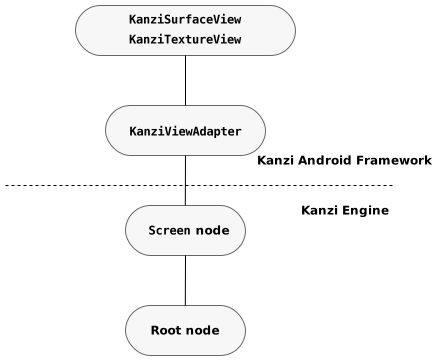
Kanzi ビューで、Screen ノードの子を取得するには、KanziView.getRoot メソッドを使用します。このルートノードから、Kanzi Java API を使用してノードツリーにアクセスできます。
// Get the Root.
Node root = view.getRoot();

// Look up a node using an alias.
Node button = root.lookupNode("#Button");

// Set a property.
button.setProperty(ButtonConceptMetadata.ToggleStateProperty, 0);

// Add a message handler.
button.addMessageHandler(ButtonConceptMetadata.ToggleStateMessage,
                           new Node.MessageSubscriptionFunction() {
                           @Override
                           public void handle(MessageArguments messageArguments) {
                              int toggleState = messageArguments.getArgument(ButtonConceptMetadata.ToggleStateProperty);
                              Log.i("Button State is " + toggleState);
                           }});
// Get the Root.
val root = view.getRoot();

// Look up a node using an alias.
val button = root.lookupNode("#Button");

// Set a property.
button!!.setProperty(ButtonConceptMetadata.ToggleStateProperty, 0);

// Add a message handler.
button.addMessageHandler(ButtonConceptMetadata.ToggleStateMessage,
    Node.MessageSubscriptionFunction { messageArguments ->
        val toggleState =
            messageArguments.getArgument(ButtonConceptMetadata.ToggleStateProperty)
        Log.i(TAG, "Button State is $toggleState")
    })
Kanzi Android framework (droidfw) はAndroid UIスレッドで実行されるため、アプリケーションコードから Kanzi Java API インターフェースを直接呼び出しても安全です。別のスレッドから Kanzi を使用する必要がある場合は、View.post(Runnable)、TaskDispatcher、または同様の機能を使用してAndroid UIスレッドにタスクを投稿できます。
タスクディスパッチャを使用してAndroid UIスレッドにタスクを投稿するには:
// This example assumes that your application code has mechanisms to ensure the
// validity of references to the Domain and root Node. For example, you can do this
// by hooking into the lifecycle of the Kanzi view or to the lifetime of a Kanzi
// object.
TaskDispatcher taskDispatcher = getDomain().getTaskDispatcher();

// Submit a task from a non-UI thread.
taskDispatcher.submit(() -> {
    // Look up the Child Node in the node tree.
    Node2D node = rootNode.lookupNode("./Child Node");
    // Set the Visible property of the node.
    node.setProperty(Node2D.VisibleProperty, true);
});
// This example assumes that your application code has mechanisms to ensure the
// validity of references to the Domain and root Node. For example, you can do this
// by hooking into the lifecycle of the Kanzi view or to the lifetime of a Kanzi
// object.
val taskDispatcher = domain.taskDispatcher

// Submit a task from a non-UI thread.
taskDispatcher.submit {
    // Look up the Child Node in the node tree.
    val node = rootNode.lookupNode<Node2D>("./Child Node")
    // Set the Visible property of the node.
    node.setProperty(Node2D.VisibleProperty, true)
}
Kanzi Java API について詳しく知るには、Java と Kotlin を使用して をご覧ください。
Kanzi Engine のアンロード
Kanzi コンテンツを含むアクティブなビューがない場合、Kanzi Engine をメモリからアンロードできます。
KanziRuntime.Reference クラスは、アクティブな KanziRuntime インスタンスに対して参照カウントを行います。各アタッチされた KanziView は、自動的に KanziRuntime.Reference を KanziRuntime に保持し、ビューがデタッチされるときにのみ閉じられます。
すべての KanziRuntime.Reference インスタンスが閉じられると、KanziRuntime がアンロードされます。
KanziRuntime がアンロードされた場合、次に KanziRuntime.acquire を呼び出すと、KanziRuntime の新しいインスタンスが初期化され、すべてのkzbファイルとリソースのリロードが必要になります。