Kanzi Studio で Kanzi Engine プラグインのカスタムタイプを表示するためのリファレンス
Kanzi Engine プラグインを使用して、Kanzi Engine API を使用してカスタムプロパティタイプとメッセージを作成し、Kanzi Studio で使用することができます。
Kanzi Engine プラグインで作成するカスタムプロパティタイプとメッセージに関する情報を Kanzi Studio に渡すには、これらのプロパティタイプとメッセージを説明するメタデータを宣言します。
メタデータは、Kanzi Engine プラグインのユーザーが Kanzi Studio でプラグインコンテンツと対話できるようにします。
例えば、メタデータは、プロパティに値を設定するための Kanzi Studio プロパティエディタのタイプと、選択する値のセットを定義します。
必要なメタデータのみを宣言してください。Kanzi Studio は、設定しない属性にデフォルト値を割り当てます。
この表は、使用可能なメタデータ属性を一覧にしています。
アトリビュート (Attribute) |
ディスクリプション (Description) |
プロパティタイプに使用 |
メッセージタイプに使用 |
|---|---|---|---|
Kanzi Studio に表示されるプロパティまたはメッセージの名前 |
X |
X |
|
プロパティまたはメッセージのツールチップ |
X |
X |
|
プロパティカテゴリ名は、Kanzi Studio に表示されている通りに |
X |
X |
|
Kanzi Studio がユーザーに選択させるプロパティの可能な値のソース |
X |
||
Kanzi Studio がプロパティを提案するノードタイプ、および Kanzi Studio がプロパティを自動的に追加するか、ユーザーが追加できるかどうか |
X |
||
プロパティの値を設定するために使用される Kanzi Studio エディターのタイプ |
X |
||
Kanzi Studio でノードまたはリソースにプロパティが追加されたときに取得する初期値 |
X |
||
プロパティが持つことができる最小値 |
X |
||
プロパティが持つことができる最大値 |
X |
||
Kanzi Studio ユーザーがプロパティ値を編集したときにその値が変化する量 |
X |
||
Kanzi Studio がアクションとしてメッセージを表示するかどうか |
X |
||
Kanzi Studio がトリガーとしてメッセージを表示するかどうか |
X |
||
Kanzi Studio 内のプロパティカテゴリ内でのプロパティの位置 |
X |
||
プロパティまたはメッセージが Kanzi Studio で利用可能かどうか |
X |
X |
|
プラグインの以前のバージョンでのプロパティまたはメッセージの名前 |
X |
X |
displayName
プロパティまたはメッセージの名前を、Kanzi Studio に表示される方法で設定します。
構文 |
|
||
値 |
|
||
例 |
metadata.displayName = "Video Filename";
@EditorInfo(displayName = "Video Filename")
@EditorInfo(displayName = "Video Filename")

|
ツールチップ
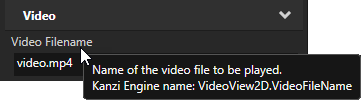
プロパティまたはメッセージのツールチップを設定します。Kanzi Studio は、ユーザーがアプリケーションコードで必要な場合に備えて、ツールチップテキストにプロパティまたはメッセージの Kanzi Engine 名を追加します。
構文 |
|
||
値 |
|
||
例 |
metadata.displayName = "Video Filename";
metadata.tooltip = "Name of the video file to be played.";
@EditorInfo(
             displayName = "Video Filename",
             tooltip = "Name of the video file to be played."
           )
@EditorInfo(
             displayName = "Video Filename",
             tooltip = "Name of the video file to be played."
           )
|
カテゴリ (Category)
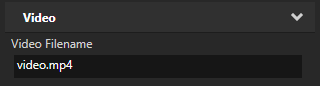
プロパティのカテゴリ名を、Kanzi Studio Properties に表示される方法で設定します。Kanzi Studio は常に General と Description のプロパティカテゴリを最初にリストし、続いて他のプロパティカテゴリをアルファベット順にリストします。
構文 |
|
||
値 |
|
||
例 |
metadata.displayName = "Video Filename";
metadata.category = "Video";
@EditorInfo(
             displayName = "Video Filename",
             category = "Video"
           )
@EditorInfo(
             displayName = "Video Filename",
             category = "Video"
           )
|
valueProvider
Kanzi Studio がユーザーが選択できるプロパティの可能な値を取得する方法を設定します。
構文 |
|
||
値 |
|
||
例 |
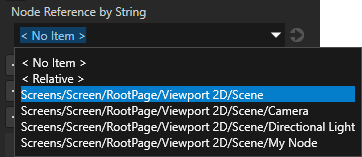
// When you set valueProvider to ProjectObject:Node3D,
// Kanzi Studio automatically uses the Node 3D selector editor.
metadata.valueProvider = "ProjectObject:Node3D";
// When you set valueProvider to ProjectObject:Node3D,
// Kanzi Studio automatically uses the Node 3D selector editor.
@EditorInfo(valueProvider = "ProjectObject:Node3D")
// When you set valueProvider to ProjectObject:Node3D,
// Kanzi Studio automatically uses the Node 3D selector editor.
@EditorInfo(valueProvider = "ProjectObject:Node3D")
// Provides a dropdown with all available property types.
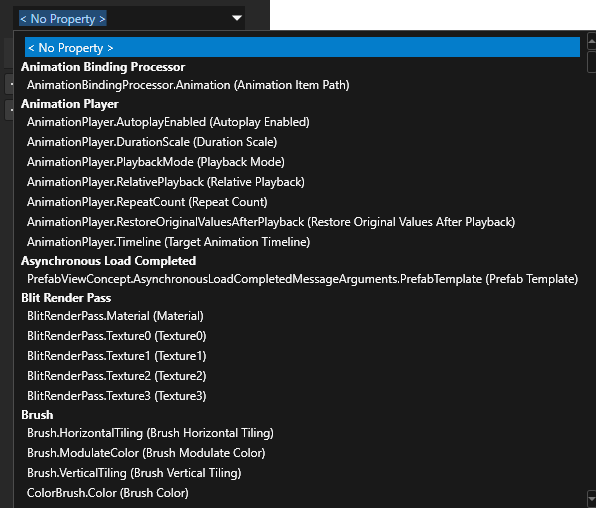
// Do not set the editor type. Kanzi Studio automatically sets the correct editor.
metadata.valueProvider = "PropertyType";
// Provides a dropdown with all available property types.
// Do not set the editor type. Kanzi Studio automatically sets the correct editor.
@EditorInfo(valueProvider = "PropertyType")
// Provides a dropdown with all available property types.
// Do not set the editor type. Kanzi Studio automatically sets the correct editor.
@EditorInfo(valueProvider = "PropertyType")
// Provides a list to which the user can add items.
// Do not set the editor type. Kanzi Studio automatically sets the correct editor.
metadata.valueProvider = "StringList";
// Provides a list to which the user can add items.
// Do not set the editor type. Kanzi Studio automatically sets the correct editor.
@EditorInfo(valueProvider = "StringList")
// Provides a list to which the user can add items.
// Do not set the editor type. Kanzi Studio automatically sets the correct editor.
@EditorInfo(valueProvider = "StringList")

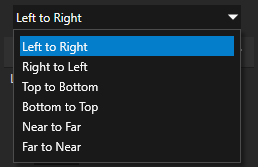
// Provides a list of directions along different dimensions which Kanzi maps to
// integers from 0 to 5.
metadata.valueProvider =
    "Enum : Left to Right|0;Right to Left|1;Top to Bottom|2;Bottom to Top|3;Near to Far|4;Far to Near|5";
// Provides a list of directions along different dimensions which Kanzi maps to
// integers from 0 to 5.
@EditorInfo(valueProvider =
    "Enum : Left to Right|0;Right to Left|1;Top to Bottom|2;Bottom to Top|3;Near to Far|4;Far to Near|5")
// Provides a list of directions along different dimensions which Kanzi maps to
// integers from 0 to 5.
@EditorInfo(valueProvider =
    "Enum : Left to Right|0;Right to Left|1;Top to Bottom|2;Bottom to Top|3;Near to Far|4;Far to Near|5")
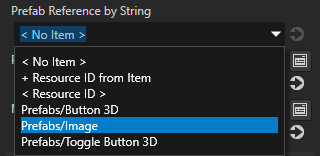
// Creates a string reference to a prefab resource.
PropertyType<string> MyPlugin::PrefabRefByStringProperty(
    kzMakeFixedString("MyPlugin.PrefabRefByString"), "", 0, false,
    KZ_DECLARE_EDITOR_METADATA(
        metadata.displayName = "Prefab Reference by String";
        // When you set valueProvider to ProjectObject:PrefabTemplate,
        // Kanzi Studio automatically uses the Prefab template selector editor.
        metadata.valueProvider = "ProjectObject:PrefabTemplate";
    ));
// Creates a string reference to a prefab resource.
@Metadata
@EditorInfo(
             displayName = "Prefab Reference by String",
             // When you set valueProvider to ProjectObject:PrefabTemplate,
             // Kanzi Studio automatically uses the Prefab template selector editor.
             valueProvider = "ProjectObject:PrefabTemplate"
           )
public static PropertyType<String> PrefabRefByStringProperty =
    new PropertyType("MyPlugin.PrefabRefByString", String.class);
companion object {
    // Creates a string reference to a prefab resource.
    @Metadata
    @EditorInfo(
                 displayName = "Prefab Reference by String",
                 // When you set valueProvider to ProjectObject:PrefabTemplate,
                 // Kanzi Studio automatically uses the Prefab template selector editor.
                 valueProvider = "ProjectObject:PrefabTemplate"
               )
    val PrefabRefByStringProperty =
        PropertyType("MyPlugin.PrefabRefByString", String::class.java);
}
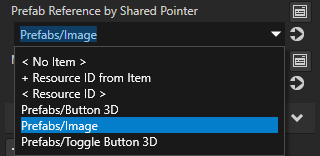
// Creates a shared pointer reference to a prefab resource.
PropertyType<ResourceSharedPtr> MyPlugin::PrefabRefBySharedPtrProperty(
    kzMakeFixedString("MyPlugin.PrefabRefBySharedPtr"), ResourceSharedPtr(), 0, false,
    KZ_DECLARE_EDITOR_METADATA(
        metadata.displayName = "Prefab Reference by Shared Pointer";
        // When you set valueProvider to ProjectObject:PrefabTemplate,
        // Kanzi Studio automatically uses the Prefab template selector editor.
        metadata.valueProvider = "ProjectObject:PrefabTemplate";
    ));
// Creates a resource reference to a prefab resource.
@Metadata
@EditorInfo(
             displayName = "Prefab Reference by Reference",
             // When you set valueProvider to ProjectObject:PrefabTemplate,
             // Kanzi Studio automatically uses the Prefab template selector editor.
             valueProvider = "ProjectObject:PrefabTemplate"
           )
public static PropertyType<Resource> PrefabRefByResourceProperty =
    new PropertyType("MyPlugin.PrefabRefBySharedPtr", Resource.class);
companion object {
    // Creates a resource reference to a prefab resource.
    @Metadata
    @EditorInfo(
                 displayName = "Prefab Reference by Reference",
                 // When you set valueProvider to ProjectObject:PrefabTemplate,
                 // Kanzi Studio automatically uses the Prefab template selector editor.
                 valueProvider = "ProjectObject:PrefabTemplate"
               )
    val PrefabRefByResourceProperty =
        PropertyType("MyPlugin.PrefabRefBySharedPtr", Resource::class.java);
}
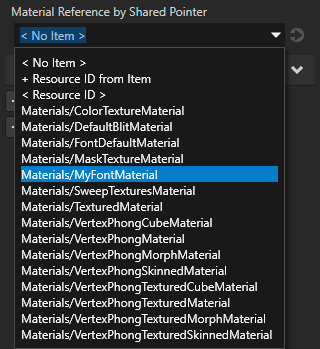
// Creates a shared pointer reference to a material resource.
PropertyType<ResourceSharedPtr> MyPlugin::MaterialRefBySharedPtrProperty(
    kzMakeFixedString("MyPlugin.MaterialRefBySharedPtr"), ResourceSharedPtr(), 0, false,
    KZ_DECLARE_EDITOR_METADATA(
        metadata.displayName = "Material Reference by Shared Pointer";
        // When you set valueProvider to ProjectObject:Material,
        // Kanzi Studio automatically uses the Material dropdown editor.
        metadata.valueProvider = "ProjectObject:Material";
    ));
// Creates a resource reference to a material resource.
@Metadata
@EditorInfo(
             displayName = "Material Reference by Reference",
             // When you set valueProvider to ProjectObject:Material,
             // Kanzi Studio automatically uses the Material dropdown editor.
             valueProvider = "ProjectObject:Material"
           )
public static PropertyType<Resource> MaterialRefByResourceProperty =
    new PropertyType("MyPlugin.MaterialRefBySharedPtr", Resource.class);
companion object {
    // Creates a resource reference to a material resource.
    @Metadata
    @EditorInfo(
                 displayName = "Material Reference by Reference",
                 // When you set valueProvider to ProjectObject:Material,
                 // Kanzi Studio automatically uses the Material dropdown editor.
                 valueProvider = "ProjectObject:Material"
                )
    val MaterialRefByResourceProperty =
        PropertyType("MyPlugin.MaterialRefBySharedPtr", Resource::class.java)
}
|
ホスト
Kanzi Studio がプロパティを提案するノードタイプを設定し、Kanzi Studio がプロパティを自動的に追加するか、ユーザーが追加するかを設定します。
host 属性を設定しない場合、Kanzi Studio はプロパティを、プロパティタイプを作成したノードのタイプに頻繁に使用されるプロパティとして追加し、ユーザーが他のタイプのノードにプロパティを追加できるようにします。
構文 |
|
||||
値 |
複数の |
||||
例 |
// Adds the property as a frequently used property for all 2D nodes.
metadata.host = "Node2D:freq";

// Adds the property automatically for all VideoView2D nodes and
// lets the user add the property for Image nodes.
metadata.host = "VideoView2D:auto,Image2D:user";
// Adds the property as a frequently used property for all 2D nodes.
@EditorInfo(host = "Node2D:freq")

// Adds the property automatically for all VideoView2D nodes and
// lets the user add the property for Image nodes.
@EditorInfo(host = "VideoView2D:auto,Image2D:user")
// Adds the property as a frequently used property for all 2D nodes.
@EditorInfo(host = "Node2D:freq")

// Adds the property automatically for all VideoView2D nodes and
// lets the user add the property for Image nodes.
@EditorInfo(host = "VideoView2D:auto,Image2D:user")
|
 としてマークされた頻繁に使用されるプロパティとしてプロパティを追加します。ユーザーは、
エディタ (Editor)
プロパティの値を設定するために Kanzi Studio ユーザーが使用するエディタタイプを設定します。エディタを設定しない場合、Kanzi がデフォルトのエディタを割り当てます。
valueProvider 属性を PropertyType または StringList に設定する場合、エディタータイプを設定しないでください。Kanzi Studio が正しいエディターを自動的に割り当てます。
Kanzi Studio プロパティエディタのリストについては、Kanzi Engine プラグインで宣言されたプロパティタイプのための Kanzi Studio プロパティエディタ を参照してください。
構文 |
|
||
値 |
|
||
例 |
// Set editor to BrowseFileTextEditor which contains a text box with
// a Browse button next to it.
metadata.editor = "BrowseFileTextEditor";
// Set editor to BrowseFileTextEditor which contains a text box with
// a Browse button next to it.
@EditorInfo(editor = "BrowseFileTextEditor")
// Set editor to BrowseFileTextEditor which contains a text box with
// a Browse button next to it.
@EditorInfo(editor = "BrowseFileTextEditor")

|
defaultValue
プロパティがノードまたはリソースに追加されたときに、Kanzi Studio がプロパティを設定する値を設定します。この属性を使用して、Kanzi Studio ユーザーがプロパティを設定したいと考える可能性が最も高い値を定義します。
例えば、デフォルト値が true のブール型プロパティの場合、metadata.defaultValue = "False"; を設定します。Kanzi Studio ユーザーがそのプロパティタイプをノードに追加すると、Kanzi Studio はプロパティを無効として設定します。この方法により、ユーザーは2つのアクションを実行する必要がありません。
構文 |
|
||
値 |
|
||
例 |
// Set the default value of a string property in Kanzi Studio to video.mp4.
metadata.defaultValue = "video.mp4";
// Set the default value of a string property in Kanzi Studio to video.mp4.
@EditorInfo(defaultValue = "video.mp4")
// Set the default value of a string property in Kanzi Studio to video.mp4.
@EditorInfo(defaultValue = "video.mp4")
// Set the default value of a float property in Kanzi Studio to 180.
metadata.defaultValue = "180";
// Set the default value of a float property in Kanzi Studio to 180.
@EditorInfo(defaultValue = "180")
// Set the default value of a float property in Kanzi Studio to 180.
@EditorInfo(defaultValue = "180")

|
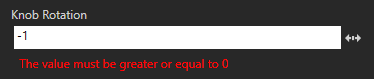
lowerBound
Kanzi Studio でプロパティが持つことができる最小値を設定します。int および float プロパティタイプには lowerBound を使用します。upperBound および ステップ (Step) も参照してください。
構文 |
|
||
値 |
|
||
例 |
// Set the lowest value the property can have to 0.
metadata.lowerBound = "0";
// Set the lowest value the property can have to 0.
@EditorInfo(lowerBound = "0")
// Set the lowest value the property can have to 0.
@EditorInfo(lowerBound = "0")
|
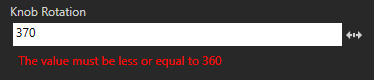
upperBound
Kanzi Studio でプロパティが持つことができる最大値を設定します。int および float プロパティタイプには upperBound を使用します。lowerBound および ステップ (Step) も参照してください。
構文 |
|
||
値 |
|
||
例 |
// Set the highest value the property can have to 360.
metadata.upperBound = "360";
// Set the highest value the property can have to 360.
@EditorInfo(upperBound = "360")
// Set the highest value the property can have to 360.
@EditorInfo(upperBound = "360")
|
ステップ (Step)
プロパティ値が Kanzi Studio ユーザーによって編集されたときに変化する量を設定します。step をintおよびfloatプロパティタイプで使用します。lowerBound および upperBound も参照してください。
構文 |
|
||
値 |
|
||
例 |
// Set the amount by which the property value changes when
// a Kanzi Studio user edits it to 10.
metadata.step = "10";
// Set the amount by which the property value changes when
// a Kanzi Studio user edits it to 10.
@EditorInfo(step = "10")
// Set the amount by which the property value changes when
// a Kanzi Studio user edits it to 10.
@EditorInfo(step = "10")
|
送信可能
Kanzi Studio がトリガーアクションのドロップダウンメニューでメッセージをアクションとして表示するかどうかを設定します。
構文 |
|
||||
値 |
|
||||
例 |
// Do not show the message as an action.
metadata.sendable = "False";
// Do not show the message as an action.
@EditorInfo(sendable = "False")
// Do not show the message as an action.
@EditorInfo(sendable = "False")
|
リスナブル
Kanzi Studio が Add Triggers ウィンドウと Add Trigger コンテキストメニューでトリガーとしてメッセージを表示するかどうかを設定します。
構文 |
|
||||
値 |
|
||||
例 |
// Do not show the message as a trigger.
metadata.listenable = "False";
// Do not show the message as a trigger.
@EditorInfo(listenable = "False")
// Do not show the message as a trigger.
@EditorInfo(listenable = "False")
|
sortingIndex
プロパティの位置を、Kanzi Studio Properties ウィンドウに表示されるプロパティカテゴリ内で設定します。デフォルトで、Kanzi Studio はプロパティカテゴリ内のプロパティタイプをメタクラス定義内の順序に従って並べ替えます。カテゴリ (Category) を参照してください。
構文 |
|
||
値 |
|
||
例 |
// Show the property as the first property in its property category.
metadata.sortingIndex = "1";
// Show the property as the first property in its property category.
@EditorInfo(sortingIndex = "1")
// Show the property as the first property in its property category.
@EditorInfo(sortingIndex = "1")
|
studioVisibility
プロパティまたはメッセージが Kanzi Studio で利用可能かどうかを設定します。
構文 |
|
||||||
値 |
|
||||||
例 |
// Make Kanzi Studio unaware of the property.
metadata.studioVisibility = "Hidden";
// Make Kanzi Studio unaware of the property.
@EditorInfo(studioVisibility = "Hidden")
// Make Kanzi Studio unaware of the property.
@EditorInfo(studioVisibility = "Hidden")
|
legacyName
Kanzi Engine プラグインの以前のバージョンでプロパティタイプまたはメッセージの名前を設定します。
プロパティタイプやメッセージの名前を変更する際は、legacyName を使用して Kanzi Studio に変更を通知します。Kanzi Studio ユーザーが Kanzi Studio プロジェクトで Kanzi Engine プラグインを更新すると、Kanzi Studio がそのプロジェクト内のプロパティタイプやメッセージのすべてのインスタンスの名前を変更します。
構文 |
|
||
値 |
|
||
例 |
// Give Kanzi Studio the name of the property type or message in
// the earlier versions of the plugin.
metadata.legacyName = "MyOldPropertyName";
// Give Kanzi Studio the name of the property type or message in
// the earlier versions of the plugin.
@EditorInfo(legacyName = "MyOldPropertyName")
// Give Kanzi Studio the name of the property type or message in
// the earlier versions of the plugin.
@EditorInfo(legacyName = "MyOldPropertyName")
|
関連項目
Kanzi Engine プラグインで宣言されたプロパティタイプのための Kanzi Studio プロパティエディタ