Viewport 2D ノードを使用する
Viewport 2D ノードは、Image や Button 2D のような2Dノードと、3Dノードである Scene の両方をレンダリングできます。
Kanzi Studio プロジェクトを作成すると、そのプロジェクトには Viewport 2D ノードが含まれており、Scene には Camera と Directional Light が含まれています。
Viewport 2D ノードの作成
Viewport 2D ノードを作成するには:
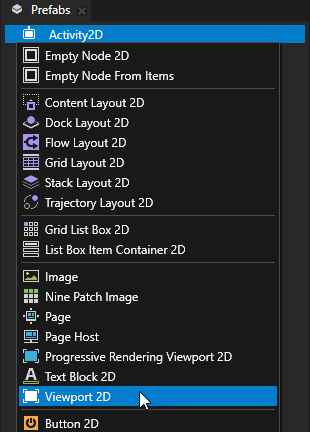
Node Tree または Prefabs で、Viewport 2D ノードを作成したい 2D ノード Alt を押しながら右クリック を選択し、Viewport 2D を選択します。
作成した Viewport 2D ノードにコンテンツを追加します。
例:
Node Tree または Prefabs で、Viewport 2D ノードを Alt を押しながら右クリック し、Scene を選択します。
Kanzi Studio は、Camera ノードと Directional Light ノードを含む Scene ノードを作成します。
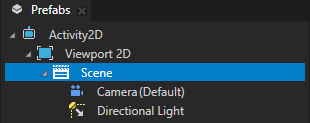
Scene ノードで、表示したい3Dノードを作成します。
3D アセット (3D Assets) を参照してください。
Kanzi が Viewport 2D ノードをレンダリングする方法を制御する
Kanzi が Viewport 2D ノードをどのようにレンダリングするかを制御できます。Kanzi は、デフォルトで Viewport 2D ノードのコンテンツの前に背景ブラシをレンダリングします。
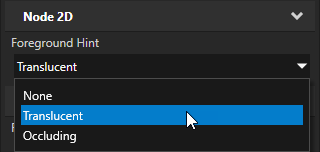
Kanzi が Viewport 2D ノードをレンダリングする方法を制御するには、Foreground Hint プロパティを設定します。
None を Viewport 2D ノードのレンダリング後に背景ブラシをレンダリングするために使用します。Viewport 2D ノードのコンテンツが不透明な場合に使用してください。
Translucent は、Viewport 2D ノードのコンテンツの前に背景ブラシをレンダリングします。これはデフォルトの値です。Viewport 2D ノードのコンテンツがアルファブレンドされている場合に使用します。
Occluding が背景ブラシをレンダリングしないようにします。Viewport 2D ノード全体が3Dコンテンツで満たされている場合に使用します。
APIで Viewport 2D ノードを使用する
Viewport 2D ノードを作成するには:
// Create a Viewport 2D named Viewport 2D and add it to the RootPage.
Viewport2DSharedPtr viewport2d = Viewport2D::create(domain, "Viewport 2D");
rootNode->addChild(viewport2d);

// To render 3D nodes in a Viewport 2D you need to add a Scene to the Viewport 2D.
// Create a Scene named Scene for 3D nodes and add it to the Viewport 2D.
SceneSharedPtr sceneNode = Scene::create(domain, "Scene for 3D nodes");
viewport2d->setScene(sceneNode);

// Create a Camera named Camera and add it to the Scene.
CameraSharedPtr camera = Camera::create(domain, "Camera");
sceneNode->addChild(camera);

// Create a Point Light named Point light and add it to the Scene.
LightSharedPtr light = Light::createPoint(domain, "Point light");
sceneNode->addChild(light);

// Create a Box mesh named Box and add it to the Scene.
Model3DSharedPtr box = Model3D::createCube(domain, "Box", 1.0f, ThemeBlue);
sceneNode->addChild(box);
詳細については、Viewport2D クラスを参照してください。
Viewport 2D プロパティタイプとメッセージ
Viewport 2D ノードで利用可能なプロパティタイプとメッセージのリストについては、Viewport 2D を参照してください。