Kanzi Engine の機能を Java で拡張する
Kanzi Engine プラグインを使用すると、Kanzi Engine の機能を拡張し、Kanzi Studio が作成したカスタムコンテンツをどのように表示するかを設定できます。
独自のノードとプロパティタイプを作成します。カスタムノードとプロパティタイプの作成 を参照してください。
Kanzi Studio のユーザーがトリガーまたはアクションとして使用できる独自のメッセージタイプを作成します。カスタムメッセージタイプの作成 を参照してください。
Kanzi Studio が Kanzi Engine プラグインで作成するプロパティタイプをどのように表示するかを設定します。カスタムプロパティタイプの設定 を参照してください。
ノードをベースにするノードで定義されている任意のプロパティタイプのデフォルト値を設定します。プロパティタイプのデフォルト値を設定する を参照してください。
独自のアクションを作成します。カスタムアクションの作成 を参照してください。
カスタムノードとプロパティタイプの作成
Java Kanzi Engine プラグインでは、カスタムプロパティタイプを持つカスタムノードを作成できます。Kanzi Studio がこれらのノードをどのように表示し、ユーザーがどのように操作できるかを設定できます。
カスタムプロパティタイプを持つカスタムノードを作成するには:
ノードクラスを作成し、このクラスに関する情報を Kanzi Studio に渡すためのメタクラスを与えます。
public static class MyNode extends Node2D
{
    @Metadata
    @EditorInfo(
        // Set the name that you want to use for your node in Kanzi Studio.
        displayName = "My Node",
        // Set the tooltip that you want to use in the Kanzi Studio Create menu.
        tooltip = "This example custom node uses custom properties.",
        customAttributes =
        {
            // Add the Horizontal Alignment and Vertical Alignment properties to the node.
            @EditorInfoAttribute(key = "AutomaticallyAddedProperties",
                value = "Node.HorizontalAlignment, Node.VerticalAlignment"),
            // Add the State Manager property as a frequently used property,
            // which users can add by clicking the + next to the property name.
            @EditorInfoAttribute(
                key = "FrequentlyAddedProperties", value = "Node.StateManager"),
            // Let the user add the Focusable property using the Add Property
            // context menu or the context tab of the Add Properties window.
            @EditorInfoAttribute(key = "ContextProperties", value = "Node.Focusable"),
        })
    public static Metaclass metaclass = new Metaclass("MyPlugin.MyNode");

    static public ObjectRef<MyNode> create(Domain domain, String name)
    {
        return Node2D.createDerived(domain, name, metaclass);
    }

    private MyNode(Domain domain, long nativeNode, Metaclass metaclass)
    {
        super(domain, nativeNode, metaclass);
    }
class MyNode private constructor(
    domain: Domain,
    nativeNode: Long,
    metaclass: Metaclass
) :
    Node2D(domain, nativeNode, metaclass) {

    companion object {
        @Metadata
        @EditorInfo(
            displayName = "My Node",
            tooltip = "This example custom node uses custom properties.",
            customAttributes = [EditorInfoAttribute(
                key = "AutomaticallyAddedProperties",
                value = "Node.HorizontalAlignment, Node.VerticalAlignment"
            ), EditorInfoAttribute(
                key = "FrequentlyAddedProperties",
                value = "Node.StateManager"
            ), EditorInfoAttribute(key = "ContextProperties", value = "Node.Focusable")]
        )
        var metaclass = Metaclass("MyPlugin.MyNode")

        @JvmStatic
        fun create(domain: Domain?, name: String?): ObjectRef<MyNode> {
            return createDerived(domain, name, metaclass)
        }
カスタムプロパティタイプとそのメタデータを作成します。
例:
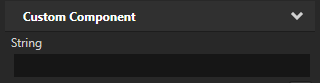
一行テキストエディタを持つ文字列プロパティ:
// Creates a string property.
// This example does not set the editor. If you do not set the editor, Kanzi Studio uses
// the default editor for this property type.
@Metadata
@EditorInfo(displayName = "String")
public static final PropertyType<String> StringProperty =
    new PropertyType<>("MyPlugin.String", String.class);
// Creates a string property.
// This example does not set the editor. If you do not set the editor, Kanzi Studio uses
// the default editor for this property type.
@Metadata
@EditorInfo(displayName = "String")
val StringProperty = PropertyType(
    "MyPlugin.String",
    String::class.java
)
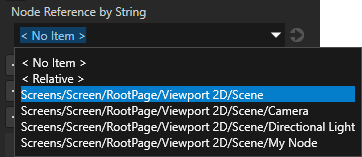
ユーザーがドロップダウンメニューから選択できる3Dノードへの文字列参照:
// Creates a string reference to a node.
@Metadata
@EditorInfo(displayName = "Node Reference by String",
    // When you set valueProvider to ProjectObject:Node3D,
    // Kanzi Studio automatically uses the Node 3D selector editor.
    valueProvider = "ProjectObject:Node3D")
public static final PropertyType<String> NodeRefByStringProperty =
    new PropertyType<>("MyPlugin.NodeRefByString", String.class);
// Creates a string reference to a node.
@Metadata
@EditorInfo(
    displayName = "Node Reference by String",
    valueProvider = "ProjectObject:Node3D"
)
val NodeRefByStringProperty = PropertyType(
    "MyPlugin.NodeRefByString",
    String::class.java
)
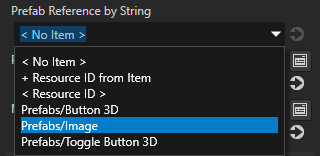
ユーザーがドロップダウンメニューから選択できるプレハブへの文字列参照:
// Creates a string reference to a prefab resource.
@Metadata
@EditorInfo(displayName = "Prefab Reference by String",
    // When you set valueProvider to ProjectObject:PrefabTemplate,
    // Kanzi Studio automatically uses the Prefab template selector editor.
    valueProvider = "ProjectObject:PrefabTemplate")
public static final PropertyType<String> PrefabRefByStringProperty =
    new PropertyType<>("MyPlugin.PrefabRefByString", String.class);
// Creates a string reference to a prefab resource.
@Metadata
@EditorInfo(
    displayName = "Prefab Reference by String",
    valueProvider = "ProjectObject:PrefabTemplate"
)
val PrefabRefByStringProperty = PropertyType(
    "MyPlugin.PrefabRefByString",
    String::class.java
)
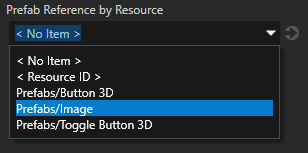
ユーザーがドロップダウンメニューから選択できるプレハブリソースへのリソース参照:
// Creates a resource reference to a prefab resource.
@Metadata
@EditorInfo(displayName = "Prefab Reference by Resource",
    // When you set valueProvider to ProjectObject:PrefabTemplate,
    // Kanzi Studio automatically uses the Prefab template selector editor.
    valueProvider = "ProjectObject:PrefabTemplate")
public static final PropertyType<Resource> PrefabRefByResourceProperty =
    new PropertyType<>("MyPlugin.MaterialRefByResource", Resource.class);
// Creates a resource reference to a prefab resource.
@Metadata
@EditorInfo(
    displayName = "Prefab Reference by Resource",
    valueProvider = "ProjectObject:PrefabTemplate"
)
val PrefabRefByResourceProperty = PropertyType(
    "MyPlugin.MaterialRefByResource",
    Resource::class.java
)
ユーザーがドロップダウンメニューから選択できるマテリアルリソースへのリソース参照:
// Creates a resource reference to a material resource.
@Metadata
@EditorInfo(displayName = "Material Reference by Resource",
    // When you set valueProvider to ProjectObject:Material,
    // Kanzi Studio automatically uses the Material dropdown editor.
    valueProvider = "ProjectObject:Material")
public static final PropertyType<Resource> MaterialRefByResourceProperty =
    new PropertyType<>("MyPlugin.MaterialRefByResource", Resource.class);
// Creates a resource reference to a material resource.
@Metadata
@EditorInfo(
    displayName = "Material Reference by Resource",
    valueProvider = "ProjectObject:Material"
)
val MaterialRefByResourceProperty = PropertyType(
    "MyPlugin.MaterialRefByResource",
    Resource::class.java
)
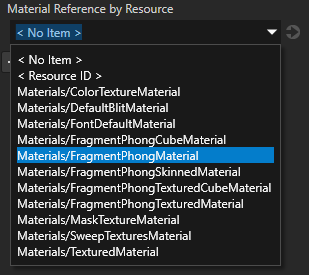
プラグインクラスに
Plugin.registerClassesメソッドを追加して、クラスをプラグインに登録します。getDomain().getMetaclassRegistry().registerClass(MyNode.class);
domain.metaclassRegistry.registerClass(MyNode::class.java)
プラグインをビルドしてインストールします。Kanzi Studio プロジェクトに Kanzi Engine プラグインを追加する を参照してください。
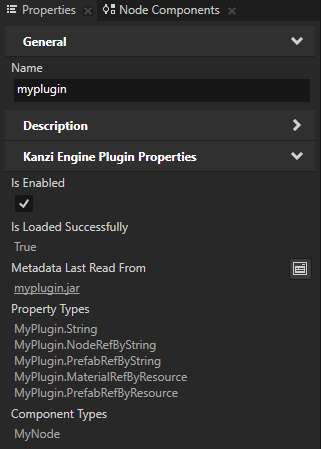
Library > Kanzi Engine Plugins の Kanzi Studio でプラグインを選択します。Properties でカスタムプロパティタイプを確認できます。
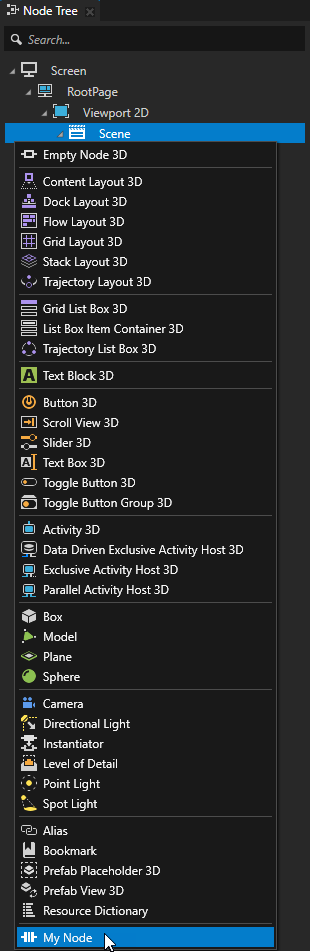
Node Tree Alt を押しながら右クリック で、ノードを作成したいノードを選択し、ノードを選択します。
(オプション) デフォルトで、Kanzi Studio はカスタムプロパティを、プロパティタイプを作成したタイプのノードに頻繁に使用されるプロパティとして追加します。Kanzi Studio がプロパティを提案するノードタイプを設定し、Kanzi Studio がプロパティを自動的に追加するか、ユーザーが追加するかを設定するには、
EditorInfoでEditorInfo.host属性を設定します。ホスト を参照してください。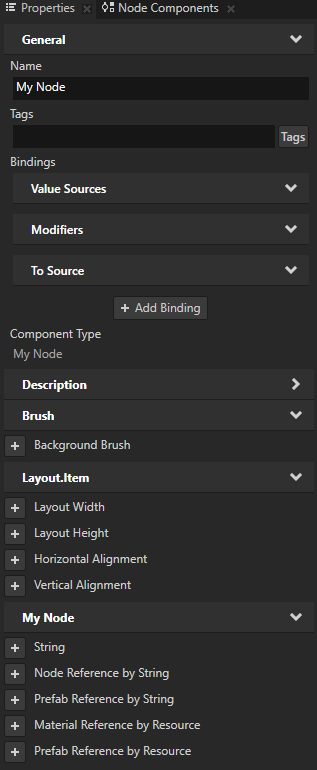
カスタムメッセージタイプの作成
アプリケーションに機能を追加するために使用するカスタムメッセージタイプを作成および設定できます。たとえば、メッセージタイプを使用して、ノードタイプがイベントに反応するようにします。
あなたが定義するすべてのカスタムメッセージタイプに対して、Kanzi Studio はメッセージアクションとメッセージトリガータイプを作成します。これにより、それぞれメッセージタイプをディスパッチし、反応することができます。
Kanzi Connect を使用する場合、アプリケーションが使用する Kanzi Connect サーバーまたはサービスに関する情報を取得するためにカスタムメッセージタイプを使用できます。
カスタムメッセージトリガーの作成
Kanzi Engine Javaプラグインでは、Kanzi Studio がメッセージトリガーとして表示するカスタムメッセージタイプを作成できます。メッセージタイプを使用すると、特定のイベントが発生したときに通知を受け取るためにサブスクライブできます。
例えば、Kanzi Studio ユーザーが On Fuel Level Changed というメッセージトリガーを追加し、カスタムノード Fuel Indicator の燃料レベルが変化したときに発動するようにするには:
ノードクラス内で、メッセージタイプの引数を保持するクラスを作成します。
// Represents message arguments of FuelIndicator.OnFuelLevelChanged message type.
@Metadata
public static class OnFuelLevelChangedMessageArguments extends MessageArguments
{
    // Define the metaclass.
    @Metadata
    public static Metaclass metaclass =
        new Metaclass("FuelIndicator.OnFuelLevelChangedMessageArguments");

    // Define the property type to hold the fuel level.
    @Metadata
    public static PropertyType<Integer> FuelLevelProperty =
        new PropertyType<>(Integer.class);

    // Define constructors.
    // A constructor with a long argument, which Kanzi uses to wrap native arguments.
    public OnFuelLevelChangedMessageArguments(long nativeObject)
    {
        super(nativeObject);
    }

    // Any additional constructors for you to use when dispatching messages.
    public OnFuelLevelChangedMessageArguments()
    {
        super();
    }
}
// Represents message arguments of FuelIndicator.OnFuelLevelChanged message type.
@Metadata
class OnFuelLevelChangedMessageArguments : MessageArguments {
    // Define constructors.
    // A constructor with a long argument, which Kanzi uses to wrap native arguments.
    constructor(nativeObject: Long) : super(nativeObject)

    // Any additional constructors for you to use when dispatching messages.
    constructor() : super()

    companion object {
        // Define the metaclass.
        @Metadata
        var metaclass = Metaclass("FuelIndicator.OnFuelLevelChangedMessageArguments")

        // Define the property type to hold the fuel level.
        @Metadata
        var FuelLevelProperty = PropertyType(Int::class.java)
    }
}
メッセージタイプを定義します:
// The message type of the FuelIndicator.OnFuelLevelChanged message.
@Metadata
@EditorInfo(
    // Set the name of the message the way you want to show it in Kanzi Studio.
    displayName = "On Fuel Level Changed",
    // Set the tooltip for the message.
    tooltip = "Fuel Indicator sets off this trigger when its level changes.",
    // Do not show the message in the trigger actions dropdown menu.
    // You show the message as a trigger.
    sendable = "False")
public static final MessageType<OnFuelLevelChangedMessageArguments>
    OnFuelLevelChangedMessage = new MessageType<>(
        "Message.FuelIndicator.OnFuelLevelChanged", MessageRouting.MessageRoutingBubbling,
        OnFuelLevelChangedMessageArguments.class);
// The message type of the FuelIndicator.OnFuelLevelChanged message.
@Metadata
@EditorInfo(
    displayName = "On Fuel Level Changed",
    tooltip = "Fuel Indicator sets off this trigger when its level changes.",
    sendable = "False"
)
val OnFuelLevelChangedMessage = MessageType(
    "Message.FuelIndicator.OnFuelLevelChanged", MessageRouting.MessageRoutingBubbling,
    OnFuelLevelChangedMessageArguments::class.java
)
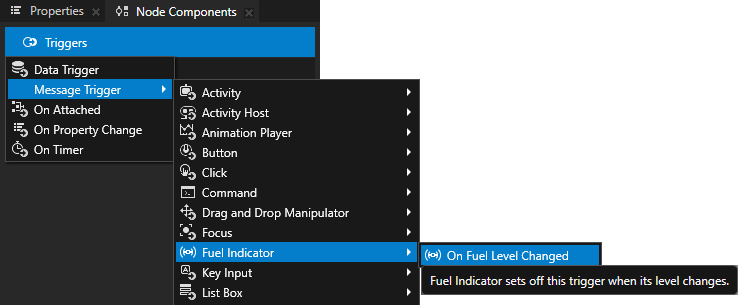
燃料レベルが変化したときにメッセージをディスパッチする関数を作成します。
// Sends a FuelIndicator.OnFuelLevelChanged message.
void onFuelLevelChanged(int fuelLevel)
{
    OnFuelLevelChangedMessageArguments messageArguments =
        new OnFuelLevelChangedMessageArguments();
    messageArguments.setArgument(
        OnFuelLevelChangedMessageArguments.FuelLevelProperty, fuelLevel);
    dispatchMessage(OnFuelLevelChangedMessage, messageArguments);
}
// Sends a FuelIndicator.OnFuelLevelChanged message.
fun onFuelLevelChanged(fuelLevel: Int) {
    val messageArguments = OnFuelLevelChangedMessageArguments()
    messageArguments.setArgument(
        OnFuelLevelChangedMessageArguments.FuelLevelProperty,
        fuelLevel
    )
    dispatchMessage(OnFuelLevelChangedMessage, messageArguments)
}
カスタムメッセージアクションの作成
Kanzi Engine Javaプラグインでは、Kanzi Studio がアクションとして表示するカスタムメッセージタイプを作成できます。
例えば、Kanzi Studio ユーザーがトリガーに Fuel Indicator: Update Level というアクションを追加し、Text Block 3D ノード内のカスタムノード Fuel Indicator のレベルを表示できるようにするには:
ノードクラス内で、メッセージタイプの引数を保持するクラスを作成します。
// Represents the message arguments of the FuelIndicator.UpdateLevel message.
@Metadata
public static class FuelIndicatorUpdateLevelMessageArguments extends MessageArguments
{
    // Define metaclass.
    @Metadata
    public static Metaclass metaclass =
        new Metaclass("FuelIndicator.UpdateLevelMessageArguments");

    // The property type which represents the value of the Fuel Indicator node.
    @Metadata
    public static PropertyType<Integer> FuelIndicatorLevelProperty =
        new PropertyType<>(Integer.class);

    // Returns the value of the Fuel Indicator message argument.
    public int getFuelIndicatorLevel()
    {
        return getArgument(FuelIndicatorLevelProperty);
    }

    // Define constructors.
    // A constructor with a long argument, which Kanzi uses to wrap native arguments.
    public FuelIndicatorUpdateLevelMessageArguments(long nativeObject)
    {
        super(nativeObject);
    }

    // Any additional constructors for you to use when dispatching messages.
    public FuelIndicatorUpdateLevelMessageArguments()
    {
        super();
    }
}
// Represents the message arguments of the FuelIndicator.UpdateLevel message.
@Metadata
class FuelIndicatorUpdateLevelMessageArguments : MessageArguments {
    // Returns the value of the Fuel Indicator message argument.
    val fuelIndicatorLevel: Int
        get() = getArgument(FuelIndicatorLevelProperty)

    // Define constructors.
    // A constructor with a long argument, which Kanzi uses to wrap native arguments.
    constructor(nativeObject: Long) : super(nativeObject)

    // Any additional constructors for you to use when dispatching messages.
    constructor() : super()

    companion object {
        // Define metaclass.
        @Metadata
        var metaclass = Metaclass("FuelIndicator.UpdateLevelMessageArguments")

        // The property type which represents the value of the Fuel Indicator node.
        @Metadata
        var FuelIndicatorLevelProperty = PropertyType(Int::class.java)
    }
}
メッセージタイプを定義します:
// The message type of the FuelIndicator.UpdateLevel message.
@Metadata
@EditorInfo(
    // Set the name of the message the way you want to show it in Kanzi Studio.
    displayName = "Fuel Indicator: Update Level",
    // Do not show the message as a trigger.
    // You show the message in the trigger actions dropdown menu.
    listenable = "False")
public static final MessageType<FuelIndicatorUpdateLevelMessageArguments>
    FuelIndicatorUpdateLevelMessage = new MessageType<>("Message.FuelIndicator.UpdateLevel",
        MessageRouting.MessageRoutingBubbling,
        FuelIndicatorUpdateLevelMessageArguments.class);
// The message type of the FuelIndicator.UpdateLevel message.
@Metadata
@EditorInfo(displayName = "Fuel Indicator: Update Level", listenable = "False")
val FuelIndicatorUpdateLevelMessage = MessageType(
    "Message.FuelIndicator.UpdateLevel",
    MessageRouting.MessageRoutingBubbling,
    FuelIndicatorUpdateLevelMessageArguments::class.java
)
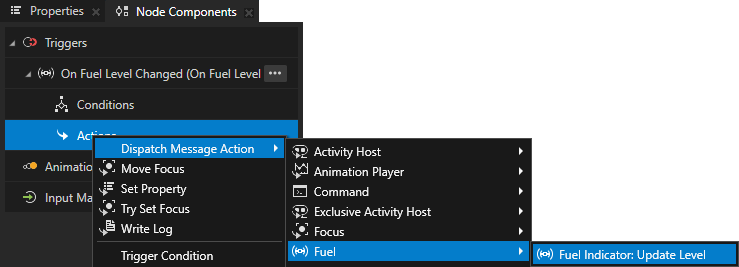
ノードクラスの
initialize()関数で、FuelIndicator.UpdateLevelメッセージのメッセージハンドラを登録します。// The message handler for the FuelIndicator.UpdateLevel message. // Shows the level of the Fuel Indicator in a Text Block 3D node. @Override protected void initialize() { super.initialize(); addMessageHandler(FuelIndicatorUpdateLevelMessage, messageArguments -> { // Get the level of the Fuel Indicator node. mCurrentLevel += messageArguments.getFuelIndicatorLevel(); // Show the level of the Fuel Indicator node in a Text Block 3D node. mTextBlock.get().setText(Integer.toString(mCurrentLevel)); }); }
// The message handler for the FuelIndicator.UpdateLevel message.
// Shows the level of the Fuel Indicator in a Text Block 3D node.
override fun initialize() {
    super.initialize()
    addMessageHandler(
        FuelIndicatorUpdateLevelMessage
    ) { messageArguments: FuelIndicatorUpdateLevelMessageArguments ->
        // Get the level of the Fuel Indicator node.
        mCurrentLevel += messageArguments.fuelIndicatorLevel
        // Show the level of the Fuel Indicator node in a Text Block 3D node.
        mTextBlock.get().text = Integer.toString(mCurrentLevel)
    }
}
カスタムノードコンポーネントの作成
カスタムノードコンポーネントは、Kanzi Engine プラグインで実装し、任意のノードにアタッチしてそのノードにカスタム機能を追加するための独立したロジックの一部です。例えば、そのプロパティの値が変わるたびにプロパティの値を Kanzi Log に出力したり、可変速度でアニメーション再生を定義したりすることができます。
例えば、プロパティの値が変更されるたびに、floatプロパティタイプの値を Kanzi の Log に出力する Log Property Value というカスタムノードコンポーネントを作成するには、次のようにします。
カスタムノードコンポーネントを表すクラスを作成し、そのメタデータを定義します。
// Represents the Log Property Value custom node component.
public static class LogPropertyValueComponent extends NodeComponent
{
    // Create the metadata for the Log Property Value custom node component.
    @Metadata
    @EditorInfo(displayName = "Log Property Value Component",
        tooltip =
            "Writes the value of a specified property to Kanzi Log every time that property changes.",
        category = "Custom Node Components")
    public static Metaclass metaclass = new Metaclass("MyPlugin.LogPropertyValueComponent");

    static public ObjectRef<LogPropertyValueComponent> create(Domain domain, String name)
    {
        return NodeComponent.createDerived(domain, name, metaclass);
    }

    protected LogPropertyValueComponent(Domain domain, long handle, Metaclass metaclass)
    {
        super(domain, handle, metaclass);
    }
// Represents the Log Property Value custom node component.
class LogPropertyValueComponent private constructor(
    domain: Domain?,
    handle: Long,
    metaclass: Metaclass?
) :
    NodeComponent(domain, handle, metaclass) {

    companion object {
        // Create the metadata for the Log Property Value custom node component.
        @Metadata
        @EditorInfo(
            displayName = "Log Property Value Component",
            tooltip = "Writes the value of a specified property to Kanzi Log every time that property changes.",
            category = "Custom Node Components"
        )
        var metaclass = Metaclass("MyPlugin.LogPropertyValueComponent")

        // Declare the metadata for the Logged Property Type property type that you use to set which
        // property the Log Property Value custom node component logs.
        @Metadata
        @EditorInfo(
            displayName = "Logged Property Type",
            tooltip = "The property type whose value you want the node component to log.",
            valueProvider = "PropertyType"
        )
        val LoggedPropertyTypeProperty = PropertyType(
            "LogPropertyValueComponent.LoggedPropertyType",
            String::class.java
        )

        @JvmStatic
        fun create(domain: Domain?, name: String?): ObjectRef<LogPropertyValueComponent> {
            return createDerived(domain, name, metaclass)
        }
プロパティの変更を追跡し、その値を記録するバインディングを実装する:
@Override
protected void attachOverride()
{
    super.attachOverride();

    // Get the name of the property type that you want to log.
    String loggedPropertyTypeName = getProperty(LoggedPropertyTypeProperty);
    if (loggedPropertyTypeName.isEmpty())
    {
        Log.info(
            "Use the Logged Property Type property to set which property type you want to log.");
        return;
    }

    // Get the property type that you want to log and check that it is valid.
    DynamicPropertyType<Float> loggedPropertyType =
        new DynamicPropertyType<>(loggedPropertyTypeName, Float.class);
    if (!loggedPropertyType.isValid())
    {
        Log.warning(
            "LogPropertyValueComponent cannot find the specified property type with float data type.");
        return;
    }

    // Add the notification handler for the property type that you want to log.
    AbstractBinding binding = BindingBuilder.createOneWay(".", loggedPropertyType);
    ObjectRef<CallbackBindingProcessor> processorRef =
        CallbackBindingProcessor.create(getDomain(), value -> {
            logPropertyValue(loggedPropertyTypeName, (Float) value);
            return false;
        });

    binding.addProcessor(processorRef.get());

    getNode().setBinding(binding);

    // Print the initial value of the property type that you want to log.
    Float initialPropertyValue = getNode().getOptionalProperty(loggedPropertyType);
    if (initialPropertyValue != null)
    {
        logPropertyValue(loggedPropertyTypeName, initialPropertyValue);
    }
}

private void logPropertyValue(String loggedPropertyTypeName, Float value)
{
    Log.info(getNode().getName() + ":" + loggedPropertyTypeName + " = " + value);
}
override fun attachOverride() {
    super.attachOverride()

    // Get the name of the property type that you want to log.
    val loggedPropertyTypeName = getProperty(LoggedPropertyTypeProperty)
    if (loggedPropertyTypeName.isEmpty()) {
        Log.info(
            "Use the Logged Property Type property to set which property type you want to log."
        )
        return
    }

    // Get the property type that you want to log and check that it is valid.
    val loggedPropertyType = DynamicPropertyType(
        loggedPropertyTypeName,
        Float::class.java
    )
    if (!loggedPropertyType.isValid) {
        Log.warning(
            "LogPropertyValueComponent cannot find the specified property type with float data type."
        )
        return
    }

    // Add the notification handler for the property type that you want to log.
    val binding = BindingBuilder.createOneWay(".", loggedPropertyType)

    val processorRef = CallbackBindingProcessor.create(
        domain,
    { value: Any ->
        logPropertyValue(loggedPropertyTypeName, value as Float)
        false
    })

    binding.addProcessor(processorRef.get())

    node.setBinding(binding)

    // Print the initial value of the property type that you want to log.
    val initialPropertyValue = node.getOptionalProperty(loggedPropertyType)
    initialPropertyValue?.let { logPropertyValue(loggedPropertyTypeName, it) }
}

private fun logPropertyValue(loggedPropertyTypeName: String, value: Float) {
    Log.info(node.name + ":" + loggedPropertyTypeName + " = " + value)
}
クラスをプラグインに登録します。
Kanzi Engine プラグインをビルドしてインストールします。Kanzi Studio プロジェクトに Kanzi Engine プラグインを追加する を参照してください。
Kanzi Studio で:
Node Tree で、ログを取りたいプロパティを持つノードを選択します。
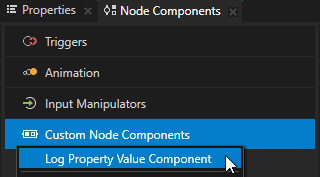
Node Components Alt を押しながら右クリック Custom Node Components で、作成した Log Property Value Component カスタムノードコンポーネントを選択します。
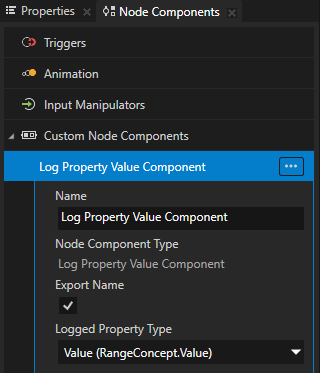
Log Property Value Component で、Logged Property Type プロパティを、Kanzi Log に出力したい値のプロパティタイプに設定します。
Kanzi Studio でそのプロパティの値を変更すると、Kanzi Studio Log ウィンドウでログメッセージを確認できます。

カスタムプロパティタイプの設定
Java Kanzi Engine プラグインで作成するカスタムプロパティタイプに関する情報を Kanzi Studio に渡すには、プロパティタイプを記述するメタデータを宣言します。
メタデータは、Kanzi Engine プラグインのユーザーが Kanzi Studio でプラグインコンテンツと対話できるようにします。
Kanzi Studio で Kanzi Engine プラグインのカスタムタイプを表示するためのリファレンス を参照してください。
例えば、Kanzi Studio ユーザーがビデオファイルを選択できるようにするために、カスタムプロパティタイプ VideoFileNameProperty のメタデータを作成するには、次のようにします。
@Metadata
@EditorInfo(displayName = "Video Filename",
    tooltip = "Name of the video file to be played.", category = "Video",
    editor = "BrowseFileTextEditor", defaultValue = "video.mp4")
public static final PropertyType<String> VideoFileNameProperty =
    new PropertyType<>("MyPlugin.VideoFileName", String.class);
@Metadata
@EditorInfo(
    displayName = "Video Filename",
    tooltip = "Name of the video file to be played.",
    category = "Video",
    editor = "BrowseFileTextEditor",
    defaultValue = "video.mp4"
)
val VideoFileNameProperty: PropertyType<String> = PropertyType(
    "MyPlugin.VideoFileName",
    String::class.java
)
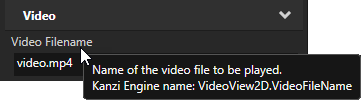
ユーザーが VideoView2D ノードを作成すると、Kanzi Studio はノードのプロパティに Video カテゴリの Video Filename プロパティを追加します。このプロパティには、Browse ボタン、ツールチップ、およびデフォルト値が video.mp4 に設定されたテキストエディタがあります。Properties ウィンドウでプロパティカテゴリを並べ替える を参照してください。
プロパティタイプ名には含めることができません:
プロパティ名の先頭または末尾にあるピリオド (.)
スペース
タブ (Tabs)
スラッシュ (/)
バックスラッシュ ()
ハッシュ (#)
波括弧を開くまたは閉じる ({})
アットサイン (@)
プロパティタイプのデフォルト値を設定する
カスタムノードでは、ノードの基礎となるノードで定義されている任意のプロパティタイプのデフォルト値を設定できます。
例えば、ノードが Node2D クラスを継承している場合、ノードの makeEditorInfo で metadata.NodeMetadata.OpacityProperty プロパティタイプのデフォルト値を 0.44 に設定するには、次のようにします。
@Metadata
@EditorInfo(displayName = "My Node",
    customAttributes =
    {
        // Set the default value of the Node.Opacity property to 0.44.
        @EditorInfoAttribute(key = "override:Node.Opacity:defaultValue", value = "0.44"),
        // (Optional) Set how Kanzi Studio suggests the use of this property type.
        // If the "host" value of the property in the base node is:
        // - "auto", you can use "auto" or "fixed"
        // - "context", you can use "auto", "context", "fixed", or "freq"
        // - "fixed", you can use "fixed"
        // - "freq", you can use "auto", "fixed", or "freq"
        // For example, to automatically add the Node.Opacity property
        // when a user adds your node.
        @EditorInfoAttribute(key = "override:Node.Opacity:host", value = "auto"),
    })
public static Metaclass metaclass = new Metaclass("MyPlugin.MyNode2");
@Metadata
@EditorInfo(
    displayName = "My Node",
    customAttributes = [EditorInfoAttribute(
        key = "override:Node.Opacity:defaultValue",
        value = "0.44"
    ), EditorInfoAttribute(key = "override:Node.Opacity:host", value = "auto")]
)
var metaclass = Metaclass("MyPlugin.MyNode2")
ホスト を参照してください。
カスタムアクションの作成
Java Kanzi Engine プラグインでは、カスタムプロパティタイプを使用してカスタムアクションを作成できます。
Kanzi Studio は、メッセージタイプを、メッセージタイプを宣言する親クラスのメタデータの EditorInfo.displayName プロパティの値に基づいて作成コンテキストメニューでグループ化します。この情報は、EditorInfo.category プロパティを設定することで上書きできます。
カスタムアクションを作成するには、以下のようにします。
プラグインプロジェクトでクラスを作成します。
たとえば、
LogActionという名前のクラスを作成します。public static class LogAction extends Action { @Metadata @EditorInfo(displayName = "Log Action", category = "Plugin Actions") public static final Metaclass metaclass = new Metaclass("MyPlugin.LogAction"); public static ObjectRef<LogAction> create(Domain domain, String name) { return Action.createDerived(domain, name, metaclass); } protected LogAction(Domain domain, long handle, Metaclass metaclass) { super(domain, handle, metaclass); } @Override public void onInvoke() { Log.info("Hello from Java!"); } }
class LogAction private constructor(domain: Domain?, handle: Long, metaclass: Metaclass?) :
    Action(domain, handle, metaclass) {
    public override fun onInvoke() {
        Log.info("Hello from Java!")
    }

    companion object {
        @Metadata
        @EditorInfo(displayName = "Log Action", category = "Plugin Actions")
        val metaclass = Metaclass("MyPlugin.LogAction")

        @JvmStatic
        fun create(domain: Domain?, name: String?): ObjectRef<LogAction> {
            return createDerived(domain, name, metaclass)
        }
    }
}
クラスをプラグインに登録します。