步骤 1 - 定义数据源
在本教程的此步骤中,您创建一个 Kanzi Engine 插件,在其中定义数据源。您使用数据源为应用程序提供数据。
获取教程
要获取本教程,请在 Kanzi Studio 的 Quick Start 窗口中点击 Examples。在 Data sources 教程旁点击  。
。
Kanzi Studio 会将教程下载到 <KanziWorkspace>/Tutorials 目录。您可以找到:
教程资产位于
<KanziWorkspace>/Tutorials/Data sources/Assets目录中。位于
<KanziWorkspace>/Tutorials/Data sources/Start目录中的教程起点工程。Tool_project目录包含 Kanzi Studio 项目,其中包含您定义数据源的用户界面。您使用此数据源中的数据来控制在此 Kanzi Studio 项目中定义的用户界面。Application目录包含用于在 Kanzi Studio 项目中定义用户界面数据源的模板。
位于
<KanziWorkspace>/Tutorials/Data sources/Completed目录中的已完成教程。
定义数据源
要定义数据源:
在文件资源管理器中,从
<KanziWorkspace>/Tutorials/Data sources/Assets/TinyXML-2目录复制tinyxml2.cpp和tinyxml2.h文件到<KanziWorkspace>/Tutorials/Data sources/Start/Application/src/plugin/src目录。在本教程中,您使用
TinyXML-2库来处理您用作数据源的 XML 文件。在
<KanziWorkspace>/Tutorials/Data sources/Start/Application/src/plugin/CMakeLists.txt中,将tinyxml2.cpp和tinyxml2.h文件添加到set命令中。set(sources_plugin src/tinyxml2.cpp src/tinyxml2.h src/xmldatasource.cpp src/xmldatasource.hpp src/xmldatasource.rc src/xmldatasource_module.cpp src/xmldatasource_module.hpp)
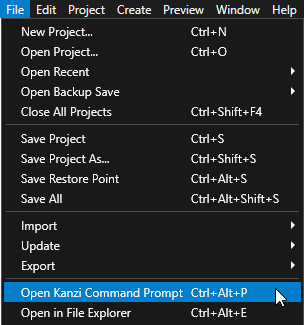
在 Kanzi Studio 中,选择 File > Open Kanzi Command Prompt。
Kanzi Command Prompt 打开 Windows 命令提示符,并为您打开 Kanzi Command Prompt 的 Kanzi 版本设置 Kanzi 环境变量。
使用 Kanzi Command Prompt 访问 Kanzi 实用程序和构建工具,例如 Gradle、SCons 和 CMake,而无需使用绝对路径或设置环境变量。
小技巧
您可以在 Windows 开始菜单的 Rightware 目录中找到 Kanzi Command Prompt。
当您安装了多个版本的 Kanzi 时,确保将您要在该命令提示符下使用的 Kanzi 版本的 Kanzi Command Prompt 启动。
在
<KanziWorkspace>/Tutorials/Data sources/Start/Application目录中的 Kanzi Command Prompt 中运行生成教程应用程序的 Visual Studio 解决方案的脚本。例如,如果您使用 Visual Studio 2019,运行
generate_cmake_vs2019_solution.bat
此脚本在目录
<KanziWorkspace>/Tutorials/Data sources/Start/Application/build_vs2019中为应用程序生成一个 Visual Studio 解决方案。在 Visual Studio 中打开
<KanziWorkspace>/Tutorials/Data sources/Start/Application/build_vs<Version>/XML_data_source_start.slnVisual Studio 解决方案。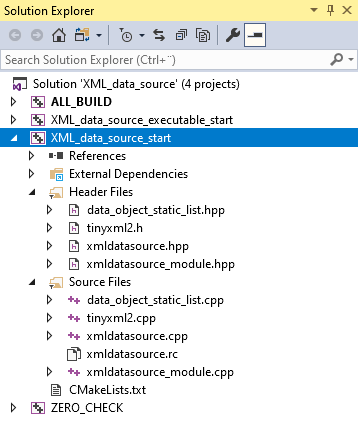
在 Visual Studio 中的 XML_data_source_start 项目中,对
xmldatasource.hpp文件进行以下更改:在 XMLDataSource 类的公共部分中创建一个属性类型,您可以使用该属性类型设置您希望此数据源使用的 XML 文件。
替换 (Replace)
class XML_DATA_SOURCE_API XMLDataSource : public DataSource
{
public:

    KZ_METACLASS_BEGIN(XMLDataSource, DataSource, "CustomDataSourceType")
    KZ_METACLASS_END()

...

};
通过
class XML_DATA_SOURCE_API XMLDataSource : public DataSource
{
public:
    // Create the XmlFilename property type. You use this property type to tell the data source plugin which XML file to read.
    static PropertyType<string> XmlFilenameProperty;

    KZ_METACLASS_BEGIN(XMLDataSource, DataSource, "XML_data_source")
        // Add the property you created to the class metadata.
        KZ_METACLASS_PROPERTY_TYPE(XmlFilenameProperty)
    KZ_METACLASS_END()

...

};
在受保护的部分中,在
Application::initialize函数之后声明:辅助函数
parseFile用于解析用户选择的 XML 文件。Kanzi 在加载应用程序的 kzb 文件后调用的函数。
class XML_DATA_SOURCE_API XMLDataSource : public DataSource
{

...

protected:

...
    // Declare the function that parses the XML file and creates data objects from its content.
    void parseFile(vector<char> fileData);

    // Kanzi calls onLoaded after loading the kzb file of the application.
    void onLoaded() override;
...
};
在 Visual Studio 中,向
xmldatasource.cpp文件中添加:包含处理 XML 所需的头文件。
// Provides the functionality to process XML.
#include "tinyxml2.h"
定义您在
xmldatasource.hpp头文件中创建的属性类型的元数据。属性可用于告诉数据源插件从哪个 XML 文件中获取数据。
// Define the metadata for the property type you use to tell the data source plugin which XML file to read.
PropertyType<string> XMLDataSource::XmlFilenameProperty(kzMakeFixedString("XMLdatasource.XMLDataSourceFile"), "", 0, false,
                                                        KZ_DECLARE_EDITOR_METADATA
                                                        (
                                                            // Set the name of the property the way it is shown in Kanzi Studio.
                                                            metadata.displayName = "XML Data Source File";
                                                            // Set the tooltip for the property.
                                                            metadata.tooltip = "Sets which XML file the data source plugin reads.";
                                                            // Select the editor which is used to edit the value of this property type.
                                                            // BrowseFileTextEditor editor contains a text box with a Browse button next to it.
                                                            metadata.editor = "BrowseFileTextEditor";
                                                        ));
在元数据定义的前面,创建一个函数,它会根据数据源文件的 XML 元素中的类型特性中指定的类型创建数据对象。
// Add a data object of the type specified by the type attribute in the XML element. Get the initial value
// from the text parameter.
DataObjectSharedPtr addDataObject(Domain* domain, const char* type, const char* name, const char* text)
{
    shared_ptr<DataObject> object;
    // Create an integer data object from the int type attributes.
    if (type && strcmp(type, "int") == 0)
    {
        int value = 0;
        if (text)
        {
            value = atoi(text);
        }
        object = DataObjectInt::create(domain, name, value);
    }
    // Create a float data object from the float and real type attributes.
    else if (type && (strcmp(type, "real") == 0 || strcmp(type, "float") == 0))
    {
        double value = 0;
        if (text)
        {
            value = atof(text);
        }
        object = DataObjectReal::create(domain, name, value);
    }
    // Create a Boolean data object from the bool and boolean type attributes.
    else if (type && (strcmp(type, "bool") == 0 || strcmp(type, "boolean") == 0))
    {
        bool value = false;
        if (text)
        {
            value = (strcmp(text, "true") == 0);
        }
        object = DataObjectBool::create(domain, name, value);
    }
    // Create a string data object from the string type attributes.
    else if (type && strcmp(type, "string") == 0)
    {
        string value;
        if (text)
        {
            value = text;
        }
        object = DataObjectString::create(domain, name, value);
    }
    else
    {
        // If the type attribute is not set, create a generic data object.
        // This is used to create the hierarchy in the data source.
        object = DataObject::create(domain, name);
    }
    return object;
}
在
addDataObject函数之后,创建一个函数,将内存中 XML 结构的内容转换为数据对象。// Convert to data objects the content of the XML structure in memory. You use these data objects to // construct the data object tree of the data source. // - The second parameter sets the node where this pass places new data objects. // - The third parameter sets the pointer to the location where the conversion and parsing is progressing (within the // XML in the memory, the child element in the XML). static void addDataObjectsRecursively(Domain* domain, DataObjectSharedPtr parent, const tinyxml2::XMLElement* xml) { // Check whether the current element in the XML file has the type attribute set. const tinyxml2::XMLAttribute* typeAttribute = xml->FindAttribute("type"); // Get value of the type attribute. const char* type = 0; if (typeAttribute) { type = typeAttribute->Value(); } // Create the data object based on the value of the type attribute. DataObjectSharedPtr object = addDataObject(domain, type, xml->Name(), xml->GetText()); // Add the data object as a child to the parent data object. parent->addChild(object); // Traverse the tree in the XML file to add data objects for each child element of the current XML element. for (const tinyxml2::XMLElement* child = xml->FirstChildElement(); child; child = child->NextSiblingElement()) { // Recurse. addDataObjectsRecursively(domain, object, child); } }
在
addDataObject函数之前,创建一个函数,将用户可以通过 XML Data Source File 属性设置的 XML 文件从磁盘加载到内存中。// Declare the addDataObjectsRecursively function. static void addDataObjectsRecursively(Domain* domain, DataObjectSharedPtr object, const tinyxml2::XMLElement* xml); // Parse the XML file and create data objects from its content. void XMLDataSource::parseFile(vector<char> fileData) { // Clear the previous data object tree. m_root.reset(); // Parse the XML document from the memory and release the open file. tinyxml2::XMLDocument doc; tinyxml2::XMLError error = doc.Parse(fileData.data(), fileData.size()); // If the plugin successfully loads the file set in the XML Data Source File property, create data objects. if (error == tinyxml2::XML_SUCCESS) { // Get the root XML element. const tinyxml2::XMLElement* element = doc.RootElement(); // Create the root data object of the data source. m_root = DataObject::create(getDomain(), "Root"); do { // Populate the child data objects of the root data object. addDataObjectsRecursively(getDomain(), m_root, element); // Handle all sibling elements of the root XML element. element = element->NextSiblingElement(); } while (element); notifyModified(); } }
在
parseFile函数之前,创建一个函数,将您用作数据源的文件内容读入内存。// Read the contents of the XML file into memory. vector<char> readFileContents(string_view filename) { ReadOnlyDiskFile file(filename); vector<char> data(static_cast<size_t>(file.size())); file.read(data.data(), data.size()); return data; }
在
readFileContents函数之后,实施在加载应用程序 kzb 文件后 Kanzi 调用的函数。// Kanzi calls onLoaded after loading the kzb file of the application. void XMLDataSource::onLoaded() { // If you do not set the value of the XML Data Source File property, the plugin does not do anything. string filename = getProperty(XmlFilenameProperty); if (!filename.empty()) { // Call the function that reads the contents of the XML file into memory, and pass the return value // to the function that parses the XML file and creates data objects from its content. parseFile(readFileContents(filename)); } }
更新数据源
本节演示如何通过随时检查用作数据源的文件是否更改来更新数据源。
要更新数据源:
对
xmldatasource.hpp进行以下更改:在私有部分中引入用于跟踪数据源中更改内容的线程和函数。替换
private:

    // Introduce the pointer to the root data object of the data source.
    DataObjectSharedPtr m_root;
通过
private:

    // Declare the function that starts the thread which monitors and reads the XML file.
    void startWorkerThread(string_view filename);

    // Declare the function that stops the thread which monitors and reads the XML file.
    void stopWorkerThread();

    // Declare the function that is executed in the thread which monitors and reads the XML file.
    // You pass a copy of the string for the filename because it is used in a different thread.
    void workerThreadCallback(string filename);

    // Introduce the pointer to the root data object of the data source.
    DataObjectSharedPtr m_root;

    // Introduce the thread for monitoring and reading the XML file.
    thread m_workerThread;

    // Introduce the exit flag for the worker thread.
    atomic<bool> m_workerThreadExitCondition;
在受保护部分,修改构造函数以初始化工人线程的退出标志。替换
// Constructor.
explicit XMLDataSource(Domain* domain, string_view name):
    DataSource(domain, name)
{
}
通过
// Constructor.
explicit XMLDataSource(Domain* domain, string_view name):
    DataSource(domain, name),
    m_workerThreadExitCondition(false)
{
}
在公有部分
create函数的定义之后声明析构函数。public: ... // Destructor ~XMLDataSource();
对
xmldatasource.cpp进行以下更改:包含监控用作数据源的文件的函数所使用的头文件。
// Provides the system utility function to get the timestamp of the file.
#include <sys/stat.h>
在
parseFile函数之前,创建用于监控和读取您用作数据源的文件的函数。// Helper function to get the file modification time. static time_t getFileModificationTime(const char* filename) { time_t result = 0; struct stat fs; if (stat(filename, &fs) == 0) { result = fs.st_mtime; } return result; } // Start the thread that monitors and reads the XML file. void XMLDataSource::startWorkerThread(string_view filename) { kzAssert(!m_workerThread.joinable()); m_workerThread = thread(&XMLDataSource::workerThreadCallback, this, string(filename)); } // Stop the thread that monitors and reads the XML file. void XMLDataSource::stopWorkerThread() { m_workerThreadExitCondition = true; if (m_workerThread.joinable()) { m_workerThread.join(); } m_workerThreadExitCondition = false; } // This thread function checks once every second whether the XML file has been modified. // The function reads the contents of the XML file and submits a task to the UI thread to parse the file contents // into the data source structure. void XMLDataSource::workerThreadCallback(string filename) { TaskDispatcher* taskDispatcher = getDomain()->getTaskDispatcher(); // Initialize the previous modification time to an invalid value. time_t oldModificationTime = static_cast<time_t>(-1); for (;;) { if (!filename.empty()) { time_t newModificationTime = getFileModificationTime(filename.c_str()); if (oldModificationTime != newModificationTime) { // Read the contents of the file into memory. // You read the file contents on this thread to avoid blocking the UI thread with a long operation. vector<char> data = readFileContents(filename); // Submit a task that parses the XML file and constructs the data source. // You must do this in the UI thread because you can manipulate data source objects // and other UI objects only in the UI thread. taskDispatcher->submit(bind(&XMLDataSource::parseFile, this, kanzi::move(data))); oldModificationTime = newModificationTime; } } // Sleep for one second. this_thread::sleep_for(chrono::milliseconds(1000)); // If the UI thread sets the exit flag, exit. if (m_workerThreadExitCondition) { break; } } }
修改
DataSource::onLoaded函数以包括关闭和启动监控和读取 XML 文件的线程。// Kanzi calls onLoaded after loading the kzb file of the application. void XMLDataSource::onLoaded() { // The Kanzi Studio Preview can call the onLoaded function multiple times whenever // the user edits properties of the data source or refreshes the data source. // Shut down the thread that monitors and reads the XML file. stopWorkerThread(); ... if (!filename.empty()) { ... // Start the thread that monitors and reads the XML file. startWorkerThread(filename); } }
在
DataSource::onLoaded函数之前,定义析构函数。// Destructor XMLDataSource::~XMLDataSource() { // Shut down the thread that monitors and reads the XML file. stopWorkerThread(); }
构建数据源插件
创建插件之后,构建插件dll。在本教程的下一步中,您将在 Kanzi Studio 项目中使用此插件从XML文件中获取应用程序的数据。
要构建数据源插件,请执行以下操作:
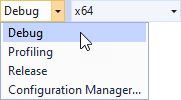
选择您要使用的解决方案配置。
在开发期间,选择 Debug 配置。当您准备好创建生产版本时,选择 Release 配置。
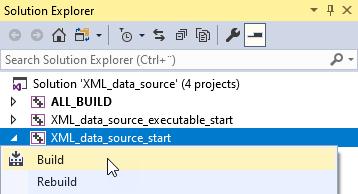
在 Solution Explorer 中,右键点击 XML_data_source_start 工程,并选择 Build。
Visual Studio 在
<ProjectName>/Application/lib/<PlatformName>/<ConfigurationName>和<ProjectName>/Application/build_vs<Version>/runtime/<ConfigurationName>目录中构建插件 DLL。Kanzi Studio 使用<ProjectName>/Application/lib目录中的插件 DLL。