日志
使用 Kanzi 日志系统将消息打印到 Log 窗口、Kanzi 调试控制台、标准输出以及目标设备上的系统日志中。例如,使用日志记录来查找 Kanzi 应用程序中的问题,并告知用户有关应用程序状态的信息。
您可以:
使用 Kanzi 日志宏打印日志消息。请参阅 打印日志消息。
使用日志等级来基于严重性显示日志消息。请参阅 设置日志级别。
使用日志类别对包含特定功能相关信息的消息进行分组。请参阅 使用日志类别。
使用自定义记录器重定向所有 Kanzi 日志消息。请参阅 创建自定义记录器。
打印日志消息
使用 Kanzi 日志宏将消息打印到日志中。大多数日志宏使用固定的日志级别来指示消息中信息的严重性。请参阅 设置日志级别。
小技巧
不要在日志宏调用中使用应用程序关键代码。如果您将应用程序关键代码作为参数放入日志宏调用中,并且在编译期间禁用了分配给该调用中消息的日志级别或日志类别,预处理器将连同应用程序关键代码一起移除日志宏调用。
Kanzi 具有以下日志宏:
日志宏 |
描述 (Description) |
|---|---|
使用默认记录器 ( |
|
使用默认记录器 ( |
|
使用默认记录器 ( |
|
使用默认记录器 ( |
|
使用默认记录器 ( |
|
日志消息,使用自定义记录器和您作为输入参数提供的日志级别和日志类别。请参阅 创建自定义记录器。 |
要打印日志消息:
在您的应用程序代码中,使用要打印日志消息的日志宏。例如:
调试宏:
// Print "This is a debug message.".
kzLogDebug(("This is a debug message."));
打印到日志:
info:debug> This is a debug message.
错误宏:
// Print "This is an error message." using the log category MY_LOG_CATEGORY.
// Use log categories to group your log messages based on the functionality to which they are related.
kzLogError(MY_LOG_CATEGORY, ("This is an error message."));
请参阅 使用日志类别。
将文件路径、错误出现行数以及错误消息打印到日志:
error:My category:c:\kanziworkspace\projects\myproject\application\src\myproject.cpp:196> This is an error message.
信息宏:
// Print "1 plus 2 equals 3." using the log category MY_LOG_CATEGORY.
kzLogInfo(MY_LOG_CATEGORY, ("{} plus {} equals {}.", 1, 2, 1+2));
int length = 100;
// Print "The length is 100.".
kzLogInfo(MY_LOG_CATEGORY, ("The length is {}.", length));
请参阅 使用日志类别。
打印到日志:
info:My category> 1 plus 2 equals 3.
info:My category> The length is 100.
构建并运行您的应用程序。请参阅 部署 Kanzi 应用程序。
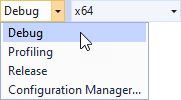
例如:在 Windows 上,使用 Debug 构建配置在 Visual Studio 中构建您的应用程序。当您运行应用程序并在代码中到达调用日志宏的点时,Kanzi 会将消息打印到调试控制台。
在代码中格式化日志消息
日志消息可以是标量值,也可以是格式说明字符串,后跟格式参数。
例如:
// Define a log category named "my category".
#define MY_LOG_CATEGORY     KZ_LOG_CREATE_CATEGORY(KZ_LOG_ENABLED_CATEGORY, "my category")

// The log message is an integer constant.
kzLogInfo(MY_LOG_CATEGORY, (100));

// Log integer variable.
int length = 100;

// Output: 100
kzLogInfo(MY_LOG_CATEGORY, (length));

// Log a string literal.
// Output: Single log message.
kzLogInfo(MY_LOG_CATEGORY, ("Single log message."));

// Log a formatted message.
// Format string: "{} plus {} equals {}.".
// Format arguments: 1, 2, 1+2.
// Output: 1 plus 2 equals 3.
kzLogInfo(MY_LOG_CATEGORY, ("{} plus {} equals {}.", 1, 2, 1+2));
格式说明字符串是一个文本字面量,可以包含大括号中的格式参数引用:
"Text {...} text {...} ... {...} ..."
当记录器写入消息时,它将参数引用替换为所引用参数值的字符串表示,并保持其余文字不变。这是格式参数引用的结构:
{[argument index][:format specification]}
格式参数索引和格式说明是可选的。
备注
在格式规范部分前放置一个冒号。
为了防止将左大括号 ‘{’ 解释为格式参数引用,请在其前面加上两个反斜杠:\\{
请注意,如果后面跟着一个右大括号 ‘}’,它不会被移除,并且会保留在日志消息输出中。唯一的字符串字面量不被视为格式字符串,并且不会被解析为格式参数引用。
例如:
// Log message consists of format string and one argument.
// Output: {} { some text }
kzLogInfo(MY_LOG_CATEGORY, ("\\{} \\{ {} } { this text is removed ", "some text"));

// Single string literals are not parsed as log message format string.
// Output: This text is string literal. Braces are kept {}, and { this text remains.
kzLogInfo(MY_LOG_CATEGORY, ("This text is string literal. Braces are kept {}, and { this text remains."));
格式参数索引是参数列表中格式参数的位置。第一个格式参数的索引为 0,接下来的参数索引为 1,依此类推。最后一个格式参数的索引为 N-1,其中 N 是格式参数的总数。
格式参数引用的格式说明部分描述了当引用被替换为参数的字符串表示时,如何将引用的参数转换为字符串。有关详细信息,请参阅日志消息参数格式说明部分。
当日志消息被写入时,消息格式字符串中找到的格式参数引用将被替换为相应参数的字符串表示形式。
在最简单的情况下,格式参数由空括号 ‘{}’ 引用:
// Format message arguments are referenced one by one using empty braces.
// Output: 1 2 3.
kzLogInfo(MY_LOG_CATEGORY, ("{} {} {}.", 1, 2, 3));

// Output: 1 plus 2 equals 3.
kzLogInfo(MY_LOG_CATEGORY, ("{} plus {} equals {}.", 1, 2, 1+2));
您还可以使用参数索引显式引用格式参数:
// Log values in custom order.
// Output: 3 1 2 3 5.
kzLogInfo(MY_LOG_CATEGORY, ("{2} {0} {1} {2} {4}.", 1, 2, 3, 4, 5));

// Log values in custom order using implicit argument indexing.
// Note: The argument reference '{1}' followed by '{}'.
// Output: argument #4 = 5, argument #0 = 1, argument #2 = 3, argument #3 = 4, argument #4 = 5.
kzLogInfo(MY_LOG_CATEGORY, ("argument #4 = {4}, argument #0 = {0}, argument #2 = {2}, argument #3 = {}, argument #4 = {}.", 1, 2, 3, 4, 5));
在最后一个示例中,您可以看到索引参数引用 ‘{2}’ 后面跟着没有索引的参数引用 ‘{}’。在这种情况下,没有索引的参数引用是跟在带索引的参数引用之后的那个(在此情况下为第 #3 个参数,带索引的参数为第 #2 个)。
日志消息参数格式规范
日志消息格式参数引用由参数索引和格式说明组成。格式说明描述了日志消息格式参数值如何转换为字符串,以及在将消息写入日志时如何定位。日志系统在将值转换为文本表示时,会考虑格式参数值的类型,从而使日志记录类型安全。
格式规范具有以下结构:
[align][sign][#][0][width][.precision][specifier]
align 格式参数设置结果文本的位置。align 的可用值:
对齐值 |
output |
|---|---|
|
文本在可用空间内左对齐。 |
|
文本在可用空间内右对齐。这是默认设置。 |
该符号仅对数值类型有效。符号的可用值:
符号值 |
output |
|---|---|
|
正数和负数的符号。 |
|
负数的符号。这是默认设置。 |
空格 |
正数前留空格,负数前加减号。 |
# 格式参数对整数类型的八进制或十六进制说明符有效。如果存在,输出将以 o 说明符的 ‘0’ 前缀或以 x/X 说明符的 ‘0x’/’0X’ 前缀。
当转换为字符串的值所占字符数少于 width 时,0 格式参数在数字左侧填充零而不是空格。
width 格式参数是一个整数,描述输出文本的最小宽度。如果文本没有占满整个宽度,剩余的空间将用空格填充,或者如果指定了 0 格式参数,则用零填充。
precision 格式参数仅对浮点类型有效,并描述了小数点后显示的位数。
precision 格式参数表示在将格式参数值转换为字符串时要使用的符号。可用的 specifier 值取决于格式参数的类型。此表列出了 specifier 的可用值。
说明符 |
output |
|---|---|
角色 |
|
|
单个字符。这是有符号字符的默认设置。 |
|
该数字在基数 10 中。 |
|
无符号的10进制数。这是无符号字符的默认设置。 |
|
以 8 为基数的数字。 |
|
使用小写字母 a - f 的基数为 16 的数字。 |
|
使用大写字母 A - F 的基数为 16 的数字。 |
整数 (Integer) |
|
|
以10为基数的数字。这是有符号整数的默认值。 |
|
无符号的十进制数。这是无符号整数的默认值。 |
|
以 8 为基数的数字。 |
|
使用小写字母 a - f 的基数为 16 的数字。 |
|
使用大写字母 A - F 的基数为 16 的数字。 |
浮点数 |
|
|
科学计数法中的数字。字母“e”表示指数部分。 |
|
科学计数法中的数字。字母 ‘E’ 表示指数部分。 |
|
小写的十进制浮点数表示。这是浮点数的默认表示方式。 |
|
十进制浮点表示法中的数字,大写。 |
|
最短表示形式中的数字:’e’ 或 ‘f’。 |
|
最短表示形式中的数字:’E’ 或 ‘F’。 |
|
小写的十六进制浮点表示法中的数字。 |
|
十六进制浮点表示法中的数字,大写。 |
|
与 ‘a’ 相同。 |
|
与 ‘A’ 相同。 |
Pointer |
|
|
指针地址。这是指针的默认设置。 |
备注
如果参数类型与说明符字段不匹配,则使用参数类型的默认说明符将参数值转换为字符串。
如果格式参数的类型是指针,日志子系统会将指针中存储的地址写入日志。如果格式参数的类型是数组 (T[]),日志子系统会将该数组第一个元素的地址写入日志。只有类型为 const char[] 或 char[] 的字符串字面量会以文本形式写入日志。
要将由 const char* 或 char* 指针指向的字符串写入日志,您可以使用 string_view 对象。您可以使用指向要记录的字符串的指针初始化 string_view 对象,然后将该对象用作日志格式参数。如果您将指向字符串的指针作为格式参数传递,则只有该字符串的地址会被写入日志。
您可以使用用户定义类型的对象作为日志格式参数。Logging 子系统使用 logArgumentToString 模板函数将用户定义类型的对象转换为字符串。只有 align 格式参数适用于用户定义类型。Logging 子系统为几种用户定义类型专门化了 logArgumentToString。
示例
使用各种参数说明符记录消息:
// Log the value of 10 in different base systems.
// Output: decimal: 10, octal: 012, hexadecimal: 0xa.
kzLogInfo(MY_LOG_CATEGORY, ("decimal: {}, octal: {:#o}, hexadecimal: {:#x}.", 10, 10, 10));

// Using argument index could be shortened to:
// added in resulting text to octal or hexadecimal presentation.
// Output: decimal: 10, octal: 012, hexadecimal: 0xa.
kzLogInfo(MY_LOG_CATEGORY, ("decimal: {}, octal: {0:#o}, hexadecimal: {0:#x}.", 10));

// Field width is 4 characters.
// Output: decimal:  10.
kzLogInfo(MY_LOG_CATEGORY, ("decimal:{:4}.", 10));

// Field width is 4 characters, left aligned.
// Output: decimal:10  .
kzLogInfo(MY_LOG_CATEGORY, ("decimal:{:<4}.", 10));

// Field width is 4 characters, zero filled.
// Output: decimal:0010.
kzLogInfo(MY_LOG_CATEGORY, ("decimal:{:04}.", 10));

// Field width is 4 characters, with sign and left aligned.
// Output: decimal:+10 .
kzLogInfo(MY_LOG_CATEGORY, ("decimal:{:<+4}.", 10));
要使用字符串格式参数:
const char* message = "Hello world!!!";

// Write message to the log:
// Output: Message: Hello World!!!
kzLogInfo(MY_LOG_CATEGORY, ("Message: {}", string_view(message)));

// Write string literal to the log:
// Output: Message: String literal message.
kzLogInfo(MY_LOG_CATEGORY, ("Message: {}", "String literal message."));
设置日志级别
使用日志级别根据严重性显示日志消息。例如,要在应用程序执行期间记录关键问题,请使用 error 日志级别 (log_level.hpp::KZ_LOG_LEVEL_ERROR)。
Kanzi 日志系统具有以下日志级别:
日志级别 |
名称 (Name) |
严重性 |
描述 (Description) |
|---|---|---|---|
|
1 |
记录关键故障消息。创建详细的错误消息,以便您可以获得有关问题的足够信息。 |
|
|
2 |
记录需要注意的事实,这些事实不一定是故障。例如,使用警告消息通知用户应用程序可以恢复的结果,例如具有默认值的缺失参数,或可能导致性能下降但不是故障的事件。 |
|
|
3 |
记录概览系统当前情况,通过的日志状态数量,配置相关的静态信息,以及其他内容的相关信息。 |
|
|
4 |
记录有关系统的最大信息量。这是最详细的日志级别。使用此级别来排查问题。 |
以下日志级别默认启用:
要设置日志级别,请使用 log_level.hpp::KZ_LOG_LEVEL_ENABLED_THRESHOLD 宏。
例如,要设置启用所有日志级别的日志级别:
#define KZ_LOG_LEVEL_ENABLED_THRESHOLD KZ_LOG_LEVEL_TRACE
您可以创建自己的日志级别。请参阅 LogLevelMacros::KZ_LOG_CREATE_LEVEL。
使用日志类别
使用日志类别对包含特定功能相关信息的消息进行分组。
Kanzi 日志系统具有以下默认日志类别:
日志类别 |
描述 (Description) |
|---|---|
收集调试消息。 |
|
收集图形网格日志消息。 |
|
收集 EGL 日志消息。 |
|
收集您尚未分配到任何其他日志类别的日志消息。建议始终将日志消息显式分配到某个日志类别,或创建一个新的日志类别。 |
要创建和使用日志类别,请执行以下代码:
使用
LogCategoryMacros::KZ_LOG_CREATE_CATEGORY宏创建一个日志类别:// Create a log category named "My category" and set the state of the category to enabled. // The Kanzi logging system uses category state to filter log messages. // To disable a log category, use the KZ_LOG_DISABLED_CATEGORY. #define MY_LOG_CATEGORY KZ_LOG_CREATE_CATEGORY(KZ_LOG_ENABLED_CATEGORY, "My category")
在创建的日志类别中打印一条日志消息:
// Print to the log "This is an info message." using the MY_LOG_CATEGORY log category.
kzLogInfo(MY_LOG_CATEGORY, ("This is an info message."));
构建并运行您的应用程序或在 Kanzi Studio Preview 中与您的应用程序交互。当您的应用程序到达您创建日志消息的代码时,Kanzi 会将消息打印到调试控制台或 Kanzi Studio Log 窗口:
info:My category> This is an info message.
创建自定义记录器
要重定向日志消息,您可以实现一个自定义记录器类,该类继承自 AbstractLogger,并将自定义记录器推送到 Kanzi 日志系统。使您的记录器类重写 AbstractLogger::writeOverride 函数。
要使用自定义记录器重写日志消息,请使用 log.hpp::kzLog 宏。
如果您想使用自定义记录器来写入所有应用程序日志消息,请在 Default Logger (DefaultLogger) 中注册该记录器。Default Logger 继承自 AbstractLogger,并包含一个日志记录器链,每条日志消息都会通过这些记录器。默认情况下,这些记录器已在 Default Logger 中注册:
默认记录器 |
日志消息目的地 |
|---|---|
标准输出 |
|
Android 系统日志 |
|
Kanzi 调试控制台在 Windows 上 |
要实施记录器:
// Use this logger to store log messages in a container for later retrieval.
//
// This class inherits from kanzi::AbstractLogger and implements the writeOverride() function. It stores logs in the container.
// To retrieve the logs, use the get() function.
class SimpleLogger : public AbstractLogger
{
public:
    // Kanzi calls this function to write messages to the log.
    //
    // This function stores the log message in a container. To retrieve all log messages, use the get() function.
    // Each log message includes:
    // - The message text
    // - The log level
    // - The log category
    // - If the message is an error, the file name and the line number where the error occured
    //
    // \param level The log level of the message.
    // \param levelName The string representation of the log level.
    // \param categoryName The string representation of the log category.
    // \param fileName The name of the file in which the message originated.
    // \param lineNumber The number of the line on which the message originated.
    // \param message The message.
    void writeOverride(LogLevel level, string_view levelName, string_view categoryName,
                               string_view fileName, size_t lineNumber, string_view message) override
    {
        // Start the log with the level name.
        string logMessage(levelName);

        // Separate the log level and the log category with a colon.
        logMessage += ':';

        // Add the category name.
        logMessage.append(categoryName.data(), categoryName.length());

        if (level == LogLevelError)
        {
            // The error is reported.
            // To show where in the code the error was reported, add the file name and the line number to the message.
            logMessage.append(fileName.data(), fileName.length());

            // Separate the file name and the line number with a colon.
            logMessage += ':';
            logMessage += to_string(lineNumber);
        }

        // Add an angle bracket and the message text.
        logMessage += "> ";
        logMessage.append(message.data(), message.length());

        // Append the log message to the log vector.
        m_log.push_back(logMessage);
    }

    // Get log vector reference.
    vector<string>& getLog()
    {
        return m_log;
    }

private:
    // Log vector.
    vector<string> m_log;
};
要以静态方式使用记录器,请实现以下操作:
// SimpleLogger inherits from kanzi::AbstractLogger and implements writeOverride.
SimpleLogger simpleLogger;

// Write a log message using SimpleLogger.
kzLog(simpleLogger, KZ_LOG_LEVEL_INFO, KZ_LOG_CATEGORY_GENERIC, ("Lets log 1 + 2 = {}.", 1 + 2));
要使用记录器链中的记录器:
// SimpleLogger inherits from kanzi::AbstractLogger and implements writeOverride.
AbstractLoggerUniquePtr simpleLogger(new SimpleLogger());

// Before adding SimpleLogger to the logger chain, get the pointer to it.
// After you add SimpleLogger to the logger chain, the logger chain controls the lifetime of SimpleLogger.
SimpleLogger* simpleLoggerPtr = static_cast<SimpleLogger*>(simpleLogger.get());

// Push SimpleLogger to the logger chain. Now both SimpleLogger and the rest of the loggers handle every logged message.
DefaultLogger::pushLogger(kanzi::move(simpleLogger));

// Write a log message. SimpleLogger handles this message.
kzLogInfo(KZ_LOG_CATEGORY_GENERIC, ("Lets log 1 + 2 = {}.", 1 + 2));
要将日志消息专门重定向到记录器:
// SimpleLogger inherits from kanzi::AbstractLogger and implements writeOverride.
AbstractLoggerUniquePtr simpleLogger(new SimpleLogger());

// Before adding SimpleLogger to the logger chain, get the pointer to it.
// After you add SimpleLogger to the logger chain, the logger chain controls the lifetime of SimpleLogger.
SimpleLogger* simpleLoggerPtr = static_cast<SimpleLogger*>(simpleLogger.get());

// Remove all default loggers from the logger chain. This way you make only SimpleLogger, which you push to the chain later, handle the logged messages.
DefaultLogger::popAllLoggers();

// Push SimpleLogger to the logger chain. Now only SimpleLogger handles every logged message.
DefaultLogger::pushLogger(kanzi::move(simpleLogger));

// Write a log message. SimpleLogger handles this message.
kzLogInfo(KZ_LOG_CATEGORY_GENERIC, ("Lets log 1 + 2 = {}.", 1 + 2));
QNX 系统记录器 (slogger2)
在 QNX 上,您可以使用 QNX 系统记录器 (slogger2) 来写入日志消息。当您将日志消息重定向到 slogger2 时,您的 Kanzi 应用程序会继续将日志消息写入默认记录器。
默认情况下,QNX 将 slogger2 日志写入 /tmp/slogger2/<Kanzi-application-name>.<process-id>。
请记住,slogger2 在 Kanzi 读取您的 Kanzi 应用程序的配置后初始化。因此,slogger2 日志不包含该时间之前的日志消息。
要了解如何在 Kanzi 应用程序中配置 slogger2,请参阅 QNX 系统记录器 (slogger2)。
查看 slogger2 日志文件
要在 QNX 设备上查看 slogger2 日志文件,请运行:
slog2info -l <log-filename>
注册自定义 slogger2 缓冲区
Kanzi 使您能够注册一个自定义的 slogger2 缓冲区并将其传递给 Kanzi 应用程序。然后,您的 Kanzi 应用程序使用该缓冲区来写入日志。例如,当您想为缓冲区指定自定义名称或想设置从传递给 slog2_register 的 slog2_buffer_set_config_t 结构中的任何属性时,可以注册一个自定义的 slogger2 缓冲区。
当您注册一个 slogger2 缓冲区时,slogger2 会忽略您在 application.cfg 或 Application::onConfigure 中设置的所有其他 QNX logger 配置参数。
请记住,-1 和 null 不是 slogger2 缓冲区名称的有效值。
要注册自定义 slogger2 缓冲区,在 Application::onConfigure 中设置:
configuration.slog2Config.customSlog2Buffer = value
其中 value 是一个 slog2_buffer_t 类型的缓冲区。默认值为 nullptr(禁用)。
例如,您可以像这样注册自定义 slogger2 缓冲区:
// Register one slog2_buffer_t buffer.
vector<slog2_buffer_t> buffers = vector<slog2_buffer_t>(1);

// For QNX 7.0.4 and newer
slog2_buffer_set_config_t buffersetConfig{ 1, "MyBufferset", SLOG2_INFO, {{ "MyBuffer", 16 }}, UINT32_MAX };

// For QNX older than 7.0.4
slog2_buffer_set_config_t buffersetConfig{ 1, "MyBufferset", SLOG2_INFO, {{ "MyBuffer", 16 }}};

if (slog2_register(&buffersetConfig, buffers.data(), 0) != 0)
{
    // Handle the error.
}

// Pass the registered buffer to the application.
configuration.slog2Config.enabled = true;
configuration.slog2Config.customSlog2Buffer = buffers[0];
slogger2 的清理工作
当您的 Kanzi 应用程序退出时,默认情况下,slogger2 会调用 slog2_reset。这将释放由 Kanzi 进程注册的所有 slogger2 缓冲区,而不仅仅是由 Kanzi 注册的缓冲区。您可以通过重写 Application::uninitializePlatform 来更改此行为。例如,当您希望在 Kanzi 应用程序退出后调用 slog2_reset 时,更改此行为。
class MyApplication : public Application
{

   ...

public:

     ...

     // Override the uninitializePlatform method to prevent calling slog2_reset.
     void uninitializePlatform() final
     {

         ...

     }
 }