创建 Kanzi Studio 命令插件
Kanzi Studio 插件扩展了 Kanzi Studio 的功能,并在 Kanzi Studio 中运行。
例如,您可以扩展 Kanzi Studio 的功能以:
在 Kanzi Studio 中自动化那些手动执行需要大量时间或容易出错的任务。
从 Kanzi Studio 导入和导出内容,例如 Kanzi Studio 不支持的格式的本地化表。
创建抽象细节并加快工作流程的编辑器,例如支持在 Kanzi Studio 上进行项目工作的可视化工具。
您可以在包含 Kanzi Studio 插件时:
在包含插件用户界面的 Kanzi Studio 窗口中。
作为用户可以从 Kanzi Studio 主菜单或上下文菜单中执行的命令,运行插件时不带用户界面。
本主题介绍如何创建 Kanzi Studio 命令插件。要了解如何创建 Kanzi Studio 窗口插件,请参阅 创建 Kanzi Studio 窗口插件。
Kanzi Studio 插件 API 作为 .NET 框架程序集提供。您可以在 <KanziInstallation>/Studio/Bin/PluginInterface.dll 中找到它。Kanzi Studio 插件 API 提供对 Kanzi Studio 中数据和命令的访问。当您想要在不同版本的 Kanzi Studio 中使用 Kanzi Studio 插件时,请使用您希望使用该插件的每个版本的 Kanzi Studio 中的 PluginInterface.dll 构建该插件。
要开发一个 Kanzi Studio 命令插件:
为 Kanzi Studio 插件创建基础。请参阅 为 Kanzi Studio 命令插件创建基础。
构建并运行您的 Kanzi Studio 插件。请参阅 构建和运行 Kanzi Studio 插件。
为您的 Kanzi Studio 插件添加功能。请参阅 向您的 Kanzi Studio 命令插件添加功能。 和 向您的 Kanzi Studio 命令插件添加多个命令。。
调试您的 Kanzi Studio 插件。请参阅 调试 Kanzi Studio 插件。
要查找有关 Kanzi Studio 插件 API 的详细信息,请参阅:
为 Kanzi Studio 命令插件创建基础
Kanzi Studio 命令插件是您作为命令执行且没有用户界面的插件。例如,使用命令插件在项目中节点树的整个或选定部分上执行命令。
在这里,您创建了一个 Kanzi Studio 命令插件的基础,然后在其中添加扩展 Kanzi Studio 功能的功能。
要创建 Kanzi Studio 命令插件:
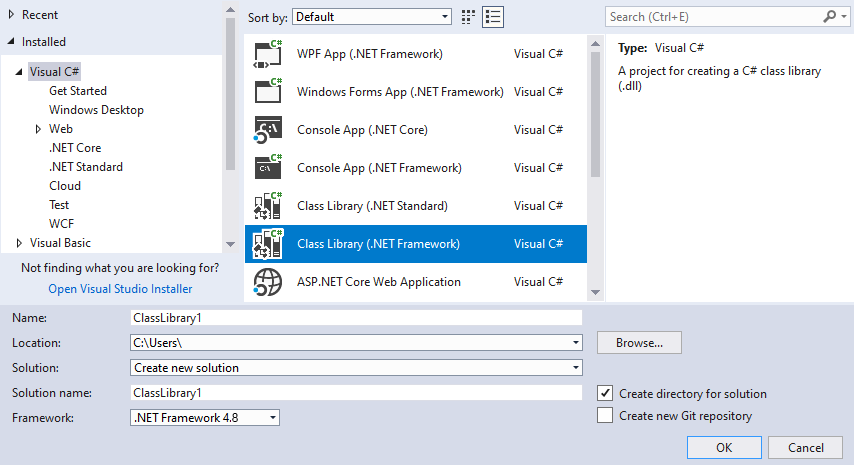
在 Visual Studio 中选择文件 (File) > 新建(New) > 工程 (Project),并创建 Visual C# 类库。
在 Solution Explorer 中,右键点击工程名称,选择添加 (Add) > 参考 (Reference),然后向文件添加参考:
选择程序集 (Assemblies) > 框架 (Framework),定位 .NET 框架 (NET Framework),然后将参考添加到:
System.ComponentModel.Composition。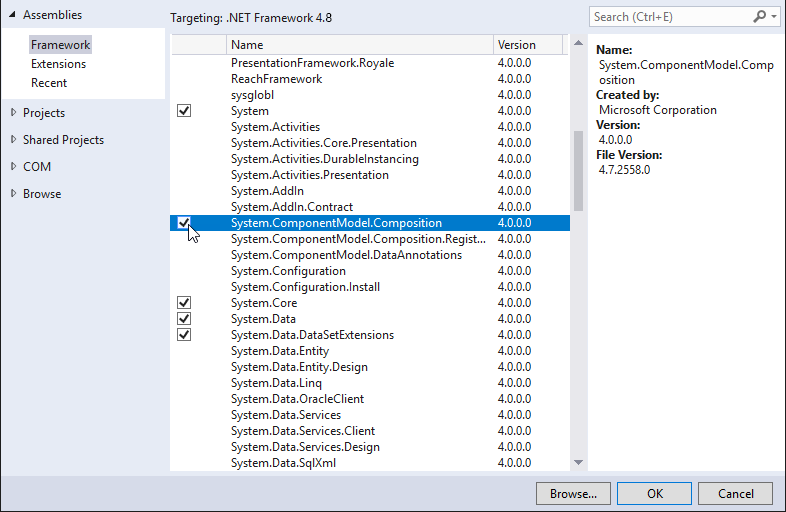
单击 Browse… 并将引用添加到
<KanziInstallation>/Studio/Bin/PluginInterface.dll文件。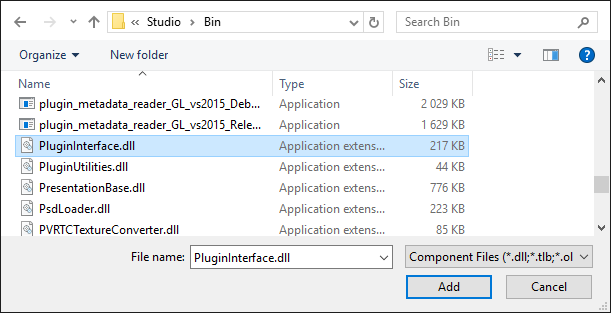
在 Solution Explorer 中右键单击项目名称,选择 Properties,并:
在 Application 选项卡中,将 Target framework 设置为 .NET Framework 4.8。
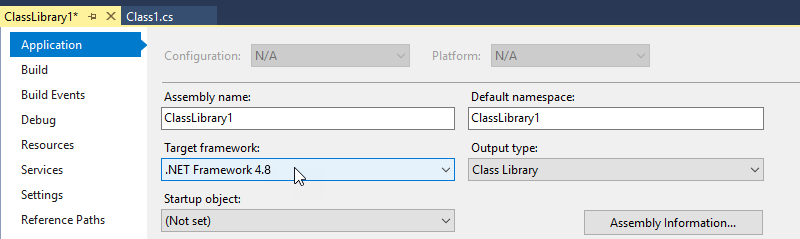
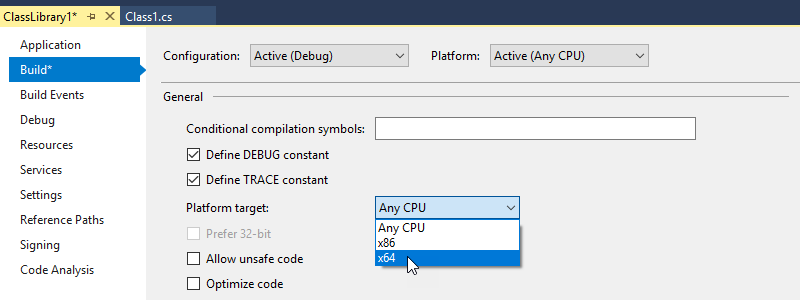
在 Build 选项卡中,将 Platform target 设置为 x64。
打开
Class1.cs文件,并添加System.ComponentModel.Composition和 Kanzi Studio 插件 API 的 using 指令:using System.ComponentModel.Composition; using Rightware.Kanzi.Studio.PluginInterface;
在实现
PluginCommand接口的命令类定义之前,使用导出属性告知 Kanzi Studio 该 .dll 是一个插件。在此示例中,您在Class1类中实现插件命令。[Export(typeof(PluginContent))]将
Class1类设置为实现PluginCommand接口,该接口由Class1类实现。Kanzi 使用此类来创建插件命令。更改
public class Class1
至 (To)
public class Class1 : PluginCommand
实现
PluginCommand接口。例如,将鼠标悬停在PluginCommand上,点击 ,然后选择实现接口。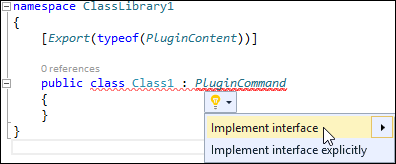
在所有函数中,使用您要执行的代码替换这一行:
throw new NotImplementedException();
确保将插件处理所有内部异常,不让它们传递到 Kanzi Studio 接口。
例如,将
Class1类中的函数设置为:使用
CommandPlacement函数设置插件的菜单名称,以及您希望显示启动插件命令的位置:要在主菜单中显示插件,使用
ContextMenuPlacement.NONE。要在从节点和资源调用的上下文菜单和主菜单中显示插件,使用
ContextMenuPlacement.PROJECT_ITEM。
public CommandPlacement CommandPlacement
{
    get
    {
        return new CommandPlacement("myPluginMenu", ContextMenuPlacement.NONE, false, null);
    }
}
小技巧
要从主菜单和上下文菜单中隐藏插件,请将
CommandPlacement函数设置为返回null。例如,当您只想使用脚本运行 Kanzi Studio 命令来执行插件命令时,隐藏插件。请参阅 自动化 Kanzi Studio 任务。public CommandPlacement CommandPlacement { get { return null; } }
使用
PluginContent.Name函数设置插件的内部名称。Kanzi 使用插件的内部名称,这样您可以更改插件的显示名称,而无需对插件进行其他更改。public string Name { get { return "Internal plugin name"; } }
使用
PluginContent.DisplayName函数在 Kanzi Studio 菜单中显示插件名称,您可以在此处启动插件。public string DisplayName { get { return "Plugin display name"; } }
使用
PluginContent.Description函数设置您的 Kanzi Studio 插件的简要描述。Kanzi Studio 在用户将鼠标指针悬停在菜单中的插件名称上时,将此描述显示为工具提示。public string Description { get { return "A tooltip with short description of what the plugin does."; } }
使用
CanExecute函数来设置用户是否可以启动您的插件,以及他们可以在哪里启动您的插件:当设置为
false时,Kanzi Studio 会在主菜单和上下文菜单中显示插件,但用户无法启动该插件。当设置为
true时,用户可以启动插件。
Kanzi Studio 为插件提供
KanziStudio对象。KanziStudio对象是数据访问的根对象,提供当前项目、可用命令、全局撤销和重做,以及与项目打开和关闭相关的事件。例如,仅当打开 Kanzi Studio 项目时使用此命令。
private KanziStudio studio;
public bool CanExecute(PluginCommandParameter parameter)
{
    return this.studio != null && this.studio.ActiveProject != null;
}
在
Execute函数中添加您希望插件运行的代码。例如,使用此代码在运行插件时将 Hello world! 打印到 Kanzi Studio 中的 Log 窗口。public void Execute(PluginCommandParameter parameter) { studio.Log("Hello world!"); }
使用
PluginContent.Initialize函数将studio放置到成员变量中。public void Initialize(KanziStudio studio) { this.studio = studio; }
构建并运行插件。请参阅 构建和运行 Kanzi Studio 插件。
在这里,您仅为您的 Kanzi Studio 插件创建了基础结构,它只是在 Kanzi Studio Log 窗口中打印一条消息。要使您的插件执行更多操作,请将您希望插件运行的代码添加到 Execute 函数中。请参阅 向您的 Kanzi Studio 命令插件添加功能。 和 向您的 Kanzi Studio 命令插件添加多个命令。。
要进一步开发您的 Kanzi Studio 插件,请参阅 Kanzi Studio 插件 API 概述 和 Kanzi Studio 插件 API 参考。
构建和运行 Kanzi Studio 插件
要构建和运行一个 Kanzi Studio 插件:
在 Visual Studio 中选择构建 (Build) > 构建解决方案 (Build Solution) 来构建插件 .dll。

将 Kanzi Studio 插件 DLL 文件复制到
%ProgramData%\Rightware\<KanziVersion>\plugins目录。如果
plugins目录在%ProgramData%\Rightware\<KanziVersion>中不存在,请创建它。小技巧
在文件资源管理器中,从您的 Kanzi Studio 插件 DLL 文件创建一个快捷方式,并将该快捷方式移动到
%ProgramData%\Rightware\<KanziVersion>\plugins目录。当您构建插件时,您可以在 Output 窗口中看到 Visual Studio 存储插件 DLL 文件的位置。
打开 Kanzi Studio。
Kanzi Studio 加载
plugins目录中的插件,并将它们添加到主菜单或从节点和资源调用的上下文菜单中。在 Kanzi Studio 中选择插件主菜单并选择插件,或在 Node Tree 中右键单击一个节点并选择您的插件名称以运行您的插件。
向您的 Kanzi Studio 命令插件添加功能。
在您为 Kanzi Studio 命令插件创建基础之后,向您的插件添加功能,使其能够执行一些有用的操作。在这里,您创建一个插件,用于删除所有没有子节点的 Empty Node 节点。
要使用 Kanzi Studio 插件删除没有子节点的 Empty Node 节点:
为您的 Kanzi Studio 命令插件创建基础。请参阅 为 Kanzi Studio 命令插件创建基础。
在 Visual Studio 中,打开插件的 Visual Studio 解决方案,然后打开实现
PluginCommand接口的类库文件。在
Execute函数中编写代码,以便在调用插件命令时执行您的插件。例如,要创建一个插件以删除所有没有子节点的 Empty Node 节点,请在
Execute函数中添加:// Your plugin executes the content of this function. Place your plugin code here. public void Execute(PluginCommandParameter parameter) { var items = parameter.Items; // Print to the Kanzi Studio Log window. studio.Log("Deleting all Empty Node nodes without child nodes"); // When executing from the main menu, items passes empty value as a parameter. // When executing from the context menu, items passes the selected items as a parameter // (even when multiple items are selected). if (items != null && items.Any()) { // If executed from the context menu, start the function that traverses // the node tree from the node where it is executed. TraverseTree(items); } else { // Check that a project is opened. if (studio != null && studio.ActiveProject!= null && studio.ActiveProject.Screen != null) { // If executed from the main menu, starts the function that traverses // the node tree from the first child of the Screen node. TraverseTree(studio.ActiveProject.Screen.Children); } } } // TraverseTree function traverses the node tree from the node where you launch the plugin. private void TraverseTree(IEnumerable<ProjectItem> items) { foreach (var item in items.ToArray()) { // If the node is an Empty Node 2D or Empty Node 3D and does not have // any child nodes, delete it. if ((item is EmptyNode2D || item is EmptyNode) && !item.Children.Any()) { // Delete the project item using a command. This enables you // to undo the action performed by the plugin. studio.Commands.DeleteProjectItem(new ProjectItem[] { item }); } // Traverse the children of the current node. else if (item.Children.Any()) { TraverseTree(item.Children); } } }
在
CanExecute函数集中设置在 Kanzi Studio 中调用插件命令的位置和方式。public bool CanExecute(PluginCommandParameter parameter) { // Allow running the plugin command from the context menu only when a single node in the scene // graph is selected. Zero items are called when executing the plugin from the main menu, // which sets the plugin to start traversing the node tree from the first child node of // the Screen node. var items = parameter.Items; return items != null && items.Count() <= 1; }
在 Kanzi Studio 中创建一个项目,其中包含多个 Empty Node 节点,一些具有子节点,一些没有子节点。
构建并运行插件。请参阅 构建和运行 Kanzi Studio 插件。
当您执行命令时,插件会移除没有任何子节点的 Empty Node 节点,这取决于您在何处调用插件命令:
如果您从主菜单执行此插件命令,则该插件移除整个工程中没有任何子节点的 Empty Node 节点。

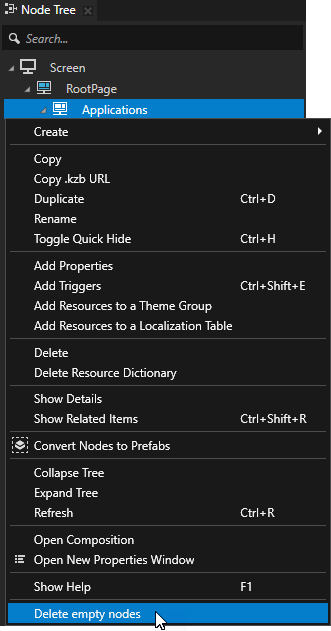
如果您在 Node Tree 中右键单击一个节点并从上下文菜单中执行插件命令,插件将在所选节点的上下文中删除没有子节点的 Empty Node 节点。
要进一步开发您的 Kanzi Studio 插件,请参阅 Kanzi Studio 插件 API 概述 和 Kanzi Studio 插件 API 参考。
向您的 Kanzi Studio 命令插件添加多个命令。
在您为 Kanzi Studio 命令插件创建基础之后,向您的插件添加功能。您可以创建一个实现多个命令的 Kanzi Studio 命令插件。在这里,您创建一个包含以下命令的插件:
将无效的 kzb URL 打印到 Log 中的 Kanzi Studio 项目。请参阅 记录无效 kzb URL。
从 Kanzi Studio 项目中删除无效的 kzb URL。请参阅 移除无效 kzb URL。
该插件查找并移除活动工程中,指向同一工程中或已加载的引用工程中资源的无效 kzb URL。
记录无效 kzb URL
要在 Kanzi Studio 项目中记录无效的 kzb URL:
为 Kanzi Studio 命令插件创建基础。请参阅 为 Kanzi Studio 命令插件创建基础。
例如,创建一个名为
InvalidKzbUrlFinder的 Visual Studio 项目,其中包含一个名为ListInvalidKzbUrls的类,该类实现了PluginCommand接口:using System.ComponentModel.Composition; using Rightware.Kanzi.Studio.PluginInterface; namespace InvalidKzbUrlFinder { [Export(typeof(PluginContent))] public class ListInvalidKzbUrls : PluginCommand { private KanziStudio studio; public void Initialize(KanziStudio studio) { this.studio = studio; } // Show the plugin command in the Kanzi Studio main menu named Kzb URL Checker. public CommandPlacement CommandPlacement => new CommandPlacement("Kzb URL Checker", ContextMenuPlacement.NONE, false, null); // Set the internal name of the plugin command. This enables you to change the display // name of your command without additional changes to the plugin. public string Name => "LogInvalidKzbUrls"; // Set the command name in the Kanzi Studio main menu. public string DisplayName => "Log Invalid Kzb URLs"; // Set the tooltip for the command. public string Description => "Prints to the Log the invalid kzb URLs in the active project."; public bool CanExecute(PluginCommandParameter parameter) { return studio?.ActiveProject != null; } } }
在实现
PluginCommand接口的类中,添加从资源的 kzb URL 获取包含该资源的项目名称的函数。public static Project GetProjectFromKzbUrl(Solution solution, string urlCandidate) { Project result = null; foreach (var project in solution.Projects) { var projectName = project.Name.Replace(" ", "_").ToLowerInvariant(); if (urlCandidate?.StartsWith("kzb://" + projectName) == true) { result = project; break; } } return result; } public Project GetProjectFromKzbUrl(string urlCandidate) { return GetProjectFromKzbUrl(studio.Solution, urlCandidate); }
为
System.Linq命名空间添加 using 指令。您在下一步中添加的函数使用 LINQ
Enumerable.Where方法。using System.Linq;
在实现
PluginCommand接口的类中,添加一个函数来检查 kzb URL 是否指向现有资源。public static bool IsValidKzbUrl(Solution solution, Project project, string kzbUrl) { var result = false; if (GetProjectFromKzbUrl(solution, kzbUrl) == project) { var projectNameInKzbFormat = project.Name.Replace(" ", "_").ToLowerInvariant(); var itemPath = kzbUrl.Substring(("kzb://" + projectNameInKzbFormat + "/").Length); ProjectItem currentItem = project; var parts = itemPath.Split('/').Where(x => !string.IsNullOrEmpty(x)); foreach (var part in parts) { currentItem = currentItem.GetChild(part); if (currentItem == null) { break; } } result = currentItem != null; } return result; }
在实现
PluginCommand接口的类中,添加一个函数,将无效的 kzb URL 打印到 Log。private int LogKzbUrls(ProjectItem item, int count) { foreach (var projectItem in item.Children) { var properties = projectItem.Properties; foreach (var property in properties) { var propertyValue = projectItem.Get(property); var nodeResource = propertyValue as ResourceReferenceBase; if (nodeResource != null) { var project = GetProjectFromKzbUrl(nodeResource.ResourceID); if (project != null && !IsValidKzbUrl(studio.Solution, project, nodeResource.ResourceID)) { studio.Log($"Invalid kzb URL \"{nodeResource}\" found in the \"{property.DisplayName}\" property of \"{projectItem.Path ?? projectItem.Name}\"."); count++; } } } count = LogKzbUrls(projectItem, count); } return count; }
在实现
PluginCommand接口的类的Execute函数中,编写在调用插件命令时插件执行的代码。public void Execute(PluginCommandParameter parameter) { studio.Log("Finding invalid kzb URLs..."); // Call the function that prints the invalid kzb URLs to the Log. var count = LogKzbUrls(studio.ActiveProject, 0); studio.Log($"This project contains {count} invalid kzb URLs."); }
构建并运行插件。请参阅 构建和运行 Kanzi Studio 插件。
当您执行命令时,插件会将无效的 kzb URL 打印到 Log,并为每个 kzb URL 打印使用该无效 kzb URL 的节点和属性。


移除无效 kzb URL
要从 Kanzi Studio 项目中删除无效的 kzb URL:
实现一个 Kanzi Studio 插件来记录无效的 kzb URL。请参阅 记录无效 kzb URL。
在 Visual Studio 中向您的插件工程添加一个新类,并设置该类以实现
PluginCommand接口。例如,添加一个名为
RemoveInvalidKzbUrls的类:using System.ComponentModel.Composition; using Rightware.Kanzi.Studio.PluginInterface; namespace InvalidKzbUrlFinder { [Export(typeof(PluginContent))] class RemoveInvalidKzbUrls : PluginCommand { private KanziStudio studio; public void Initialize(KanziStudio studio) { this.studio = studio; } // Show the plugin command in the Kanzi Studio main menu named Kzb URL Checker. public CommandPlacement CommandPlacement => new CommandPlacement("Kzb URL Checker", ContextMenuPlacement.NONE, false, null); // Set the internal name of the plugin command. This enables you to change the display // name of your command without additional changes to the plugin. public string Name => "RemoveInvalidKzbUrls"; // Set the command name in the Kanzi Studio main menu. public string DisplayName => "Remove Invalid Kzb URLs"; // Set the tooltip for the command. public string Description => "Removes the invalid kzb URLs from the active project."; public bool CanExecute(PluginCommandParameter parameter) { return studio?.ActiveProject != null; } public void Execute(PluginCommandParameter parameter) { throw new NotImplementedException(); } } }
在上一步中添加的类中,创建移除无效 kzb URL 的函数。
private int RemoveKzbUrls(ProjectItem item, int currentCount)
{
    foreach (var projectItem in item.Children)
    {
        var properties = projectItem.Properties;

        foreach (var property in properties)
        {
            var propertyValue = projectItem.Get(property);
            var nodeResource = propertyValue as ResourceReferenceBase;
            if (nodeResource != null)
            {
                var project = ListInvalidKzbUrls.GetProjectFromKzbUrl(studio.Solution, nodeResource.ResourceID);
                if (project != null &&
                    !ListInvalidKzbUrls.IsValidKzbUrl(studio.Solution, project, nodeResource.ResourceID))
                {
                    projectItem.Set(property.Name, null);
                    currentCount++;
                }
            }
        }

        currentCount = RemoveKzbUrls(projectItem, currentCount);
    }

    return currentCount;
}
在
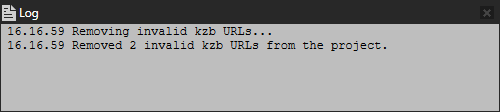
Execute函数中编写代码,以便在调用插件命令时执行您的插件。public void Execute(PluginCommandParameter parameter) { studio.Log("Removing invalid kzb URLs..."); // Call the function that removes the invalid kzb URLs. var removedCount = RemoveKzbUrls(studio.ActiveProject, 0); studio.Log($"Removed {removedCount} invalid kzb URLs from the project."); }
构建并运行插件。请参阅 构建和运行 Kanzi Studio 插件。
当执行此命令时,该插件移除无效的 kzb URL。

要进一步开发您的 Kanzi Studio 插件,请参阅 Kanzi Studio 插件 API 概述 和 Kanzi Studio 插件 API 参考。