步骤 2 - 访问在 Kanzi Studio 项目中创建的内容。
在本教程中,您将创建一个小部件商店,您可以在一个视图中浏览和选择小部件,并在另一个视图中选择小部件以查看其描述。当在上一步结束时运行项目时,您只看到了应用程序背景。您从 Kanzi Studio 项目创建的 kzb 文件,并在本教程上一步中使用 API 加载,包含了使用 API 创建应用程序逻辑所需的所有节点和资源:
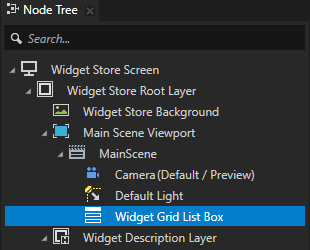
一个名为 Widget Grid List Box 的 Grid List Box 3D 节点是您使用 API 动态加载小部件表示的节点。Grid List Box 节点定义了其显示项目的布局和交互行为。
您可以在 Widget Store Screen > Widget Store Root Layer > Main Scene Viewport > MainScene 中的 Node Tree 窗口中找到它。
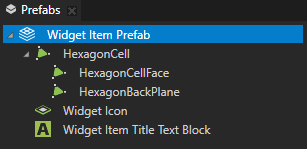
一个名为 Widget Item Prefab 的预制模板,用于定义列在 Widget Grid List Box 小部件列表中的每个小部件项的属性。要向 Widget Grid List Box 节点添加小部件,您需要为每个小部件创建此预设的实例,并为其指定不同的名称、图标和描述。
您可以在 Prefabs 窗口中找到它。
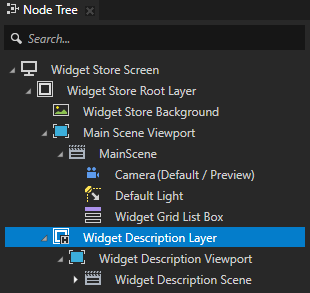
一个名为 Widget Description Layer 的 Empty Node 2D 节点用作描述面板,显示所选小部件的描述。此节点在用户从 Widget Grid List Box 中选择小部件之前是隐藏的。
您可以在 Widget Store Screen > Widget Store Root Layer 中的 Node Tree 窗口中找到它。
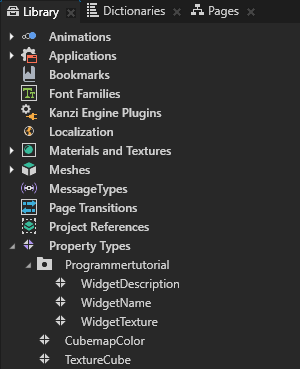
自定义属性类型,用于设置小组件名称、描述和纹理。
别名,通过 Kanzi Engine API 访问 kzb 文件中的内容,以及动画剪辑的资源 ID。
您可以在 Dictionaries 窗口中的 Node Tree 中看到您选择的节点的资源字典中的别名。
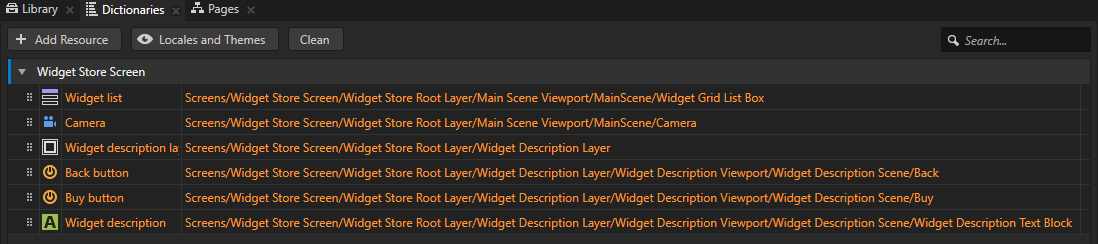
要使用 Kanzi Engine API 访问 Kanzi Studio 项目的内容:
要创建预设实例并将它们添加到 Widget Grid List Box 节点,您需要通过从项目中加载这些资产来获取访问权限。要在应用程序代码中访问加载的项目资产,请在应用程序类的成员变量中创建并存储这些资产。
private:

    // Grid List Box 3D node which contains the widgets.
    GridListBox3DSharedPtr m_widgetList;

    // The currently selected widget in the Widget Grid List Box node.
    GridListBox3D::ItemSharedPtr m_selectedItem;

    // The camera of the scene.
    CameraSharedPtr m_camera;

    // Transformation target for the camera animation.
    SRTValue3D m_cameraTransformationTarget;

    // Animation clip for animating the camera.
    SRTValue3DAnimationSharedPtr m_cameraAnimation;

    // Timeline playback for animating the camera.
    TimelinePlaybackSharedPtr m_cameraPlayback;

    // Timeline playback for highlighting the item.
    TimelinePlaybackSharedPtr m_widgetHighlightPlayback;

    // Timeline playback for enabling the Back button.
    TimelinePlaybackSharedPtr m_backButtonEnablePlayback;

    // Animation clip item for animating the selected widget.
    SRTValue3DAnimationSharedPtr m_selectedItemAnimation;

    // Description panel that contains the description of the selected
    // widget and the Back button.
    NodeSharedPtr m_widgetDescriptionNode;

    // Animation clip for animating the visibility of the widget description.
    BoolAnimationSharedPtr m_widgetDescriptionVisibilityAnimation;

    // Timeline playback for animating visibility of the widget description.
    TimelinePlaybackSharedPtr m_widgetDescriptionVisibilityPlayback;

    // Text Block 3D node that shows the widget description in the
    // Widget Description Layer node.
    TextBlock3DSharedPtr m_widgetDescriptionTextBlock;

    // Back button on the widget.
    NodeSharedPtr m_backButton;

    // Animation clip for disabling and enabling the Back button.
    BoolAnimationSharedPtr m_backButtonEnableAnimation;

    // User-defined property type for storing the names of widgets.
    OptionalStringDynamicPropertyType m_widgetNamePropertyType;

    // User-defined property type for storing the descriptions for widgets.
    OptionalStringDynamicPropertyType m_widgetDescriptionPropertyType;
在
ProgrammerTutorialApplication类中,在Application::onConfigure函数之后添加Application::onProjectLoaded函数。当您将函数放置在
Application::onProjectLoaded内时,Kanzi 在加载您的应用程序后调用该函数。protected: // Initializes application when project is loaded. void onProjectLoaded() override { }
要访问 kzb 文件中的节点,您首先必须获取 Screen 节点,然后使用别名或相对路径来获取每个节点。
使用 Alias 来获得对 Kanzi 节点的一致访问。您可以使用别名来访问 Kanzi Studio 中的节点,并使用 Kanzi Engine API。
因为在 Kanzi Studio 中创建应用程序时会在项目的节点树中移动节点,所以跟踪它们的最简单方法是使用别名。您可以使用绑定或 Kanzi Engine API 通过使用井号 (
#) 后跟别名的名称来检索别名目标节点,而不考虑节点在项目中的位置。请参阅 使用别名。例如:在本教程中,Widget Grid List Box 的别名被命名为 Widget list,并存储在 Widget Store Screen 节点的资源字典中。使用 #Widget list 通过其在 API 中的别名访问 Widget Grid List Box 节点。
void onProjectLoaded() override
{
    // Get the Screen node in the kzb file. You use the Screen node to access all the other nodes and resources in the kzb file.
    ScreenSharedPtr screen = getScreen();

    // Access content from the Kanzi Studio project binary.

    // Get the reference to the Widget Grid List Box node to which you add instances
    // of the Widget Item Prefab prefabricated template.
    // You can set to which node the alias points in the Kanzi Studio project.
    m_widgetList = screen->lookupNode<GridListBox3D>("#Widget list");

    // Get the reference to the Camera node. You need the reference to the Camera node
    // so that you can animate it when the user selects a widget.
    m_camera = screen->lookupNode<Camera>("#Camera");

    // Create target transformation for camera animation.
    m_cameraTransformationTarget = SRTValue3D(Vector3(1.0f, 1.0f, 1.0f), Vector3(degreesToRadians(60.0f), degreesToRadians(0.0f), 0.0f), Vector3(-1.5f, 7.0f, -5.0f));

    // Get the reference to the Widget Description Layer node. This node is shown
    // when the user selects a widget and is used as a panel that contains the
    // widget description.
    m_widgetDescriptionNode = screen->lookupNode<Node>("#Widget description layer");

    // Get the reference to the Text Block node in the Widget Description Layer node
    // where the widget description is shown.
    m_widgetDescriptionTextBlock = screen->lookupNode<TextBlock3D>("#Widget description");

    // Get the reference to the reusable prefab (template) for the widget icons.
    // Domain is a collection of all subsystems and contains the Kanzi resource manager. You need to get the resource manager to access the resources in the .kzb file.
    ResourceManager* resourceManager = getDomain()->getResourceManager();
    PrefabTemplateSharedPtr widgetItemPrefabTemplate = resourceManager->acquireResource<PrefabTemplate>("kzb://programmer_tutorial/Prefabs/Widget Item Prefab");


    // Get the reference to the back button in the description layer.
    m_backButton = screen->lookupNode<Node>("#Back button");

    // Create animation clip for disabling and enabling back button.
    m_backButtonEnableAnimation = FromToAnimation<bool, StepEasingFunction>::create(getDomain(), chrono::seconds(1), false, true);

    // Create animation clip for hiding the description layer.
    m_widgetDescriptionVisibilityAnimation = FromToAnimation<bool, StepEasingFunction>::create(getDomain(), chrono::seconds(1), true, false);

    // Create animation clip for animating selected list box item.
    m_selectedItemAnimation = FromToAnimation<SRTValue3D, LinearEasingFunction>::create(getDomain(), chrono::milliseconds(800),
            SRTValue3D(Vector3(1.0f, 1.0f, 1.0f), Vector3(degreesToRadians(0.0f), 0.0f, 0.0f),  Vector3(0.0f, 0.0f, 0.0f)),
            SRTValue3D(Vector3(1.0f, 1.0f, 1.0f), Vector3(degreesToRadians(60.0f), 0.0f, 0.0f), Vector3(0.0f, 0.0f, 1.0f)));
}
在本教程中,您使用在 Kanzi Studio 项目中定义的自定义属性类型。要访问这些自定义属性类型,请创建一个
DynamicPropertyType,并使用与 Kanzi Studio 项目中相同的名称。资源被包装在一个共享指针中,属性被包装在一个可选项中。
class ProgrammerTutorialApplication: public ExampleApplication
{
...
    // Optional type for the string custom property types.
    using OptionalStringDynamicPropertyType = OptionalDynamicPropertyType<string>;

protected:

    void onProjectLoaded() override
    {
    ...
        // Get the custom property type for storing the widget name. This custom
        // property type is created in the Kanzi Studio project.
        m_widgetNamePropertyType = DynamicPropertyType<string>::tryCreate("Programmertutorial.WidgetName");

        // Get the custom property type for storing the widget description. This custom
        // property type is created in the Kanzi Studio project.
        m_widgetDescriptionPropertyType = DynamicPropertyType<string>::tryCreate("Programmertutorial.WidgetDescription");
    }
    ...
};