定义属性编辑器
在 Kanzi Studio 中,当您需要 Kanzi Studio 未提供的属性编辑器时,您可以定义自己的属性编辑器。您将属性编辑器定义为 Kanzi Studio 插件。
要查看可用的 Kanzi Studio 属性编辑器列表,请参阅 Kanzi Studio 属性编辑器用于在 Kanzi Engine 插件中声明的属性类型。。
要了解如何创建 Kanzi Studio 插件,请参阅 创建 Kanzi Studio 命令插件 和 创建 Kanzi Studio 窗口插件。
要查找有关 Kanzi Studio 插件 API 的详细信息,请参阅:
此过程显示如何定义一个属性编辑器,使用户能够选择一个文件。
要定义一个属性编辑器:
为 Kanzi Studio 命令插件创建基础,以扩展 Kanzi Studio 的功能。
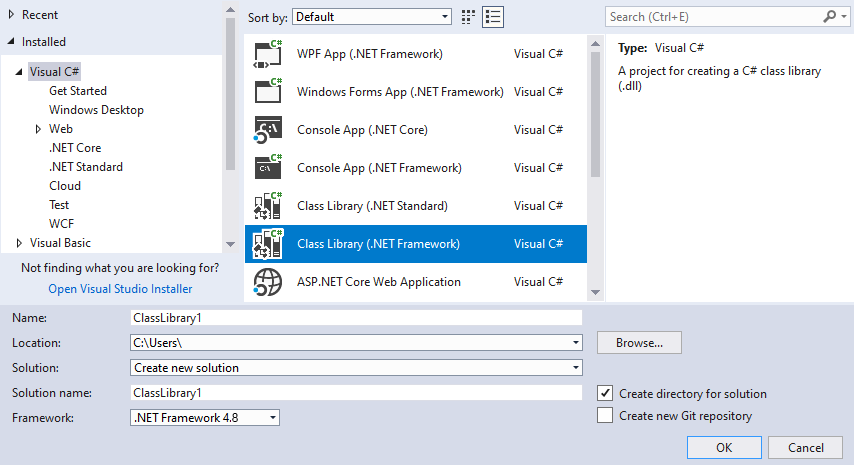
在 Visual Studio 中选择 File > New > Project 并选择:
Visual C# > Class Library (.NET Framework)
Framework 到 .NET Framework 4.8
单击 OK。
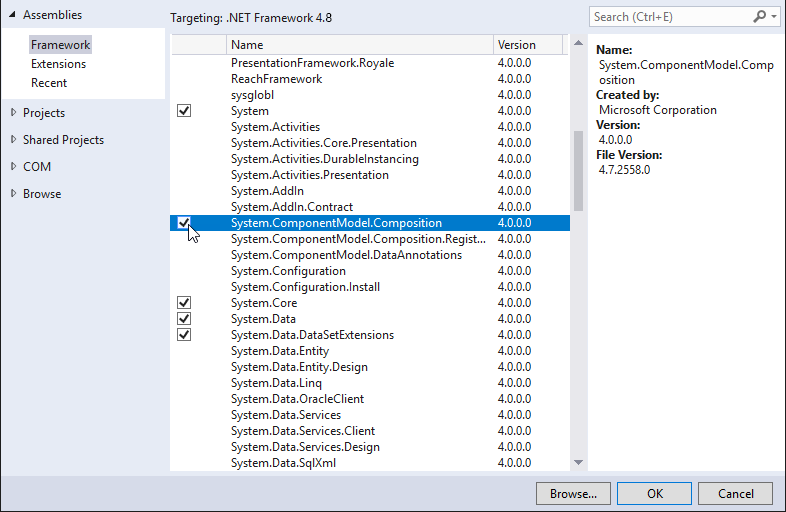
在 Solution Explorer 中,右键单击项目名称,选择 Add > Reference,并添加以下引用:
选择 Assemblies > Framework > System.ComponentModel.Composition。
单击 Browse… 并将引用添加到
<KanziInstallation>/Studio/Bin/PluginInterface.dll文件。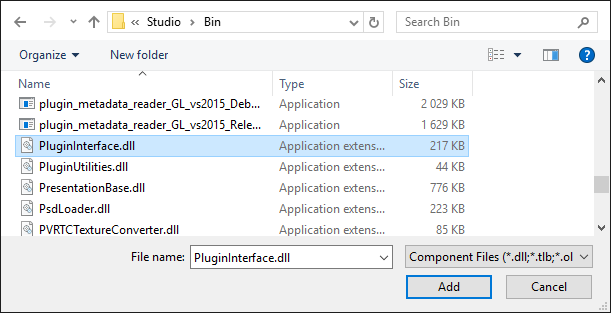
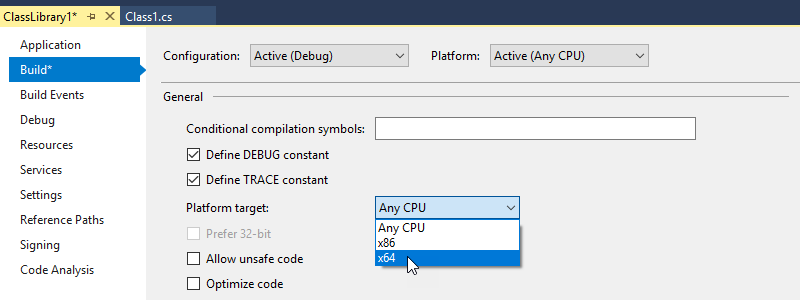
在 Solution Explorer 中右键单击项目名称,选择 Properties,并:
在 Application 选项卡中,将 Target framework 设置为 .NET Framework 4.8。
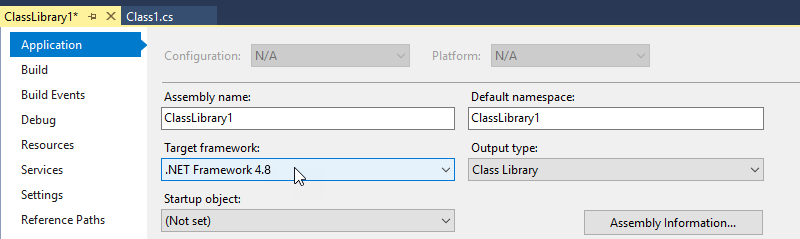
在 Build 选项卡中,将 Platform target 设置为 x64。
使用
ViewModelFactory类实现属性编辑器的逻辑层。在
ClassLibrary1中创建一个类,将其命名为FileSelectorViewModelFactory.cs,并将其内容替换为:using System; using Rightware.Kanzi.Studio.PluginInterface; using Rightware.Kanzi.Studio.PluginInterface.Editors; namespace ClassLibrary1 { // Implement the PluginPropertyValueEditorContextFactory interface to allow Kanzi Studio // to create an instance of the editor ViewModel. For simple editors instead of // implementing your own PluginPropertyValueEditorContext class, you can use the // BasePluginEditorViewModel class that implements the PluginPropertyValueEditorContext // interface. This interface describes how you handle property value changes in // Kanzi Studio. // // If you want to add a more complex logic behind the property editor then it is a good idea // to create a separate ViewModel class that implements PluginPropertyValueEditorContext // or inherits the BasePluginEditorViewModel class. // // For Kanzi Studio to create an instance of the ViewModel, you must implement // the ViewModelFactory. public class FileSelectorViewModelFactory : PluginPropertyValueEditorContextFactory { public PluginPropertyValueEditorContext Create(object initialValue, Action<object> valueSetCallback) { // You can use the BasePluginEditorViewModel that contains the PropertyValue Property // which you can bind to a user control. return new BasePluginEditorViewModel(initialValue, valueSetCallback); } } }
使用
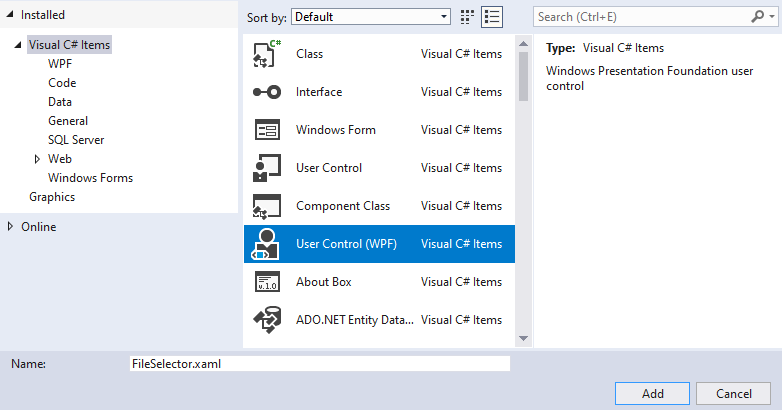
UserControl实现属性编辑器的表示层。在 Visual Studio 中,在 Solution Explorer 中右键单击项目名称,选择 Add > New Item,选择一个 User Control (WPF) 文件类型,并将其命名为 FileSelector.xaml。
将
FileSelector.xaml的内容替换为:<UserControl x:Class="ClassLibrary1.FileSelector" xmlns="http://schemas.microsoft.com/winfx/2006/xaml/presentation" xmlns:x="http://schemas.microsoft.com/winfx/2006/xaml" xmlns:mc="http://schemas.openxmlformats.org/markup-compatibility/2006" xmlns:d="http://schemas.microsoft.com/expression/blend/2008" mc:Ignorable="d" d:DesignHeight="450" d:DesignWidth="800"> <Grid> <Grid.ColumnDefinitions> <ColumnDefinition Width="*"/> <ColumnDefinition Width="30"/> </Grid.ColumnDefinitions> <TextBox Name="tbFileName" Grid.Column="0" Text="{Binding PropertyValue}"/> <Button Grid.Column="1" Click="Button_Click">...</Button> </Grid> </UserControl>
对于此属性编辑器,您使用
GridWPF 控件来布局编辑器,并创建:一个文本框,您可以在其中输入文件名。
您将
TextBox控件的Text属性绑定到您想要编辑的属性:Text="{Binding PropertyValue}"。PropertyValue来自逻辑层。这样,Kanzi Studio 可以跟踪TextBox控件中的更改。一个可用于选择文件的按钮。
要创建一个按钮以打开一个可以选择文件的窗口,请为
Button使用Click处理程序。
将
FileSelector.xaml.cs的内容替换为:using System.Windows; using System.Windows.Controls; using Microsoft.Win32; namespace ClassLibrary1 { public partial class FileSelector : UserControl { public FileSelector() { InitializeComponent(); } // Define the behavior when the user clicks the button in the file selector editor. private void Button_Click(object sender, RoutedEventArgs e) { // Check that the DataContext has the correct value. if (DataContext is BasePluginEditorViewModel editorContext) { // Open the window where the user can select a file. OpenFileDialog openFileDialog = new OpenFileDialog(); if (openFileDialog.ShowDialog() == true) { // Write the path and file name of the selected file name in the TextBox. editorContext.PropertyValue = openFileDialog.FileName; } } } } }
实现 Kanzi Studio 插件类,在其中定义属性编辑器。
要创建文件选择器编辑器,请在
ClassLibrary1类中添加一个类,将其命名为FileSelectorSettings.cs,并将其内容替换为:using System.ComponentModel.Composition; using System.Windows; using Rightware.Kanzi.Studio.PluginInterface; namespace ClassLibrary1 { // This way you tell Kanzi Studio that this class contains plugin settings. [Export(typeof(PluginContent))] public class FileSelectorSettings : PluginPropertyValueEditorSettings { // Add the property that sets the editor name. Use this name when you set // the value of the editor for a custom property type that you define in // a Kanzi Engine plugin. public string Name => "FileSelectorEditor"; // These properties set the name and a description for the property editor in Kanzi Studio. public string DisplayName => "File selector editor"; public string Description => "Enables you to select a file."; // This way you enable Kanzi Studio to instantiate the UIControl. private DataTemplate dataTemplate; public DataTemplate DataTemplate { get { if (dataTemplate == null) { dataTemplate = new DataTemplate(); dataTemplate.VisualTree = new FrameworkElementFactory(typeof(FileSelector)); } return dataTemplate; } } // This way you allow Kanzi Studio to instantiate the DataContext // for the property editor. public PluginPropertyValueEditorContextFactory PropertyValueEditorContextFactory { get; } = new FileSelectorViewModelFactory(); public void Initialize(KanziStudio studio) { } // Implement the IsCompatibleWith method to define the base data types that // the property editor can work with. public bool IsCompatibleWith(PluginPropertyDataType? propertyDataType) { return propertyDataType == PluginPropertyDataType.STRING; } } }
构建并准备 Kanzi Studio 插件以供使用。
在 Visual Studio 中选择 Build > Build Solution。

将 Kanzi Studio 插件 DLL 文件复制到
%ProgramData%\Rightware\<KanziVersion>\plugins目录。如果
plugins目录在%ProgramData%\Rightware\<KanziVersion>中不存在,请创建它。小技巧
在文件资源管理器中,从您的 Kanzi Studio 插件 DLL 文件创建一个快捷方式,并将该快捷方式移动到
%ProgramData%\Rightware\<KanziVersion>\plugins目录。当您构建插件时,您可以在 Output 窗口中看到 Visual Studio 存储插件 DLL 文件的位置。
当您在 Kanzi Studio 项目中打开或重启 Kanzi Studio 时,在 Library > Property Types 中创建或选择一个属性类型,并设置:
Data Type 到 Text
Editor 到 File selector editor
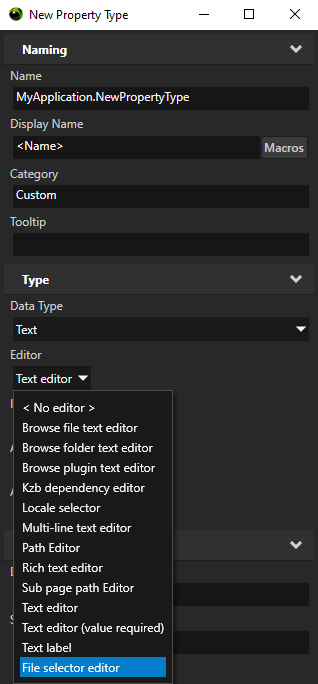
当您将此属性类型添加到节点时,在 Properties 中使用您定义的编辑器来设置属性类型的值。
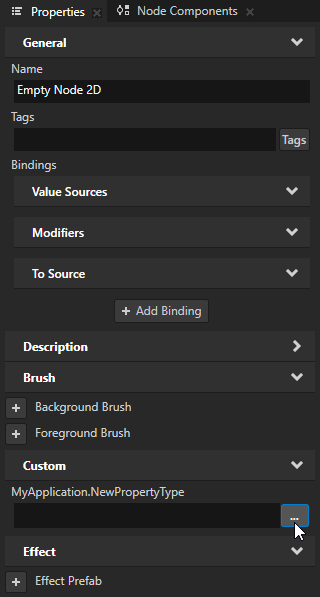
使用自定义属性编辑器与 Kanzi Engine 自定义属性类型。
要为您在 Kanzi Engine 插件中定义的自定义属性类型使用自定义属性编辑器,请在 Kanzi Engine 插件中该属性类型的属性编辑器元数据声明中,将 metadata.editor 设置为您要使用的编辑器的名称。
编辑器的名称在定义属性编辑器的类的 Name 属性中设置。
例如,要将自定义 File selector editor 设置为属性编辑器,请使用:
PropertyType<string> VideoView2D::VideoFileNameProperty(kzMakeFixedString("VideoView2D.VideoFileName"), "", 0, false,
                                                     KZ_DECLARE_EDITOR_METADATA
                                                     (
                                                         metadata.editor = "FileSelectorEditor"
                                                         metadata.displayName = "Video Filename";
                                                         metadata.tooltip = "Video file to be played";
                                                         metadata.host = "VideoView2D:freq";
                                                     ));