在 Kanzi Studio 中显示 Kanzi Engine 插件自定义类型的参考。
您可以使用 Kanzi Engine 插件通过 Kanzi Engine API 创建自定义属性类型和消息,并在 Kanzi Studio 中使用它们。
要将有关您在 Kanzi Engine 插件中创建的自定义属性类型和消息的信息传递给 Kanzi Studio,您需要声明描述这些属性类型和消息的元数据。
元数据使 Kanzi Engine 插件用户能够在 Kanzi Studio 中与插件内容进行交互。
例如,元数据定义了用于设置属性值的 Kanzi Studio 属性编辑器的类型,以及可供选择的值集。
仅声明您需要的元数据。Kanzi Studio 为您未设置的属性分配默认值。
此表列出了您可以使用的元数据特性。
特性 (Attribute) |
描述 (Description) |
用于属性类型 |
用于消息类型 |
|---|---|---|---|
在 Kanzi Studio 中显示的属性或消息的名称。 |
X |
X |
|
属性或消息的工具提示 |
X |
X |
|
属性类别名称如在 Kanzi Studio 中所示。 |
X |
X |
|
Kanzi Studio 允许用户选择的属性可能值的来源。 |
X |
||
Kanzi Studio 建议属性的节点类型,以及 Kanzi Studio 是否自动添加该属性或让用户添加它。 |
X |
||
用于设置该属性值的 Kanzi Studio 编辑器类型。 |
X |
||
在 Kanzi Studio 中,当属性被添加到节点或资源时,它获得的初始值。 |
X |
||
属性可以拥有的最低值 |
X |
||
属性可以拥有的最高值 |
X |
||
当 Kanzi Studio 用户编辑属性值时,属性值的变化量。 |
X |
||
Kanzi Studio 是否将消息显示为一个操作。 |
X |
||
Kanzi Studio 是否将消息显示为触发器。 |
X |
||
该属性在 Kanzi Studio 中的属性类别中的位置。 |
X |
||
该属性或消息是否在 Kanzi Studio 中可用。 |
X |
X |
|
在较早版本的插件中,属性或消息的名称 |
X |
X |
displayName
设置 Kanzi Studio 中显示的属性或消息的名称。
语法 |
|
||
Values |
|
||
示例 |
metadata.displayName = "Video Filename";
@EditorInfo(displayName = "Video Filename")
@EditorInfo(displayName = "Video Filename")

|
tooltip
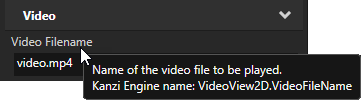
设置属性或消息的工具提示。Kanzi Studio 将属性或消息的 Kanzi Engine 名称附加到工具提示文本中,以防用户在应用程序代码中需要它。
语法 |
|
||
Values |
|
||
示例 |
metadata.displayName = "Video Filename";
metadata.tooltip = "Name of the video file to be played.";
@EditorInfo(
             displayName = "Video Filename",
             tooltip = "Name of the video file to be played."
           )
@EditorInfo(
             displayName = "Video Filename",
             tooltip = "Name of the video file to be played."
           )
|
类别
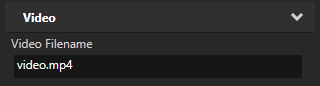
设置属性的类别名称,使其在 Kanzi Studio Properties 中显示的方式。Kanzi Studio 总是首先列出 General 和 Description 属性类别,然后按字母顺序列出其他属性类别。
语法 |
|
||
Values |
|
||
示例 |
metadata.displayName = "Video Filename";
metadata.category = "Video";
@EditorInfo(
             displayName = "Video Filename",
             category = "Video"
           )
@EditorInfo(
             displayName = "Video Filename",
             category = "Video"
           )
|
valueProvider
设置 Kanzi Studio 如何获取属性的可能值以供用户选择。
语法 |
|
||
Values |
|
||
示例 |
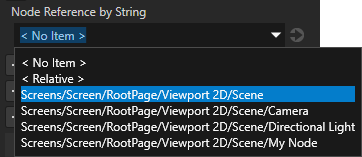
// When you set valueProvider to ProjectObject:Node3D,
// Kanzi Studio automatically uses the Node 3D selector editor.
metadata.valueProvider = "ProjectObject:Node3D";
// When you set valueProvider to ProjectObject:Node3D,
// Kanzi Studio automatically uses the Node 3D selector editor.
@EditorInfo(valueProvider = "ProjectObject:Node3D")
// When you set valueProvider to ProjectObject:Node3D,
// Kanzi Studio automatically uses the Node 3D selector editor.
@EditorInfo(valueProvider = "ProjectObject:Node3D")
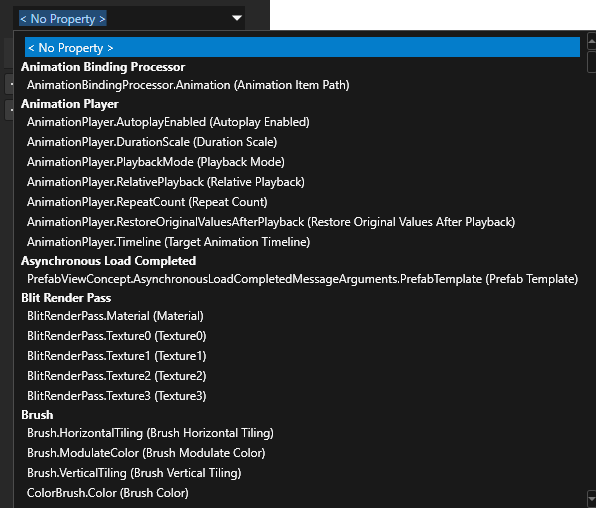
// Provides a dropdown with all available property types.
// Do not set the editor type. Kanzi Studio automatically sets the correct editor.
metadata.valueProvider = "PropertyType";
// Provides a dropdown with all available property types.
// Do not set the editor type. Kanzi Studio automatically sets the correct editor.
@EditorInfo(valueProvider = "PropertyType")
// Provides a dropdown with all available property types.
// Do not set the editor type. Kanzi Studio automatically sets the correct editor.
@EditorInfo(valueProvider = "PropertyType")
// Provides a list to which the user can add items.
// Do not set the editor type. Kanzi Studio automatically sets the correct editor.
metadata.valueProvider = "StringList";
// Provides a list to which the user can add items.
// Do not set the editor type. Kanzi Studio automatically sets the correct editor.
@EditorInfo(valueProvider = "StringList")
// Provides a list to which the user can add items.
// Do not set the editor type. Kanzi Studio automatically sets the correct editor.
@EditorInfo(valueProvider = "StringList")

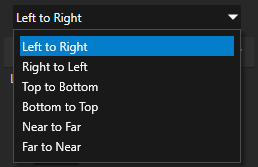
// Provides a list of directions along different dimensions which Kanzi maps to
// integers from 0 to 5.
metadata.valueProvider =
    "Enum : Left to Right|0;Right to Left|1;Top to Bottom|2;Bottom to Top|3;Near to Far|4;Far to Near|5";
// Provides a list of directions along different dimensions which Kanzi maps to
// integers from 0 to 5.
@EditorInfo(valueProvider =
    "Enum : Left to Right|0;Right to Left|1;Top to Bottom|2;Bottom to Top|3;Near to Far|4;Far to Near|5")
// Provides a list of directions along different dimensions which Kanzi maps to
// integers from 0 to 5.
@EditorInfo(valueProvider =
    "Enum : Left to Right|0;Right to Left|1;Top to Bottom|2;Bottom to Top|3;Near to Far|4;Far to Near|5")
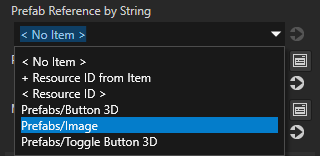
// Creates a string reference to a prefab resource.
PropertyType<string> MyPlugin::PrefabRefByStringProperty(
    kzMakeFixedString("MyPlugin.PrefabRefByString"), "", 0, false,
    KZ_DECLARE_EDITOR_METADATA(
        metadata.displayName = "Prefab Reference by String";
        // When you set valueProvider to ProjectObject:PrefabTemplate,
        // Kanzi Studio automatically uses the Prefab template selector editor.
        metadata.valueProvider = "ProjectObject:PrefabTemplate";
    ));
// Creates a string reference to a prefab resource.
@Metadata
@EditorInfo(
             displayName = "Prefab Reference by String",
             // When you set valueProvider to ProjectObject:PrefabTemplate,
             // Kanzi Studio automatically uses the Prefab template selector editor.
             valueProvider = "ProjectObject:PrefabTemplate"
           )
public static PropertyType<String> PrefabRefByStringProperty =
    new PropertyType("MyPlugin.PrefabRefByString", String.class);
companion object {
    // Creates a string reference to a prefab resource.
    @Metadata
    @EditorInfo(
                 displayName = "Prefab Reference by String",
                 // When you set valueProvider to ProjectObject:PrefabTemplate,
                 // Kanzi Studio automatically uses the Prefab template selector editor.
                 valueProvider = "ProjectObject:PrefabTemplate"
               )
    val PrefabRefByStringProperty =
        PropertyType("MyPlugin.PrefabRefByString", String::class.java);
}
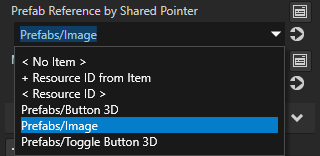
// Creates a shared pointer reference to a prefab resource.
PropertyType<ResourceSharedPtr> MyPlugin::PrefabRefBySharedPtrProperty(
    kzMakeFixedString("MyPlugin.PrefabRefBySharedPtr"), ResourceSharedPtr(), 0, false,
    KZ_DECLARE_EDITOR_METADATA(
        metadata.displayName = "Prefab Reference by Shared Pointer";
        // When you set valueProvider to ProjectObject:PrefabTemplate,
        // Kanzi Studio automatically uses the Prefab template selector editor.
        metadata.valueProvider = "ProjectObject:PrefabTemplate";
    ));
// Creates a resource reference to a prefab resource.
@Metadata
@EditorInfo(
             displayName = "Prefab Reference by Reference",
             // When you set valueProvider to ProjectObject:PrefabTemplate,
             // Kanzi Studio automatically uses the Prefab template selector editor.
             valueProvider = "ProjectObject:PrefabTemplate"
           )
public static PropertyType<Resource> PrefabRefByResourceProperty =
    new PropertyType("MyPlugin.PrefabRefBySharedPtr", Resource.class);
companion object {
    // Creates a resource reference to a prefab resource.
    @Metadata
    @EditorInfo(
                 displayName = "Prefab Reference by Reference",
                 // When you set valueProvider to ProjectObject:PrefabTemplate,
                 // Kanzi Studio automatically uses the Prefab template selector editor.
                 valueProvider = "ProjectObject:PrefabTemplate"
               )
    val PrefabRefByResourceProperty =
        PropertyType("MyPlugin.PrefabRefBySharedPtr", Resource::class.java);
}
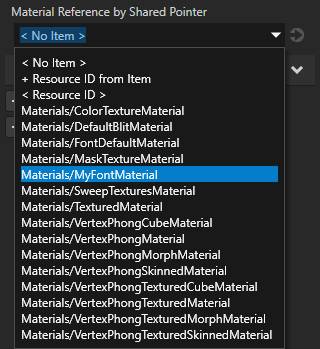
// Creates a shared pointer reference to a material resource.
PropertyType<ResourceSharedPtr> MyPlugin::MaterialRefBySharedPtrProperty(
    kzMakeFixedString("MyPlugin.MaterialRefBySharedPtr"), ResourceSharedPtr(), 0, false,
    KZ_DECLARE_EDITOR_METADATA(
        metadata.displayName = "Material Reference by Shared Pointer";
        // When you set valueProvider to ProjectObject:Material,
        // Kanzi Studio automatically uses the Material dropdown editor.
        metadata.valueProvider = "ProjectObject:Material";
    ));
// Creates a resource reference to a material resource.
@Metadata
@EditorInfo(
             displayName = "Material Reference by Reference",
             // When you set valueProvider to ProjectObject:Material,
             // Kanzi Studio automatically uses the Material dropdown editor.
             valueProvider = "ProjectObject:Material"
           )
public static PropertyType<Resource> MaterialRefByResourceProperty =
    new PropertyType("MyPlugin.MaterialRefBySharedPtr", Resource.class);
companion object {
    // Creates a resource reference to a material resource.
    @Metadata
    @EditorInfo(
                 displayName = "Material Reference by Reference",
                 // When you set valueProvider to ProjectObject:Material,
                 // Kanzi Studio automatically uses the Material dropdown editor.
                 valueProvider = "ProjectObject:Material"
                )
    val MaterialRefByResourceProperty =
        PropertyType("MyPlugin.MaterialRefBySharedPtr", Resource::class.java)
}
|
host
设置 Kanzi Studio 建议属性的节点类型,以及 Kanzi Studio 是自动添加属性还是让用户添加属性。
如果您未设置 host 属性,Kanzi Studio 会将该属性添加为您为其创建属性类型的节点类型的常用属性,并允许用户将该属性添加到任何其他类型的节点。
语法 |
|
||||
Values |
您可以设置多个用逗号分隔的 |
||||
示例 |
// Adds the property as a frequently used property for all 2D nodes.
metadata.host = "Node2D:freq";

// Adds the property automatically for all VideoView2D nodes and
// lets the user add the property for Image nodes.
metadata.host = "VideoView2D:auto,Image2D:user";
// Adds the property as a frequently used property for all 2D nodes.
@EditorInfo(host = "Node2D:freq")

// Adds the property automatically for all VideoView2D nodes and
// lets the user add the property for Image nodes.
@EditorInfo(host = "VideoView2D:auto,Image2D:user")
// Adds the property as a frequently used property for all 2D nodes.
@EditorInfo(host = "Node2D:freq")

// Adds the property automatically for all VideoView2D nodes and
// lets the user add the property for Image nodes.
@EditorInfo(host = "VideoView2D:auto,Image2D:user")
|
 。用户也可以使用与
 编辑器 (Editor)
设置编辑器类型 Kanzi Studio 用户用于设置属性的值。如果您未设置编辑器,Kanzi 将分配一个默认编辑器。
如果将 valueProvider 属性设置为 PropertyType 或 StringList,请不要设置编辑器类型。Kanzi Studio 会自动分配正确的编辑器。
有关 Kanzi Studio 属性编辑器的列表,请参阅 Kanzi Studio 属性编辑器用于在 Kanzi Engine 插件中声明的属性类型。。
语法 |
|
||
Values |
|
||
示例 |
// Set editor to BrowseFileTextEditor which contains a text box with
// a Browse button next to it.
metadata.editor = "BrowseFileTextEditor";
// Set editor to BrowseFileTextEditor which contains a text box with
// a Browse button next to it.
@EditorInfo(editor = "BrowseFileTextEditor")
// Set editor to BrowseFileTextEditor which contains a text box with
// a Browse button next to it.
@EditorInfo(editor = "BrowseFileTextEditor")

|
DefaultValue
设置 Kanzi Studio 在将属性添加到节点或资源时设置属性的值。使用此属性来定义 Kanzi Studio 用户最有可能希望设置属性的值。
例如,对于默认值为 true 的布尔属性类型,设置 metadata.defaultValue = "False";。当 Kanzi Studio 用户将该属性类型添加到节点时,Kanzi Studio 将属性设置为禁用。这样,用户不必执行两个操作。
语法 |
|
||
Values |
|
||
示例 |
// Set the default value of a string property in Kanzi Studio to video.mp4.
metadata.defaultValue = "video.mp4";
// Set the default value of a string property in Kanzi Studio to video.mp4.
@EditorInfo(defaultValue = "video.mp4")
// Set the default value of a string property in Kanzi Studio to video.mp4.
@EditorInfo(defaultValue = "video.mp4")
// Set the default value of a float property in Kanzi Studio to 180.
metadata.defaultValue = "180";
// Set the default value of a float property in Kanzi Studio to 180.
@EditorInfo(defaultValue = "180")
// Set the default value of a float property in Kanzi Studio to 180.
@EditorInfo(defaultValue = "180")

|
LowerBound
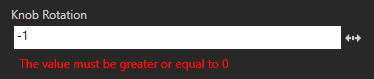
在 Kanzi Studio 中设置属性可以具有的最低值。使用 lowerBound 与 int 和 float 属性类型。另请参阅 UpperBound 和 步进。
语法 |
|
||
Values |
|
||
示例 |
// Set the lowest value the property can have to 0.
metadata.lowerBound = "0";
// Set the lowest value the property can have to 0.
@EditorInfo(lowerBound = "0")
// Set the lowest value the property can have to 0.
@EditorInfo(lowerBound = "0")
|
UpperBound
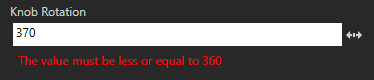
在 Kanzi Studio 中设置属性可以具有的最高值。使用 upperBound 与 int 和 float 属性类型。请参阅 LowerBound 和 步进。
语法 |
|
||
Values |
|
||
示例 |
// Set the highest value the property can have to 360.
metadata.upperBound = "360";
// Set the highest value the property can have to 360.
@EditorInfo(upperBound = "360")
// Set the highest value the property can have to 360.
@EditorInfo(upperBound = "360")
|
步进
设置当 Kanzi Studio 用户编辑属性值时的变化量。使用 step 与 int 和 float 属性类型。请参阅 LowerBound 和 UpperBound。
语法 |
|
||
Values |
|
||
示例 |
// Set the amount by which the property value changes when
// a Kanzi Studio user edits it to 10.
metadata.step = "10";
// Set the amount by which the property value changes when
// a Kanzi Studio user edits it to 10.
@EditorInfo(step = "10")
// Set the amount by which the property value changes when
// a Kanzi Studio user edits it to 10.
@EditorInfo(step = "10")
|
Sendable
设置 Kanzi Studio 是否在触发操作下拉菜单中将消息显示为一个操作。
语法 |
|
||||
Values |
|
||||
示例 |
// Do not show the message as an action.
metadata.sendable = "False";
// Do not show the message as an action.
@EditorInfo(sendable = "False")
// Do not show the message as an action.
@EditorInfo(sendable = "False")
|
Listenable
设置 Kanzi Studio 是否在 Add Triggers 窗口和 Add Trigger 上下文菜单中显示该消息作为触发器。
语法 |
|
||||
Values |
|
||||
示例 |
// Do not show the message as a trigger.
metadata.listenable = "False";
// Do not show the message as a trigger.
@EditorInfo(listenable = "False")
// Do not show the message as a trigger.
@EditorInfo(listenable = "False")
|
SortingIndex
设置属性在 Kanzi Studio Properties 窗口中显示的属性类别中的位置。默认情况下,Kanzi Studio 根据元类定义中的顺序对属性类别中的属性类型进行排序。请参阅 类别。
语法 |
|
||
Values |
|
||
示例 |
// Show the property as the first property in its property category.
metadata.sortingIndex = "1";
// Show the property as the first property in its property category.
@EditorInfo(sortingIndex = "1")
// Show the property as the first property in its property category.
@EditorInfo(sortingIndex = "1")
|
studioVisibility
设置属性或消息是否在 Kanzi Studio 中可用。
语法 |
|
||||||
Values |
|
||||||
示例 |
// Make Kanzi Studio unaware of the property.
metadata.studioVisibility = "Hidden";
// Make Kanzi Studio unaware of the property.
@EditorInfo(studioVisibility = "Hidden")
// Make Kanzi Studio unaware of the property.
@EditorInfo(studioVisibility = "Hidden")
|
legacyName
在早期版本的 Kanzi Engine 插件中设置属性类型或消息的名称。
当您重命名属性类型或消息时,使用 legacyName 通知 Kanzi Studio 该更改。当 Kanzi Studio 用户在 Kanzi Studio 项目中更新 Kanzi Engine 插件时,Kanzi Studio 会重命名该项目中该属性类型或消息的所有实例。
语法 |
|
||
Values |
|
||
示例 |
// Give Kanzi Studio the name of the property type or message in
// the earlier versions of the plugin.
metadata.legacyName = "MyOldPropertyName";
// Give Kanzi Studio the name of the property type or message in
// the earlier versions of the plugin.
@EditorInfo(legacyName = "MyOldPropertyName")
// Give Kanzi Studio the name of the property type or message in
// the earlier versions of the plugin.
@EditorInfo(legacyName = "MyOldPropertyName")
|