步骤 5 - 响应输入消息
在此步骤中,您将学习如何在 Lua 脚本中使用消息处理程序。
您首先声明一个消息处理程序,然后向消息处理程序添加功能以移动这些部分。
声明一个消息处理程序
要声明消息处理程序:
使用在 Kanzi Studio 项目中定义的 MovePieceMessage 消息类型。
在脚本中,将变量初始化在其他变量旁边。
在 Preview 中,当您点击一个 Piece 预设时,Button 2D 节点将此消息发送给自身。
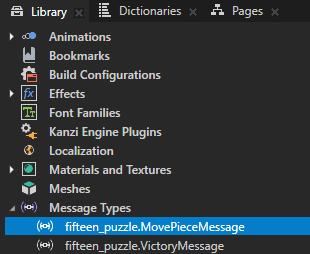
-- Find the "fifteen_puzzle.MovePieceMessage" custom message type.
local MovePieceMessage = MessageType:new("fifteen_puzzle.MovePieceMessage")
在定义
createArray函数之前,定义MovePieceMessage的消息处理函数。-- Declare a message handler function for the "MovePieceMessage". local function movePieceMessageHandler(args) -- Read the message argument that contains the index of the clicked piece. local index = args:getArgument(PieceIndexProperty) -- Find the clicked node. local piece = grid:getChild(index - 1) -- Read the property values of the clicked node. local row = piece:getProperty(GridLayout2D.RowProperty) local column = piece:getProperty(GridLayout2D.ColumnProperty) print(string.format("Clicked node %d at (%d,%d)", index, row, column)) end
要使
movePieceMessageHandler函数执行某些操作,您必须将其添加到一个节点中。在创建每个部分时,请使用addMessageHandler函数执行此操作,但在将其添加到网格之前。-- Create the grid child nodes. for i = 1,PieceCount do ... -- Add a message handler for the MovePieceMessage. piece:addMessageHandler(MovePieceMessage, movePieceMessageHandler) -- Add the new node to the grid. grid:addChild(piece) end
当您保存脚本并在 Preview 中点击  ,然后点击任意棋子时,脚本会在 Log 中打印出被点击棋子的索引及其在 Grid 节点中的坐标。

单击时移动拼图块
请注意,消息处理程序在脚本退出后仍然存在,即使您进一步编辑脚本也是如此。此脚本始终删除所有使用 grid:removeAllChildren() 创建的节点,这也会删除消息处理程序。
要在点击时移动拼图块:
声明变量以跟踪网格中的空槽。
在脚本中,将变量初始化在其他变量旁边。
-- Keep track of the empty slot in the grid.
-- Initially the empty slot is at the bottom right of the grid.
local freeSlotRow = RowCount - 1
local freeSlotColumn = ColumnCount - 1
修改
movePieceMessageHandler消息处理程序,使其不仅仅打印到 Log,而是移动被点击的棋子并将移动记录到 Log。-- Declare a message handler function for the "MovePiece" message. local function movePieceMessageHandler(args) -- Read the message argument that contains the index of the clicked piece. local index = args:getArgument(PieceIndexProperty) -- Find the node that was clicked. local piece = grid:getChild(index - 1) -- Read the property values of the clicked node. local row = piece:getProperty(GridLayout2D.RowProperty) local column = piece:getProperty(GridLayout2D.ColumnProperty) -- Check whether the piece can be moved. local dy = math.abs(row - freeSlotRow) local dx = math.abs(column - freeSlotColumn) if dx + dy == 1 then print(string.format("Moved piece %d from (%d,%d) to (%d,%d)", index, row, column, freeSlotRow, freeSlotColumn)) -- Move the piece. piece:setProperty(GridLayout2D.RowProperty, freeSlotRow) piece:setProperty(GridLayout2D.ColumnProperty, freeSlotColumn) freeSlotRow = row freeSlotColumn = column end end
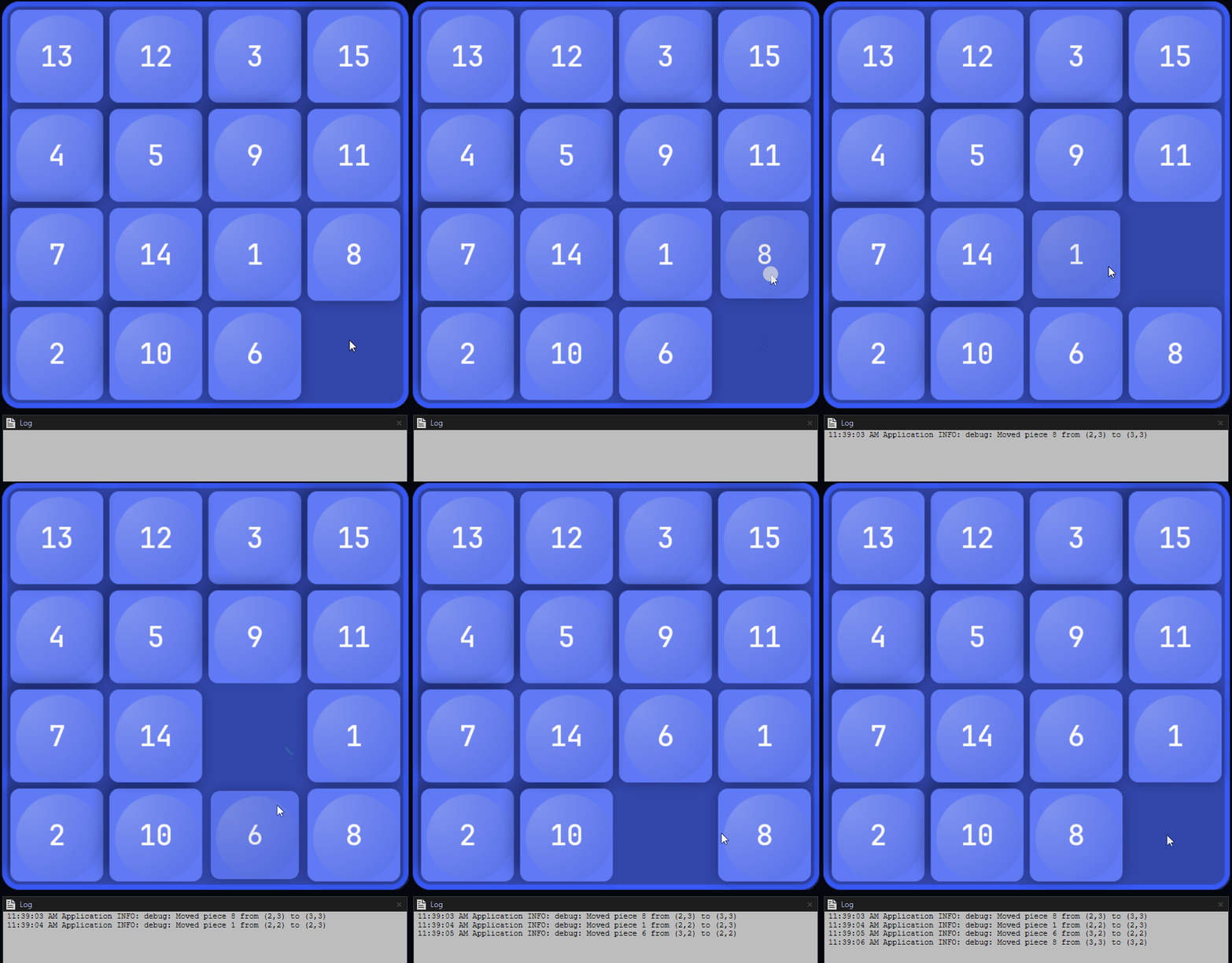
当您保存脚本并在 预览 中点击 ,然后点击空槽旁边的任何棋子时,脚本:
移动该棋子。
将点击的棋子索引及其在网格中先前和当前位置的坐标打印到 Log。