步骤 2 - 访问节点和属性
在此步骤中,您将学习如何从 Lua 脚本访问节点和属性。
例如:
要访问节点树,使用
contextNodeLua 变量。Kanzi 将运行 Lua 脚本的节点的引用分配给此变量。一旦您有了对节点的引用,要读取属性值,请将您要读取其值的属性的 Kanzi Engine 名称传递给
getProperty函数。-- Get the value of the Name property of the contextNode. local name = contextNode:getProperty(Node.NameProperty) -- Print to Log the property value. print(name)
要访问节点树中的节点,请将要访问的节点的路径传递给
lookupNode函数。您可以使用存储在资源字典中的别名来代替路径。例如,要使用本教程起始项目的 Screen 节点的资源字典中的别名访问 Grid 节点:
-- Find the node with the alias "Grid".
local grid = contextNode:lookupNode("#Grid")

-- Check whether the node exists.
if grid ~= nil then
    -- If the node exists, print the name of the node.
    local name = grid:getProperty(Node.NameProperty)
    print("Found node " .. name)
end
要访问节点的所有子节点,请使用
getChildCount和getChild函数。例如,要打印子节点的名称:
-- Find the node with the alias "Grid".
local grid = contextNode:lookupNode("#Grid")

-- Access the grid child nodes.
local childCount = grid:getChildCount()
-- Print to Log the name of each child node.
for i = 0, childCount - 1 do
    local child = grid:getChild(i)
    local childName = child:getProperty(Node.NameProperty)
    print(childName)
end
要设置属性值,请使用
setProperty成员函数。setProperty函数的第一个参数是属性类型。例如,要设置在 Kanzi Studio 项目中定义的属性类型的属性值,首先查找属性类型。然后,您可以像使用内置属性类型一样使用该属性类型。
-- Find the node with the alias "Grid".
local grid = contextNode:lookupNode("#Grid")

-- Find the "fifteen_puzzle.PieceIndex" custom property type.
local PieceIndexProperty = PropertyType:new("fifteen_puzzle.PieceIndex")

-- Get the third child node of the grid node.
local child = grid:getChild(2)

-- Set the property value to the child node in the grid.
-- The "Piece" prefab uses the "fifteen_puzzle.PieceIndex" property type to set the piece number.
child:setProperty(PieceIndexProperty, 3)
使用
assert确保在节点树内容不符合预期时脚本会失败。-- Assert if the node with the alias "Grid" does not exist. local grid = contextNode:lookupNode("#Grid") assert(grid)
您可以在 Kanzi Lua API 参考 中找到可在 Lua 中使用的 Kanzi 内置属性类型列表。
修改网格和棋子的索引。
为了使拼图正常工作,每个拼图块必须具有唯一的索引。
要修改网格和棋子的索引,在 Script Editor 中,将 new_game.lua 脚本的内容替换为:
print("Entering new_game.lua")

-- Find the "Grid" node using its alias.
local grid = contextNode:lookupNode("#Grid")
assert(grid)

-- Find the "fifteen_puzzle.PieceIndex" custom property type.
-- This property type sets the piece number.
local PieceIndexProperty = PropertyType:new("fifteen_puzzle.PieceIndex")

-- Access the grid child nodes.
local childCount = grid:getChildCount()
-- Iterate through grid child nodes.
for i = 0, childCount - 1 do
    local child = grid:getChild(i)

    -- Assign the number to the piece.
    child:setProperty(PieceIndexProperty, i)
    -- Place the piece in the third row and in own column.
    child:setProperty(GridLayout2D.RowProperty, 2)
    child:setProperty(GridLayout2D.ColumnProperty, i)
end

print("Exiting new_game.lua")
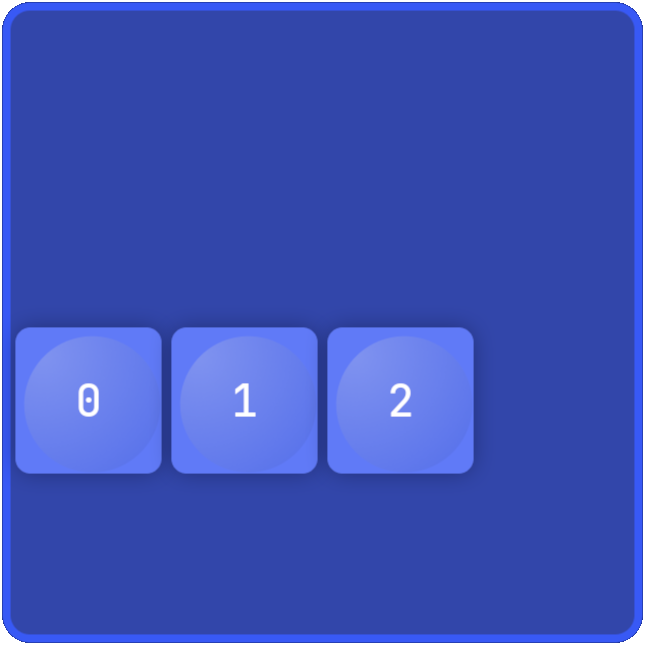
当您保存脚本并在 Preview 中点击  时,脚本会将网格中的三个部分移动到第三行,并为每个部分分配一个唯一的编号。