使用 Lua
Kanzi Engine Lua API 是一个使用 Lua 编程语言的 Kanzi Engine 的平台无关接口。它允许您在 Kanzi Studio 中创建应用程序和用户界面逻辑。
当您导出 kzb 文件时,Kanzi Studio 会将 Lua 脚本嵌入到 kzb 文件中。
备注
要在不支持动态库运行时加载的平台(例如 Android)上使用 Kanzi Engine Lua API,请在应用程序的 CMakeLists 中添加对 kzlua 库的链接:
if(ANDROID)
   target_link_libraries(Application_Name Kanzi::kzlua)
本主题概述了 Kanzi Engine Lua API 的基础知识。有关完整的 API 参考,请参阅 Kanzi Lua API 参考。
通过完成 教程:Kanzi Engine Lua API 基本使用,学习如何使用 Kanzi Engine Lua API 为您的 Kanzi 应用程序开发应用程序逻辑。
Kanzi 使用 Lua 5.4。请参阅 https://www.lua.org/manual/5.4/。
执行 Lua 脚本
要执行 Lua 脚本:
在 Node Tree 或 Prefabs 中,选择或创建一个节点。在 Node Components > Triggers 中,创建一个您想要执行 Lua 脚本的触发器。
例如:从 Asset Packages 将 Button 资产拖到 Preview,并在 Prefabs 中使用 Button: Click 触发器。
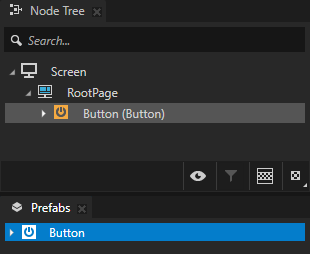
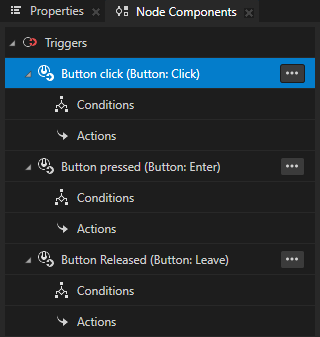
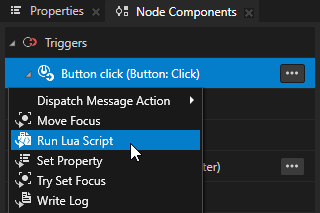
在 Node Components > Triggers 中,按 Alt 并右键单击 触发器中选择您要执行 Lua 脚本的位置,并选择 Run Lua Script。
例如:在 Prefabs 中选择 Button。在 Node Components 中,按 Alt 并右键单击 Button: Click 并选择 Run Lua Script。
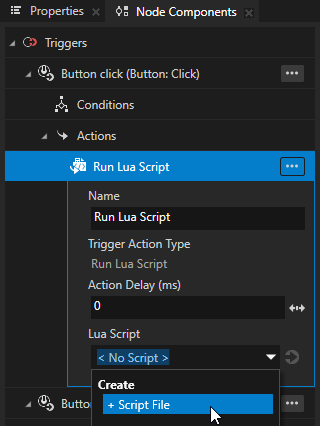
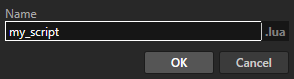
在 Run Lua Script 操作中,将 Lua Script 属性设置为 + Script File 并命名脚本。
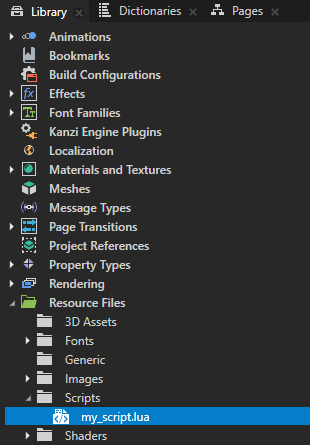
Kanzi Studio 在 Library > Resource Files > Scripts 中创建 Lua 脚本。
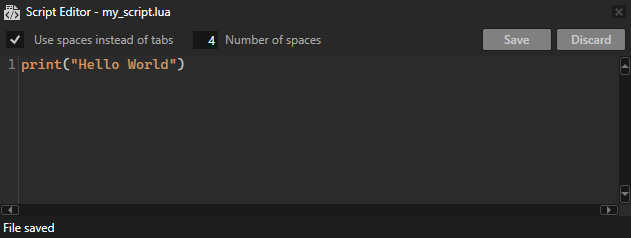
在 Library > Resource Files > Scripts 中双击您创建的脚本。在 Script Editor 中添加 Lua 代码,然后单击 Save。
print("Hello world!")
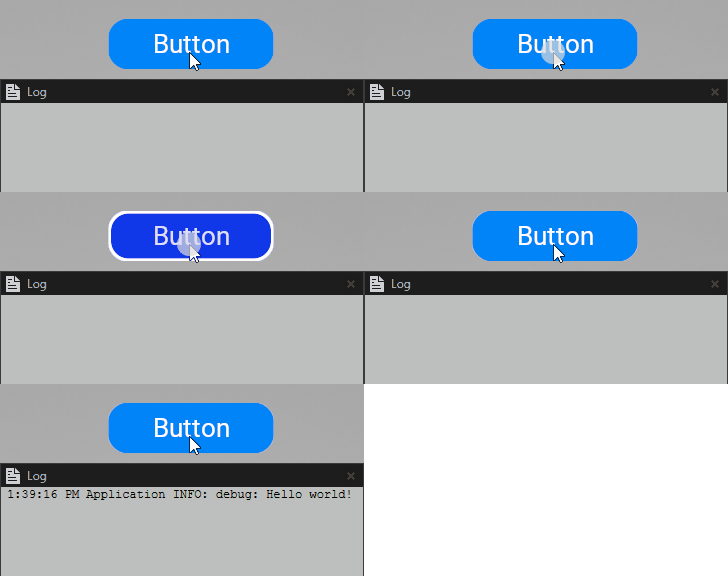
当您触发触发器时,它会执行 Run Lua Script 操作,该操作运行脚本中的代码。例如,当您单击按钮时,Lua 脚本会将 Hello world! 打印到 Log。
使用 Lua 变量
在 Lua 中,您可以声明:
局部变量,仅在声明变量的脚本范围内可访问。
Kanzi 在作用域结束时销毁局部变量。
local x = 1
全局变量,在所有脚本中都可以访问,并且在多次脚本执行中保持持久。
if runCount == nil then
    -- Initialize a persistent global variable `runCount` on the first run of this script.
    runCount = 0
end
runCount = runCount + 1
print("This script has been executed " .. runCount .. " times.")
访问节点
当您触发执行 Run Lua Script 操作的触发器时,该操作将触发器所在节点的引用分配给 contextNode 变量。
-- Print the name of the node that executes the script.
local name = contextNode:getProperty(Node.NameProperty)
print(name)
要导航节点树,请从 contextNode 变量开始,然后使用 lookupNode 函数:
相对路径
-- To access the parent node.
local parent = contextNode:lookupNode("..")
local parentName = parent:getProperty(Node.NameProperty)
print(parentName)
-- To access a child node with the name "Empty Node 2D".
local child = contextNode:lookupNode("Empty Node 2D")
local childName = child:getProperty(Node.NameProperty)
print(childName)
在最近的资源字典中别名
-- To access a node to which the alias "Home" in the nearest resource dictionary points.
local node = contextNode:lookupNode("#Home")
local nodeName = node:getProperty(Node.NameProperty)
print(nodeName)
要访问节点的所有子节点,请使用 getChild 和 getChildCount 函数。
local childCount = contextNode:getChildCount()
for i = 0, childCount - 1 do
    local child = contextNode:getChild(i)
    local name = child:getProperty(Node.NameProperty)
    print(name)
end
使用属性
Kanzi Engine Lua API 允许您使用现有的属性类型。大多数 Kanzi 属性类型都存在于 Kanzi Engine Lua API 中。
要访问属性类型,请使用它们的完整 Kanzi Engine 名称,例如 Node.OpacityProperty。您可以在 Kanzi Lua API 参考 中找到 Kanzi Engine Lua API 中所有可用属性类型的完整 Kanzi Engine 名称。
要访问内置的 Kanzi 属性类型:
-- Set property.
contextNode:setProperty(Node.OpacityProperty, 0.5)

-- Get property.
local opacity = contextNode:getProperty(Node.OpacityProperty)
print(opacity)
要访问自定义属性类型,请使用属性类型的完整 Kanzi Engine 名称创建一个 PropertyType 实例。
-- Find the "MyProject.MyPropertyType" custom property type.
local customPropertyType = PropertyType:new("MyProject.MyPropertyType")
contextNode:setProperty(customPropertyType, "Hello Kanzi!")
小技巧
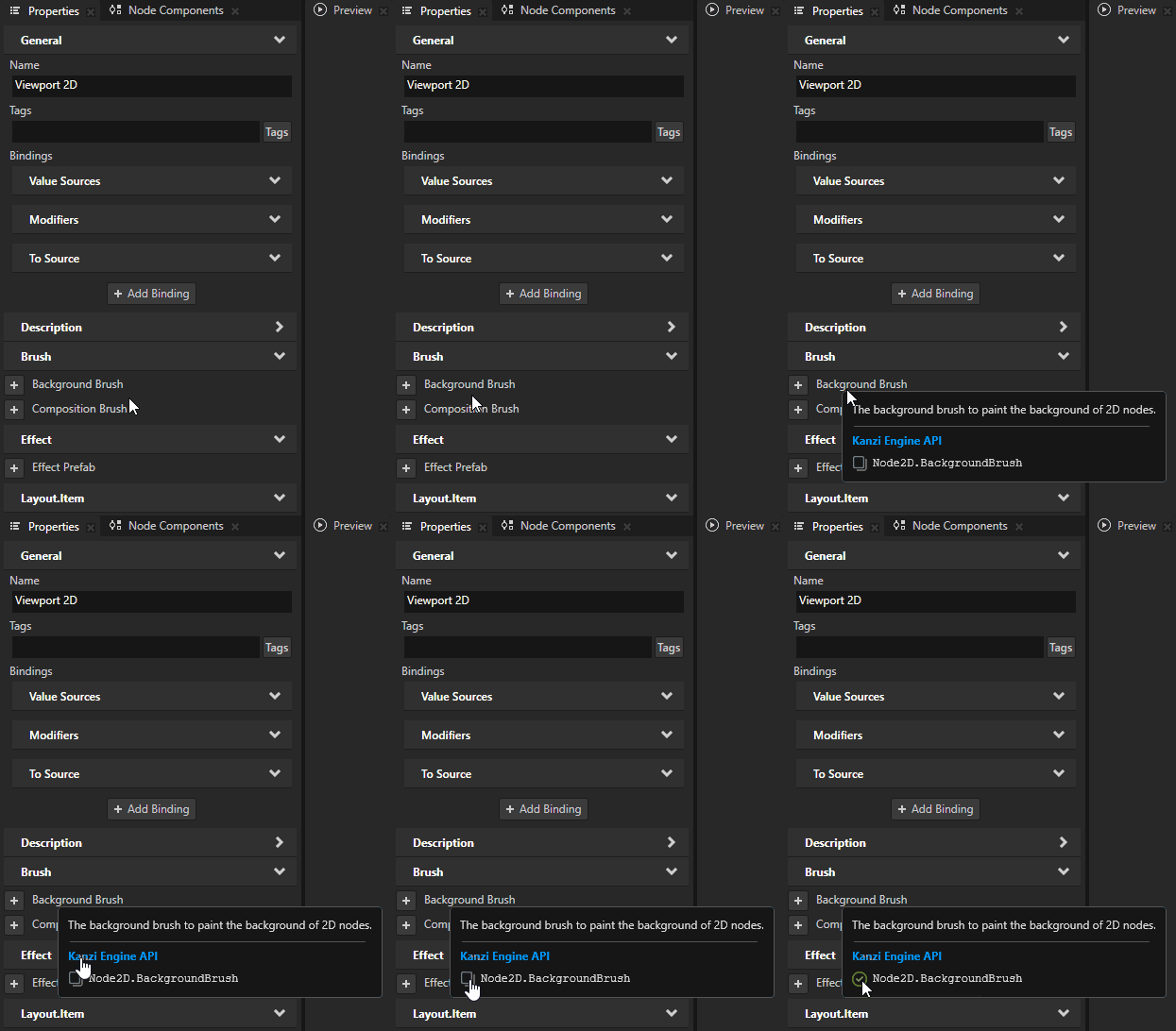
对于大多数 Kanzi 属性类型,您可以在属性工具提示中找到完整的 Kanzi Engine 名称。
使用 vector 数据类型
在 Lua 脚本中,您可以将这些 Kanzi 数学类型用作值类型:
Vector2
Vector3
Vector4
ColorRGBA
quaternion
Matrix3x3
Matrix4x4
SRTValue2D
SRTValue3D
例如,您可以:
声明局部变量。
local a = Vector2(1.4, 0)
local b = Vector3(4.5, -2.3, 0)
local c = Vector4()
local d = ColorRGBA(0,0,0)
local e = Quaternion()
local f = Matrix3x3(Vector2(1,0), Vector2(0,1), Vector2(0,0))
local g = Matrix4x4(Vector3(1,0,0), Vector3(0,1,0), Vector3(0,0,1), Vector3(0,0,0))
local h = SRTValue2D(Vector2(1,1), 0, Vector2(0,0))
local i = SRTValue3D(Vector3(1,1,1), Quaternion(), Vector3(0,0,0))
分配属性值。
local srt = contextNode:getProperty(Node2D.LayoutTransformationProperty)
srt:setTranslation(Vector2(10, 0))
contextNode:setProperty(Node2D.LayoutTransformationProperty, srt)
使用从零开始的索引访问所有向量类型的字段。
local v = Vector3()
v[0] = -1.1
v[1] = 1.2
v[2] = 2.3
print(string.format("%.2f %.2f %.2f", v[0], v[1], v[2]))
使用辅助函数来创建转换。
local j = Matrix3x3.createTranslation(Vector2(10,0))
local k = Matrix4x4.createTranslation(Vector3(10,0,0))
local l = SRTValue2D.createTranslation(Vector2(10,0))
local n = SRTValue2D.createRotation(3.1415)
执行数学运算。
local direction = Vector2(10, 10)
local length = direction:length()
local squaredLength = direction:squaredLength()
local normalizedDirection = direction:normalized()
使用重载运算符进行常见的向量操作。例如,您可以将两个向量相加或乘以一个标量。
local position = Vector2(0,0)
local direction = Vector2(10, 0)
local rotation = Matrix3x3.createRotationInDegrees(45.0)
local speed = 2.4
position = position + (rotation * direction):normalized() * speed
创建和删除节点
要实例化预设件:
-- Load a prefab at kzb URL.
local prefab = contextNode:tryAcquireResource("kzb://myProject/Prefabs/MyPrefab")
-- Create a node from the prefab.
local node = prefab:instantiate("My Node")
-- Add the node to the node tree.
contextNode:addChild(node)
要用您创建的节点替换节点的所有子节点:
-- Remove all child nodes from the current node.
contextNode:removeAllChildren()

-- Create a Text Block 2D node named "My TextBlock2D",
-- set it to show "Hello", and add it to the current node.
local node = TextBlock2D:create("My TextBlock2D")
node:setProperty(TextBlock2D.TextProperty, "Hello")
contextNode:addChild(node)
请参阅 使用节点预设。
使用消息
您可以访问已在 Kanzi Engine 中注册的所有消息类型。但是,您不能定义消息类型。
要发送内置消息类型的消息:
-- Create an instance of message arguments for a message that you want to send.
local arguments = ExclusiveActivityHost2D.NavigateNextMessageMessage:newMessageArguments()
-- Set the argument values.
arguments:setLoopActivityProperty(true)
-- Send the message.
contextNode:dispatchMessage(ExclusiveActivityHost2D.NavigateNextMessageMessage, arguments)
要通过名称访问消息类型,请使用消息类型的全名创建 MessageType 的实例:
-- Access a message type and message argument.
local messageType = MessageType:new("ExclusiveActivityHostConcept.NavigateNextMessage")
local propertyType = PropertyType:new("ExclusiveActivityHostConcept.ImplicitActivityChangeRequestMessageArguments.LoopActivity")

-- Send the message.
local arguments = messageType:newMessageArguments()
arguments:setArgument(propertyType, true)
contextNode:dispatchMessage(messageType, arguments)
请参阅 使用消息。
接收消息
设置消息处理程序以接收消息。创建一个接受消息参数的处理函数,并将该函数设置为消息处理程序。
要接收消息:
-- Access a message type and message argument.
local messageType = MessageType:new("MyMessage")
local propertyType = PropertyType:new("MyMessageArgument")

-- Define a message handler.
function myMessageHandler(arguments)
    local value = arguments:getArgument(propertyType)
    print("MyMessage received, argument = " .. value)
end

-- Add the message handler to the current node.
contextNode:addMessageHandler(messageType, myMessageHandler)